This website uses cookies. By clicking Accept, you consent to the use of cookies. Click Here to learn more about how we use cookies.
RUCKUS Community Forums are now in READ-ONLY mode while we migrate to a new platform.
You will still be able to read posts and knowledge articles, but will be unable to post new content until Go Live on the new platform Monday August 17.
Lennar Smart Home customers: please contact [email protected] for assistance during the week of August 9-17.

- Community
- RUCKUS Technologies
- RUCKUS Lennar Support
- Community Services
- RTF
- RTF Community
- Australia and New Zealand – English
- Brazil – Português
- China – 简体中文
- France – Français
- Germany – Deutsch
- Hong Kong – 繁體中文
- India – English
- Indonesia – bahasa Indonesia
- Italy – Italiano
- Japan – 日本語
- Korea – 한국어
- Latin America – Español (Latinoamérica)
- Middle East & Africa – English
- Netherlands – Nederlands
- Nordics – English
- North America – English
- Poland – polski
- Russia – Русский
- Singapore, Malaysia, and Philippines – English
- Spain – Español
- Taiwan – 繁體中文
- Thailand – ไทย
- Turkey – Türkçe
- United Kingdom – English
- Vietnam – Tiếng Việt
- EOL Products
Turn on suggestions
Auto-suggest helps you quickly narrow down your search results by suggesting possible matches as you type.
Showing results for
- RUCKUS Forums
- RUCKUS Technologies
- RUCKUS Self-Help
- Cloudpath: How to generate QR code for DPSK SSID i...
Options
- Subscribe to RSS Feed
- Mark Topic as New
- Mark Topic as Read
- Float this Topic for Current User
- Bookmark
- Subscribe
- Mute
- Printer Friendly Page
Cloudpath: How to generate QR code for DPSK SSID in the workflow

Options
- Mark as New
- Bookmark
- Subscribe
- Mute
- Subscribe to RSS Feed
- Permalink
- Report Inappropriate Content
10-17-2023 11:49 AM - edited 10-17-2023 01:22 PM
This article explains setting up a Cloudpath Enrollment System for QR code generation in workflow for DPSK SSID.
Steps:
- Once DPSK is generated in the Workflow>>Click on the below marked arrow.
- Add another step to Display a Message.


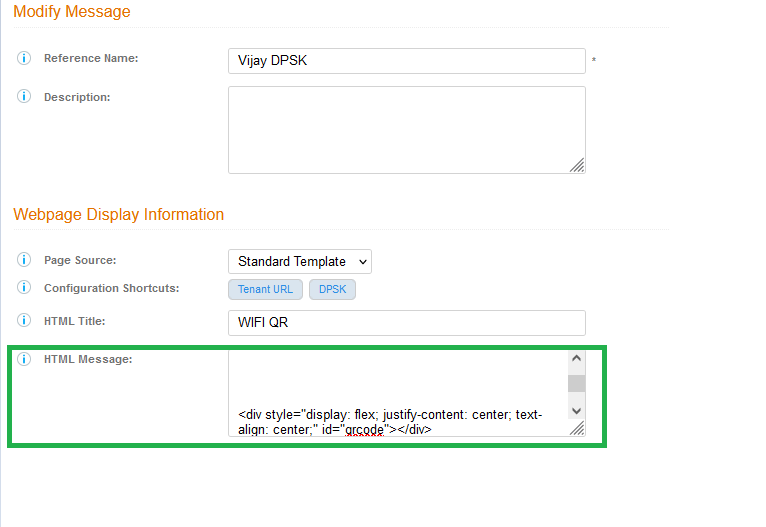
- Update the HTML message with the "Standard template QR Code", as below.
Your personal Wi-Fi Password is ${DPSK}
<br><br>
Use this password on any device to access your personal network. You can also scan this QR Code from your mobile device:<br><br>


<div style="display: flex; justify-content: center; text-align: center;" id="qrcode"></div>


<script>new QRCode(document.getElementById("qrcode"), "WIFI:S:WLAN-NAME;T:WPA;P:${DPSK};;");</script>
Make Sure to update the BOLD part (WIFI:S:WLAN-NAME) in the HTML template with your actual SSID value and Click on Save. - Once Saved, Click on the pencil icon to re-modify the Display Message.
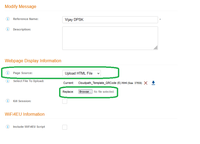
- In the Page Source: Change to Upload HTML template and browse "Cloudpath_Template_QRCode" and click on Save.(attached below)
- Publish the Workflow.

Note:
Rename the attachment "Cloudpath_Template_QRCode.txt" to "Cloudpath_Template_QRCode.html".
If you make changes as ‘Standard Template’ as Page Source, you will have to upload the HTML file again, always upload the file last, then save and publish.
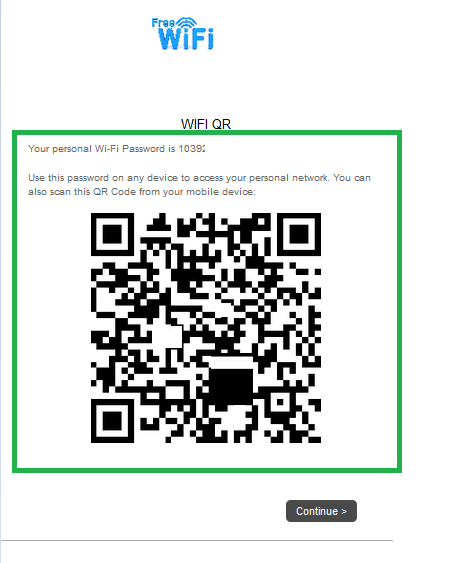
- Test the workflow, QR code will be visible after DPSK generation, Scan the QR code to connect to the DPSK SSID.
Vijay Kuniyal
Staff Technical Support Engineer
CCNA RnS | CCNA Wireless | CWNA | RASZA | Meraki CMNO | RACPA
Staff Technical Support Engineer
CCNA RnS | CCNA Wireless | CWNA | RASZA | Meraki CMNO | RACPA
Labels:
- Labels:
-
Cloudpath
-
RUCKUS Self-Help
Reply
0 REPLIES 0

Labels
-
AAA
2 -
Access points
48 -
Analytics
3 -
AP Certificate error
1 -
AP Controller Connectivity
5 -
AP Management
8 -
AP migration
1 -
AP reporting
1 -
API
2 -
Authentication Server
2 -
Client Management
1 -
Cloud
20 -
Cloud ICX
1 -
Cloudpath
23 -
Cluster synchronization
1 -
Deployment
2 -
Firmware Recommendation
1 -
Firmware Upgrade
5 -
Guest Access
2 -
ICX
73 -
ICX Switch Management
7 -
Installation
5 -
IoT
1 -
Licensing
1 -
Mobile Apps
2 -
Monitoring
1 -
Poe
2 -
RADIUS
2 -
Ruckus Cloud
1 -
RUCKUS Self-Help
209 -
Security
6 -
SmartZone or vSZ
64 -
Stacking
1 -
SZ ICX Connectivity
1 -
Traffic Management-
1 -
UMM
3 -
Unleashed
15 -
User Management
1 -
Venue Management
1 -
Wired Throughput
2 -
Wireless Throughput
1 -
WLAN Management
5 -
ZoneDirector
15
- « Previous
- Next »
