This website uses cookies. By clicking Accept, you consent to the use of cookies. Click Here to learn more about how we use cookies.
RUCKUS Community Forums are now in READ-ONLY mode while we migrate to a new platform.
You will still be able to read posts and knowledge articles, but will be unable to post new content until Go Live on the new platform Monday August 17.
Lennar Smart Home customers: please contact [email protected] for assistance during the week of August 9-17.

- Community
- RUCKUS Technologies
- RUCKUS Lennar Support
- Community Services
- RTF
- RTF Community
- Australia and New Zealand – English
- Brazil – Português
- China – 简体中文
- France – Français
- Germany – Deutsch
- Hong Kong – 繁體中文
- India – English
- Indonesia – bahasa Indonesia
- Italy – Italiano
- Japan – 日本語
- Korea – 한국어
- Latin America – Español (Latinoamérica)
- Middle East & Africa – English
- Netherlands – Nederlands
- Nordics – English
- North America – English
- Poland – polski
- Russia – Русский
- Singapore, Malaysia, and Philippines – English
- Spain – Español
- Taiwan – 繁體中文
- Thailand – ไทย
- Turkey – Türkçe
- United Kingdom – English
- Vietnam – Tiếng Việt
- EOL Products
Turn on suggestions
Auto-suggest helps you quickly narrow down your search results by suggesting possible matches as you type.
Showing results for
- RUCKUS Forums
- RUCKUS Technologies
- RUCKUS Self-Help
- How to locate SWITCH password in Ruckus Cloud cont...
Options
- Subscribe to RSS Feed
- Mark Topic as New
- Mark Topic as Read
- Float this Topic for Current User
- Bookmark
- Subscribe
- Mute
- Printer Friendly Page
How to locate SWITCH password in Ruckus Cloud controller

Options
- Mark as New
- Bookmark
- Subscribe
- Mute
- Subscribe to RSS Feed
- Permalink
- Report Inappropriate Content
08-17-2023 09:35 AM
Here is a quick guide on how to obtain the switch password in the ruckus cloud controller:
- Go to the venue where the switch is located
-Select configuration
-Select switch configuration
-Select AAA
-Scroll down to local users - click in the eye to see the password for the user
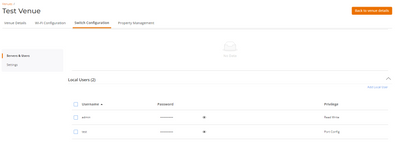
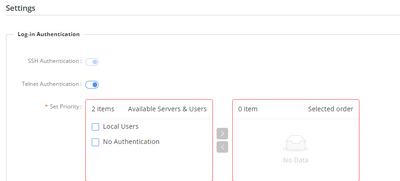
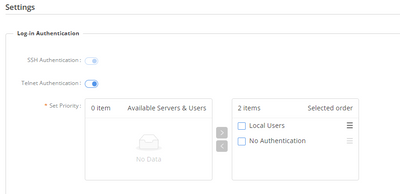
Note: the user needs to be previously added in order to access the switch using the username and password, you can do this by scrolling down in the same page to Settings >select Set priority > move the user from the left to the right like this and save the changes with the SAVE AAA button:
Labels:
- Labels:
-
RUCKUS Self-Help
Reply
0 REPLIES 0

Labels
-
AAA
2 -
Access points
48 -
Analytics
3 -
AP Certificate error
1 -
AP Controller Connectivity
5 -
AP Management
8 -
AP migration
1 -
AP reporting
1 -
API
2 -
Authentication Server
2 -
Client Management
1 -
Cloud
20 -
Cloud ICX
1 -
Cloudpath
23 -
Cluster synchronization
1 -
Deployment
2 -
Firmware Recommendation
1 -
Firmware Upgrade
5 -
Guest Access
2 -
ICX
73 -
ICX Switch Management
7 -
Installation
5 -
IoT
1 -
Licensing
1 -
Mobile Apps
2 -
Monitoring
1 -
Poe
2 -
RADIUS
2 -
Ruckus Cloud
1 -
RUCKUS Self-Help
209 -
Security
6 -
SmartZone or vSZ
64 -
Stacking
1 -
SZ ICX Connectivity
1 -
Traffic Management-
1 -
UMM
3 -
Unleashed
15 -
User Management
1 -
Venue Management
1 -
Wired Throughput
2 -
Wireless Throughput
1 -
WLAN Management
5 -
ZoneDirector
15
- « Previous
- Next »
