This website uses cookies. By clicking Accept, you consent to the use of cookies. Click Here to learn more about how we use cookies.
RUCKUS Community Forums are now in READ-ONLY mode while we migrate to a new platform.
You will still be able to read posts and knowledge articles, but will be unable to post new content until Go Live on the new platform Monday August 17.
Lennar Smart Home customers: please contact [email protected] for assistance during the week of August 9-17.

- Community
- RUCKUS Technologies
- RUCKUS Lennar Support
- Community Services
- RTF
- RTF Community
- Australia and New Zealand – English
- Brazil – Português
- China – 简体中文
- France – Français
- Germany – Deutsch
- Hong Kong – 繁體中文
- India – English
- Indonesia – bahasa Indonesia
- Italy – Italiano
- Japan – 日本語
- Korea – 한국어
- Latin America – Español (Latinoamérica)
- Middle East & Africa – English
- Netherlands – Nederlands
- Nordics – English
- North America – English
- Poland – polski
- Russia – Русский
- Singapore, Malaysia, and Philippines – English
- Spain – Español
- Taiwan – 繁體中文
- Thailand – ไทย
- Turkey – Türkçe
- United Kingdom – English
- Vietnam – Tiếng Việt
- EOL Products
Turn on suggestions
Auto-suggest helps you quickly narrow down your search results by suggesting possible matches as you type.
Showing results for
- RUCKUS Forums
- RUCKUS Technologies
- SZ / vSZ
- Custom web portal no authentication - only optin
Options
- Subscribe to RSS Feed
- Mark Topic as New
- Mark Topic as Read
- Float this Topic for Current User
- Bookmark
- Subscribe
- Mute
- Printer Friendly Page
Custom web portal no authentication - only optin

Options
- Mark as New
- Bookmark
- Subscribe
- Mute
- Subscribe to RSS Feed
- Permalink
- Report Inappropriate Content
06-04-2023 08:15 AM
Hi,
I wish to be able to have a complete custom captive portal with custom form and validation.
No "registration" are needed just fill in the form and accept condition.
The form page, validation and database is already done, just need the way to link it to the wlan
What is the best way to achieve this with vsz ? is there any documentation on this?
Thanks
1 REPLY 1
Options
- Mark as New
- Bookmark
- Subscribe
- Mute
- Subscribe to RSS Feed
- Permalink
- Report Inappropriate Content
06-15-2023 02:59 AM
Hi @vinise,
Please correct me if I am wrong, you created an External Portal and would like to Map it on the vSZ. This can be achieved by configuring a "Hotspot (WISPr)" WLAN and selecting the Under the Hotspot Portal -> Create -> Enter the Portal name and select the Logon URL as External.
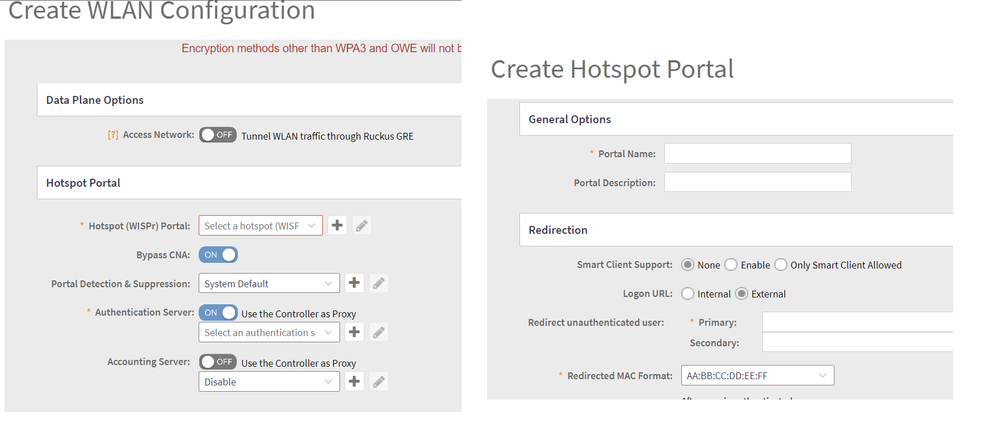
External: Indicates the external URL of the subscriber portal. Selecting External provides an option to reroute an unauthorized user to a primary location. You can set the primary location in Redirect unauthenticated users. If an unauthorized user is rerouted, the AP redirects the UE to a backup portal.
Please let me know if the above helps.
Thank you!
Amith
Reply

Labels
-
9210
1 -
AD
1 -
AP Controller Connectivity
2 -
AP Management
5 -
AP reporting
1 -
API Help
1 -
Client Management
4 -
er
1 -
Google
1 -
Guest Access
3 -
ICX Switch Management
1 -
IP Multicast
1 -
Proposed Solution
3 -
RADIUS
2 -
RUCKUS Self-Help
8 -
SmartZone
4 -
SmartZone or vSZ
6 -
Social Media
1 -
Solution Proposed
3 -
string
1 -
SZ ICX Connectivity
1 -
Traffic Management-
1 -
User Management
2 -
vSZ
2 -
Wifi
1 -
WLAN Management
2
- « Previous
- Next »
