This website uses cookies. By clicking Accept, you consent to the use of cookies. Click Here to learn more about how we use cookies.
RUCKUS Community Forums are now in READ-ONLY mode while we migrate to a new platform.
You will still be able to read posts and knowledge articles, but will be unable to post new content until Go Live on the new platform Monday August 17.
Lennar Smart Home customers: please contact [email protected] for assistance during the week of August 9-17.

- Community
- RUCKUS Technologies
- RUCKUS Lennar Support
- Community Services
- RTF
- RTF Community
- Australia and New Zealand – English
- Brazil – Português
- China – 简体中文
- France – Français
- Germany – Deutsch
- Hong Kong – 繁體中文
- India – English
- Indonesia – bahasa Indonesia
- Italy – Italiano
- Japan – 日本語
- Korea – 한국어
- Latin America – Español (Latinoamérica)
- Middle East & Africa – English
- Netherlands – Nederlands
- Nordics – English
- North America – English
- Poland – polski
- Russia – Русский
- Singapore, Malaysia, and Philippines – English
- Spain – Español
- Taiwan – 繁體中文
- Thailand – ไทย
- Turkey – Türkçe
- United Kingdom – English
- Vietnam – Tiếng Việt
- EOL Products
Turn on suggestions
Auto-suggest helps you quickly narrow down your search results by suggesting possible matches as you type.
Showing results for
- RUCKUS Forums
- RUCKUS Lennar Support
- RUCKUS Support for Lennar Homes
- Re: Ruckus Wi-Fi icx7150 c12p
Options
- Subscribe to RSS Feed
- Mark Topic as New
- Mark Topic as Read
- Float this Topic for Current User
- Bookmark
- Subscribe
- Mute
- Printer Friendly Page

Options
- Mark as New
- Bookmark
- Subscribe
- Mute
- Subscribe to RSS Feed
- Permalink
- Report Inappropriate Content
01-09-2023 09:22 PM
Problem: The WiFi speeds from my Ruckus device are below 50 Mbps when connected; as a result, acces to a simple site such as yahoo.com takes longer than 30 minutes to load. To provide additional context, my connection speed from my ISP is 1 Gig (~960 Mbps tested). Due to the poor speeds from the Ruckus device, I am unable to work from home and my security system is not able to function properly.
Priority: High
Contact Information:
Brandon
P: 205-520-6077
Availability: M: anytime, Tues: 5:30pm till 10:00pm, Wed: 5:30pm till 10:00pm, Thur: 5:30pm till 10:00pm, Fri: anytime, Sat: anytime, Sun: anytime
Solved! Go to Solution.
2 ACCEPTED SOLUTIONS
Options
- Mark as New
- Bookmark
- Subscribe
- Mute
- Subscribe to RSS Feed
- Permalink
- Report Inappropriate Content
01-13-2023 08:17 AM
Ruckus Networks, Inc. All rights reserved.
UNIT 1: compiled on Sep 23 2019 at 00:00:25 labeled as SPR08090d
(32539748 bytes) from Secondary SPR08090d.bin (UFI)
SW: Version 08.0.90dT213
Compressed Secondary Boot Code size = 786944, Version:10.1.15T225 (mnz10115)
Compiled on Thu Jan 31 07:08:55 2019
HW: Stackable ICX7150-C12-POE
UNIT 1: SL 1: ICX7150-C12-2X1G POE 12-port Management Module
Serial #:FEK3834R173
Software Package: ICX7150_BASE_L3_SOFT_PACKAGE
Current License: 2X1G
P-ASIC 0: type B160, rev 11 Chip BCM56160_B0
UNIT 1: SL 2: ICX7150-2X1GC 2-port 2G Module
UNIT 1: SL 3: ICX7150-2X10GF 2-port 20G Module
1000 MHz ARM processor ARMv7 88 MHz bus
8192 KB boot flash memory
2048 MB code flash memory
1024 MB DRAM
STACKID 1 system uptime is 5 hour(s) 22 second(s)
The system started at 00:05:38 GMT+00 Sat Jan 01 2000
The system : started=cold start
The system : started=cold start


Options
- Mark as New
- Bookmark
- Subscribe
- Mute
- Subscribe to RSS Feed
- Permalink
- Report Inappropriate Content
01-13-2023 03:42 PM
Hi @Bjamal
Doing great ! , Based on the color lights can be that the WLAN service was disable.
We have 2 Options to fix this.
1-Based on the Output your Access Point IP address
1-Access Point : 192.168.1.4
2-Access Point : 192.168.1.9
Please try to copy the IP address and past it in the URL to see if you are able to log in into the Unleashed web page like the following :
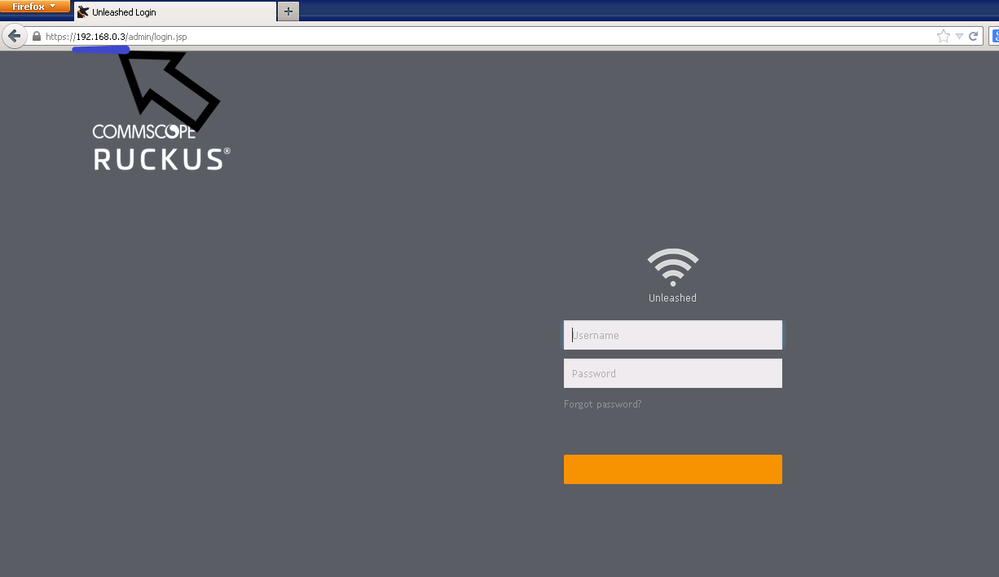
This credentials should be the same as the unleashed mobile APP
Most common defaults ( Key sensitive ) :
username:admin password :Lennar
username:admin password :lennar
username:admin password :Ruckus1
username:admin password :Ruckus!
Select Access Point>>>>>Select Summary >>>> Edit
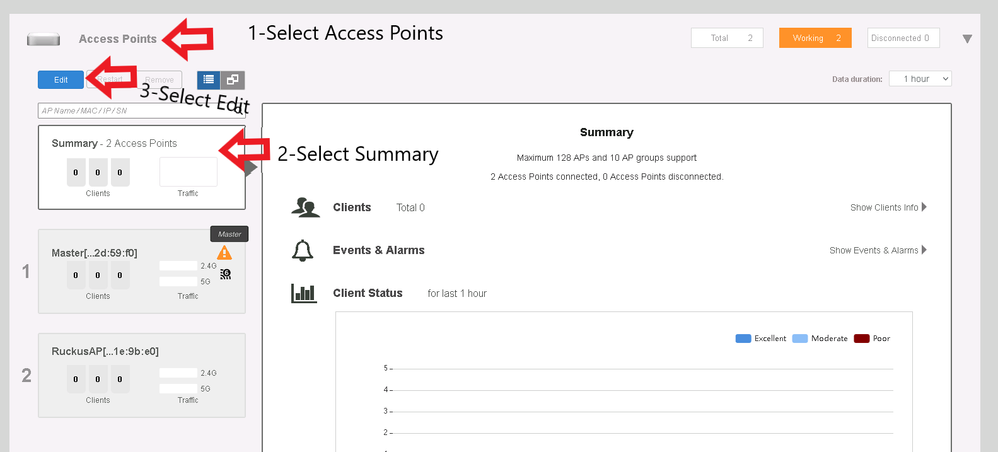
Verify Status of WLAN service>>>> If Disable>>>Change to Enable on both the radio and Click OK.
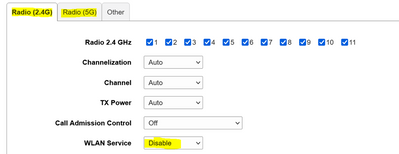
Make sure it says enable on 5G and 2.4G
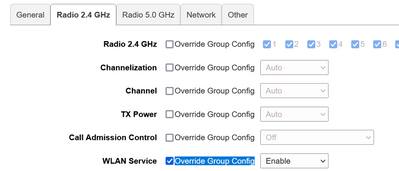
The second option will be to reconfigure the Access Points from 0
1-On the unleashed dashboard
2-Physical option : Please read the following guide carefully: make sure you only have (1) the access point plug on the ICX-7150-C12P, the one still connected to the switch is the one that the factory reset will work on

Physical Factory Reset an Access Points Ruckus
Best Regards
Fernando Vasquez
19 REPLIES 19
Options
- Mark as New
- Bookmark
- Subscribe
- Mute
- Subscribe to RSS Feed
- Permalink
- Report Inappropriate Content
01-13-2023 07:57 AM
Hi @Bjamal
Please share the entire command of the switch.
SSH@ICX7150-C12-Switch#show version
Best regards,
Jayavidhya
Lennar Home Community
Options
- Mark as New
- Bookmark
- Subscribe
- Mute
- Subscribe to RSS Feed
- Permalink
- Report Inappropriate Content
01-13-2023 08:17 AM
Ruckus Networks, Inc. All rights reserved.
UNIT 1: compiled on Sep 23 2019 at 00:00:25 labeled as SPR08090d
(32539748 bytes) from Secondary SPR08090d.bin (UFI)
SW: Version 08.0.90dT213
Compressed Secondary Boot Code size = 786944, Version:10.1.15T225 (mnz10115)
Compiled on Thu Jan 31 07:08:55 2019
HW: Stackable ICX7150-C12-POE
UNIT 1: SL 1: ICX7150-C12-2X1G POE 12-port Management Module
Serial #:FEK3834R173
Software Package: ICX7150_BASE_L3_SOFT_PACKAGE
Current License: 2X1G
P-ASIC 0: type B160, rev 11 Chip BCM56160_B0
UNIT 1: SL 2: ICX7150-2X1GC 2-port 2G Module
UNIT 1: SL 3: ICX7150-2X10GF 2-port 20G Module
1000 MHz ARM processor ARMv7 88 MHz bus
8192 KB boot flash memory
2048 MB code flash memory
1024 MB DRAM
STACKID 1 system uptime is 5 hour(s) 22 second(s)
The system started at 00:05:38 GMT+00 Sat Jan 01 2000
The system : started=cold start
The system : started=cold start
Options
- Mark as New
- Bookmark
- Subscribe
- Mute
- Subscribe to RSS Feed
- Permalink
- Report Inappropriate Content
01-13-2023 10:14 AM
I am still unable to access my internet through the Ruckus device. What are the next steps? The command line output above is not a solution because I am still unable to access my internet.
Options
- Mark as New
- Bookmark
- Subscribe
- Mute
- Subscribe to RSS Feed
- Permalink
- Report Inappropriate Content
01-13-2023 10:18 AM
Hi @Bjamal
As I can see your Switch is running the known routing issue for Lennar home users , this will affect the network performance.
Please run the following commands
Note: Hit Enter to accept each command
enable
copy flash flash secondary
boot system flash secondary yes
example:
ICX7150-24P Router>enable (hit enter to accept the command)
ICX7150-24P Router#copy flash flash secondary (hit enter to accept the command and wait: until the flash finished)
ICX7150-24P Router#boot system flash secondary yes (hit enter to accept the command : the switch will reboot )
More in detail check the following guide :
How to Fix Routing code issues on Lennar Home users via CLI
Best Regards
Fernando Vasquez
Options
- Mark as New
- Bookmark
- Subscribe
- Mute
- Subscribe to RSS Feed
- Permalink
- Report Inappropriate Content
01-13-2023 11:01 AM
Hello Fernando. That successfully reset and reconnected the switch; however, I do not see the network under my WiFi options. I looked at my access points in my home and only 2 green lights are active, in the past I had 3 green lights active. The active green lights are CTL and PWR. The 5G nor 2.4G lights are active on either access point, what are the next steps?

Labels
-
Access point
3 -
Access points
5 -
all lights blinking after reset icx 7150 switch
1 -
Amber
1 -
Amber System
2 -
AP
1 -
AP Management
1 -
Boot mode
1 -
bootloader
1 -
cli
1 -
Compatibility
1 -
Console
1 -
console access
1 -
dns
1 -
eero
2 -
eps
1 -
Frontier
1 -
Green Power
2 -
Hard reset
1 -
Heartbeat
1 -
Heartbeat loss recurring
2 -
Help
2 -
Help Needed
2 -
i Al
1 -
ICX
2 -
ICX 7150-C12p
7 -
ICX switch
4 -
ICX Switch Disconnected
1 -
ICX Switch Management
4 -
ICX-7150-C12
3 -
ICX-7150-C12P
1 -
Important Announcement
1 -
Installation
1 -
Internet Issue
2 -
Ive been
1 -
Lennar
3 -
Lennar Home
2 -
Lennar homes
25 -
Management Port
1 -
NAND flash memory
1 -
New
1 -
No POE
2 -
No power via Ethernet
1 -
password
1 -
Please
1 -
Poe
2 -
Poe not working
1 -
Power Outage
1 -
Power Outtage
1 -
Proposed Solution
1 -
R510
2 -
r510 no power
2 -
REBOOT
1 -
Recovery
1 -
Red LED
1 -
Remote access
1 -
Reset ICX username password
1 -
Return
1 -
RMA
3 -
Ruckus
2 -
Ruckus ICX 7150-C12P
4 -
RUCKUS Self-Help
1 -
RUKUS 7150 c12p
1 -
Setup
1 -
Software Recovery
1 -
Solution Proposed
1 -
Solution Proposed warranty
1 -
SPR
1 -
SSH
1 -
Switch
1 -
Telnet
1 -
Unleashed
3 -
Unresolved Issue
1 -
Upgrade
3 -
Upgrading R510
1 -
User Management
1 -
username
1 -
VPN streaming fail proxy not working Amazon prime video
1 -
Wifi
1 -
Wifi6
1 -
Wireless
3
- « Previous
- Next »
