This website uses cookies. By clicking Accept, you consent to the use of cookies. Click Here to learn more about how we use cookies.

- Community
- RUCKUS Technologies
- RUCKUS Lennar Support
- Community Services
- RTF
- RTF Community
- Australia and New Zealand – English
- Brazil – Português
- China – 简体中文
- France – Français
- Germany – Deutsch
- Hong Kong – 繁體中文
- India – English
- Indonesia – bahasa Indonesia
- Italy – Italiano
- Japan – 日本語
- Korea – 한국어
- Latin America – Español (Latinoamérica)
- Middle East & Africa – English
- Netherlands – Nederlands
- Nordics – English
- North America – English
- Poland – polski
- Russia – Русский
- Singapore, Malaysia, and Philippines – English
- Spain – Español
- Taiwan – 繁體中文
- Thailand – ไทย
- Turkey – Türkçe
- United Kingdom – English
- Vietnam – Tiếng Việt
- EOL Products
Turn on suggestions
Auto-suggest helps you quickly narrow down your search results by suggesting possible matches as you type.
Showing results for
- RUCKUS Forums
- RUCKUS Lennar Support
- RUCKUS Support for Lennar Homes
- Re: RMA Warranty Request - Lennar Homeowner ICX 71...
Options
- Subscribe to RSS Feed
- Mark Topic as New
- Mark Topic as Read
- Float this Topic for Current User
- Bookmark
- Subscribe
- Mute
- Printer Friendly Page
RMA Warranty Request - Lennar Homeowner ICX 7150-C12P PoE Severe ErrorMessage:

Options
- Mark as New
- Bookmark
- Subscribe
- Mute
- Subscribe to RSS Feed
- Permalink
- Report Inappropriate Content
06-20-2026 01:39 PM
Hello, I am the original Lennar homeowner. My Ruckus ICX 7150-C12P has suddenly stopped providing power to my Wi-Fi Access Points.I have physically disconnected all network cables from ports 1 through 12 so the switch is completely bare. I performed a hard power cycle and a physical factory reset. Despite having absolutely nothing plugged into the switch, the console boot log instantly floods with this hardware failure during initialization:PoE module 1 of Unit 1 initialization is done.U1-MSG: PoE Severe Error: Power being injected on port 1/1/9. No new PDs can get powered on this unit.
17 REPLIES 17


Options
- Mark as New
- Bookmark
- Subscribe
- Mute
- Subscribe to RSS Feed
- Permalink
- Report Inappropriate Content
06-22-2026 05:28 AM
Greetings!!!
Thank you for reaching out to the RUCKUS Lennar Home Community.
We appreciate your patience and understanding as we work to resolve the issues you are experiencing with your RUCKUS setup.
Based on the information provided, it appears that you are encountering issues with the RUCKUS Switch PoE.
We apologize for any inconvenience this has caused and are committed to assisting you promptly.
To better assist you, could you please provide the following information:
We may need to check some configurations of your RUCKUS ICX-7150-C12P Switch to troubleshoot this issue.
To proceed with troubleshooting the issue, please follow the steps outlined below to access the Command Line Interface (CLI) and provide the necessary command outputs:
1. First, identify the current IP address assigned to the switch ICX-7150-C12P by your local router. You can use an IP scanner tool to easily locate the switch's IP address on your network. Here is a guide on how to perform this using IP Scanner free applications:
2. Once you have identified the IP address of the switch, proceed to access the Command Line Interface (CLI) of the RUCKUS ICX-7150-C12P switch. Here is a guide on how to access the CLI:
If you can access the Command line the prompt should look like below:
ICX7150-C12 Router> OR
ICX7150-C12 Switch>
3. After successfully accessing the CLI, please execute the following commands and provide the outputs:
enable
show version
show flash
show inline power
show inline power detail
show interface brief
Please share the command outputs or screenshots if you encounter any issues or errors during these steps.
Feel free to reach out if you have any questions or require further assistance.
Thank you for your cooperation and patience.
Best regards,
Imran Sanadi
RUCKUS | Lennar Home Community Support
Options
- Mark as New
- Bookmark
- Subscribe
- Mute
- Subscribe to RSS Feed
- Permalink
- Report Inappropriate Content
07-01-2026 11:28 PM
- port 9 does not have any cables connected.
- We have tried the solution mentioned in the https://support.ruckuswireless.com/articles/000015143 and https://community.ruckuswireless.com/t5/RUCKUS-Support-for-Lennar-Homes/How-to-perform-a-Software-re...
- Tried turning off the device, waited for 30 mins, turned back on. Did not help.
- Performed hard reset 2 or 3 times and all the times we got same result for port 9 (external power etc.) but nothing is connected there.
-
Here is the complete logs
CX7150-C12 Switch>enable
No password has been assigned yet...
ICX7150-C12 Switch#show version
Copyright (c) 2017 Ruckus Wireless, Inc. All rights reserved.
UNIT 1: compiled on Nov 20 2018 at 00:09:55 labeled as SPS08080d
(25968884 bytes) from Primary SPS08080d.bin
SW: Version 08.0.80dT211
Compressed Boot-Monitor Image size = 786944, Version:10.1.14T225
(mnz10114 )
Compiled on Thu Nov 15 12:59:22 2018
HW: Stackable ICX7150-C12-POE
=========================================================================
=
UNIT 1: SL 1: ICX7150-C12-2X1G POE 12-port Management Module
Serial #:FEK3822Q4BX
Software Package: BASE_SOFT_PACKAGE
Current License: 2X1G
P-ASIC 0: type B160, rev 11 Chip BCM56160_B0
=========================================================================
=
UNIT 1: SL 2: ICX7150-2X1GC 2-port 2G Module
=========================================================================
=
UNIT 1: SL 3: ICX7150-2X10GF 2-port 20G Module
=========================================================================
1000 MHz ARM processor ARMv7 88 MHz bus
8192 KB boot flash memory
2048 MB code flash memory
1024 MB DRAM
STACKID 1 system uptime is 9 minute(s) 14 second(s)
The system started at 08:42:21 GMT+00 Mon Jan 10 2000
The system : started=cold start
ICX7150-C12 Switch#show flash
Stack unit 1:
NAND Type: Micron NAND 2GiB (x 1)
Compressed Pri Code size = 25968884, Version:08.0.80dT211 (SPS08080d.bin)
Compressed Sec Code size = 29819448, Version:08.0.80dT213 (SPR08080d.bin)
Compressed Boot-Monitor Image size = 786944, Version:10.1.14T225
Code Flash Free Space = 1319342080
ICX7150-C12 Switch#show inline power
Power Capacity: Total is 124000 mWatts. Current Free is 124000 mWatts.
Power Allocations: Requests Honored 12 times
Port Admin Oper ---Power(mWatts)--- PD Type PD Class Pri Fault/
State State Consumed Allocated Error
1/1/1 On Off 0 0 n/a n/a 3 n/a
1/1/2 On Off 0 0 n/a n/a 3 n/a
1/1/3 On Off 0 0 n/a n/a 3 n/a
1/1/4 On Off 0 0 n/a n/a 3 n/a
1/1/5 On Non-PD 0 0 n/a n/a 3 n/a
1/1/6 On Off 0 0 n/a n/a 3 n/a
1/1/7 On Non-PD 0 0 n/a n/a 3 n/a
1/1/8 On Off 0 0 n/a n/a 3 n/a
1/1/9 On Off 0 0 n/a n/a 3 voltage app lied from ext
src
1/1/10 On Off 0 0 n/a n/a 3 n/a
1/1/11 On Off 0 0 n/a n/a 3 n/a
1/1/12 On Off 0 0 n/a n/a 3 n/a
--------------------------------------------------------------------------
Total 0 0
ICX7150-C12 Switch#show inline power
Power Capacity: Total is 124000 mWatts. Current Free is 124000 mWatts.
Power Allocations: Requests Honored 13 times
Port Admin Oper ---Power(mWatts)--- PD Type PD Class Pri Fault/
State State Consumed Allocated Error
1/1/1 On Off 0 0 n/a n/a 3 n/a
1/1/2 On Off 0 0 n/a n/a 3 n/a
1/1/3 On Off 0 0 n/a n/a 3 n/a
1/1/4 On Off 0 0 n/a n/a 3 n/a
1/1/5 On Non-PD 0 0 n/a n/a 3 n/a
1/1/6 On Off 0 0 n/a n/a 3 n/a
1/1/7 On Non-PD 0 0 n/a n/a 3 n/a
1/1/8 On Off 0 0 n/a n/a 3 n/a
1/1/9 On Off 0 0 n/a n/a 3 voltage applied from ext src
1/1/10 On Off 0 0 n/a n/a 3 n/a
1/1/11 On Off 0 0 n/a n/a 3 n/a
1/1/12 On Off 0 0 n/a n/a 3 n/a
--------------------------------------------------------------------------
Total 0 0
ICX7150-C12 Switch#show inline power detail
Power Supply Data On unit 1:
++++++++++++++++++
Power Supply Data:
++++++++++++++++++
Power Supply #1:
Max Curr: 2.3 Amps
Voltage: 54.0 Volts
Capacity: 124 Watts
PoePower: 124 Watts
POE Details Info. On Unit 1 :
General PoE Data:
+++++++++++++++++
Firmware
Version
----------------
02.1.0 Build 002
Hardware
Version
----------------
V2R4
Cumulative Port State Data:
+++++++++++++++++++++++++++
#Ports #Ports #Ports #Ports #Ports #Ports #Ports
Admin-On Admin-Off Oper-On Oper-Off Off-Denied Off-No-PD Off-Fault
-------------------------------------------------------------------------
12 0 0 12 0 10 3
Cumulative Port Power Data:
+++++++++++++++++++++++++++
#Ports #Ports #Ports Power Power
Pri: 1 Pri: 2 Pri: 3 Consumption Allocation
-----------------------------------------------
0 0 12 0.000 W 0.000 W
ICX7150-C12 Switch#show innterface brief
Invalid input -> innterface brief
Type ? for a list
ICX7150-C12 Switch#show interface brief
Port Link State Dupl Speed Trunk Tag Pvid Pri MAC Name
1/1/1 Down None None None None No 1 0 c0c5.2098.3f0f
1/1/2 Down None None None None No 1 0 c0c5.2098.3f10
1/1/3 Down None None None None No 1 0 c0c5.2098.3f11
1/1/4 Down None None None None No 1 0 c0c5.2098.3f12
1/1/5 Up Forward Full 100M None No 1 0 c0c5.2098.3f13
1/1/6 Down None None None None No 1 0 c0c5.2098.3f14
1/1/7 Up Forward Full 1G None No 1 0 c0c5.2098.3f15
1/1/8 Down None None None None No 1 0 c0c5.2098.3f16
1/1/9 Down None None None None No 1 0 c0c5.2098.3f17
1/1/10 Down None None None None No 1 0 c0c5.2098.3f18
1/1/11 Down None None None None No 1 0 c0c5.2098.3f19
1/1/12 Down None None None None No 1 0 c0c5.2098.3f1a
1/2/1 Down None None None None No 1 0 c0c5.2098.3f1c
1/2/2 Down None None None None No 1 0 c0c5.2098.3f1d
1/3/1 Down None None None None No 1 0 c0c5.2098.3f1e
1/3/2 Down None None None None No 1 0 c0c5.2098.3f1f
mgmt1 Down None None None None No None 0 c0c5.2098.3f0f
ICX7150-C12 Switch#
- We have tried the solution mentioned in the https://support.ruckuswireless.com/articles/000015143 and https://community.ruckuswireless.com/t5/RUCKUS-Support-for-Lennar-Homes/How-to-perform-a-Software-re...
- Tried turning off the device, waited for 30 mins, turned back on. Did not help.
- Performed hard reset 2 or 3 times and all the times we got same result for port 9 (external power etc.) but nothing is connected there.
-
Here is the complete logs
CX7150-C12 Switch>enable
No password has been assigned yet...
ICX7150-C12 Switch#show version
Copyright (c) 2017 Ruckus Wireless, Inc. All rights reserved.
UNIT 1: compiled on Nov 20 2018 at 00:09:55 labeled as SPS08080d
(25968884 bytes) from Primary SPS08080d.bin
SW: Version 08.0.80dT211
Compressed Boot-Monitor Image size = 786944, Version:10.1.14T225
(mnz10114 )
Compiled on Thu Nov 15 12:59:22 2018
HW: Stackable ICX7150-C12-POE
=========================================================================
=
UNIT 1: SL 1: ICX7150-C12-2X1G POE 12-port Management Module
Serial #:FEK3822Q4BX
Software Package: BASE_SOFT_PACKAGE
Current License: 2X1G
P-ASIC 0: type B160, rev 11 Chip BCM56160_B0
=========================================================================
=
UNIT 1: SL 2: ICX7150-2X1GC 2-port 2G Module
=========================================================================
=
UNIT 1: SL 3: ICX7150-2X10GF 2-port 20G Module
=========================================================================
1000 MHz ARM processor ARMv7 88 MHz bus
8192 KB boot flash memory
2048 MB code flash memory
1024 MB DRAM
STACKID 1 system uptime is 9 minute(s) 14 second(s)
The system started at 08:42:21 GMT+00 Mon Jan 10 2000
The system : started=cold start
ICX7150-C12 Switch#show flash
Stack unit 1:
NAND Type: Micron NAND 2GiB (x 1)
Compressed Pri Code size = 25968884, Version:08.0.80dT211 (SPS08080d.bin)
Compressed Sec Code size = 29819448, Version:08.0.80dT213 (SPR08080d.bin)
Compressed Boot-Monitor Image size = 786944, Version:10.1.14T225
Code Flash Free Space = 1319342080
ICX7150-C12 Switch#show inline power
Power Capacity: Total is 124000 mWatts. Current Free is 124000 mWatts.
Power Allocations: Requests Honored 12 times
Port Admin Oper ---Power(mWatts)--- PD Type PD Class Pri Fault/
State State Consumed Allocated Error
1/1/1 On Off 0 0 n/a n/a 3 n/a
1/1/2 On Off 0 0 n/a n/a 3 n/a
1/1/3 On Off 0 0 n/a n/a 3 n/a
1/1/4 On Off 0 0 n/a n/a 3 n/a
1/1/5 On Non-PD 0 0 n/a n/a 3 n/a
1/1/6 On Off 0 0 n/a n/a 3 n/a
1/1/7 On Non-PD 0 0 n/a n/a 3 n/a
1/1/8 On Off 0 0 n/a n/a 3 n/a
1/1/9 On Off 0 0 n/a n/a 3 voltage app lied from ext
src
1/1/10 On Off 0 0 n/a n/a 3 n/a
1/1/11 On Off 0 0 n/a n/a 3 n/a
1/1/12 On Off 0 0 n/a n/a 3 n/a
--------------------------------------------------------------------------
Total 0 0
ICX7150-C12 Switch#show inline power
Power Capacity: Total is 124000 mWatts. Current Free is 124000 mWatts.
Power Allocations: Requests Honored 13 times
Port Admin Oper ---Power(mWatts)--- PD Type PD Class Pri Fault/
State State Consumed Allocated Error
1/1/1 On Off 0 0 n/a n/a 3 n/a
1/1/2 On Off 0 0 n/a n/a 3 n/a
1/1/3 On Off 0 0 n/a n/a 3 n/a
1/1/4 On Off 0 0 n/a n/a 3 n/a
1/1/5 On Non-PD 0 0 n/a n/a 3 n/a
1/1/6 On Off 0 0 n/a n/a 3 n/a
1/1/7 On Non-PD 0 0 n/a n/a 3 n/a
1/1/8 On Off 0 0 n/a n/a 3 n/a
1/1/9 On Off 0 0 n/a n/a 3 voltage applied from ext src
1/1/10 On Off 0 0 n/a n/a 3 n/a
1/1/11 On Off 0 0 n/a n/a 3 n/a
1/1/12 On Off 0 0 n/a n/a 3 n/a
--------------------------------------------------------------------------
Total 0 0
ICX7150-C12 Switch#show inline power detail
Power Supply Data On unit 1:
++++++++++++++++++
Power Supply Data:
++++++++++++++++++
Power Supply #1:
Max Curr: 2.3 Amps
Voltage: 54.0 Volts
Capacity: 124 Watts
PoePower: 124 Watts
POE Details Info. On Unit 1 :
General PoE Data:
+++++++++++++++++
Firmware
Version
----------------
02.1.0 Build 002
Hardware
Version
----------------
V2R4
Cumulative Port State Data:
+++++++++++++++++++++++++++
#Ports #Ports #Ports #Ports #Ports #Ports #Ports
Admin-On Admin-Off Oper-On Oper-Off Off-Denied Off-No-PD Off-Fault
-------------------------------------------------------------------------
12 0 0 12 0 10 3
Cumulative Port Power Data:
+++++++++++++++++++++++++++
#Ports #Ports #Ports Power Power
Pri: 1 Pri: 2 Pri: 3 Consumption Allocation
-----------------------------------------------
0 0 12 0.000 W 0.000 W
ICX7150-C12 Switch#show innterface brief
Invalid input -> innterface brief
Type ? for a list
ICX7150-C12 Switch#show interface brief
Port Link State Dupl Speed Trunk Tag Pvid Pri MAC Name
1/1/1 Down None None None None No 1 0 c0c5.2098.3f0f
1/1/2 Down None None None None No 1 0 c0c5.2098.3f10
1/1/3 Down None None None None No 1 0 c0c5.2098.3f11
1/1/4 Down None None None None No 1 0 c0c5.2098.3f12
1/1/5 Up Forward Full 100M None No 1 0 c0c5.2098.3f13
1/1/6 Down None None None None No 1 0 c0c5.2098.3f14
1/1/7 Up Forward Full 1G None No 1 0 c0c5.2098.3f15
1/1/8 Down None None None None No 1 0 c0c5.2098.3f16
1/1/9 Down None None None None No 1 0 c0c5.2098.3f17
1/1/10 Down None None None None No 1 0 c0c5.2098.3f18
1/1/11 Down None None None None No 1 0 c0c5.2098.3f19
1/1/12 Down None None None None No 1 0 c0c5.2098.3f1a
1/2/1 Down None None None None No 1 0 c0c5.2098.3f1c
1/2/2 Down None None None None No 1 0 c0c5.2098.3f1d
1/3/1 Down None None None None No 1 0 c0c5.2098.3f1e
1/3/2 Down None None None None No 1 0 c0c5.2098.3f1f
mgmt1 Down None None None None No None 0 c0c5.2098.3f0f
ICX7150-C12 Switch#
Options
- Mark as New
- Bookmark
- Subscribe
- Mute
- Subscribe to RSS Feed
- Permalink
- Report Inappropriate Content
07-02-2026 05:31 AM
Greetings!
Thank you for the response and the update.
When your switch is connected to the outlet, do you observe any illuminated lights (amber or green)? Kindly describe which lights are visible. Additionally, please provide a photo showing the status of the lights and the full switch panel with cable connections to the switch ports.
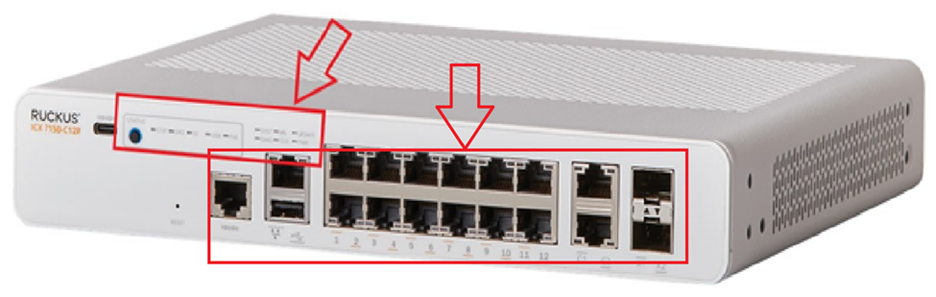
Please log into your RUCKUS Account before uploading these photos/screenshots.

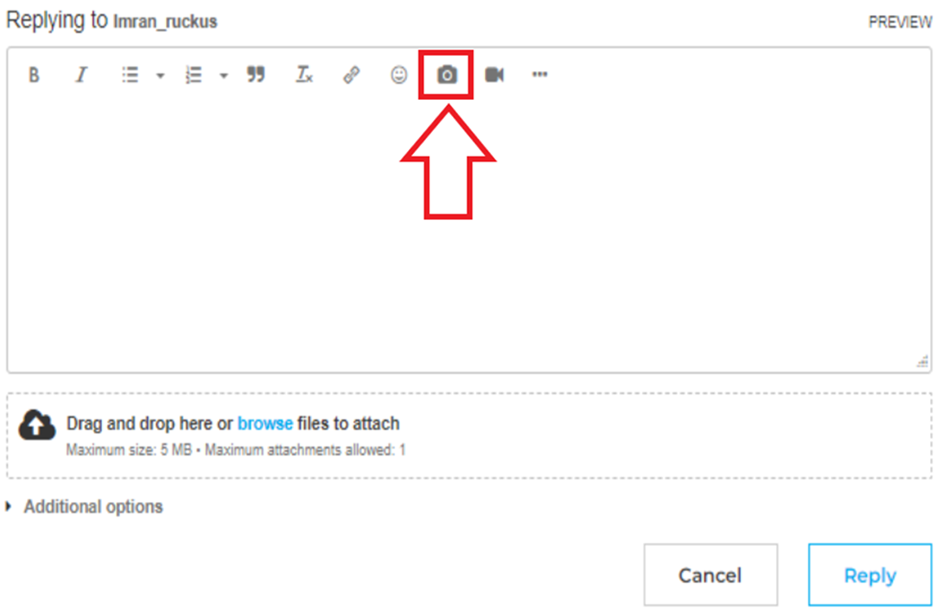
Should you have any further questions or concerns, feel free to reach out.
We appreciate your cooperation and look forward to resolving this matter for you promptly.
Best regards,
Imran Sanadi
RUCKUS | Lennar Home Community Support
Options
- Mark as New
- Bookmark
- Subscribe
- Mute
- Subscribe to RSS Feed
- Permalink
- Report Inappropriate Content
07-06-2026 06:04 AM
Greetings!!!
I trust this message finds you well.
I kindly request an update on the status of the issue so that we may proceed further with resolving it.
If we do not receive a response from you within 24 hours from the timestamp of this message, your case will proceed to closure.
Thank you.
Best regards,
Imran Sanadi
RUCKUS | Lennar Home Community Support

Labels
-
Access point
3 -
Access points
5 -
all lights blinking after reset icx 7150 switch
1 -
Amber
1 -
Amber System
2 -
AP
1 -
AP Management
1 -
Boot mode
1 -
bootloader
1 -
cli
1 -
Compatibility
1 -
Console
1 -
console access
1 -
dns
1 -
eero
2 -
eps
1 -
Frontier
1 -
Green Power
2 -
Hard reset
1 -
Heartbeat
1 -
Heartbeat loss recurring
2 -
Help
2 -
Help Needed
2 -
i Al
1 -
ICX
2 -
ICX 7150-C12p
7 -
ICX switch
4 -
ICX Switch Disconnected
1 -
ICX Switch Management
4 -
ICX-7150-C12
3 -
ICX-7150-C12P
1 -
Important Announcement
1 -
Installation
1 -
Internet Issue
2 -
Ive been
1 -
Lennar
3 -
Lennar Home
2 -
Lennar homes
25 -
Management Port
1 -
NAND flash memory
1 -
New
1 -
No POE
2 -
No power via Ethernet
1 -
password
1 -
Please
1 -
Poe
2 -
Poe not working
1 -
Power Outage
1 -
Power Outtage
1 -
Proposed Solution
1 -
R510
2 -
r510 no power
2 -
REBOOT
1 -
Recovery
1 -
Red LED
1 -
Remote access
1 -
Reset ICX username password
1 -
Return
1 -
RMA
3 -
Ruckus
2 -
Ruckus ICX 7150-C12P
4 -
RUCKUS Self-Help
1 -
RUKUS 7150 c12p
1 -
Setup
1 -
Software Recovery
1 -
Solution Proposed
1 -
Solution Proposed warranty
1 -
SPR
1 -
SSH
1 -
Switch
1 -
Telnet
1 -
Unleashed
3 -
Unresolved Issue
1 -
Upgrade
3 -
Upgrading R510
1 -
User Management
1 -
username
1 -
VPN streaming fail proxy not working Amazon prime video
1 -
Wifi
1 -
Wifi6
1 -
Wireless
3
- « Previous
- Next »
