This website uses cookies. By clicking Accept, you consent to the use of cookies. Click Here to learn more about how we use cookies.
RUCKUS Community Forums are now in READ-ONLY mode while we migrate to a new platform.
You will still be able to read posts and knowledge articles, but will be unable to post new content until Go Live on the new platform Monday August 17.
Lennar Smart Home customers: please contact [email protected] for assistance during the week of August 9-17.

- Community
- RUCKUS Technologies
- RUCKUS Lennar Support
- Community Services
- RTF
- RTF Community
- Australia and New Zealand – English
- Brazil – Português
- China – 简体中文
- France – Français
- Germany – Deutsch
- Hong Kong – 繁體中文
- India – English
- Indonesia – bahasa Indonesia
- Italy – Italiano
- Japan – 日本語
- Korea – 한국어
- Latin America – Español (Latinoamérica)
- Middle East & Africa – English
- Netherlands – Nederlands
- Nordics – English
- North America – English
- Poland – polski
- Russia – Русский
- Singapore, Malaysia, and Philippines – English
- Spain – Español
- Taiwan – 繁體中文
- Thailand – ไทย
- Turkey – Türkçe
- United Kingdom – English
- Vietnam – Tiếng Việt
- EOL Products
Turn on suggestions
Auto-suggest helps you quickly narrow down your search results by suggesting possible matches as you type.
Showing results for
- RUCKUS Forums
- RUCKUS Lennar Support
- RUCKUS Support for Lennar Homes
- Re: Just moved into 2018 Lennar home with R510 acc...
Options
- Subscribe to RSS Feed
- Mark Topic as New
- Mark Topic as Read
- Float this Topic for Current User
- Bookmark
- Subscribe
- Mute
- Printer Friendly Page
Just moved into 2018 Lennar home with R510 access point - no longer supported

Options
- Mark as New
- Bookmark
- Subscribe
- Mute
- Subscribe to RSS Feed
- Permalink
- Report Inappropriate Content
06-22-2025 03:20 PM
Following the Community advice I downloaded the Ruckus Unleashed app to my phone, factory reset the master R510 access point, connected to the Configure.Me-xxxxx WiFi network, the app acknowledged I was connected to the network, then I hit start and received a message saying "AP version not supported. Please upgrade your AP." (see image attached).
Can someone help me with next steps? I was never connected to the network before resetting because it required the previous owner's login credentials. Appreciate any advice you can give.

44 REPLIES 44
Options
- Mark as New
- Bookmark
- Subscribe
- Mute
- Subscribe to RSS Feed
- Permalink
- Report Inappropriate Content
08-15-2025 01:33 PM
Thank you for the response. I initially turned off the 2.4 GHz and 5 GHz Wireless Networks; however, the internet disconnection issue continued. I then went back in and also disabled the Wireless 802.11 Radio (for both 2.4 and 5 GHz) and changed the 2.4 GHz Channel to 6. Hopefully this will solve the issue.
If you don't mind keeping the case open for a few more days so I can test the new configurations, I'd appreciate it.
Thanks,
Matt

Options
- Mark as New
- Bookmark
- Subscribe
- Mute
- Subscribe to RSS Feed
- Permalink
- Report Inappropriate Content
08-15-2025 01:52 PM
Hello @wehttam77 ,
Thank you for your response.
I will keep the case open and await further updates from your side.
Please keep us informed as the situation progresses.
Thank you for your patience and understanding.
Regards,
Pinky Rajendran
RUCKUS Lennar Home Community
Options
- Mark as New
- Bookmark
- Subscribe
- Mute
- Subscribe to RSS Feed
- Permalink
- Report Inappropriate Content
08-15-2025 08:21 PM
I'm still having the issue after my last modifications. Any next steps you can suggest would be greatly appreciated.
Here is my modem's event log:

And here is the Unleashed event log:

Options
- Mark as New
- Bookmark
- Subscribe
- Mute
- Subscribe to RSS Feed
- Permalink
- Report Inappropriate Content
08-18-2025 07:57 AM
Hello @wehttam77 ,
Thank you for the response.
We understand that you are still having slower speed issues while accessing through Ruckus devices
Achieving the maximum speed from the Wi-Fi Access Points may not always be possible due to several factors, including:
- Ethernet Cable Quality: The quality of the Ethernet cables used to connect the Access Points to the Switch (e.g., Cat5, Cat5e, or Cat6) can affect performance. Sometimes, defective or substandard Ethernet cables between the ISP Router, RUCKUS Switch, and RUCKUS Access Points may cause speed limitations.
- Interference from Other Devices: Many household electronic devices, such as microwaves, baby monitors, security cameras, garage door openers, and cordless phones, operate on the 2.4 GHz frequency, which can cause interference and reduce Wi-Fi speeds.
- Distance and Placement: The distance between the Access Points and the device accessing the Internet can impact the signal strength and speed. Additionally, the placement of Access Points within the home can also influence performance, with walls and other obstructions potentially reducing signal quality.
It appears that the Access Points (APs) are now functioning normally. The observed speed variations may be attributed to several factors, such as RF interference and the distance between the device and the AP.
To clarify, a 2.4 GHz connection generally provides longer range but at lower speeds, whereas 5 GHz frequencies offer faster speeds but cover shorter distances. The choice between 2.4 GHz and 5 GHz is often determined automatically by the end device (such as phones, PCs, Ring doorbells, Mac devices, iPhones). Additionally, network configuration (Wi-Fi/SSID/WLAN) may specify whether the network supports only 2.4 GHz, only 5 GHz, or both.
It's also worth noting that many electronic devices and appliances, such as microwaves, baby monitors, security cameras, garage door openers, and phones, operate on the 2.4 GHz frequency, which can contribute to interference. Screenshot below for the reference.
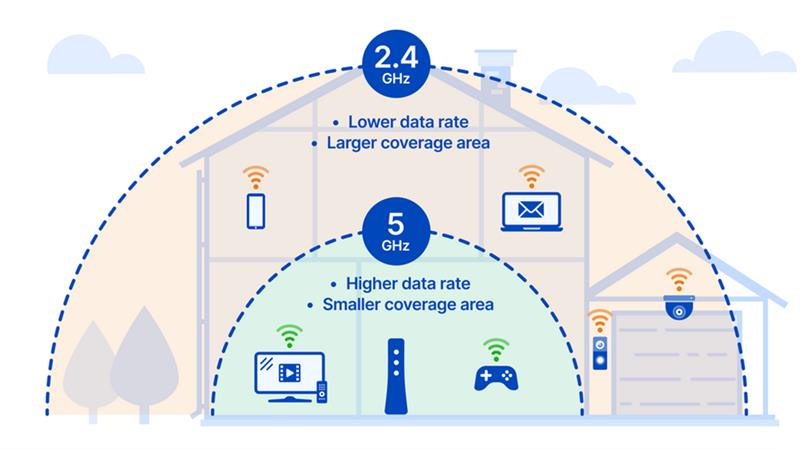
Please let us know if you have any queries in this regard.
Thank you for your patience and understanding.
Regards,
Pinky Rajendran
RUCKUS Lennar Home Community
Options
- Mark as New
- Bookmark
- Subscribe
- Mute
- Subscribe to RSS Feed
- Permalink
- Report Inappropriate Content
08-18-2025 08:21 AM
The issue I’m having is not with speed of internet. It’s with completely losing internet connection all together. I thought you were aware that this was the issue as we’ve discussed repeatedly over the past several weeks.
I had Xfinity (ISP) out to the house yesterday and he didn’t find any issues with wiring to the modem; however, I did purchase a new modem just to be sure and will be installing it this evening after work. I’ll let you know whether it solves the issue. If not, the only other culprit is the ICX switch or the APs.

Labels
-
Access point
3 -
Access points
5 -
all lights blinking after reset icx 7150 switch
1 -
Amber
1 -
Amber System
2 -
AP
1 -
AP Management
1 -
Boot mode
1 -
bootloader
1 -
cli
1 -
Compatibility
1 -
Console
1 -
console access
1 -
dns
1 -
eero
2 -
eps
1 -
Frontier
1 -
Green Power
2 -
Hard reset
1 -
Heartbeat
1 -
Heartbeat loss recurring
2 -
Help
2 -
Help Needed
2 -
i Al
1 -
ICX
2 -
ICX 7150-C12p
7 -
ICX switch
4 -
ICX Switch Disconnected
1 -
ICX Switch Management
4 -
ICX-7150-C12
3 -
ICX-7150-C12P
1 -
Important Announcement
1 -
Installation
1 -
Internet Issue
2 -
Ive been
1 -
Lennar
3 -
Lennar Home
2 -
Lennar homes
25 -
Management Port
1 -
NAND flash memory
1 -
New
1 -
No POE
2 -
No power via Ethernet
1 -
password
1 -
Please
1 -
Poe
2 -
Poe not working
1 -
Power Outage
1 -
Power Outtage
1 -
Proposed Solution
1 -
R510
2 -
r510 no power
2 -
REBOOT
1 -
Recovery
1 -
Red LED
1 -
Remote access
1 -
Reset ICX username password
1 -
Return
1 -
RMA
3 -
Ruckus
2 -
Ruckus ICX 7150-C12P
4 -
RUCKUS Self-Help
1 -
RUKUS 7150 c12p
1 -
Setup
1 -
Software Recovery
1 -
Solution Proposed
1 -
Solution Proposed warranty
1 -
SPR
1 -
SSH
1 -
Switch
1 -
Telnet
1 -
Unleashed
3 -
Unresolved Issue
1 -
Upgrade
3 -
Upgrading R510
1 -
User Management
1 -
username
1 -
VPN streaming fail proxy not working Amazon prime video
1 -
Wifi
1 -
Wifi6
1 -
Wireless
3
- « Previous
- Next »
