This website uses cookies. By clicking Accept, you consent to the use of cookies. Click Here to learn more about how we use cookies.

- Community
- RUCKUS Technologies
- RUCKUS Lennar Support
- Community Services
- RTF
- RTF Community
- Australia and New Zealand – English
- Brazil – Português
- China – 简体中文
- France – Français
- Germany – Deutsch
- Hong Kong – 繁體中文
- India – English
- Indonesia – bahasa Indonesia
- Italy – Italiano
- Japan – 日本語
- Korea – 한국어
- Latin America – Español (Latinoamérica)
- Middle East & Africa – English
- Netherlands – Nederlands
- Nordics – English
- North America – English
- Poland – polski
- Russia – Русский
- Singapore, Malaysia, and Philippines – English
- Spain – Español
- Taiwan – 繁體中文
- Thailand – ไทย
- Turkey – Türkçe
- United Kingdom – English
- Vietnam – Tiếng Việt
- EOL Products
Turn on suggestions
Auto-suggest helps you quickly narrow down your search results by suggesting possible matches as you type.
Showing results for
- RUCKUS Forums
- RUCKUS Lennar Support
- RUCKUS Support for Lennar Homes
- Re: Slow Download Speeds R710 Unleashed
Options
- Subscribe to RSS Feed
- Mark Topic as New
- Mark Topic as Read
- Float this Topic for Current User
- Bookmark
- Subscribe
- Mute
- Printer Friendly Page
Slow Download Speeds R710 Unleashed

Options
- Mark as New
- Bookmark
- Subscribe
- Mute
- Subscribe to RSS Feed
- Permalink
- Report Inappropriate Content
08-18-2019 12:10 PM
Strange issue with R710 on latest unleashed firmware. Upload speeds consistently incredible on both laptop and phone but downloads even from 5 ft away never go over 200 but stay consistent through 3 thick walls. Speedflex on android shows 550 up 550 down to AP. Iperf reflects speedtest.net results. Cable shouldn't be the problem as I have plugged my laptop on it and gotten the gigabit fiber speeds I should be getting. I have factory reset it countless times set everything to auto and tried manually setting the bands and channel width, am I missing something? Any help would be appreciated.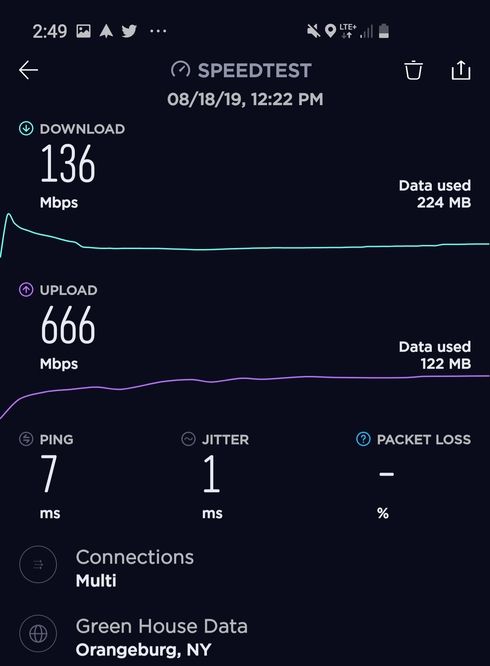
379 REPLIES 379

Options
- Mark as New
- Bookmark
- Subscribe
- Mute
- Subscribe to RSS Feed
- Permalink
- Report Inappropriate Content
09-19-2019 11:02 AM
Same issue for me on R510. How do I go back to 200.6.10?

Options
- Mark as New
- Bookmark
- Subscribe
- Mute
- Subscribe to RSS Feed
- Permalink
- Report Inappropriate Content
09-19-2019 11:21 AM
Download the firmware 200.6.10.x to a desktop/laptop computer
https://support.ruckuswireless.com/so...
Log on to the master controller app via webbrowser and go to the admin section which I think ha s the firmware update section.
Note upload the firmware to the slave first and then to the master. Note, this will reset everything to factory settings..
Make sure you have the unleashed app installed on your iPhone or iOS device so you can configure it.
note: Saved Settings from 200.7.10 will not work for 200.6.10
https://support.ruckuswireless.com/so...
Log on to the master controller app via webbrowser and go to the admin section which I think ha s the firmware update section.
Note upload the firmware to the slave first and then to the master. Note, this will reset everything to factory settings..
Make sure you have the unleashed app installed on your iPhone or iOS device so you can configure it.
note: Saved Settings from 200.7.10 will not work for 200.6.10
Options
- Mark as New
- Bookmark
- Subscribe
- Mute
- Subscribe to RSS Feed
- Permalink
- Report Inappropriate Content
09-19-2019 11:24 AM
Thanks! This is helpful. I wonder if it's worth it to roll it back. How quickly does Ruckus respond to things like this? My guess is it could be months or......never.
Options
- Mark as New
- Bookmark
- Subscribe
- Mute
- Subscribe to RSS Feed
- Permalink
- Report Inappropriate Content
09-19-2019 12:25 PM
yeah it's worth to roll back.. this is the first time I've seen ruckus release a really bad firmware that wasn't tested as well.. Normally it takes ruckus 6months to a year to release firmware.. Then again structure with the software teams might be different since Arris took over Ruckus the last few years. I've deployed in the past Ruckus 7372 and R710, R610, 510 at schools , high end homes and small business. At least ruckus is more consistent with stable firmware than say Unifi firmware and software which is more like beta testing.
Options
- Mark as New
- Bookmark
- Subscribe
- Mute
- Subscribe to RSS Feed
- Permalink
- Report Inappropriate Content
09-19-2019 11:04 AM
Also, what settings are you guys using to get speeds like this? I am seeing nothing close to even 400Mbps up or down. I have a Lennar home with 2 R510 AP's in the ceiling. 2 story home. One in the center of each floor. 2700 sq. feet.

Labels
-
Access point
3 -
Access points
5 -
all lights blinking after reset icx 7150 switch
1 -
Amber
1 -
Amber System
2 -
AP
1 -
Boot mode
1 -
bootloader
1 -
cli
1 -
Compatibility
1 -
Console
1 -
console access
1 -
dns
1 -
eero
2 -
eps
1 -
Frontier
1 -
Green Power
2 -
Hard reset
1 -
Heartbeat
1 -
Heartbeat loss recurring
2 -
Help
2 -
Help Needed
2 -
i Al
1 -
ICX
2 -
ICX 7150-C12p
7 -
ICX switch
4 -
ICX Switch Disconnected
1 -
ICX Switch Management
2 -
ICX-7150-C12
2 -
ICX-7150-C12P
1 -
Important Announcement
1 -
Installation
1 -
Internet Issue
2 -
Ive been
1 -
Lennar
3 -
Lennar Home
2 -
Lennar homes
25 -
Management Port
1 -
New
1 -
No POE
2 -
No power via Ethernet
1 -
password
1 -
Please
1 -
Poe
1 -
Poe not working
1 -
Power Outage
1 -
Power Outtage
1 -
Proposed Solution
1 -
R510
2 -
r510 no power
2 -
REBOOT
1 -
Recovery
1 -
Red LED
1 -
Remote access
1 -
Reset ICX username password
1 -
Return
1 -
RMA
3 -
Ruckus
2 -
Ruckus ICX 7150-C12P
4 -
RUCKUS Self-Help
1 -
RUKUS 7150 c12p
1 -
Setup
1 -
Software Recovery
1 -
Solution Proposed
1 -
Solution Proposed warranty
1 -
SPR
1 -
SSH
1 -
Switch
1 -
Telnet
1 -
Unleashed
3 -
Unresolved Issue
1 -
Upgrade
3 -
Upgrading R510
1 -
User Management
1 -
username
1 -
VPN streaming fail proxy not working Amazon prime video
1 -
Wifi
1 -
Wifi6
1 -
Wireless
3
- « Previous
- Next »
