This website uses cookies. By clicking Accept, you consent to the use of cookies. Click Here to learn more about how we use cookies.

- Community
- RUCKUS Technologies
- RUCKUS Lennar Support
- Community Services
- RTF
- RTF Community
- Australia and New Zealand – English
- Brazil – Português
- China – 简体中文
- France – Français
- Germany – Deutsch
- Hong Kong – 繁體中文
- India – English
- Indonesia – bahasa Indonesia
- Italy – Italiano
- Japan – 日本語
- Korea – 한국어
- Latin America – Español (Latinoamérica)
- Middle East & Africa – English
- Netherlands – Nederlands
- Nordics – English
- North America – English
- Poland – polski
- Russia – Русский
- Singapore, Malaysia, and Philippines – English
- Spain – Español
- Taiwan – 繁體中文
- Thailand – ไทย
- Turkey – Türkçe
- United Kingdom – English
- Vietnam – Tiếng Việt
- EOL Products
Turn on suggestions
Auto-suggest helps you quickly narrow down your search results by suggesting possible matches as you type.
Showing results for
- RUCKUS Forums
- RUCKUS Lennar Support
- RUCKUS Support for Lennar Homes
- Re: After ICX 7150 c12p factory reset need help as...
Options
- Subscribe to RSS Feed
- Mark Topic as New
- Mark Topic as Read
- Float this Topic for Current User
- Bookmark
- Subscribe
- Mute
- Printer Friendly Page

Options
- Mark as New
- Bookmark
- Subscribe
- Mute
- Subscribe to RSS Feed
- Permalink
- Report Inappropriate Content
02-19-2024 06:00 AM
I had to repost because it wasn’t in the Lennar forums I was told. Yes this is for a Lennar smart home.
Hello. I had to reset my ICX switch to factory and now I need a walk through to set everything back up.
I am able to get to the switch via the command line with USB-C to from the switch to my laptop. I was able to create a new password after the reset but I really don’t understand or know the commands like that to assign the IP address, default gateway, and TFtp. I have download putty and TFTP but as of now I’m stuck on assigning a IP address to the TFTP on the switch.
The commands I found on the forums seems to not work when trying to assign IP address. I just need a up to date or someone to speak to help assist getting the switch not the AP back functioning from the Lennar setup please..
Solved! Go to Solution.
1 ACCEPTED SOLUTION
Options
- Mark as New
- Bookmark
- Subscribe
- Mute
- Subscribe to RSS Feed
- Permalink
- Report Inappropriate Content
02-26-2024 12:07 PM
@imran_ruckus @sgatjens
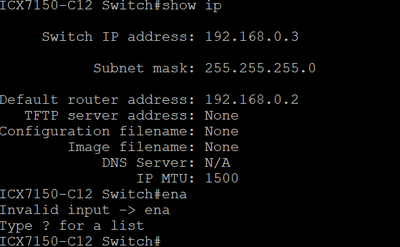
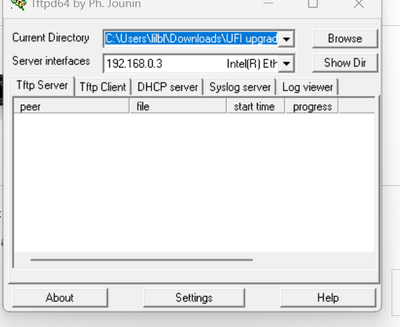
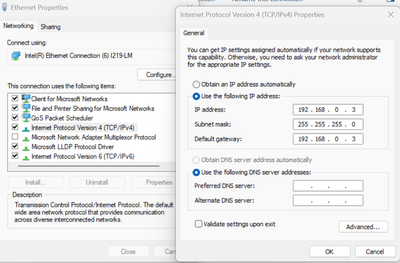
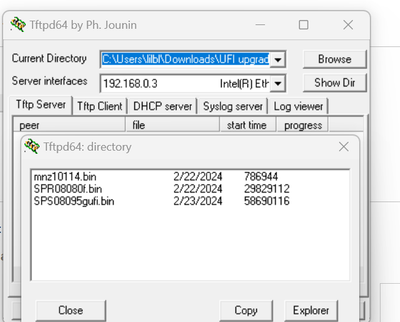
Same issue. I change the IP address to match the IP within CLI.

18 REPLIES 18
Options
- Mark as New
- Bookmark
- Subscribe
- Mute
- Subscribe to RSS Feed
- Permalink
- Report Inappropriate Content
02-19-2024 10:20 AM
Is there someone that I can speak to about this. I get I might not get a response quickly, but once I do and it’s not answer I don’t want to wait several more hours before the next response. It would be great if I could work this case out with someone until the end.


Options
- Mark as New
- Bookmark
- Subscribe
- Mute
- Subscribe to RSS Feed
- Permalink
- Report Inappropriate Content
02-20-2024 05:26 AM
Helli @mpyrtle
Greetings!!!
Thank you for contacting RUCKUS Lennar Home Community.
I hope you are doing well!!!
Could you please let me know why exactly you need to set and IP address to the TFTP server? Are you trying to upgrade the switch? If so, have you checked this guide?
How to Upgrade a Switch ICX-7150-C12P via TFTP
https://community.ruckuswireless.com/t5/RUCKUS-Support-for-Lennar-Homes/How-to-Upgrade-a-Switch-ICX-...
Kind regards,
Sofia Gätjens
Options
- Mark as New
- Bookmark
- Subscribe
- Mute
- Subscribe to RSS Feed
- Permalink
- Report Inappropriate Content
02-20-2024 07:49 AM
I was following another KB article that was on the forum.
Long story short and got a new internet service which is fiber now 2G. My switch was fixed to not go past 80mbps on the ports. I couldn’t log into the switch as all of the default usernames and password that was mention throughout these forums didn’t work. So I reset the ICX and went to the factory mode. I need assistance to set everything back up on the switch as if this was new set up for a Lennar home. Right now I was just able to set a password for the switch. I did give it IP address with a subnet and create a IP address to the default gateway that matches my Ethernet port on my laptop.
Maybe I’m following so old instructions and it might be a simpler way to get everything back, but I’m not to familiar with the commands for the ruckus.
Do mind assisting me to get everything set and then I can following other instructions to configure the port to on the switch to be active and adjust the ports speeds as well.
Options
- Mark as New
- Bookmark
- Subscribe
- Mute
- Subscribe to RSS Feed
- Permalink
- Report Inappropriate Content
02-21-2024 07:22 AM - edited 02-21-2024 07:24 AM
Hi @mpyrtle
Our switches are designed to be "plug and play" for Lennar customers, meaning they come without any specific configurations. The ISP provides the IP address to our ICX devices, and consequently, the gateway is also provided by the ISP; we do not set it ourselves. However, we can verify the port speed and the Power over Ethernet (PoE) settings, which enable the power supply to your access points.
For the ICX7150-C12P model, the specifications are as follows: RUCKUS ICX 7150 Compact Switch with 12×10/100/1000 Mbps PoE+ ports, 2×1 GbE RJ45 uplink ports, and 2×1 GbE SFP uplink ports, which can be upgraded to 2×10 GbE SFP+ with a license. It has a PoE budget of 124 W.
To check the speed and PoE settings, you can use the following commands:
#show interface ethernet x/x/x (port number)
Example:
#show interface ethernet 1/1/1
Note: Typically, the interface/port speed is configured as "speed auto," meaning the port auto-negotiates the speed, allowing devices to communicate at the maximum speed supported by both ends of the connection.
You can also use the command below to display inline power information:
#show inline power
Please check this guide: Most common Setups for Lennar homes users
https://community.ruckuswireless.com/t5/RUCKUS-Support-for-Lennar-Homes/Most-common-Setups-for-Lenna...
Feel free to contact me if you have questions.
Kind regards,
Sofia Gätjens

Labels
-
Access point
3 -
Access points
5 -
all lights blinking after reset icx 7150 switch
1 -
Amber
1 -
Amber System
2 -
AP
1 -
AP Management
1 -
Boot mode
1 -
bootloader
1 -
cli
1 -
Compatibility
1 -
Console
1 -
console access
1 -
dns
1 -
eero
2 -
eps
1 -
Frontier
1 -
Green Power
2 -
Hard reset
1 -
Heartbeat
1 -
Heartbeat loss recurring
2 -
Help
2 -
Help Needed
2 -
i Al
1 -
ICX
2 -
ICX 7150-C12p
7 -
ICX switch
4 -
ICX Switch Disconnected
1 -
ICX Switch Management
4 -
ICX-7150-C12
3 -
ICX-7150-C12P
1 -
Important Announcement
1 -
Installation
1 -
Internet Issue
2 -
Ive been
1 -
Lennar
3 -
Lennar Home
2 -
Lennar homes
25 -
Management Port
1 -
NAND flash memory
1 -
New
1 -
No POE
2 -
No power via Ethernet
1 -
password
1 -
Please
1 -
Poe
2 -
Poe not working
1 -
Power Outage
1 -
Power Outtage
1 -
Proposed Solution
1 -
R510
2 -
r510 no power
2 -
REBOOT
1 -
Recovery
1 -
Red LED
1 -
Remote access
1 -
Reset ICX username password
1 -
Return
1 -
RMA
3 -
Ruckus
2 -
Ruckus ICX 7150-C12P
4 -
RUCKUS Self-Help
1 -
RUKUS 7150 c12p
1 -
Setup
1 -
Software Recovery
1 -
Solution Proposed
1 -
Solution Proposed warranty
1 -
SPR
1 -
SSH
1 -
Switch
1 -
Telnet
1 -
Unleashed
3 -
Unresolved Issue
1 -
Upgrade
3 -
Upgrading R510
1 -
User Management
1 -
username
1 -
VPN streaming fail proxy not working Amazon prime video
1 -
Wifi
1 -
Wifi6
1 -
Wireless
3
- « Previous
- Next »
