Admin and Licensing
cancel
Showing results for 
Search instead for 
Did you mean: 

Forum Posts

SmartZone Licensing via Fetchbot

Self-service tools now available via Fetch The Fetch chatbot now supports SmartZone licensing self-service features—bringing key LiMAN capabilities from Support Portal to Fetch. Fetch allows RUCKUS Customers and Partner Administrators to perform the ...
SmartZone / virtual SmartZone Licensing Articles

Our most popular Knowledge Base Articles (KBA) for SmartZone Licensing: Adding AP Licenses on the virtual controllers from LiMAN portalHow to activate RTU and AP Licenses on vSCG/vSZ, vSPOT, SCILiMAN License Transfer on a vSZ/SZ/SCI/vSPoTInsufficient...

RUCKUS ICX Switch Licensing

Our most popular Knowledge Base Articles (KBA) for ICX Licensing: ICX 7150 License UpgradeICX License Install InstructionsPoD licenses for ICX 6610, ICX 6450,ICX 7150, ICX 7250ICX Licensed Features and Platform SupportActivating ICX 7250 PREM license...

Managing Users in RUCKUS Analytics

You can add registered users, associate them to resource groups, and manage users from the RUCKUS Analytics web interface.The user must be registered with the system (a valid account on support.ruckuswireless.com).From the web interface of Ruckus Ana...

Image_ images_messages_614cae162091224058c21e3b_25abef4a3b67627d1a7588ce6d84febc_RA-fdaf69dc-78b4-441f-8690-d31af2b3b180-1885866518.png Image_ images_messages_614cae162091224058c21e3b_b53cc27ffdadb6d3ecc6d17980bc306d_RA2-c8e08f73-321b-4adc-a143-0d913d6f822e-1669410206.png

License Download and Upload -Hardware Controllers

License Download: Follow the below instructions to download Hardware licenses Log in to Ruckus support portal - https://support.ruckuswireless.comClick on AssetsClick on Hardware SummarySearch for the controller SN in the Search boxClick on SNNote:...

Virtual license activation

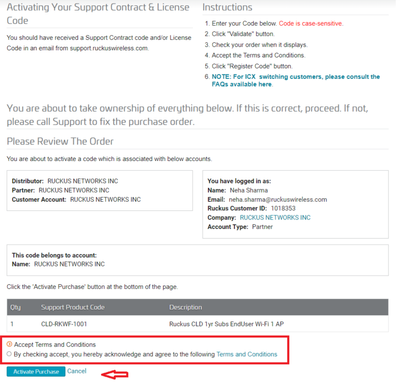
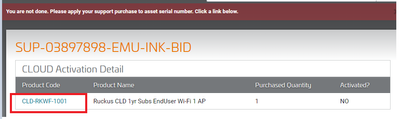
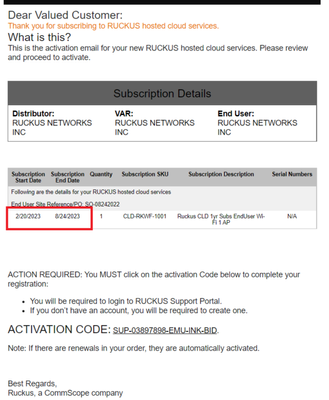
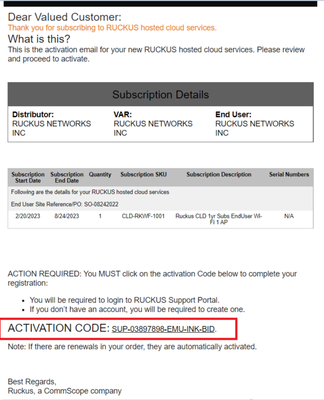
Virtual license activation doesn’t ask the customer to bind the SN, since they are account specific and not SN specific. Follow the below steps to activate virtual licenses via support portal Customer to open the License Purchase Acknowledgement (S...

End user /Partner support activation

Customer to open the Support Purchase Acknowledgement (SPA) email that was received from Ruckus/Disti/VAR for the orderLogin to Ruckus support portal: https://support.ruckuswireless.comClick on Activate PurchaseEnter the activation code "SUP-123456-A...