This website uses cookies. By clicking Accept, you consent to the use of cookies. Click Here to learn more about how we use cookies.
RUCKUS Community Forums are now in READ-ONLY mode while we migrate to a new platform.
You will still be able to read posts and knowledge articles, but will be unable to post new content until Go Live on the new platform Monday August 17.
Lennar Smart Home customers: please contact [email protected] for assistance during the week of August 9-17.

- Community
- RUCKUS Technologies
- RUCKUS Lennar Support
- Community Services
- RTF
- RTF Community
- Australia and New Zealand – English
- Brazil – Português
- China – 简体中文
- France – Français
- Germany – Deutsch
- Hong Kong – 繁體中文
- India – English
- Indonesia – bahasa Indonesia
- Italy – Italiano
- Japan – 日本語
- Korea – 한국어
- Latin America – Español (Latinoamérica)
- Middle East & Africa – English
- Netherlands – Nederlands
- Nordics – English
- North America – English
- Poland – polski
- Russia – Русский
- Singapore, Malaysia, and Philippines – English
- Spain – Español
- Taiwan – 繁體中文
- Thailand – ไทย
- Turkey – Türkçe
- United Kingdom – English
- Vietnam – Tiếng Việt
- EOL Products
Turn on suggestions
Auto-suggest helps you quickly narrow down your search results by suggesting possible matches as you type.
Showing results for
- RUCKUS Forums
- RUCKUS Technologies
- ZD
- trouble adding vlan to an SSID
Options
- Subscribe to RSS Feed
- Mark Topic as New
- Mark Topic as Read
- Float this Topic for Current User
- Bookmark
- Subscribe
- Mute
- Printer Friendly Page
trouble adding vlan to an SSID

Anonymous
Not applicable
Options
- Mark as New
- Bookmark
- Subscribe
- Mute
- Subscribe to RSS Feed
- Permalink
- Report Inappropriate Content
10-18-2013 01:57 AM
HI,
We are trying to setup a second WLAN in our infrastructure. This WLAN would using a different vlan from the standard wifi.
standard WIFI->vlan 3
guest WIFI -> vlan 5
The ports were APs and Zone Director(ZD 1100) are connected are trunks allowing vlan 3 and 5, with vlan 3 as native.
When I use standard wifi everything work. When I try the guest wifi my clients do not get any IP.
We have two dhcps one for vlan 3 and one for vlan 5.
When I connect a dekstop on a similar trunk port and set the network card to use vlan 5, an IP from vlan 5 dhcp is assigned.
Considering that I guess it is because the packet on the guest are not properly tagged.
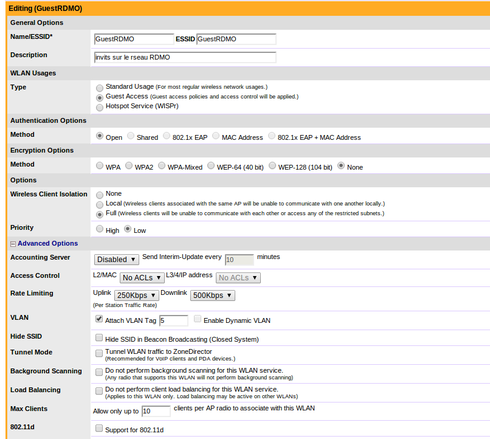
Here is my configuration
wlan configuration
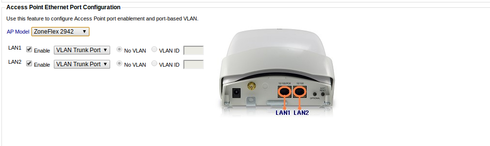
APs configuration
thank for the help
We are trying to setup a second WLAN in our infrastructure. This WLAN would using a different vlan from the standard wifi.
standard WIFI->vlan 3
guest WIFI -> vlan 5
The ports were APs and Zone Director(ZD 1100) are connected are trunks allowing vlan 3 and 5, with vlan 3 as native.
When I use standard wifi everything work. When I try the guest wifi my clients do not get any IP.
We have two dhcps one for vlan 3 and one for vlan 5.
When I connect a dekstop on a similar trunk port and set the network card to use vlan 5, an IP from vlan 5 dhcp is assigned.
Considering that I guess it is because the packet on the guest are not properly tagged.
Here is my configuration
wlan configuration
APs configuration
thank for the help
Reply
4 REPLIES 4

Options
- Mark as New
- Bookmark
- Subscribe
- Mute
- Subscribe to RSS Feed
- Permalink
- Report Inappropriate Content
10-18-2013 10:36 PM
HI,
From your description I came to know that in your network.
Vlan 3-> Native Vlan for standard SSID[untagged].
Vlan 5 -> guest WIFI
->When you try to connect the guest wifi what IP address do your clients get?
Do they get APIPA IP or an IP from Native Vlan 3 subnet.
-> What happens if you connect a client to a switch port where only Vlan 5 is tagged, do they get IP from proper scope.
-> Is both Vlan 3 and Vlan 5 scopes are defined on a single DHCP server?
Could you Please try configuring a new standard SSID with Vlan 5 tagged and see if clients are able to get an IP from proper scope.
Please let me know the above details for better understanding.
Thanks,
Harish Kumar
From your description I came to know that in your network.
Vlan 3-> Native Vlan for standard SSID[untagged].
Vlan 5 -> guest WIFI
->When you try to connect the guest wifi what IP address do your clients get?
Do they get APIPA IP or an IP from Native Vlan 3 subnet.
-> What happens if you connect a client to a switch port where only Vlan 5 is tagged, do they get IP from proper scope.
-> Is both Vlan 3 and Vlan 5 scopes are defined on a single DHCP server?
Could you Please try configuring a new standard SSID with Vlan 5 tagged and see if clients are able to get an IP from proper scope.
Please let me know the above details for better understanding.
Thanks,
Harish Kumar
Anonymous
Not applicable
Options
- Mark as New
- Bookmark
- Subscribe
- Mute
- Subscribe to RSS Feed
- Permalink
- Report Inappropriate Content
08-06-2014 02:08 AM
Hey Guys,
I am having a very similar problem.
Basically I have 3 vlans for my wireless, valn12 managment, vlan20 standard wireless, vlan21 guest wireless.
I have my switch ports configured for both the connection to ZD and the AP configured with vlan12 untagged and tagged for all other vlans.
When I specify a vlan in the SSID other than the default, clients will get an APIPA address.
If I leave everything as default vlan id 1 I get an IP address from vlan12.
If I set the default vlan id on the console interface I am no longer able to talk to the ZD at all.
What am I doing wrong?
Any suggestions would be greatly appreciated.
I am having a very similar problem.
Basically I have 3 vlans for my wireless, valn12 managment, vlan20 standard wireless, vlan21 guest wireless.
I have my switch ports configured for both the connection to ZD and the AP configured with vlan12 untagged and tagged for all other vlans.
When I specify a vlan in the SSID other than the default, clients will get an APIPA address.
If I leave everything as default vlan id 1 I get an IP address from vlan12.
If I set the default vlan id on the console interface I am no longer able to talk to the ZD at all.
What am I doing wrong?
Any suggestions would be greatly appreciated.

Options
- Mark as New
- Bookmark
- Subscribe
- Mute
- Subscribe to RSS Feed
- Permalink
- Report Inappropriate Content
09-24-2014 03:30 PM
Hi Andrew,
are you connecting the ZD to a trunk port in the switch?
Could you set a monitor port and try to capture some traffic? I would like to identify if traffic is flowing as expected.
What about fixing an IP? does it work?
Victor,
are you connecting the ZD to a trunk port in the switch?
Could you set a monitor port and try to capture some traffic? I would like to identify if traffic is flowing as expected.
What about fixing an IP? does it work?
Victor,
Anonymous
Not applicable
Options
- Mark as New
- Bookmark
- Subscribe
- Mute
- Subscribe to RSS Feed
- Permalink
- Report Inappropriate Content
06-09-2015 07:42 PM
Was there a solution to this post?
Thanks.
Thanks.
Labels
-
DHCP
1 -
IP lease
1 -
license snmp
1 -
Proposed Solution
1 -
Ruckus
1 -
server
1 -
VLAN
1 -
wap
1 -
zone director
1 -
ZoneDirector
1
