This website uses cookies. By clicking Accept, you consent to the use of cookies. Click Here to learn more about how we use cookies.
RUCKUS Community Forums are now in READ-ONLY mode while we migrate to a new platform.
You will still be able to read posts and knowledge articles, but will be unable to post new content until Go Live on the new platform Monday August 17.
Lennar Smart Home customers: please contact [email protected] for assistance during the week of August 9-17.

- Community
- RUCKUS Technologies
- RUCKUS Lennar Support
- Community Services
- RTF
- RTF Community
- Australia and New Zealand – English
- Brazil – Português
- China – 简体中文
- France – Français
- Germany – Deutsch
- Hong Kong – 繁體中文
- India – English
- Indonesia – bahasa Indonesia
- Italy – Italiano
- Japan – 日本語
- Korea – 한국어
- Latin America – Español (Latinoamérica)
- Middle East & Africa – English
- Netherlands – Nederlands
- Nordics – English
- North America – English
- Poland – polski
- Russia – Русский
- Singapore, Malaysia, and Philippines – English
- Spain – Español
- Taiwan – 繁體中文
- Thailand – ไทย
- Turkey – Türkçe
- United Kingdom – English
- Vietnam – Tiếng Việt
- EOL Products
Turn on suggestions
Auto-suggest helps you quickly narrow down your search results by suggesting possible matches as you type.
Showing results for
- RUCKUS Forums
- RUCKUS Technologies
- Unleashed
- Re: ssid and password reset
Options
- Subscribe to RSS Feed
- Mark Topic as New
- Mark Topic as Read
- Float this Topic for Current User
- Bookmark
- Subscribe
- Mute
- Printer Friendly Page
ssid and password reset

Options
- Mark as New
- Bookmark
- Subscribe
- Mute
- Subscribe to RSS Feed
- Permalink
- Report Inappropriate Content
02-12-2026 08:44 AM
HI Guys
I got access to some old H510 units and decided to play with them a while back.
Logn and short, I was able to set them up but then it got put on the back burner.
Now trying to get back to it I can see on my cell phone that it's broadcasting and on the back of the units I have green power and orange 2.4 and 5. gig
MY issue is I CAN NOT remember the password I set up.
I am logged into
192.168.XX.XXX/admin/dashboard.jsp
and I can see the tabs
internet - connected
WIFI Network traffic and working
BUt I can not find where I can change or see he SSID and Password
waht am I missing!?
2 REPLIES 2


Options
- Mark as New
- Bookmark
- Subscribe
- Mute
- Subscribe to RSS Feed
- Permalink
- Report Inappropriate Content
02-18-2026 10:34 AM
Hi @Corwyn13
Greetings!!!
Thank you for reaching out to the RUCKUS Community Forums.
We appreciate your patience and understanding as we work to resolve the issues you are experiencing with your RUCKUS setup.
Based on the information provided, it appears that you are trying to reset the Wi-Fi network password.
We apologize for any inconvenience this has caused and are committed to assisting you promptly.
Below is the article explaining the LED status of the Access Points.
Steps to reset the password.
Please log in to your Unleashed account and follow the steps below to change the Wi-Fi password:
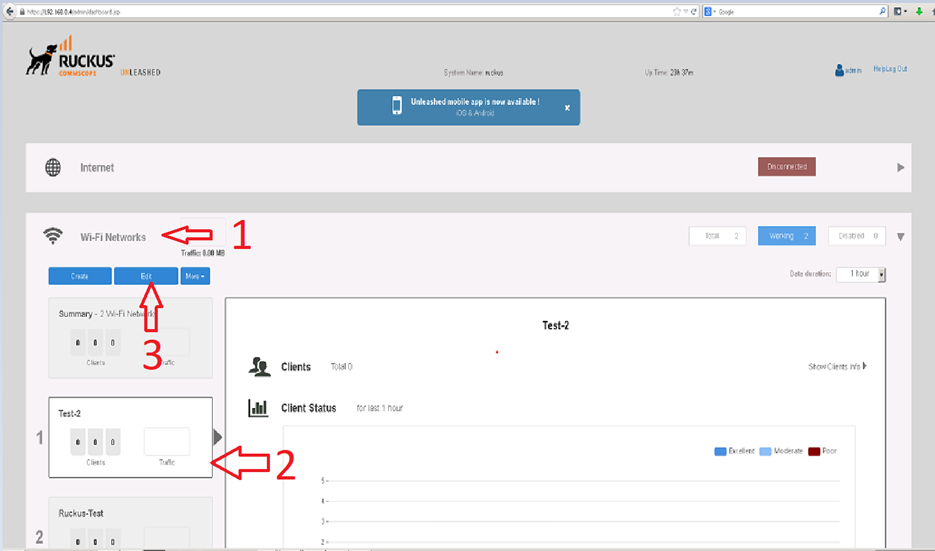
1. Go to Wi-Fi Network
2. Select your WLAN Network (SSID)
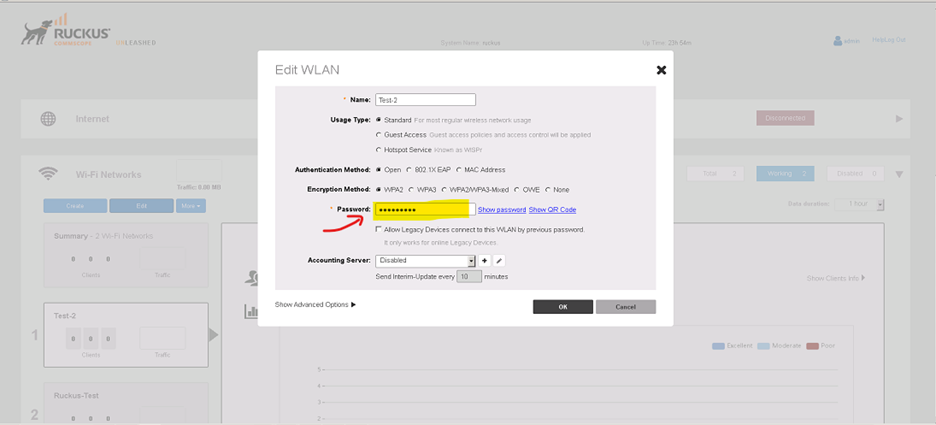
3. Click Edit WLAN
4. Change the Password field as needed
(Please refer to the screenshots below for guidance.)
Alternatively, you can create a new WLAN SSID if preferred. For step-by-step instructions, please see the video here:
https://community.ruckuswireless.com/t5/RUCKUS-Lennar-Support-Knowledge/Guidelines-on-creating-a-Wir...
Please let me know if you have any questions.
Thank you again for your patience and understanding.
Best regards,
Imran Sanadi
RUCKUS | Community Support Forums
Options
- Mark as New
- Bookmark
- Subscribe
- Mute
- Subscribe to RSS Feed
- Permalink
- Report Inappropriate Content
02-23-2026 04:48 AM
Hi @Corwyn13
Greetings!!!
I trust this message finds you well.
I kindly request an update on the status of the issue so that we may proceed further with resolving it.
Thank you.
Best regards,
Imran Sanadi
RUCKUS | Lennar Home Community Support

Labels
-
AP Certificate error
1 -
AP Management
5 -
AP reporting
1 -
authentication fails
1 -
captive portal
1 -
Certificate
1 -
Client Management
1 -
DPSK
1 -
Guest Access
1 -
Guest Pass
1 -
Installation
1 -
IP Multicast
1 -
l2acl
1 -
LACP
1 -
laptop hp probook 430 g8
1 -
Mesh
1 -
Monitoring
1 -
Op
1 -
pfSense
1 -
R310
2 -
R550
1 -
Security
1 -
Solution Proposed
3 -
SSID
1 -
temporarily blocked
1 -
Unleashed
5 -
User Management
1 -
Web UI
1 -
Wired Throughput
1 -
Wireless Throughput
2 -
WLAN
1 -
WLAN Management
2 -
WPA3
1 -
WPA3-Enterprise
1
- « Previous
- Next »
