This website uses cookies. By clicking Accept, you consent to the use of cookies. Click Here to learn more about how we use cookies.

- Community
- RUCKUS Technologies
- RUCKUS Lennar Support
- Community Services
- RTF
- RTF Community
- Australia and New Zealand – English
- Brazil – Português
- China – 简体中文
- France – Français
- Germany – Deutsch
- Hong Kong – 繁體中文
- India – English
- Indonesia – bahasa Indonesia
- Italy – Italiano
- Japan – 日本語
- Korea – 한국어
- Latin America – Español (Latinoamérica)
- Middle East & Africa – English
- Netherlands – Nederlands
- Nordics – English
- North America – English
- Poland – polski
- Russia – Русский
- Singapore, Malaysia, and Philippines – English
- Spain – Español
- Taiwan – 繁體中文
- Thailand – ไทย
- Turkey – Türkçe
- United Kingdom – English
- Vietnam – Tiếng Việt
- EOL Products
Turn on suggestions
Auto-suggest helps you quickly narrow down your search results by suggesting possible matches as you type.
Showing results for
- RUCKUS Forums
- RUCKUS Technologies
- Unleashed
- Unleashed client connect to the far access point
Options
- Subscribe to RSS Feed
- Mark Topic as New
- Mark Topic as Read
- Float this Topic for Current User
- Bookmark
- Subscribe
- Mute
- Printer Friendly Page
Unleashed client connect to the far access point

Anonymous
Not applicable
Options
- Mark as New
- Bookmark
- Subscribe
- Mute
- Subscribe to RSS Feed
- Permalink
- Report Inappropriate Content
12-05-2017 02:18 AM
I have more than one client mostly in 2.4Ghz that are connecting not to the near AP R600 2 meters but they are connecting automatically to the far access point R500 where is 3-4 meters away plus kitchen and 2walls in between.
I reduced already the TX power of 2.4Ghz to -4dB, screenshot settings attached.
What else do you suggest ?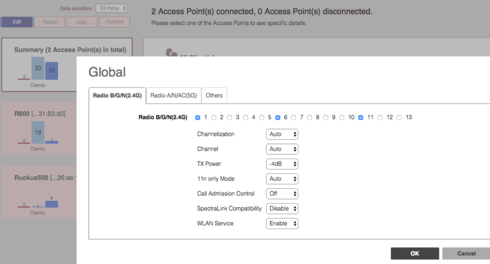
I reduced already the TX power of 2.4Ghz to -4dB, screenshot settings attached.
What else do you suggest ?
7 REPLIES 7

Options
- Mark as New
- Bookmark
- Subscribe
- Mute
- Subscribe to RSS Feed
- Permalink
- Report Inappropriate Content
12-05-2017 08:34 AM
Instead of adjusting the TX Power, have you tried enabling 802.11k for the WLAN and setting a low 2.4GHz percentage in Services, Radio Control and Band Balancing? That said, you might also get better performance if you do not limit the radio to three channels.
Anonymous
Not applicable
Options
- Mark as New
- Bookmark
- Subscribe
- Mute
- Subscribe to RSS Feed
- Permalink
- Report Inappropriate Content
12-05-2017 01:23 PM
Hi Daniel,
thanks for your reply ,
at the moment, the firmware installed is 200.3.9.13.228 and these are my settings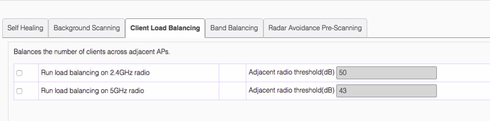
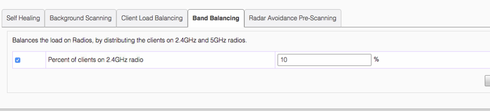
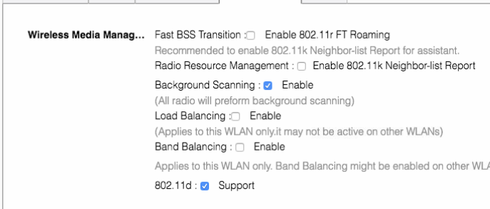
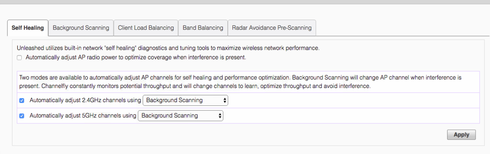
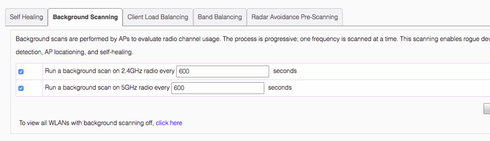
1 the band balancing at the moment is set to 10% shall I drop to 2% ?
2 do I need also enable the "band balancing" in the WLAN to make the 1 option working ?
thanks for your reply ,
at the moment, the firmware installed is 200.3.9.13.228 and these are my settings
1 the band balancing at the moment is set to 10% shall I drop to 2% ?
2 do I need also enable the "band balancing" in the WLAN to make the 1 option working ?
Options
- Mark as New
- Bookmark
- Subscribe
- Mute
- Subscribe to RSS Feed
- Permalink
- Report Inappropriate Content
12-05-2017 02:47 PM
I don't know if 2% will help more, but you do need Band Balancing enabled. Like I mentioned, you might also want to try enabling 802.11k.
Anonymous
Not applicable
Options
- Mark as New
- Bookmark
- Subscribe
- Mute
- Subscribe to RSS Feed
- Permalink
- Report Inappropriate Content
12-21-2017 05:55 AM
even after this changes , I have client connecting to the far AP and slow speed.
is the anything else I can do ?
is the anything else I can do ?
Labels
-
AP Certificate error
1 -
AP Management
5 -
AP reporting
1 -
authentication fails
1 -
captive portal
1 -
Certificate
1 -
Client Management
1 -
DPSK
1 -
Guest Access
1 -
Guest Pass
1 -
Installation
1 -
IP Multicast
1 -
l2acl
1 -
LACP
1 -
laptop hp probook 430 g8
1 -
Mesh
1 -
Monitoring
1 -
Op
1 -
pfSense
1 -
R310
2 -
R550
1 -
Security
1 -
Solution Proposed
3 -
SSID
1 -
temporarily blocked
1 -
Unleashed
5 -
User Management
1 -
Web UI
1 -
Wired Throughput
1 -
Wireless Throughput
2 -
WLAN
1 -
WLAN Management
2 -
WPA3
1 -
WPA3-Enterprise
1
- « Previous
- Next »
