This website uses cookies. By clicking Accept, you consent to the use of cookies. Click Here to learn more about how we use cookies.
RUCKUS Community Forums are now in READ-ONLY mode while we migrate to a new platform.
You will still be able to read posts and knowledge articles, but will be unable to post new content until Go Live on the new platform Monday August 17.
Lennar Smart Home customers: please contact [email protected] for assistance during the week of August 9-17.

- Community
- RUCKUS Technologies
- RUCKUS Lennar Support
- Community Services
- RTF
- RTF Community
- Australia and New Zealand – English
- Brazil – Português
- China – 简体中文
- France – Français
- Germany – Deutsch
- Hong Kong – 繁體中文
- India – English
- Indonesia – bahasa Indonesia
- Italy – Italiano
- Japan – 日本語
- Korea – 한국어
- Latin America – Español (Latinoamérica)
- Middle East & Africa – English
- Netherlands – Nederlands
- Nordics – English
- North America – English
- Poland – polski
- Russia – Русский
- Singapore, Malaysia, and Philippines – English
- Spain – Español
- Taiwan – 繁體中文
- Thailand – ไทย
- Turkey – Türkçe
- United Kingdom – English
- Vietnam – Tiếng Việt
- EOL Products
Turn on suggestions
Auto-suggest helps you quickly narrow down your search results by suggesting possible matches as you type.
Showing results for
- RUCKUS Forums
- RUCKUS Technologies
- Unleashed
- Re: Ruckus Unleashed Blocking policy
Options
- Subscribe to RSS Feed
- Mark Topic as New
- Mark Topic as Read
- Float this Topic for Current User
- Bookmark
- Subscribe
- Mute
- Printer Friendly Page

Options
- Mark as New
- Bookmark
- Subscribe
- Mute
- Subscribe to RSS Feed
- Permalink
- Report Inappropriate Content
01-09-2024 12:50 AM
Good day
I am trying to limit all Android and iOS devices(Basically phones) from accessing the network via our R510 APs. I would also want to block usage and access of certain social apps and so far this is not working. The I have created rules as seen on the pictures on the post. The phones will gain access regardless of the rules I have set. Access to social media domains also does not work as you can see the usage pie chart on the pictures. I even used system defined rules and still nothing works when it comes to denying services to these apps and domain.
I would honestly like help with this issue, I have been manually blocking phones even thought the facility is there to monitor which devices have access to the network and block those defined. Maybe I am doing it all wrong so if anyone can help I would really grateful.
Thank you
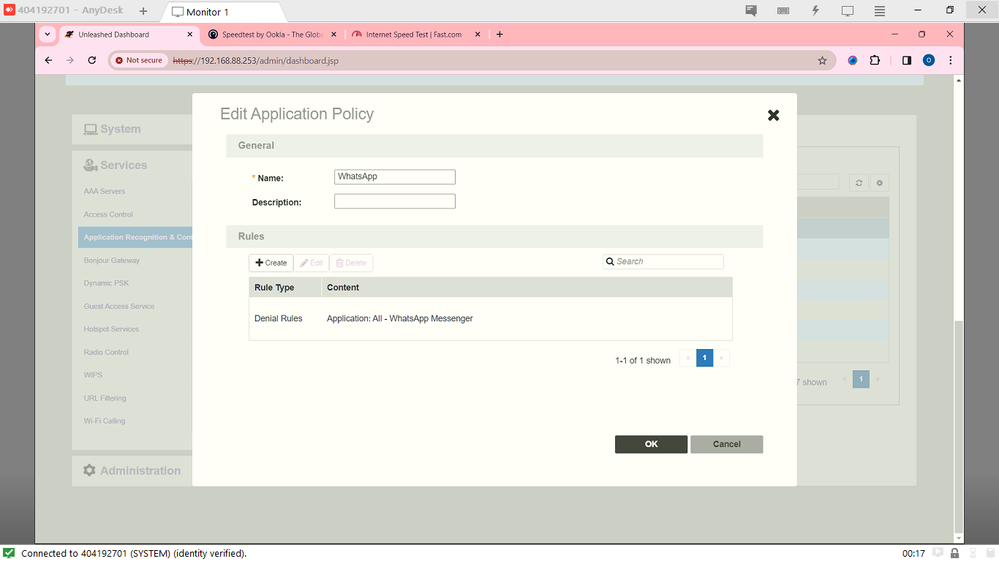
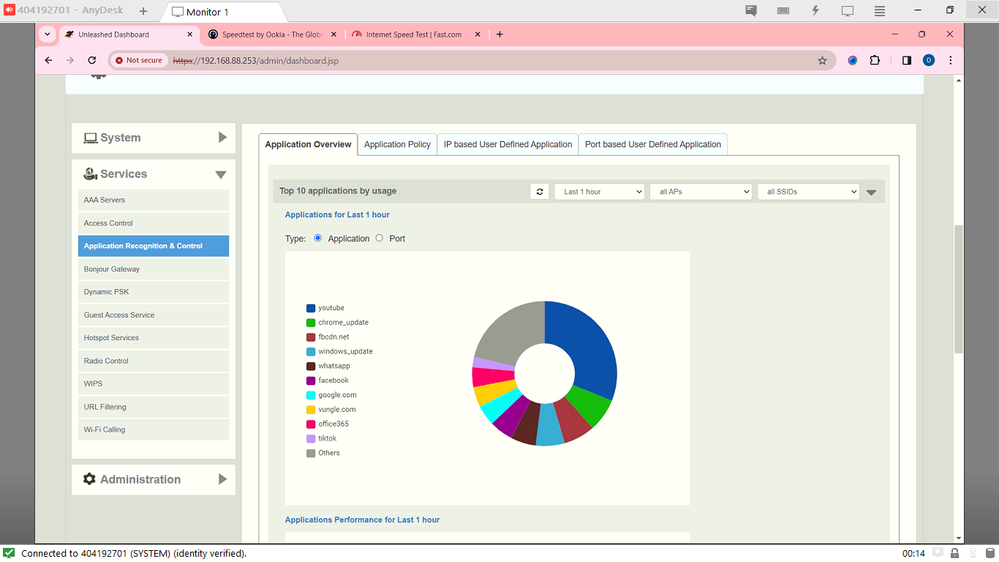
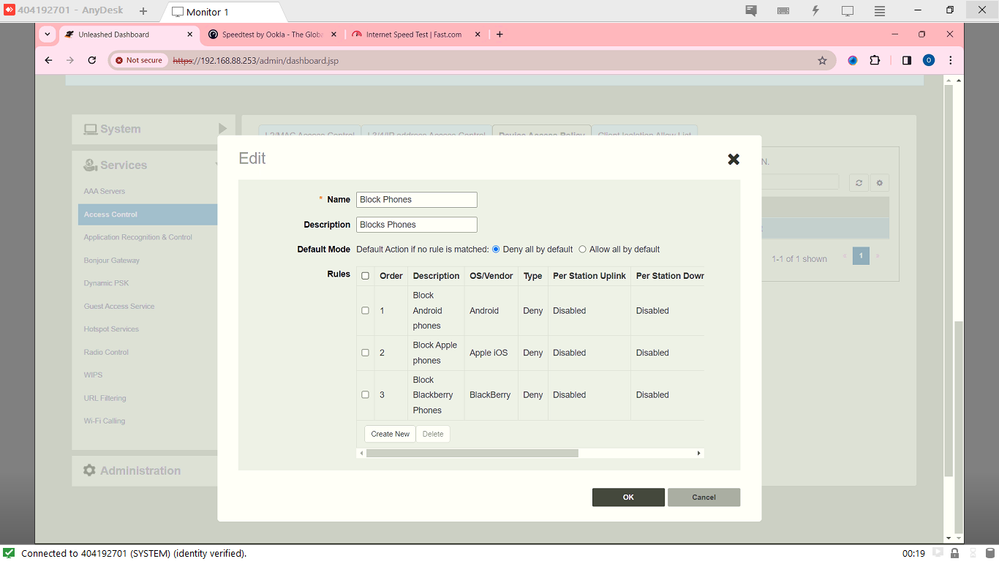
Solved! Go to Solution.
1 ACCEPTED SOLUTION
Options
- Mark as New
- Bookmark
- Subscribe
- Mute
- Subscribe to RSS Feed
- Permalink
- Report Inappropriate Content
01-15-2024 06:23 AM
Very straightforward. Just edit the Wi-if network, click ‘advanced options’ and click the Access Controls tab. You’ll find everything there.
5 REPLIES 5


Options
- Mark as New
- Bookmark
- Subscribe
- Mute
- Subscribe to RSS Feed
- Permalink
- Report Inappropriate Content
01-10-2024 11:00 AM
Hi @smuglar,
I hope you have mapped these application profiles under the WLAN's setting, if not, these will not work.
Syamantak Omer
Sr.Staff TSE | CWNA | CCNA | RCWA | RASZA | RICXI
RUCKUS Networks, CommScope!
Follow me on LinkedIn
Options
- Mark as New
- Bookmark
- Subscribe
- Mute
- Subscribe to RSS Feed
- Permalink
- Report Inappropriate Content
01-10-2024 03:45 PM
Hi, thank you for the response... How exactly do I go about doing that? Or is it straight forward?
Options
- Mark as New
- Bookmark
- Subscribe
- Mute
- Subscribe to RSS Feed
- Permalink
- Report Inappropriate Content
01-15-2024 06:23 AM
Very straightforward. Just edit the Wi-if network, click ‘advanced options’ and click the Access Controls tab. You’ll find everything there.
Options
- Mark as New
- Bookmark
- Subscribe
- Mute
- Subscribe to RSS Feed
- Permalink
- Report Inappropriate Content
01-25-2024 02:09 AM
Well this seems to have worked and but now out of nowhere it sees a Windows laptop as an Android devices. So it has been blocked and I'm wondering if there is a way to exempt it from the rules? Also there are no firmware updates so Im hoping for a way to get around the issue.
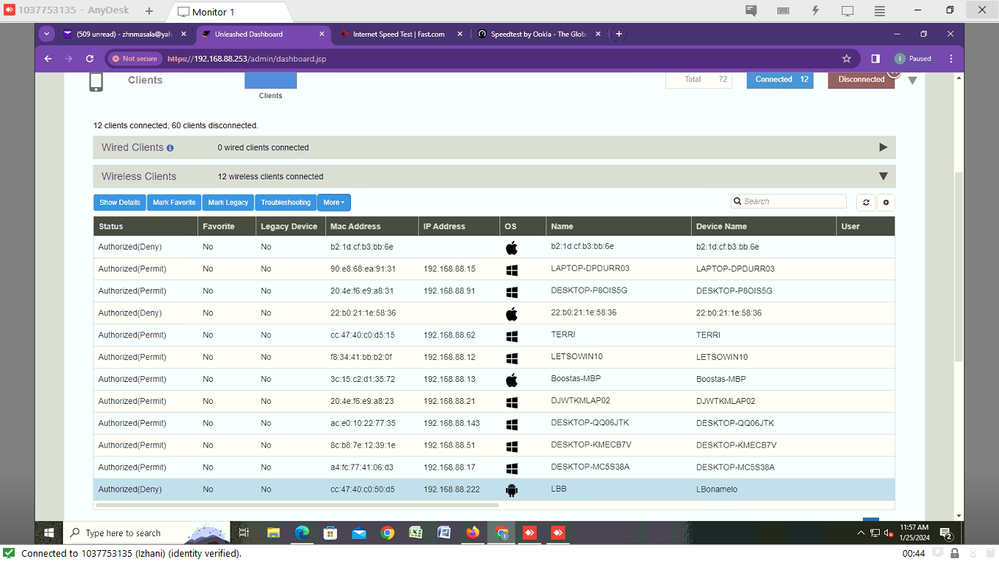

Labels
-
AP Certificate error
1 -
AP Management
5 -
AP reporting
1 -
authentication fails
1 -
captive portal
1 -
Certificate
1 -
Client Management
1 -
DPSK
1 -
Guest Access
1 -
Guest Pass
1 -
Installation
1 -
IP Multicast
1 -
l2acl
1 -
LACP
1 -
laptop hp probook 430 g8
1 -
Mesh
1 -
Monitoring
1 -
Op
1 -
pfSense
1 -
R310
2 -
R550
1 -
Security
1 -
Solution Proposed
3 -
SSID
1 -
temporarily blocked
1 -
Unleashed
5 -
User Management
1 -
Web UI
1 -
Wired Throughput
1 -
Wireless Throughput
2 -
WLAN
1 -
WLAN Management
2 -
WPA3
1 -
WPA3-Enterprise
1
- « Previous
- Next »
