This website uses cookies. By clicking Accept, you consent to the use of cookies. Click Here to learn more about how we use cookies.
RUCKUS Community Forums are now in READ-ONLY mode while we migrate to a new platform.
You will still be able to read posts and knowledge articles, but will be unable to post new content until Go Live on the new platform Monday August 17.
Lennar Smart Home customers: please contact [email protected] for assistance during the week of August 9-17.

- Community
- RUCKUS Technologies
- RUCKUS Lennar Support
- Community Services
- RTF
- RTF Community
- Australia and New Zealand – English
- Brazil – Português
- China – 简体中文
- France – Français
- Germany – Deutsch
- Hong Kong – 繁體中文
- India – English
- Indonesia – bahasa Indonesia
- Italy – Italiano
- Japan – 日本語
- Korea – 한국어
- Latin America – Español (Latinoamérica)
- Middle East & Africa – English
- Netherlands – Nederlands
- Nordics – English
- North America – English
- Poland – polski
- Russia – Русский
- Singapore, Malaysia, and Philippines – English
- Spain – Español
- Taiwan – 繁體中文
- Thailand – ไทย
- Turkey – Türkçe
- United Kingdom – English
- Vietnam – Tiếng Việt
- EOL Products
Turn on suggestions
Auto-suggest helps you quickly narrow down your search results by suggesting possible matches as you type.
Showing results for
- RUCKUS Forums
- RUCKUS Lennar Support
- RUCKUS Support for Lennar Homes
- Re: Unleashed APs Not Connecting After Enabling Ga...
Options
- Subscribe to RSS Feed
- Mark Topic as New
- Mark Topic as Read
- Float this Topic for Current User
- Bookmark
- Subscribe
- Mute
- Printer Friendly Page
Unleashed APs Not Connecting After Enabling Gateway Mode on Ruckus Master

Options
- Mark as New
- Bookmark
- Subscribe
- Mute
- Subscribe to RSS Feed
- Permalink
- Report Inappropriate Content
04-06-2025 07:45 PM
To Ruckus Support,
Hello,
I’m experiencing an issue with my home network setup and need assistance getting it fully operational. Here's a summary of the current setup and problem:
Environment:
Switch: Ruckus ICX 7150-C12P
Access Points: (3) Ruckus R510
1 AP set as Master (Gateway Mode enabled)
2 APs connected via Ethernet (wired)
Modem/Gateway: AT&T Fiber Gateway (IP Passthrough mode)
Goal: Use the Ruckus system as the main router/gateway and have all 3 APs connected, managing DHCP and DNS.
Issue:
After enabling Gateway Mode on the Master AP and connecting the AT&T gateway to Port C2 (10Gb SFP+ uplink) on the ICX switch:
Only 1 of the 3 APs (the Master) connects and functions properly.
The other 2 APs show as disconnected in the Unleashed dashboard.
Wired clients connected to the switch do not get internet access.
Wireless clients occasionally receive IPs (from the 192.168.2.x pool), but no reliable internet access via IPv4.
DNS and Gateway appear unreachable from the Ruckus dashboard at times.
IPv6 pings work, but IPv4 fails (e.g., 8.8.8.8 returns destination unreachable).
Steps Taken:
Set AT&T Gateway to IP Passthrough mode.
Connected AT&T modem to port C2 on the Ruckus ICX 7150.
Enabled Gateway Mode on the Master AP.
Configured WAN IP manually (192.168.1.199) and DHCP range (192.168.2.2 – 192.168.2.200).
Set Primary DNS to 8.8.8.8 and Secondary DNS to 1.1.1.1.
Reset and reconnected 2 of the APs. Only one came back online.
Restored AT&T gateway as temporary DHCP/DNS server for client functionality.
Assistance Requested:
Confirm the correct port and configuration for WAN uplink (C2) on the ICX 7150-C12P in Gateway Mode.
Guidance on how to bring the remaining AP(s) online after factory reset.
Troubleshooting why wired and wireless clients can't access IPv4 internet through the Ruckus Gateway.
Clarification on whether any VLAN settings or switch port configurations are needed for WAN and LAN separation in this setup.
Thank you in advance for your help — looking forward to getting the system fully online.
Best regards,
Jeff Weiler
20 REPLIES 20
Options
- Mark as New
- Bookmark
- Subscribe
- Mute
- Subscribe to RSS Feed
- Permalink
- Report Inappropriate Content
04-10-2025 02:13 PM
Lennar did not leave us with any power cables in the ruckus box. Suggestions?
Options
- Mark as New
- Bookmark
- Subscribe
- Mute
- Subscribe to RSS Feed
- Permalink
- Report Inappropriate Content
04-10-2025 06:35 PM
Hello Ruckus Support Team,
I’m writing to provide an update on the troubleshooting steps performed for the third Ruckus R510 access point in our network. I followed the instructions step-by-step, but unfortunately this AP still shows as Disconnected in the Unleashed dashboard. Below are the details of the actions taken and the current status:
Steps Performed
• Physical Reset: Removed the R510 AP from the ceiling and performed a factory reset using a paperclip, with the unit powered by a 12V DC adapter (no PoE inline).
• LED Confirmation: Waited for the expected LED pattern during reboot. The AP displayed solid PWR and blinking CTL LEDs initially, and eventually both the PWR and CTL LEDs turned solid, indicating a successful reset to factory defaults.
• Default SSID Broadcast: Confirmed that the AP began broadcasting the default “Configure.Me-34ACA0” SSID after the reset.
• Client Connection: Connected a Windows laptop to the “Configure.Me-34ACA0” wireless network. The laptop was able to obtain a DHCP IP address and a proper gateway from the AP, confirming that the AP’s default network services were working. I verified the network settings on the laptop to ensure connectivity (no specific IP values are included here for privacy).
After completing the above steps, I powered down the AP and reconnected it to our network via the PoE switch (as it was originally) so it could rejoin the Unleashed system.
Current Status
Despite the successful reset and the AP broadcasting its default SSID, the unit still appears as disconnected in the Unleashed dashboard. It has not rejoined or become active in the controller interface. The other two R510 APs in the network remain connected and operational, so the issue is isolated to this third AP.
As requested, I have uploaded the relevant screenshots and photos documenting these steps to the Google Drive link provided by the support team. This includes images of the AP’s LED status and the Unleashed dashboard showing the AP’s disconnected state. Please refer to those files for visual confirmation of each step and the current state.
Request for Next Steps
I have carefully followed all the instructions provided by Ruckus support in the previous correspondence. Since the AP remains disconnected even after the factory reset and reconnection, I am reaching out for further guidance on how to proceed. Could you please advise on the next troubleshooting steps or any additional procedures needed to bring this R510 AP online?
Thank you for your continued assistance. I appreciate your help in resolving this issue and am ready to perform any further actions you recommend. Please let me know if you need more information from my end.


Options
- Mark as New
- Bookmark
- Subscribe
- Mute
- Subscribe to RSS Feed
- Permalink
- Report Inappropriate Content
04-11-2025 05:44 AM
Hi @MJ
Greetings!
Thank you for your response and the update.
Once you have connected the Access Point to 12 VDC and performed a reset, did you follow the steps outlined in the video below by connecting to the configuration.me-xxxxxx SSID?
https://www.youtube.com/watch?v=j8I5aVwMNMg
If you haven't already followed the instructions in the video, please do so first.
If you have already completed those steps, please proceed with the following:
1. Remove the disconnected Access Point from the Unleashed System (refer to the screenshot below).
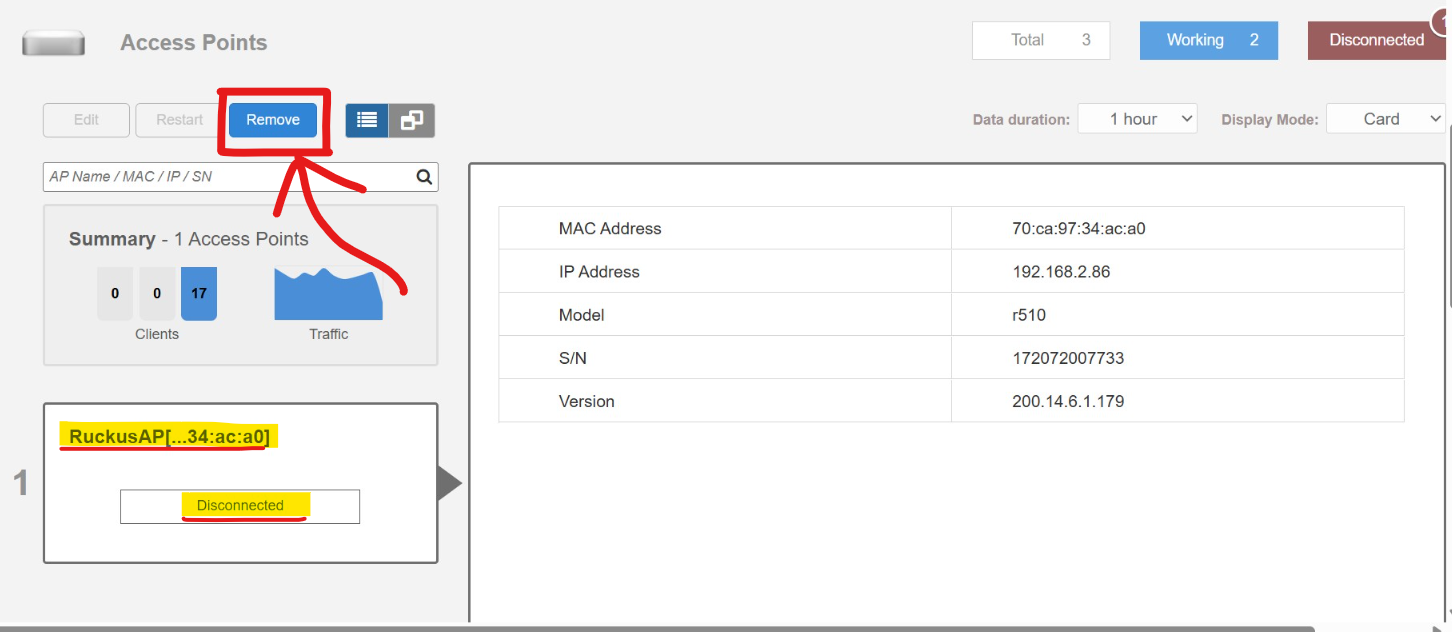
2. Reconnect the Access Point to the switch via the PoE Ethernet port.
3. Allow some time for the Access Point to power on and sync with the other two units. Check if it comes online and functions properly.
Please let me know the outcome after trying the above steps.
Thank you again for your patience and understanding.
Best regards,
Imran Sanadi
RUCKUS Lennar Home Community
Options
- Mark as New
- Bookmark
- Subscribe
- Mute
- Subscribe to RSS Feed
- Permalink
- Report Inappropriate Content
04-11-2025 08:30 PM
Hi Imran,
Thank you again for your continued support.
I wanted to provide an update based on your recent instructions and the resources you shared. We were able to reach the reset screen at unleashed.ruckuswireless.com after connecting to the Configure.Me network broadcast by the factory-reset AP. However, the steps in the YouTube video appear to initiate setup for a new Unleashed Master AP — and in our case, we already have an existing Master AP running and fully operational.
To avoid creating a second Master, we did not proceed with that setup.
We then connected the reset AP via PoE to the same switch where the Master AP is currently connected. Unfortunately, the reset AP did not adopt into the Unleashed network. It remained disconnected. I’ve uploaded a screenshot of the current status to the Google Drive folder provided earlier.
Can you please advise on next steps to ensure this AP properly joins the existing Unleashed network?
Thanks again for your guidance and patience as we work through this.
Best regards,
Jeff Weiler
Options
- Mark as New
- Bookmark
- Subscribe
- Mute
- Subscribe to RSS Feed
- Permalink
- Report Inappropriate Content
04-14-2025 05:36 AM
Hi @MJ
Greetings!
Thank you for your response and the update.
Kindly proceed with removing the disconnected Access Point from the Unleashed system as explained in my previous post. If already done or once removed, reconnect the Access Point to the switch port and allow some time for it, and check in the Unleashed AP dashboard if that syncs with the other two Access Points.
Please let me know the outcome once you’ve completed the steps.
Thank you again for your patience and understanding.
Best regards,
Imran Sanadi
RUCKUS | Lennar Home Community Support

Labels
-
Access point
3 -
Access points
5 -
all lights blinking after reset icx 7150 switch
1 -
Amber
1 -
Amber System
2 -
AP
1 -
AP Management
1 -
Boot mode
1 -
bootloader
1 -
cli
1 -
Compatibility
1 -
Console
1 -
console access
1 -
dns
1 -
eero
2 -
eps
1 -
Frontier
1 -
Green Power
2 -
Hard reset
1 -
Heartbeat
1 -
Heartbeat loss recurring
2 -
Help
2 -
Help Needed
2 -
i Al
1 -
ICX
2 -
ICX 7150-C12p
7 -
ICX switch
4 -
ICX Switch Disconnected
1 -
ICX Switch Management
4 -
ICX-7150-C12
3 -
ICX-7150-C12P
1 -
Important Announcement
1 -
Installation
1 -
Internet Issue
2 -
Ive been
1 -
Lennar
3 -
Lennar Home
2 -
Lennar homes
25 -
Management Port
1 -
NAND flash memory
1 -
New
1 -
No POE
2 -
No power via Ethernet
1 -
password
1 -
Please
1 -
Poe
2 -
Poe not working
1 -
Power Outage
1 -
Power Outtage
1 -
Proposed Solution
1 -
R510
2 -
r510 no power
2 -
REBOOT
1 -
Recovery
1 -
Red LED
1 -
Remote access
1 -
Reset ICX username password
1 -
Return
1 -
RMA
3 -
Ruckus
2 -
Ruckus ICX 7150-C12P
4 -
RUCKUS Self-Help
1 -
RUKUS 7150 c12p
1 -
Setup
1 -
Software Recovery
1 -
Solution Proposed
1 -
Solution Proposed warranty
1 -
SPR
1 -
SSH
1 -
Switch
1 -
Telnet
1 -
Unleashed
3 -
Unresolved Issue
1 -
Upgrade
3 -
Upgrading R510
1 -
User Management
1 -
username
1 -
VPN streaming fail proxy not working Amazon prime video
1 -
Wifi
1 -
Wifi6
1 -
Wireless
3
- « Previous
- Next »
