This website uses cookies. By clicking Accept, you consent to the use of cookies. Click Here to learn more about how we use cookies.

- Community
- RUCKUS Technologies
- RUCKUS Lennar Support
- Community Services
- RTF
- RTF Community
- Australia and New Zealand – English
- Brazil – Português
- China – 简体中文
- France – Français
- Germany – Deutsch
- Hong Kong – 繁體中文
- India – English
- Indonesia – bahasa Indonesia
- Italy – Italiano
- Japan – 日本語
- Korea – 한국어
- Latin America – Español (Latinoamérica)
- Middle East & Africa – English
- Netherlands – Nederlands
- Nordics – English
- North America – English
- Poland – polski
- Russia – Русский
- Singapore, Malaysia, and Philippines – English
- Spain – Español
- Taiwan – 繁體中文
- Thailand – ไทย
- Turkey – Türkçe
- United Kingdom – English
- Vietnam – Tiếng Việt
- EOL Products
Turn on suggestions
Auto-suggest helps you quickly narrow down your search results by suggesting possible matches as you type.
Showing results for
- RUCKUS Forums
- RUCKUS Lennar Support
- RUCKUS Support for Lennar Homes
- Re: Unable to get AP to connect to Ruckus
Options
- Subscribe to RSS Feed
- Mark Topic as New
- Mark Topic as Read
- Float this Topic for Current User
- Bookmark
- Subscribe
- Mute
- Printer Friendly Page
Unable to get AP to connect to Ruckus

Options
- Mark as New
- Bookmark
- Subscribe
- Mute
- Subscribe to RSS Feed
- Permalink
- Report Inappropriate Content
05-25-2025 07:54 PM - edited 05-25-2025 07:58 PM
Hello! We've been living in our Lennar home for more than 5.5 years. Unfortunately, just last week the internet dropped and we were unable to locate the WIFI for our home. There were no power outages recently and nothing of concern lately that could have tripped the Ruckus.
We checked the Ruckus switch and based on all the forms I read, there were no issues with lights by the ports (Syst and Pwr lights are solid green as well as the lights next to the two AP ports).


We noticed the 2 APs itself had flashing power lights and either a solid or flashing CTL light. After doing numerous restarts to the power cord connected to the Ruckus we are still not able to connect to the WIFI. I've been reading a lot of the forums and previous posts and have attempted many different things but cannot figure out the issue.


(Please note both of these AP photos are of the same AP. The second AP has flashing green lights for both the Pwr and the CTRL lights, which are not shown).
1) I am unable to scan for my Ruckus' IP address. I have installed the Advanced IP Scanner and cannot locate any Ruckus devices. Even did restarts to the Ruckus to see if it would catch, but it made no difference.

2) Thought it was the PoE's not On and working so I connected to the Command Line through USB-C and was able to see that all of the ports were "On".

3) Have done numerous resets on the Ruckus itself and followed the instructions to hold the reset button waiting for all lights to flash and let it do it's thing.
Unfortunately, none of these things have helped us in reconnecting the Ruckus to the APs. Please help!
16 REPLIES 16


Options
- Mark as New
- Bookmark
- Subscribe
- Mute
- Subscribe to RSS Feed
- Permalink
- Report Inappropriate Content
05-27-2025 01:58 PM
Hi @yng2019
Greetings!
Thank you for your response and the update.
Please accept our apologies for any inconvenience caused.
Upon reviewing the details, I noticed that your switch is currently running an older non-UFI version (08070c), as shown in the screenshot below.
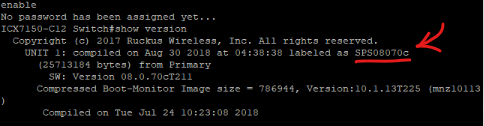
We recommend upgrading your switch to a supported version for improved performance and compatibility. You can follow the step-by-step instructions outlined in the RUCKUS Lennar Knowledge Base article linked below:
Important: Since you have access to the CLI, we recommend using Option 1 (TFTP method) for greater control and flexibility during the upgrade.
If you need any assistance at any point in the process, please don’t hesitate to reach out.
Thank you again for your patience and cooperation.
Best regards,
Imran Sanadi
RUCKUS | Lennar Home Community Support
Options
- Mark as New
- Bookmark
- Subscribe
- Mute
- Subscribe to RSS Feed
- Permalink
- Report Inappropriate Content
05-28-2025 10:47 AM
I have gone through the steps to download all of the required softwares in the link you provided. However, I am back at square one of not being able to locate the IP address of the switch. After googling, I was able to find the command and it shows no IP address found:

Please let us know what the next step is in getting this figured out. This has taken many days to try to fix with no resolution.
Options
- Mark as New
- Bookmark
- Subscribe
- Mute
- Subscribe to RSS Feed
- Permalink
- Report Inappropriate Content
05-28-2025 10:53 AM
Hi @yng2019
Greetings!
Thank you for your response and the update.
Kindly verify the IP address for the TFTP server using Command Prompt instead of the PuTTY CLI.
Please refer to section F) Setting up TFTP server for upgrade, specifically points 1, 2, and 3 in the following guide:
Let me know how it goes.
Thank you once again. We truly appreciate your patience and understanding.
Best regards,
Imran Sanadi
RUCKUS | Lennar Home Community Support
Options
- Mark as New
- Bookmark
- Subscribe
- Mute
- Subscribe to RSS Feed
- Permalink
- Report Inappropriate Content
05-28-2025 01:40 PM
Hi, the command prompt was not locating the IP address. None of the MAC addresses matched the one on the switch.
Only went back to CLI to see if there were any other way, to no success.
Options
- Mark as New
- Bookmark
- Subscribe
- Mute
- Subscribe to RSS Feed
- Permalink
- Report Inappropriate Content
05-28-2025 01:59 PM
Hi @yng2019
Thank you for your response and the update.
Here, there is no requirement for the IP address of the switch or its MAC address.
Again, kindly refer to Section F) Setting up TFTP server for upgrade, specifically points 1, 2, and 3 in the guide below:
Please let us know how it goes.
Thank you once again. We truly appreciate your patience and understanding.
Best regards,
Imran Sanadi
RUCKUS | Lennar Home Community Support

Labels
-
Access point
3 -
Access points
5 -
all lights blinking after reset icx 7150 switch
1 -
Amber
1 -
Amber System
2 -
AP
1 -
AP Management
1 -
Boot mode
1 -
bootloader
1 -
cli
1 -
Compatibility
1 -
Console
1 -
console access
1 -
dns
1 -
eero
2 -
eps
1 -
Frontier
1 -
Green Power
2 -
Hard reset
1 -
Heartbeat
1 -
Heartbeat loss recurring
2 -
Help
2 -
Help Needed
2 -
i Al
1 -
ICX
2 -
ICX 7150-C12p
7 -
ICX switch
4 -
ICX Switch Disconnected
1 -
ICX Switch Management
4 -
ICX-7150-C12
3 -
ICX-7150-C12P
1 -
Important Announcement
1 -
Installation
1 -
Internet Issue
2 -
Ive been
1 -
Lennar
3 -
Lennar Home
2 -
Lennar homes
25 -
Management Port
1 -
NAND flash memory
1 -
New
1 -
No POE
2 -
No power via Ethernet
1 -
password
1 -
Please
1 -
Poe
2 -
Poe not working
1 -
Power Outage
1 -
Power Outtage
1 -
Proposed Solution
1 -
R510
2 -
r510 no power
2 -
REBOOT
1 -
Recovery
1 -
Red LED
1 -
Remote access
1 -
Reset ICX username password
1 -
Return
1 -
RMA
3 -
Ruckus
2 -
Ruckus ICX 7150-C12P
4 -
RUCKUS Self-Help
1 -
RUKUS 7150 c12p
1 -
Setup
1 -
Software Recovery
1 -
Solution Proposed
1 -
Solution Proposed warranty
1 -
SPR
1 -
SSH
1 -
Switch
1 -
Telnet
1 -
Unleashed
3 -
Unresolved Issue
1 -
Upgrade
3 -
Upgrading R510
1 -
User Management
1 -
username
1 -
VPN streaming fail proxy not working Amazon prime video
1 -
Wifi
1 -
Wifi6
1 -
Wireless
3
- « Previous
- Next »
