This website uses cookies. By clicking Accept, you consent to the use of cookies. Click Here to learn more about how we use cookies.
RUCKUS Community Forums are now in READ-ONLY mode while we migrate to a new platform.
You will still be able to read posts and knowledge articles, but will be unable to post new content until Go Live on the new platform Monday August 17.
Lennar Smart Home customers: please contact [email protected] for assistance during the week of August 9-17.

- Community
- RUCKUS Technologies
- RUCKUS Lennar Support
- Community Services
- RTF
- RTF Community
- Australia and New Zealand – English
- Brazil – Português
- China – 简体中文
- France – Français
- Germany – Deutsch
- Hong Kong – 繁體中文
- India – English
- Indonesia – bahasa Indonesia
- Italy – Italiano
- Japan – 日本語
- Korea – 한국어
- Latin America – Español (Latinoamérica)
- Middle East & Africa – English
- Netherlands – Nederlands
- Nordics – English
- North America – English
- Poland – polski
- Russia – Русский
- Singapore, Malaysia, and Philippines – English
- Spain – Español
- Taiwan – 繁體中文
- Thailand – ไทย
- Turkey – Türkçe
- United Kingdom – English
- Vietnam – Tiếng Việt
- EOL Products
Turn on suggestions
Auto-suggest helps you quickly narrow down your search results by suggesting possible matches as you type.
Showing results for
- RUCKUS Forums
- RUCKUS Technologies
- ICX Switches
- Re: No lights on Ruckus APs
Options
- Subscribe to RSS Feed
- Mark Topic as New
- Mark Topic as Read
- Float this Topic for Current User
- Bookmark
- Subscribe
- Mute
- Printer Friendly Page
No lights on Ruckus APs

Options
- Mark as New
- Bookmark
- Subscribe
- Mute
- Subscribe to RSS Feed
- Permalink
- Report Inappropriate Content
03-18-2023 08:43 PM
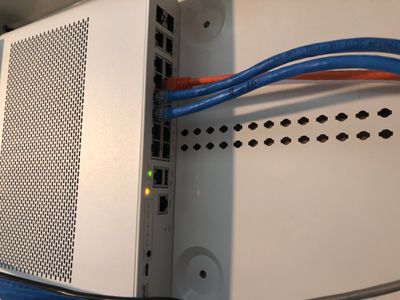
My APs are not receiving power (no lights present) after the ICX-7150-12CP switch was disconnected from power, the switch has two lights present (see attached picture). I read through similar posts on here and followed steps to console the switch with USB-C to USB, which I was able to do. I also followed steps to perform a software recovery but was unsuccessful as I received the following:
ICX7150-Boot>setenv ipaddr 192.168.0.3
ICX7150-Boot>setenv gatewayip 192.168.0.2
ICX7150-Boot>setenv netmask 255.255.255.0
ICX7150-Boot>setenv serverip 192.168.0.2
ICX7150-Boot>printenv
baudrate=9600
ipaddr=192.168.0.3
serverip=192.168.0.2
netmask=255.255.255.0
gatewayip=192.168.0.2
uboot=mnz10115.bin
image_name=SPS08090k.bin
ver=10.1.15T225 (Jan 30 2019 - 23:08:47 -0800)
Environment size: 189/16379 bytes
ICX7150-Boot>saveenv
ICX7150-Boot>ping 192.168.0.2
bcm_xgs_gmac-0 Waiting for PHY auto negotiation to complete......... TIMEOUT !
Auto-neg error, defaulting to 10BT/HD
Change GMAC speed to 10MB
Using bcm_xgs_gmac-0 device
ARP Retry count exceeded; starting again
ping failed; host 192.168.0.2 is not alive
ICX7150-Boot>
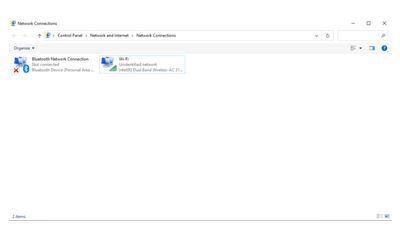
I am not sure if the error was due to not being connected with an Ethernet, the step in which I was required to input an IP address was to be done through an Ethernet properties (see step below), however, my laptop does not have an Ethernet port so I used the properties for the Bluetooth and WiFi (see attached pic). Since I received an error I am unsure what to do next.
Start>type control panel>View network status and Task>change adapter setting>Ethernet>right click properties>Internet Protocol (TCP/IPv4)>Select Use the following IP address>insert the same information I have>Click OK
5 REPLIES 5

Options
- Mark as New
- Bookmark
- Subscribe
- Mute
- Subscribe to RSS Feed
- Permalink
- Report Inappropriate Content
03-19-2023 02:59 AM - edited 03-19-2023 04:23 AM
Hi Ampersand ,
Thank you for posting your query !!!
I understand that your APs are not receiving power (no light present) after the
ICX-7150-12cp switch was disconnected from the power .And I also notice that
you have tried a software recovery but no luck over there and you are getting
the error.
I also notice that from the image you provided that the unit is having amber light . And When the SYS light is amber that means that the switch is stuck in boot mode.
I have a question for you here :
1> Did you try to boot the ICX 7150-12cp from primary and secondary image from service os .If not try to boot the primary or secondary partition like this: boot_primary or boot_secondary.
Regarding the error which you are getting it seems you are not reachable to the default gateway ip=192.168.0.2 that is you laptop in this case . So make sure you laptop is having a TFTP server application with reachability towards the ICX .And make sure you have Ethernet cable connectivity from your ICX to laptop because here Wi-Fi and Bluetooth connectivity wont help .
Could you please try again the software recovery method by following the below video link .
https://youtube.com/watch?v=Ql22blH_CGo&si=EnSIkaIECMiOmarE
Please let us know how it goes.
Moving Forward If this issue is not resolved , Please log a ticket with the below link so that we will help you to process RMA
https://support.ruckuswireless.com/contact-us
I hope this information helps you
Please feel free to leave us a message if any concerns
Note: Please feel free to mark the post as ACCEPTED SOLUTIONS if its addressed your query.
Thanks
Options
- Mark as New
- Bookmark
- Subscribe
- Mute
- Subscribe to RSS Feed
- Permalink
- Report Inappropriate Content
03-19-2023 07:59 AM
Thank you for the quick reply. In the response I was told to “make sure you have Ethernet cable connectivity from your ICX to laptop because here Wi-Fi and Bluetooth connectivity wont help”, however, as I stated in the initial post I stated I do not have an Ethernet post, how would I proceed in this instance?
Options
- Mark as New
- Bookmark
- Subscribe
- Mute
- Subscribe to RSS Feed
- Permalink
- Report Inappropriate Content
03-19-2023 11:21 AM
Hi Ampersand,
There is no way , other than using ethernet port connectivity between laptop and ICX to Perform software recovery Hope that helps !
Options
- Mark as New
- Bookmark
- Subscribe
- Mute
- Subscribe to RSS Feed
- Permalink
- Report Inappropriate Content
03-19-2023 11:32 AM
That does no make any sense to me as the instructions are also for a USB to USB-C cable.

Labels
-
7250
1 -
802.3af PoE
1 -
802.3at PoE
1 -
AAA
1 -
ACL
1 -
auto-provision
1 -
auto-provisioning
1 -
Cluster synchronization
1 -
Crypto Keys
1 -
Deployment
1 -
dhcp-66
1 -
fastiron-10
1 -
fastiron-8
1 -
Firmware Downgrade
1 -
Firmware Recommendation
1 -
Firmware Upgrade
5 -
ICX
3 -
ICX 7150-C12p
1 -
ICX switch
2 -
ICX Switch Management
10 -
ICX-7150-C12
1 -
ICX-7550
1 -
ICX-8200
1 -
Installation
2 -
not enough electricity
1 -
overlad
1 -
Override PoE Operating Mode
1 -
PD overload
1 -
Poe
2 -
PoE mode.
1 -
power limitations
1 -
Proposed Solution
1 -
RADIUS
1 -
Routing
2 -
RUCKUS Self-Help
2 -
stack
1 -
stack password
1 -
Stacking
1 -
tftp
1 -
Upgrade
1 -
Upgrade path
1 -
We
1 -
zero-touch
1
- « Previous
- Next »
