This website uses cookies. By clicking Accept, you consent to the use of cookies. Click Here to learn more about how we use cookies.

- Community
- RUCKUS Technologies
- RUCKUS Lennar Support
- Community Services
- RTF
- RTF Community
- Australia and New Zealand – English
- Brazil – Português
- China – 简体中文
- France – Français
- Germany – Deutsch
- Hong Kong – 繁體中文
- India – English
- Indonesia – bahasa Indonesia
- Italy – Italiano
- Japan – 日本語
- Korea – 한국어
- Latin America – Español (Latinoamérica)
- Middle East & Africa – English
- Netherlands – Nederlands
- Nordics – English
- North America – English
- Poland – polski
- Russia – Русский
- Singapore, Malaysia, and Philippines – English
- Spain – Español
- Taiwan – 繁體中文
- Thailand – ไทย
- Turkey – Türkçe
- United Kingdom – English
- Vietnam – Tiếng Việt
- EOL Products
Turn on suggestions
Auto-suggest helps you quickly narrow down your search results by suggesting possible matches as you type.
Showing results for
- RUCKUS Forums
- RUCKUS Technologies
- ICX Switches
- Re: ICX7150-C12P -2X1G - No Connectivity to the sw...
Options
- Subscribe to RSS Feed
- Mark Topic as New
- Mark Topic as Read
- Float this Topic for Current User
- Bookmark
- Subscribe
- Mute
- Printer Friendly Page

Options
- Mark as New
- Bookmark
- Subscribe
- Mute
- Subscribe to RSS Feed
- Permalink
- Report Inappropriate Content
12-17-2025 08:17 AM
I am not sure what has happened over night other than it rained, but I have a Back-UPS connected to the switch to prevent power outage issues as I had an issue on the switch within the first 6 months due to a power outage. It is a Lennar home that has the ICX-7150-C12P switch with three R510 APs connected to an AT&T Fiber Modem (BGW320-500).
Internet is connected via C1 port. I have pulled the power on the switch and powered back on but the router is not seeing the switch when I connect to any ports including the C1 and C2 ports. When i connect to the Out-of-band management port (RJ-45) with 2 LEDs, I get connection to the router. What is needed to get my switch and AP connected. I really don't want to reset the switch as it will take a lot of configuration to get it all set back up.
My suspicion is the switch is faulty.
Solved! Go to Solution.
2 ACCEPTED SOLUTIONS


Options
- Mark as New
- Bookmark
- Subscribe
- Mute
- Subscribe to RSS Feed
- Permalink
- Report Inappropriate Content
12-17-2025 09:13 AM
Hello @Jota31 ,
Greetings!
Thank you for contacting RUCKUS Lennar Home Community.
I hope you are doing well!!!
Thank you for the information you shared.
As per the case description, I understand that your RUCKUS setup is not working after the power outage
Could you please let us know the answers to the below queries to assist you better?
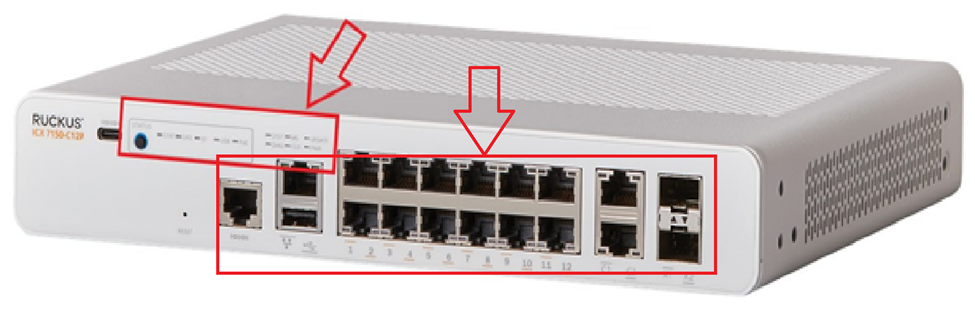
On your switch while it's plugged into the outlet, do you see any lights on? (Amber or green) Please let us know which lights are on. (Please refer to the below picture and share a picture of the same, showing the light status and the FULL Switch panel cable connections to the Switch ports)
Also, please share the light status of your Access points as well as mentioned in the below picture:
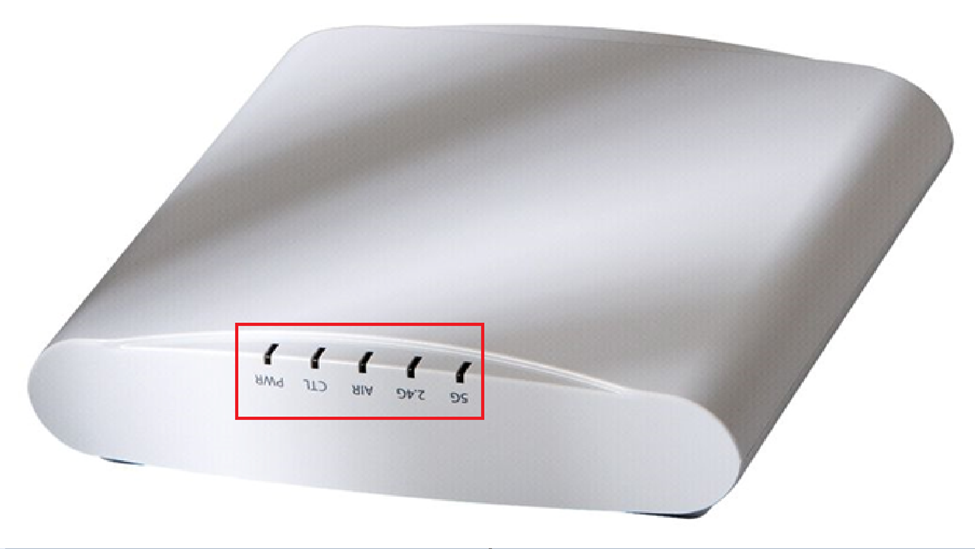
Please help us with pictures of your ICX-7150-C12P Switch showing the status of the lights and cable connections to the Switch ports. Also, light the status of Access Points.
Before uploading the photos please log in to the RUCKUS account and you can upload the image.

Please let us know the answers to ALL the above queries or let us know if you have any queries in this regard.
Thank you again for your patience.
Best regards,
Pinky Rajendran
RUCKUS Lennar Home Community.
Options
- Mark as New
- Bookmark
- Subscribe
- Mute
- Subscribe to RSS Feed
- Permalink
- Report Inappropriate Content
12-17-2025 10:37 AM
Hello @Jota31 ,
Greetings!
Thank you for sharing the response.
From the response you shared, I understand that the status lights on the Switch is Amber and the PWR light is Green, which means that the Switch is stuck in a boot mode
Please follow the below RUCKUS Lennar Knowledge base self-help article which will help you to fix the issue when the Switch is in boot mode.
Please follow the process as explained in the article and let me know if you have any queries in this regard.
Thank you again for your patience and understanding.
Best regards,
Pinky Rajendran
RUCKUS Lennar Home Community.
31 REPLIES 31
Options
- Mark as New
- Bookmark
- Subscribe
- Mute
- Subscribe to RSS Feed
- Permalink
- Report Inappropriate Content
12-19-2025 10:55 AM
Hello @Jota31 ,
Thank you for the response.
Could you please confirm if the IP address used was for the Switch or the IP address for the TFTP server?
Thank you for your patience and understanding.
Regards,
Pinky Rajendran
RUCKUS Lennar Home Community
Options
- Mark as New
- Bookmark
- Subscribe
- Mute
- Subscribe to RSS Feed
- Permalink
- Report Inappropriate Content
12-19-2025 11:03 AM
That IP is for the TFTP server.
Options
- Mark as New
- Bookmark
- Subscribe
- Mute
- Subscribe to RSS Feed
- Permalink
- Report Inappropriate Content
12-19-2025 11:42 AM
Hello @Jota31 ,
Thank you for the response.
Could you please confirm the Firmware version you downloaded the software of?
Have you downloaded the intermediate version 08080f?
Thank you for your patience and understanding.
Regards,
Pinky Rajendran
RUCKUS Lennar Home Community
Options
- Mark as New
- Bookmark
- Subscribe
- Mute
- Subscribe to RSS Feed
- Permalink
- Report Inappropriate Content
12-19-2025 12:31 PM
I download the following files:
mnz10114.bin, SPS08080f.bin, and SPS08095gufi.bin.
When I started this thread, I downloaded SPR08090k.bin and mnz10115.bin. Which is why my system has primary and secondary on the SPR08090k build.
Options
- Mark as New
- Bookmark
- Subscribe
- Mute
- Subscribe to RSS Feed
- Permalink
- Report Inappropriate Content
12-19-2025 12:50 PM
Hello @Jota31 ,
Thank you for the response.
I understand that you are facing issues with your Ruckus Switch upgrade and removing SPR code.
We will work together and try to fix this issue as early as possible.
Please update us with a convenient date and time for next week so that we could arrange a remote session for you.
Thank you again. We appreciate your patience and understanding.
Best regards,
Pinky Rajendran
RUCKUS Lennar Home Community.

Labels
-
7250
1 -
802.3af PoE
1 -
802.3at PoE
1 -
AAA
1 -
ACL
1 -
auto-provision
1 -
auto-provisioning
1 -
Cluster synchronization
1 -
Crypto Keys
1 -
Deployment
1 -
dhcp-66
1 -
fastiron-10
1 -
fastiron-8
1 -
Firmware Upgrade
4 -
ICX
3 -
ICX 7150-C12p
1 -
ICX switch
2 -
ICX Switch Management
9 -
ICX-7150-C12
1 -
ICX-7550
1 -
ICX-8200
1 -
Installation
2 -
not enough electricity
1 -
overlad
1 -
Override PoE Operating Mode
1 -
PD overload
1 -
Poe
2 -
PoE mode.
1 -
power limitations
1 -
Proposed Solution
1 -
RADIUS
1 -
Routing
2 -
RUCKUS Self-Help
2 -
stack
1 -
stack password
1 -
Stacking
1 -
tftp
1 -
Upgrade
1 -
Upgrade path
1 -
We
1 -
zero-touch
1
- « Previous
- Next »
