This website uses cookies. By clicking Accept, you consent to the use of cookies. Click Here to learn more about how we use cookies.
RUCKUS Community Forums are now in READ-ONLY mode while we migrate to a new platform.
You will still be able to read posts and knowledge articles, but will be unable to post new content until Go Live on the new platform Monday August 17.
Lennar Smart Home customers: please contact [email protected] for assistance during the week of August 9-17.

- Community
- RUCKUS Technologies
- RUCKUS Lennar Support
- Community Services
- RTF
- RTF Community
- Australia and New Zealand – English
- Brazil – Português
- China – 简体中文
- France – Français
- Germany – Deutsch
- Hong Kong – 繁體中文
- India – English
- Indonesia – bahasa Indonesia
- Italy – Italiano
- Japan – 日本語
- Korea – 한국어
- Latin America – Español (Latinoamérica)
- Middle East & Africa – English
- Netherlands – Nederlands
- Nordics – English
- North America – English
- Poland – polski
- Russia – Русский
- Singapore, Malaysia, and Philippines – English
- Spain – Español
- Taiwan – 繁體中文
- Thailand – ไทย
- Turkey – Türkçe
- United Kingdom – English
- Vietnam – Tiếng Việt
- EOL Products
Turn on suggestions
Auto-suggest helps you quickly narrow down your search results by suggesting possible matches as you type.
Showing results for
- RUCKUS Forums
- RUCKUS Technologies
- Unleashed
- jbl 500 authentics connection problems
Options
- Subscribe to RSS Feed
- Mark Topic as New
- Mark Topic as Read
- Float this Topic for Current User
- Bookmark
- Subscribe
- Mute
- Printer Friendly Page

Options
- Mark as New
- Bookmark
- Subscribe
- Mute
- Subscribe to RSS Feed
- Permalink
- Report Inappropriate Content
02-11-2026 10:54 AM
Hi pack ;-),
I ran into a problem with connecting a jbl 500 authentics speaker to Ruckus Unleashed (latest available version) on an R320: I can connect it to a WLAN set up without a password, but as soon as I set up WPA2, WPA3 or WPA2/3 combined it won't connect any more (the setup app simply stays with the message "connecting...". All attempts to reset the speaker, delete the WLAN, etc. failed.
Any ideas on this? My falback now is to have an open WLAN which just allows one client, but obviously this is far from an ideal solution. I also failed with setting up MAC access control, it won't connect either.
Cheers, Joachim.
Solved! Go to Solution.
2 ACCEPTED SOLUTIONS


Options
- Mark as New
- Bookmark
- Subscribe
- Mute
- Subscribe to RSS Feed
- Permalink
- Report Inappropriate Content
02-18-2026 08:20 PM
Hi,
Could you try the below steps which was having similar issue with Sonos speaker>
We have the fix applied in later version, 200.15 is the last version supported for R320.
But try this workaround from CLI and check.
https://community.ruckuswireless.com/t5/RUCKUS-Support-for-Lennar-Homes/Cannot-connect-Sonos-wireles...


Options
- Mark as New
- Bookmark
- Subscribe
- Mute
- Subscribe to RSS Feed
- Permalink
- Report Inappropriate Content
02-19-2026 03:51 AM - edited 02-19-2026 10:55 AM
Hi @jp
Greetings!
Thank you for your response and the update.
Execute Configuration Commands
Once the upgrade is complete, please proceed with the following steps:
Run the following commands:
(Please replace “your Wi-Fi name” with your actual Wi-Fi/SSID name, enclosed in double quotes if it contains spaces)
ruckus> en
ruckus# config
ruckus(config)# wlan "your Wi-Fi name"
ruckus(config-wlan)# no qos directed-multicast
ruckus(config-wlan)# qos directed-threshold 0
ruckus(config-wlan)# end
ruckus(config)# end
This configuration may help resolve the issue.
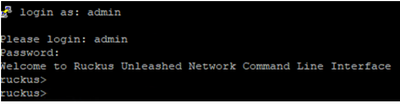
Here’s an example of PuTTY command line output from my lab for reference: (Bold fonts are commands to execute)
login as: admin
Please login: admin
Password:
Welcome to Ruckus Unleashed Network Command Line Interface
ruckus> en
ruckus# config
You have all rights in this mode.
ruckus(config)# wlan "Your Wi-Fi Name"
The WLAN service 'Your Wi-Fi Name' has been created. To save the WLAN service, type 'end' or 'exit'.
ruckus(config-wlan)# no qos directed-multicast
The command was executed successfully. To save the changes, type 'end' or 'exit'.
ruckus(config-wlan)# qos directed-threshold 0
The command was executed successfully. To save the changes, type 'end' or 'exit'.
ruckus(config-wlan)# end
The WLAN service 'Your Wi-Fi Name' has been updated and saved.
Your changes have been saved.
ruckus(config)# end
Your changes have been saved.
ruckus# ap-mode
You have all rights in this mode.
Once done with the commands, please reconnect and check.
Please let me know how it goes.
Thank you once again for your patience and cooperation.
Best regards,
Imran Sanadi
RUCKUS | Community Support Forums
17 REPLIES 17
Options
- Mark as New
- Bookmark
- Subscribe
- Mute
- Subscribe to RSS Feed
- Permalink
- Report Inappropriate Content
02-16-2026 01:17 PM
Sorry, I am late ;-( ... just didn't manage yet, but it's moving up on my priority list.
Options
- Mark as New
- Bookmark
- Subscribe
- Mute
- Subscribe to RSS Feed
- Permalink
- Report Inappropriate Content
02-17-2026 02:39 AM
... here we go: The R320 runs Unleashed 200.15.6.212.27. I set up a WLAN on it as below. You then connect with an iPhone to the WLAN (works with no problem), it finds the (resetted) JBL box but unfortulately the JBL box won't connect, the iPhone app says "cannot connect". I could not find anything useful in the R320 logs. I can connect the JBL box when I use an open WLAN without encryption.
Am I correct that the other WLAN parameters need to be editied via the CLI?


Options
- Mark as New
- Bookmark
- Subscribe
- Mute
- Subscribe to RSS Feed
- Permalink
- Report Inappropriate Content
02-17-2026 12:48 PM
Hi @jp
Greetings!
Thank you for confirming the settings.
Could you please verify the following additional security parameters:
- Is Management Frame Protection (PMF) set to Disabled?
WLAN>>Edit>>Security>>Management Frame Protection
- Is the WLAN strictly WPA2-PSK (AES only) with no WPA3 or transition mode enabled?
On recent Unleashed 200.15 firmware builds, PMF or WPA3 transition mode can cause authentication failures with certain IoT devices even if WPA2 is selected.
If PMF Is Already Disabled:
Then the next likely steps you can check:
The JBL firmware itself has weak WPA2 implementation
Or firmware 200.15 tightened security behavior
At that point please test:
- Create a brand-new WLAN (not cloned)
- Simple SSID name (no spaces)
- Simple PSK
- No advanced features touched
If that fails too then we can consider:
- Testing on older Unleashed firmware
- Checking JBL firmware update
Let me know if that works.
Thank you again for your patience.
Best regards,
Imran Sanadi
RUCKUS | Community Support Forums
Reply
Options
- Mark as New
- Bookmark
- Subscribe
- Mute
- Subscribe to RSS Feed
- Permalink
- Report Inappropriate Content
02-18-2026 01:59 PM
Dear Imran, first of all thanks a lot for your prompt help - very much appreciated!!!
All seems as suggested. I guess by PMF you mean the CLI switch 80211w-pmf, but OKC / Opportunistic Key Caching appears neither in the GUI nor in the CLI documentation. Where can I find this switch?
Best, Joachim.
Options
- Mark as New
- Bookmark
- Subscribe
- Mute
- Subscribe to RSS Feed
- Permalink
- Report Inappropriate Content
02-18-2026 08:20 PM
Hi,
Could you try the below steps which was having similar issue with Sonos speaker>
We have the fix applied in later version, 200.15 is the last version supported for R320.
But try this workaround from CLI and check.
https://community.ruckuswireless.com/t5/RUCKUS-Support-for-Lennar-Homes/Cannot-connect-Sonos-wireles...

Labels
-
AP Certificate error
1 -
AP Management
5 -
AP reporting
1 -
authentication fails
1 -
captive portal
1 -
Certificate
1 -
Client Management
1 -
DPSK
1 -
Guest Access
1 -
Guest Pass
1 -
Installation
1 -
IP Multicast
1 -
l2acl
1 -
LACP
1 -
laptop hp probook 430 g8
1 -
Mesh
1 -
Monitoring
1 -
Op
1 -
pfSense
1 -
R310
2 -
R550
1 -
Security
1 -
Solution Proposed
3 -
SSID
1 -
temporarily blocked
1 -
Unleashed
5 -
User Management
1 -
Web UI
1 -
Wired Throughput
1 -
Wireless Throughput
2 -
WLAN
1 -
WLAN Management
2 -
WPA3
1 -
WPA3-Enterprise
1
- « Previous
- Next »
