This website uses cookies. By clicking Accept, you consent to the use of cookies. Click Here to learn more about how we use cookies.

- Community
- RUCKUS Technologies
- RUCKUS Lennar Support
- Community Services
- RTF
- RTF Community
- Australia and New Zealand – English
- Brazil – Português
- China – 简体中文
- France – Français
- Germany – Deutsch
- Hong Kong – 繁體中文
- India – English
- Indonesia – bahasa Indonesia
- Italy – Italiano
- Japan – 日本語
- Korea – 한국어
- Latin America – Español (Latinoamérica)
- Middle East & Africa – English
- Netherlands – Nederlands
- Nordics – English
- North America – English
- Poland – polski
- Russia – Русский
- Singapore, Malaysia, and Philippines – English
- Spain – Español
- Taiwan – 繁體中文
- Thailand – ไทย
- Turkey – Türkçe
- United Kingdom – English
- Vietnam – Tiếng Việt
- EOL Products
Turn on suggestions
Auto-suggest helps you quickly narrow down your search results by suggesting possible matches as you type.
Showing results for
- RUCKUS Forums
- RUCKUS Lennar Support
- RUCKUS Support for Lennar Homes
- Re: WAPs all down after power outage - attempts to...
Options
- Subscribe to RSS Feed
- Mark Topic as New
- Mark Topic as Read
- Float this Topic for Current User
- Bookmark
- Subscribe
- Mute
- Printer Friendly Page
WAPs all down after power outage - attempts to console (Mac) have failed

Options
- Mark as New
- Bookmark
- Subscribe
- Mute
- Subscribe to RSS Feed
- Permalink
- Report Inappropriate Content
06-26-2023 06:46 PM
After a power outage, my switch stopped working. We have a connection from our ISP router, but both access points have all lights off. The switch has two lights on: SYST/amber, and PWR/green.
I've restarted the switch and also tried the reset button while replugging it in, but that left the lights blinking endlessly.
After installing the two drivers listed in this article, I've connected my Macbook Pro with a type-C cable to the switch, and opened Terminal. I followed the steps listed in the post, as well as the different instructions in the video the same article linked to, but neither approach worked. No device appears to be detected - using the prompts doesn't display any additional connection.
Strangely, while attempting to console at one point earlier in the day, I noticed the WAPs were on, but the connection was weak. After leaving that to do its thing for a few hours, I decided to restart the device to give it a good bootup. Unfortunately, that brought me back to square one: orange SYST light, green PWR, no connection, access points all down.
I've had power outages before in this house and the reset has always worked. Please advise, thank you.
30 REPLIES 30
Options
- Mark as New
- Bookmark
- Subscribe
- Mute
- Subscribe to RSS Feed
- Permalink
- Report Inappropriate Content
07-03-2023 11:53 AM
Update:
I think I figured out how to get the update via the GUI method (using the Mac TFTP application I downloaded) but it keeps timing out:

Options
- Mark as New
- Bookmark
- Subscribe
- Mute
- Subscribe to RSS Feed
- Permalink
- Report Inappropriate Content
07-03-2023 01:00 PM
Another update:
Using a different tftp client, I was able to save the .bin file to both the configuration and image, and selected "reload" from the command options, as described in the instructions.
After giving it time to reload, I'm not sure what to do next. The wifi for the access points is not showing in my available network list. Logging into the app, it says "unable to reach Unleashed Network remotely."

Options
- Mark as New
- Bookmark
- Subscribe
- Mute
- Subscribe to RSS Feed
- Permalink
- Report Inappropriate Content
07-03-2023 01:08 PM
Hi @gmasciopinto
Please share the screenshot of the error you are getting while following the steps.
Also for upgrading the switch using TFTP for MAC please follow the below steps.
Please follow the below steps for MAC console access to switch also steps to perform software recovery.
Mac iOS system solution
1-Install the drivers on your machine to read the cable type C to console the switch ( ICX-7150-C12P )
Software:
Link:https://support.ruckuswireless.com/software/1413-brocade-ruckus-7150-usb-serial-driver-mac
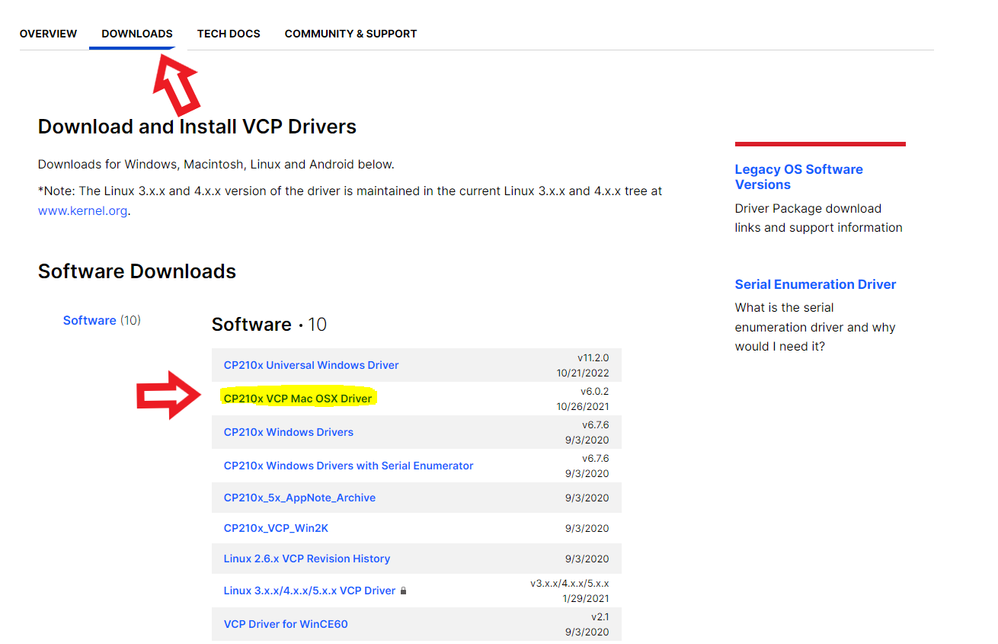
2-After successfully installing the Mac Drivers, open the Mac terminal, when you see the command prompt do the following:
Enter this command:
ls /dev/cu.*
This command will display something like this:
One of those logs will say something similar to /dev/cu.SiLabs_Serial (which is related to the drivers you installed)
3-Then enter the following command using the name of the installed driver that was displayed:
screen /dev/cu.SiLabs_Serial 9600
4-Hit Enter and you will have access to the ICX7150’s CLI. (Comand Line)
Video link as reference: https://www.youtube.com/watch?v=1AcJokMm78U
Once you have access to CLI please follow the below link to upgrade the switch to the code 8095h.
Please let us know if you have any queries in this regard.
Best regards,
Jayavidhya
Lennar Home Community
Options
- Mark as New
- Bookmark
- Subscribe
- Mute
- Subscribe to RSS Feed
- Permalink
- Report Inappropriate Content
07-03-2023 01:13 PM
Please view the most recent message (you posted 8 minutes after I responded, so you may not have seen).
Options
- Mark as New
- Bookmark
- Subscribe
- Mute
- Subscribe to RSS Feed
- Permalink
- Report Inappropriate Content
07-03-2023 01:43 PM
latest update:
The access points are now showing as an option for network, but connecting to it is the same problem as before: no speed (less than .01 mb/s).
On the switch itself, the STAT, SYST, and PWR are all green.


Labels
-
Access point
3 -
Access points
5 -
all lights blinking after reset icx 7150 switch
1 -
Amber
1 -
Amber System
2 -
AP
1 -
Boot mode
1 -
bootloader
1 -
cli
1 -
Compatibility
1 -
Console
1 -
console access
1 -
dns
1 -
eero
2 -
eps
1 -
Frontier
1 -
Green Power
2 -
Hard reset
1 -
Heartbeat
1 -
Heartbeat loss recurring
2 -
Help
2 -
Help Needed
2 -
i Al
1 -
ICX
2 -
ICX 7150-C12p
7 -
ICX switch
4 -
ICX Switch Disconnected
1 -
ICX Switch Management
2 -
ICX-7150-C12
2 -
ICX-7150-C12P
1 -
Important Announcement
1 -
Installation
1 -
Internet Issue
2 -
Ive been
1 -
Lennar
3 -
Lennar Home
2 -
Lennar homes
25 -
Management Port
1 -
New
1 -
No POE
2 -
No power via Ethernet
1 -
password
1 -
Please
1 -
Poe
1 -
Poe not working
1 -
Power Outage
1 -
Power Outtage
1 -
Proposed Solution
1 -
R510
2 -
r510 no power
2 -
REBOOT
1 -
Recovery
1 -
Red LED
1 -
Remote access
1 -
Reset ICX username password
1 -
Return
1 -
RMA
3 -
Ruckus
2 -
Ruckus ICX 7150-C12P
4 -
RUCKUS Self-Help
1 -
RUKUS 7150 c12p
1 -
Setup
1 -
Software Recovery
1 -
Solution Proposed
1 -
Solution Proposed warranty
1 -
SPR
1 -
SSH
1 -
Switch
1 -
Telnet
1 -
Unleashed
3 -
Unresolved Issue
1 -
Upgrade
3 -
Upgrading R510
1 -
User Management
1 -
username
1 -
VPN streaming fail proxy not working Amazon prime video
1 -
Wifi
1 -
Wifi6
1 -
Wireless
3
- « Previous
- Next »
