This website uses cookies. By clicking Accept, you consent to the use of cookies. Click Here to learn more about how we use cookies.
RUCKUS Community Forums are now in READ-ONLY mode while we migrate to a new platform.
You will still be able to read posts and knowledge articles, but will be unable to post new content until Go Live on the new platform Monday August 17.
Lennar Smart Home customers: please contact [email protected] for assistance during the week of August 9-17.

Turn on suggestions
Auto-suggest helps you quickly narrow down your search results by suggesting possible matches as you type.
Showing results for
- RUCKUS Forums
- RUCKUS Lennar Support
- RUCKUS Support for Lennar Homes
- Re: Ruckus stopped working after recent power outa...
Options
- Subscribe to RSS Feed
- Mark Topic as New
- Mark Topic as Read
- Float this Topic for Current User
- Bookmark
- Subscribe
- Mute
- Printer Friendly Page

Options
- Mark as New
- Bookmark
- Subscribe
- Mute
- Subscribe to RSS Feed
- Permalink
- Report Inappropriate Content
06-29-2025 02:18 PM
After a power outage a couple of days ago, My Ruckus has stopped working. I just see the amber and yellow light. I was provided by a friend to follow instructions in an article "How to perform a software recover on an ICX7150 switch". When following the instructions and after connecting the two cables, when I try to open PUTTY under a "COM" session, it display an "error". I went into device manager to see if the USB "COM" connection was detected, but I do not see it. This is the exact same place I got stuck the last time around when the same issue happened. After many weeks of back and forth, I was sent an RMA, with a new ruckus box and then it has worked. Until, the power outage a couple of days ago, and I am afraid it is again the same issue and I am stuck at the exact same place.
Solved! Go to Solution.
1 ACCEPTED SOLUTION


Options
- Mark as New
- Bookmark
- Subscribe
- Mute
- Subscribe to RSS Feed
- Permalink
- Report Inappropriate Content
06-30-2025 12:02 PM
Hi @Amulyabhat
Greetings of the day!!!
Thank you for sharing the requested information.
Based on the troubleshooting performed, your ICX-7150-C12P Switch is not responding to CLI/Console access, and the Software Recovery process has been unsuccessful. A hard reset was also attempted; however, the issue still persists.
As a result, this Switch unit appears to be defective and needs to be replaced through the RMA (Return Merchandise Authorization) process.
To initiate the replacement, please contact us via chat using the link provided below in this post. Kindly copy the URL/link of this post and paste it in the chat along with the serial number of your RUCKUS Switch when prompted.
Please refer to the example screenshot below for guidance on how to copy and share the required information:
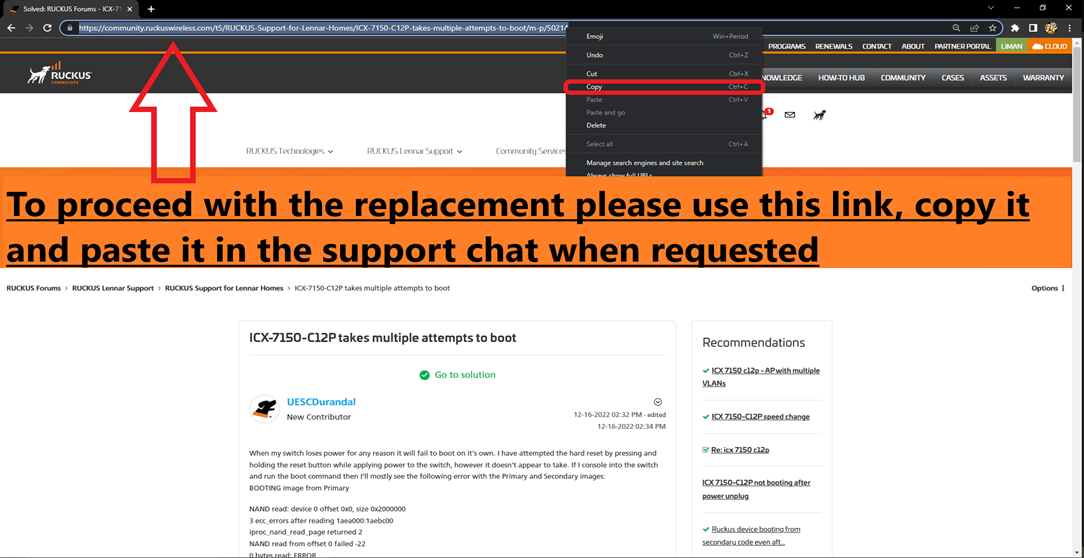
The below link is to contact us by chat (only)
https://support.ruckuswireless.com/contact-us
Did I answer your queries? If yes, hit the Kudos buttons and also accept the answers as Accepted solutions.
Please let me know if you have any queries in this regard.
Thank you again for your patience and understanding.
Best regards,
Imran Sanadi
RUCKUS | Lennar Home Community Support
Reply
12 REPLIES 12
Options
- Mark as New
- Bookmark
- Subscribe
- Mute
- Subscribe to RSS Feed
- Permalink
- Report Inappropriate Content
06-30-2025 10:43 AM
Same issue, no diff.

Options
- Mark as New
- Bookmark
- Subscribe
- Mute
- Subscribe to RSS Feed
- Permalink
- Report Inappropriate Content
06-30-2025 10:52 AM
Imran, see below article, this is the exact command I see on PUTTY ... Please note again this requires RMA. I would like to immediately start the RMA process as I have been without internet for 5 days now and cannot work from home.
Really appreciate your help here
Solved: RUCKUS Forums - ICX7150-C12P won't boot - DRAM: Validate Shmoo pa... - CommScope RUCKUS Comm...
Options
- Mark as New
- Bookmark
- Subscribe
- Mute
- Subscribe to RSS Feed
- Permalink
- Report Inappropriate Content
06-30-2025 12:02 PM
Hi @Amulyabhat
Greetings of the day!!!
Thank you for sharing the requested information.
Based on the troubleshooting performed, your ICX-7150-C12P Switch is not responding to CLI/Console access, and the Software Recovery process has been unsuccessful. A hard reset was also attempted; however, the issue still persists.
As a result, this Switch unit appears to be defective and needs to be replaced through the RMA (Return Merchandise Authorization) process.
To initiate the replacement, please contact us via chat using the link provided below in this post. Kindly copy the URL/link of this post and paste it in the chat along with the serial number of your RUCKUS Switch when prompted.
Please refer to the example screenshot below for guidance on how to copy and share the required information:
The below link is to contact us by chat (only)
https://support.ruckuswireless.com/contact-us
Did I answer your queries? If yes, hit the Kudos buttons and also accept the answers as Accepted solutions.
Please let me know if you have any queries in this regard.
Thank you again for your patience and understanding.
Best regards,
Imran Sanadi
RUCKUS | Lennar Home Community Support
Reply

Labels
-
Access point
3 -
Access points
5 -
all lights blinking after reset icx 7150 switch
1 -
Amber
1 -
Amber System
2 -
AP
1 -
AP Management
1 -
Boot mode
1 -
bootloader
1 -
cli
1 -
Compatibility
1 -
Console
1 -
console access
1 -
dns
1 -
eero
2 -
eps
1 -
Frontier
1 -
Green Power
2 -
Hard reset
1 -
Heartbeat
1 -
Heartbeat loss recurring
2 -
Help
2 -
Help Needed
2 -
i Al
1 -
ICX
2 -
ICX 7150-C12p
7 -
ICX switch
4 -
ICX Switch Disconnected
1 -
ICX Switch Management
4 -
ICX-7150-C12
3 -
ICX-7150-C12P
1 -
Important Announcement
1 -
Installation
1 -
Internet Issue
2 -
Ive been
1 -
Lennar
3 -
Lennar Home
2 -
Lennar homes
25 -
Management Port
1 -
NAND flash memory
1 -
New
1 -
No POE
2 -
No power via Ethernet
1 -
password
1 -
Please
1 -
Poe
2 -
Poe not working
1 -
Power Outage
1 -
Power Outtage
1 -
Proposed Solution
1 -
R510
2 -
r510 no power
2 -
REBOOT
1 -
Recovery
1 -
Red LED
1 -
Remote access
1 -
Reset ICX username password
1 -
Return
1 -
RMA
3 -
Ruckus
2 -
Ruckus ICX 7150-C12P
4 -
RUCKUS Self-Help
1 -
RUKUS 7150 c12p
1 -
Setup
1 -
Software Recovery
1 -
Solution Proposed
1 -
Solution Proposed warranty
1 -
SPR
1 -
SSH
1 -
Switch
1 -
Telnet
1 -
Unleashed
3 -
Unresolved Issue
1 -
Upgrade
3 -
Upgrading R510
1 -
User Management
1 -
username
1 -
VPN streaming fail proxy not working Amazon prime video
1 -
Wifi
1 -
Wifi6
1 -
Wireless
3
- « Previous
- Next »
