This website uses cookies. By clicking Accept, you consent to the use of cookies. Click Here to learn more about how we use cookies.
RUCKUS Community Forums are now in READ-ONLY mode while we migrate to a new platform.
You will still be able to read posts and knowledge articles, but will be unable to post new content until Go Live on the new platform Monday August 17.
Lennar Smart Home customers: please contact [email protected] for assistance during the week of August 9-17.

- Community
- RUCKUS Technologies
- RUCKUS Lennar Support
- Community Services
- RTF
- RTF Community
- Australia and New Zealand – English
- Brazil – Português
- China – 简体中文
- France – Français
- Germany – Deutsch
- Hong Kong – 繁體中文
- India – English
- Indonesia – bahasa Indonesia
- Italy – Italiano
- Japan – 日本語
- Korea – 한국어
- Latin America – Español (Latinoamérica)
- Middle East & Africa – English
- Netherlands – Nederlands
- Nordics – English
- North America – English
- Poland – polski
- Russia – Русский
- Singapore, Malaysia, and Philippines – English
- Spain – Español
- Taiwan – 繁體中文
- Thailand – ไทย
- Turkey – Türkçe
- United Kingdom – English
- Vietnam – Tiếng Việt
- EOL Products
Turn on suggestions
Auto-suggest helps you quickly narrow down your search results by suggesting possible matches as you type.
Showing results for
- RUCKUS Forums
- RUCKUS Lennar Support
- RUCKUS Support for Lennar Homes
- Ruckus icx 7150-c12p - stopped working.
Options
- Subscribe to RSS Feed
- Mark Topic as New
- Mark Topic as Read
- Float this Topic for Current User
- Bookmark
- Subscribe
- Mute
- Printer Friendly Page

Options
- Mark as New
- Bookmark
- Subscribe
- Mute
- Subscribe to RSS Feed
- Permalink
- Report Inappropriate Content
06-08-2026 11:12 AM

Hi - I an issue where my Ruckus icx 7150-c12p is not working. I tried rebooting the switch few times and also tried connecting WAP to different ports without luck. looks like only one port might be working where I have MY q device installed. Attaching a photo of the device after multiple restarts and port changes. Tried login to the admin console but none of the user/pass combinations work. Home internet is working via the IP router but the WAP and other smart devices are not except one as you can see on the photo.
Solved! Go to Solution.
2 ACCEPTED SOLUTIONS


Options
- Mark as New
- Bookmark
- Subscribe
- Mute
- Subscribe to RSS Feed
- Permalink
- Report Inappropriate Content
06-08-2026 12:08 PM
Thank you for your response and for providing the command outputs.
Based on the information shared, it appears that the ports on the RUCKUS ICX-7150-C12P Switch may have entered a disabled state.
To troubleshoot and resolve this issue, please refer to the following RUCKUS Lennar Knowledge Base self-help article:
Please follow the steps outlined in the article and let me know the outcome. If you encounter any issues during the process, I will be happy to assist further.
Thank you again for your patience and understanding.
Best regards,
Imran Sanadi
RUCKUS | Lennar Home Community Support
Options
- Mark as New
- Bookmark
- Subscribe
- Mute
- Subscribe to RSS Feed
- Permalink
- Report Inappropriate Content
06-08-2026 12:44 PM
Thank you very much for your help. That helped and all the devices are now connected.
6 REPLIES 6
Options
- Mark as New
- Bookmark
- Subscribe
- Mute
- Subscribe to RSS Feed
- Permalink
- Report Inappropriate Content
06-08-2026 11:36 AM
Greetings!!!
Thank you for reaching out to the RUCKUS Lennar Home Community.
We appreciate your patience and understanding as we work to resolve the issues you are experiencing with your RUCKUS setup.
Based on the information provided, it appears that you are encountering intermittent internet connectivity.
We apologize for any inconvenience this has caused and are committed to assisting you promptly.
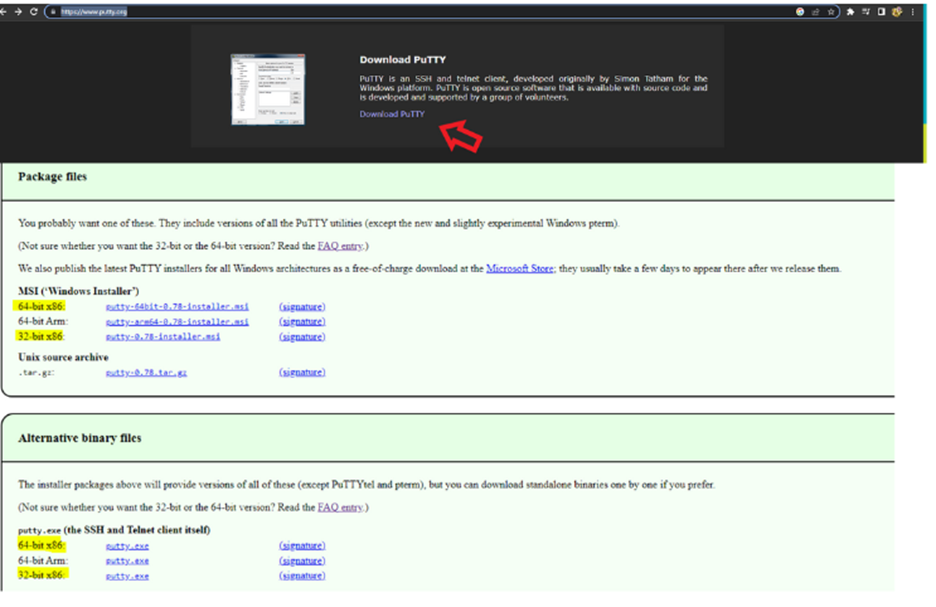
Could you please download the Putty Application and try to log in to the CLI using the Switch IP Address from the IP Scan and share the output of the below commands?
Putty download link:https://www.putty.org/
You could try the SSH Or Telnet option to log in to CLI (Putty) as described in the same guide- Please refer below
SSH- Port 22
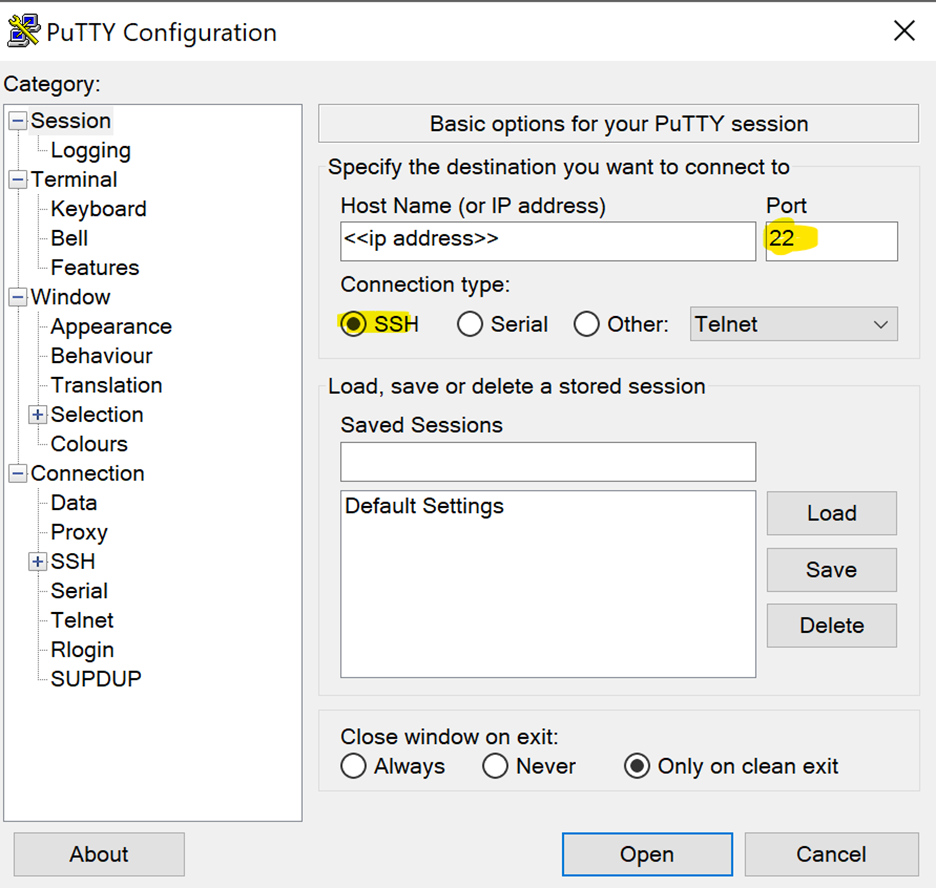
OR
Telnet – Port 23 (If SSH doesn’t work)
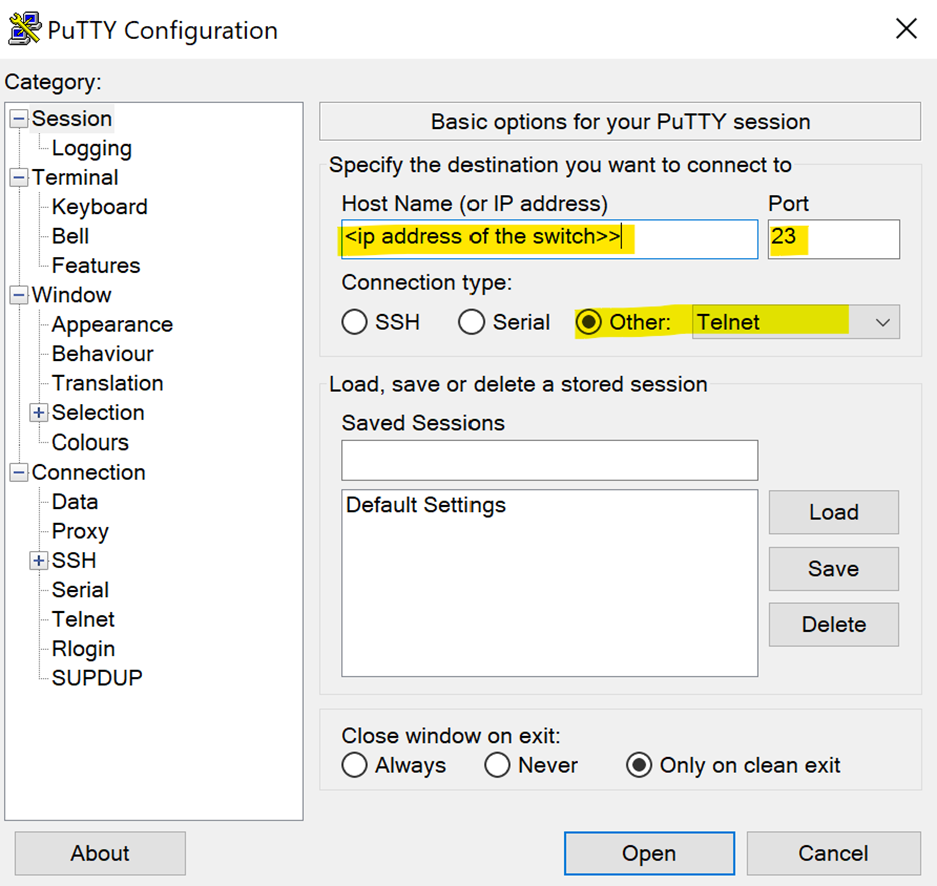
If you can access the Command line should look like this:
ICX7150-C12 Router> OR
ICX7150-C12 Switch>
Please enter the below commands once you log in to CLI and share the output.
Note: Hit Enter to accept each command
enable
show version
show flash
show inline power
show inline power detail
show interface brief
Please share the output of the above commands and let me know if you are stuck at any point.
Thank you again for your patience and understanding.
Best regards,
Imran Sanadi
RUCKUS | Lennar Home Community Support
Options
- Mark as New
- Bookmark
- Subscribe
- Mute
- Subscribe to RSS Feed
- Permalink
- Report Inappropriate Content
06-08-2026 11:53 AM
telnet@ICX7150-C12-Switch>enable
No password has been assigned yet...
telnet@ICX7150-C12-Switch#show version
Copyright (c) 1996-2017 Brocade Communications Systems, Inc. All rights reserv ed.
UNIT 1: compiled on Aug 14 2017 at 06:54:44 labeled as SPS08061a
(24723488 bytes) from Primary
SW: Version 08.0.61aT211
Compressed Boot-Monitor Image size = 786944, Version:10.1.10T225 (mnz10110 )
Compiled on Sun Jun 25 09:25:15 2017
HW: Stackable ICX7150-C12-POE
==========================================================================
UNIT 1: SL 1: ICX7150-C12-2X1G POE 12-port Management Module
Serial #:FEK3205P0F0
Current License:
P-ASIC 0: type B160, rev 11 Chip BCM56160_B0
==========================================================================
UNIT 1: SL 2: ICX7150-2X1GC 2-port 2G Module
==========================================================================
UNIT 1: SL 3: ICX7150-2X10GF 2-port 20G Module
==========================================================================
1000 MHz ARM processor ARMv7 88 MHz bus
8192 KB boot flash memory
2048 MB code flash memory
1024 MB DRAM
STACKID 1 system uptime is 21 hour(s) 52 minute(s) 11 second(s)
The system started at 00:02:04 GMT+00 Sat Jan 01 2000
The system : started=cold start
telnet@ICX7150-C12-Switch#show flas
Stack unit 1:
Compressed Pri Code size = 24723488, Version:08.0.61aT211
Compressed Sec Code size = 28314668, Version:08.0.61aT213
Compressed Boot-Monitor Image size = 786944, Version:10.1.10T225
Code Flash Free Space = 1314447360
telnet@ICX7150-C12-Switch#show flash
Stack unit 1:
Compressed Pri Code size = 24723488, Version:08.0.61aT211
Compressed Sec Code size = 28314668, Version:08.0.61aT213
Compressed Boot-Monitor Image size = 786944, Version:10.1.10T225
Code Flash Free Space = 1314447360
telnet@ICX7150-C12-Switch#show inline power
Power Capacity: Total is 124000 mWatts. Current Free is 124000 mWatts.
Power Allocations: Requests Honored 0 times
Port Admin Oper ---Power(mWatts)--- PD Type PD Class Pri Fault/
State State Consumed Allocated Error
--------------------------------------------------------------------------
1/1/1 Off Off 0 0 n/a n/a 3 n/a
1/1/2 Off Off 0 0 n/a n/a 3 n/a
1/1/3 Off Off 0 0 n/a n/a 3 n/a
1/1/4 Off Off 0 0 n/a n/a 3 n/a
1/1/5 Off Off 0 0 n/a n/a 3 n/a
1/1/6 Off Off 0 0 n/a n/a 3 n/a
1/1/7 Off Off 0 0 n/a n/a 3 n/a
1/1/8 Off Off 0 0 n/a n/a 3 n/a
1/1/9 Off Off 0 0 n/a n/a 3 n/a
1/1/10 Off Off 0 0 n/a n/a 3 n/a
1/1/11 Off Off 0 0 n/a n/a 3 n/a
1/1/12 Off Off 0 0 n/a n/a 3 n/a
--------------------------------------------------------------------------
Total 0 0
telnet@ICX7150-C12-Switch#show inline power detail
Power Supply Data On unit 1:
++++++++++++++++++
Power Supply Data:
++++++++++++++++++
Power Supply #1:
Max Curr: 2.3 Amps
Voltage: 54.0 Volts
Capacity: 124 Watts
PoePower: 124 Watts
POE Details Info. On Unit 1 :
General PoE Data:
+++++++++++++++++
Firmware
Version
----------------
01.8.7 Build 021
Hardware
Version
----------------
V2R2
Cumulative Port State Data:
+++++++++++++++++++++++++++
#Ports #Ports #Ports #Ports #Ports #Ports #Ports
Admin-On Admin-Off Oper-On Oper-Off Off-Denied Off-No-PD Off-Fault
-------------------------------------------------------------------------
0 12 0 12 0 0 0
Cumulative Port Power Data:
+++++++++++++++++++++++++++
#Ports #Ports #Ports Power Power
Pri: 1 Pri: 2 Pri: 3 Consumption Allocation
-----------------------------------------------
0 0 0 0.000 W 0.000 W
telnet@ICX7150-C12-Switch#show interface brief
Port Link State Dupl Speed Trunk Tag Pvid Pri MAC Name
1/1/1 Down None None None None No 1 0 78a6.e140.3dac
1/1/2 Up Forward Full 1G None No 1 0 78a6.e140.3dad
1/1/3 Down None None None None No 1 0 78a6.e140.3dae
1/1/4 Up Forward Full 100M None No 1 0 78a6.e140.3daf
1/1/5 Down None None None None No 1 0 78a6.e140.3db0
1/1/6 Up Forward Full 100M None No 1 0 78a6.e140.3db1
1/1/7 Up Forward Half 10M None No 1 0 78a6.e140.3db2
1/1/8 Up Forward Full 100M None No 1 0 78a6.e140.3db3
1/1/9 Down None None None None No 1 0 78a6.e140.3db4
1/1/10 Down None None None None No 1 0 78a6.e140.3db5
1/1/11 Down None None None None No 1 0 78a6.e140.3db6
1/1/12 Down None None None None No 1 0 78a6.e140.3db7
1/2/1 Down None None None None No 1 0 78a6.e140.3db9
1/2/2 Down None None None None No 1 0 78a6.e140.3dba
1/3/1 Down None None None None No 1 0 78a6.e140.3dbb
1/3/2 Down None None None None No 1 0 78a6.e140.3dbc
mgmt1 Down None None None None No None 0 78a6.e140.3dac
telnet@ICX7150-C12-Switch#
Options
- Mark as New
- Bookmark
- Subscribe
- Mute
- Subscribe to RSS Feed
- Permalink
- Report Inappropriate Content
06-08-2026 11:54 AM
CLI output above.
Options
- Mark as New
- Bookmark
- Subscribe
- Mute
- Subscribe to RSS Feed
- Permalink
- Report Inappropriate Content
06-08-2026 12:08 PM
Thank you for your response and for providing the command outputs.
Based on the information shared, it appears that the ports on the RUCKUS ICX-7150-C12P Switch may have entered a disabled state.
To troubleshoot and resolve this issue, please refer to the following RUCKUS Lennar Knowledge Base self-help article:
Please follow the steps outlined in the article and let me know the outcome. If you encounter any issues during the process, I will be happy to assist further.
Thank you again for your patience and understanding.
Best regards,
Imran Sanadi
RUCKUS | Lennar Home Community Support

Labels
-
Access point
3 -
Access points
5 -
all lights blinking after reset icx 7150 switch
1 -
Amber
1 -
Amber System
2 -
AP
1 -
AP Management
1 -
Boot mode
1 -
bootloader
1 -
cli
1 -
Compatibility
1 -
Console
1 -
console access
1 -
dns
1 -
eero
2 -
eps
1 -
Frontier
1 -
Green Power
2 -
Hard reset
1 -
Heartbeat
1 -
Heartbeat loss recurring
2 -
Help
2 -
Help Needed
2 -
i Al
1 -
ICX
2 -
ICX 7150-C12p
7 -
ICX switch
4 -
ICX Switch Disconnected
1 -
ICX Switch Management
4 -
ICX-7150-C12
3 -
ICX-7150-C12P
1 -
Important Announcement
1 -
Installation
1 -
Internet Issue
2 -
Ive been
1 -
Lennar
3 -
Lennar Home
2 -
Lennar homes
25 -
Management Port
1 -
NAND flash memory
1 -
New
1 -
No POE
2 -
No power via Ethernet
1 -
password
1 -
Please
1 -
Poe
2 -
Poe not working
1 -
Power Outage
1 -
Power Outtage
1 -
Proposed Solution
1 -
R510
2 -
r510 no power
2 -
REBOOT
1 -
Recovery
1 -
Red LED
1 -
Remote access
1 -
Reset ICX username password
1 -
Return
1 -
RMA
3 -
Ruckus
2 -
Ruckus ICX 7150-C12P
4 -
RUCKUS Self-Help
1 -
RUKUS 7150 c12p
1 -
Setup
1 -
Software Recovery
1 -
Solution Proposed
1 -
Solution Proposed warranty
1 -
SPR
1 -
SSH
1 -
Switch
1 -
Telnet
1 -
Unleashed
3 -
Unresolved Issue
1 -
Upgrade
3 -
Upgrading R510
1 -
User Management
1 -
username
1 -
VPN streaming fail proxy not working Amazon prime video
1 -
Wifi
1 -
Wifi6
1 -
Wireless
3
- « Previous
- Next »
