This website uses cookies. By clicking Accept, you consent to the use of cookies. Click Here to learn more about how we use cookies.
RUCKUS Community Forums are now in READ-ONLY mode while we migrate to a new platform.
You will still be able to read posts and knowledge articles, but will be unable to post new content until Go Live on the new platform Monday August 17.
Lennar Smart Home customers: please contact [email protected] for assistance during the week of August 9-17.

- Community
- RUCKUS Technologies
- RUCKUS Lennar Support
- Community Services
- RTF
- RTF Community
- Australia and New Zealand – English
- Brazil – Português
- China – 简体中文
- France – Français
- Germany – Deutsch
- Hong Kong – 繁體中文
- India – English
- Indonesia – bahasa Indonesia
- Italy – Italiano
- Japan – 日本語
- Korea – 한국어
- Latin America – Español (Latinoamérica)
- Middle East & Africa – English
- Netherlands – Nederlands
- Nordics – English
- North America – English
- Poland – polski
- Russia – Русский
- Singapore, Malaysia, and Philippines – English
- Spain – Español
- Taiwan – 繁體中文
- Thailand – ไทย
- Turkey – Türkçe
- United Kingdom – English
- Vietnam – Tiếng Việt
- EOL Products
Turn on suggestions
Auto-suggest helps you quickly narrow down your search results by suggesting possible matches as you type.
Showing results for
- RUCKUS Forums
- RUCKUS Lennar Support
- RUCKUS Support for Lennar Homes
- Re: Outdoor Extender to work with Ruckus R510
Options
- Subscribe to RSS Feed
- Mark Topic as New
- Mark Topic as Read
- Float this Topic for Current User
- Bookmark
- Subscribe
- Mute
- Printer Friendly Page

Options
- Mark as New
- Bookmark
- Subscribe
- Mute
- Subscribe to RSS Feed
- Permalink
- Report Inappropriate Content
03-17-2026 11:49 AM
Our R510 AP works great indoors. However, the signal only extends about 8 feet outside of our hurricane glass sliding doors. The total distance from the R510 to the sliding glass doors is only 22 feet, so this gives a range of only 30 feet. Is there a signal booster that could be plugged in outside or is another wired AP required? If so, what signal booster or AP is recommended? There is a covered area outside, so it is protected from the elements with ambient temperatures ranging from 40-95 degrees F.
Solved! Go to Solution.
3 ACCEPTED SOLUTIONS


Options
- Mark as New
- Bookmark
- Subscribe
- Mute
- Subscribe to RSS Feed
- Permalink
- Report Inappropriate Content
03-17-2026 12:05 PM
Hi @MizzouWoman
Greetings!!!
Thank you for reaching out to the RUCKUS Lennar Home Community.
We appreciate your patience and understanding as we work to resolve the issues you are experiencing with your RUCKUS setup.
Based on the information provided, it appears that you are looking extend your Wi-Fi connectivity range.
The RUCKUS R510 Access Point is specifically designed for indoor Wi-Fi deployments and optimized for indoor coverage and performance.
What you're experiencing is actually expected behavior for an indoor AP like the R510.
The R510 is designed for indoor use, and materials like hurricane/impact glass can significantly attenuate Wi-Fi signals. Even standard glass can reduce signal strength, and coated or reinforced glass can block it even more, which is why you're only seeing ~8 ft of usable signal outside.
In this scenario, there are two important points:
1. Wi-Fi “boosters” are not recommended
- Traditional signal boosters/repeaters are not supported in RUCKUS Unleashed environments
- They typically reduce performance (half bandwidth, added latency)
2. Best practice = add another AP (recommended solution)
- For reliable outdoor coverage, you should deploy a second AP closer to or in the outdoor area
- Ideally, this should be a wired AP (Ethernet backhaul)
Recommended options:
- Outdoor AP:
Example: RUCKUS E510 (weatherproof, designed for patios/outdoor use) - Indoor AP placed near exit (temporary/limited):
Another R510 mounted closer to the door may help, but won’t fully overcome glass attenuation
If running Ethernet is difficult, you can also consider RUCKUS Mesh, but performance will be better with a wired AP.
If you are looking to extend Wi-Fi coverage to outdoor areas, RUCKUS offers a dedicated range of outdoor Access Points that are built to handle environmental factors such as weather, temperature variations, and longer-range coverage requirements.
You may try to contact the local authorized seller to know more about the Outdoor APs.
For more details, please contact the authorized RUCKUS Seller through the link below. The team will be happy to assist you with the necessary information.
https://www.ruckusnetworks.com/partners/partner-locator/
https://www.commscope.com/partners/partner-locator/
If you have any further questions, please feel free to reach out.
Thank you again for your patience!
Best regards,
Imran Sanadi
RUCKUS | Lennar Home Community Support
Options
- Mark as New
- Bookmark
- Subscribe
- Mute
- Subscribe to RSS Feed
- Permalink
- Report Inappropriate Content
03-18-2026 09:03 AM
Hi @MizzouWoman
Greetings!!!
Thank you for your patience.
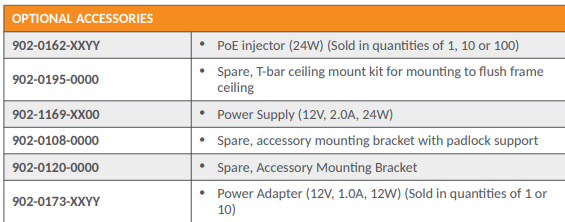
RUCKUS Access Point power supply part numbers (typically formatted as 902-xxxx-xxxx) can be found on the label of the original power adapter, within the RUCKUS Accessory Guide, or by contacting an authorized reseller. One commonly used model is 902-1169-XX00 (12V).
Please refer to the detailed screenshot provided below for further clarity.
We hope this information is helpful.
Thank you again for your continued patience and understanding.
Best regards,
Imran Sanadi
RUCKUS | Lennar Home Community Support
Options
- Mark as New
- Bookmark
- Subscribe
- Mute
- Subscribe to RSS Feed
- Permalink
- Report Inappropriate Content
03-18-2026 09:33 AM
Thank you!
10 REPLIES 10
Options
- Mark as New
- Bookmark
- Subscribe
- Mute
- Subscribe to RSS Feed
- Permalink
- Report Inappropriate Content
03-17-2026 12:05 PM
Hi @MizzouWoman
Greetings!!!
Thank you for reaching out to the RUCKUS Lennar Home Community.
We appreciate your patience and understanding as we work to resolve the issues you are experiencing with your RUCKUS setup.
Based on the information provided, it appears that you are looking extend your Wi-Fi connectivity range.
The RUCKUS R510 Access Point is specifically designed for indoor Wi-Fi deployments and optimized for indoor coverage and performance.
What you're experiencing is actually expected behavior for an indoor AP like the R510.
The R510 is designed for indoor use, and materials like hurricane/impact glass can significantly attenuate Wi-Fi signals. Even standard glass can reduce signal strength, and coated or reinforced glass can block it even more, which is why you're only seeing ~8 ft of usable signal outside.
In this scenario, there are two important points:
1. Wi-Fi “boosters” are not recommended
- Traditional signal boosters/repeaters are not supported in RUCKUS Unleashed environments
- They typically reduce performance (half bandwidth, added latency)
2. Best practice = add another AP (recommended solution)
- For reliable outdoor coverage, you should deploy a second AP closer to or in the outdoor area
- Ideally, this should be a wired AP (Ethernet backhaul)
Recommended options:
- Outdoor AP:
Example: RUCKUS E510 (weatherproof, designed for patios/outdoor use) - Indoor AP placed near exit (temporary/limited):
Another R510 mounted closer to the door may help, but won’t fully overcome glass attenuation
If running Ethernet is difficult, you can also consider RUCKUS Mesh, but performance will be better with a wired AP.
If you are looking to extend Wi-Fi coverage to outdoor areas, RUCKUS offers a dedicated range of outdoor Access Points that are built to handle environmental factors such as weather, temperature variations, and longer-range coverage requirements.
You may try to contact the local authorized seller to know more about the Outdoor APs.
For more details, please contact the authorized RUCKUS Seller through the link below. The team will be happy to assist you with the necessary information.
https://www.ruckusnetworks.com/partners/partner-locator/
https://www.commscope.com/partners/partner-locator/
If you have any further questions, please feel free to reach out.
Thank you again for your patience!
Best regards,
Imran Sanadi
RUCKUS | Lennar Home Community Support
Options
- Mark as New
- Bookmark
- Subscribe
- Mute
- Subscribe to RSS Feed
- Permalink
- Report Inappropriate Content
03-17-2026 02:09 PM
Thank you! I ordered a E510 for placement outside and plan to use Smart Mesh since running ethernet cable with our house construction is not trivial. Where do I find the part number to order a power supply? My internet investigations have yielded conflicting info.
Options
- Mark as New
- Bookmark
- Subscribe
- Mute
- Subscribe to RSS Feed
- Permalink
- Report Inappropriate Content
03-17-2026 02:31 PM
Hi @MizzouWoman
Thank you for your response.
I am currently checking this with the concerned team internally and will get back to you shortly with an update.
Thank you again for your patience and understanding.
Best regards,
Imran Sanadi
RUCKUS | Lennar Home Community Support
Options
- Mark as New
- Bookmark
- Subscribe
- Mute
- Subscribe to RSS Feed
- Permalink
- Report Inappropriate Content
03-18-2026 09:03 AM
Hi @MizzouWoman
Greetings!!!
Thank you for your patience.
RUCKUS Access Point power supply part numbers (typically formatted as 902-xxxx-xxxx) can be found on the label of the original power adapter, within the RUCKUS Accessory Guide, or by contacting an authorized reseller. One commonly used model is 902-1169-XX00 (12V).
Please refer to the detailed screenshot provided below for further clarity.
We hope this information is helpful.
Thank you again for your continued patience and understanding.
Best regards,
Imran Sanadi
RUCKUS | Lennar Home Community Support

Labels
-
Access point
3 -
Access points
5 -
all lights blinking after reset icx 7150 switch
1 -
Amber
1 -
Amber System
2 -
AP
1 -
AP Management
1 -
Boot mode
1 -
bootloader
1 -
cli
1 -
Compatibility
1 -
Console
1 -
console access
1 -
dns
1 -
eero
2 -
eps
1 -
Frontier
1 -
Green Power
2 -
Hard reset
1 -
Heartbeat
1 -
Heartbeat loss recurring
2 -
Help
2 -
Help Needed
2 -
i Al
1 -
ICX
2 -
ICX 7150-C12p
7 -
ICX switch
4 -
ICX Switch Disconnected
1 -
ICX Switch Management
4 -
ICX-7150-C12
3 -
ICX-7150-C12P
1 -
Important Announcement
1 -
Installation
1 -
Internet Issue
2 -
Ive been
1 -
Lennar
3 -
Lennar Home
2 -
Lennar homes
25 -
Management Port
1 -
NAND flash memory
1 -
New
1 -
No POE
2 -
No power via Ethernet
1 -
password
1 -
Please
1 -
Poe
2 -
Poe not working
1 -
Power Outage
1 -
Power Outtage
1 -
Proposed Solution
1 -
R510
2 -
r510 no power
2 -
REBOOT
1 -
Recovery
1 -
Red LED
1 -
Remote access
1 -
Reset ICX username password
1 -
Return
1 -
RMA
3 -
Ruckus
2 -
Ruckus ICX 7150-C12P
4 -
RUCKUS Self-Help
1 -
RUKUS 7150 c12p
1 -
Setup
1 -
Software Recovery
1 -
Solution Proposed
1 -
Solution Proposed warranty
1 -
SPR
1 -
SSH
1 -
Switch
1 -
Telnet
1 -
Unleashed
3 -
Unresolved Issue
1 -
Upgrade
3 -
Upgrading R510
1 -
User Management
1 -
username
1 -
VPN streaming fail proxy not working Amazon prime video
1 -
Wifi
1 -
Wifi6
1 -
Wireless
3
- « Previous
- Next »
