This website uses cookies. By clicking Accept, you consent to the use of cookies. Click Here to learn more about how we use cookies.

- Community
- RUCKUS Technologies
- RUCKUS Lennar Support
- Community Services
- RTF
- RTF Community
- Australia and New Zealand – English
- Brazil – Português
- China – 简体中文
- France – Français
- Germany – Deutsch
- Hong Kong – 繁體中文
- India – English
- Indonesia – bahasa Indonesia
- Italy – Italiano
- Japan – 日本語
- Korea – 한국어
- Latin America – Español (Latinoamérica)
- Middle East & Africa – English
- Netherlands – Nederlands
- Nordics – English
- North America – English
- Poland – polski
- Russia – Русский
- Singapore, Malaysia, and Philippines – English
- Spain – Español
- Taiwan – 繁體中文
- Thailand – ไทย
- Turkey – Türkçe
- United Kingdom – English
- Vietnam – Tiếng Việt
- EOL Products
Turn on suggestions
Auto-suggest helps you quickly narrow down your search results by suggesting possible matches as you type.
Showing results for
- RUCKUS Forums
- RUCKUS Lennar Support
- RUCKUS Support for Lennar Homes
- Re: ICX7150 won't factory reset; need RMA
Options
- Subscribe to RSS Feed
- Mark Topic as New
- Mark Topic as Read
- Float this Topic for Current User
- Bookmark
- Subscribe
- Mute
- Printer Friendly Page
ICX7150 won't factory reset; need RMA

Options
- Mark as New
- Bookmark
- Subscribe
- Mute
- Subscribe to RSS Feed
- Permalink
- Report Inappropriate Content
05-07-2026 01:54 PM
I followed all the posts to factory reset my ICX7150, but it won't reset. It seems this is common issue.
Additionally, I see text output via console cable on MobaXTerm, but it doesn't allow keyboard input (thus why I'm trying to factory reset it). I made sure the terminal settings were correct based off other support forums here, but to cover all bases, I tried several different combinations of baud rates and other settings.
I made sure the drivers were installed - also based off of support forums here.
I tried to do an RMA since this device is clearly defective, but that went as well as you'd expect for a "Lennar" purchased product, so now I'm trying to do a convoluted RMA request through this support forum as instructed by Ruckus support.
10 REPLIES 10


Options
- Mark as New
- Bookmark
- Subscribe
- Mute
- Subscribe to RSS Feed
- Permalink
- Report Inappropriate Content
05-11-2026 05:41 AM
Greetings!!!
Thank you for your recent correspondence and update.
As per the light status of the Switch it is in a normal state. We may need to check some configurations of your RUCKUS ICX-7150-C12P Switch to troubleshoot this issue.
To proceed with troubleshooting the issue, please follow the steps outlined below to access the Command Line Interface (CLI) and provide the necessary command outputs:
1. First, identify the current IP address assigned to the switch ICX-7150-C12P by your local router. You can use an IP scanner tool to easily locate the switch's IP address on your network. Here is a guide on how to perform this using IP Scanner free applications:
2. Once you have identified the IP address of the switch, proceed to access the Command Line Interface (CLI) of the RUCKUS ICX-7150-C12P switch. Here is a guide on how to access the CLI:
If you can access the Command line the prompt should look like below:
ICX7150-C12 Router> OR
ICX7150-C12 Switch>
3. After successfully accessing the CLI, please execute the following commands and provide the outputs:
enable
show version
show flash
show inline power
show inline power detail
show interface brief
Please share the command outputs or screenshots if you encounter any issues or errors during these steps.
Feel free to reach out if you have any questions or require further assistance.
Thank you for your cooperation and patience.
Best regards,
Imran Sanadi
RUCKUS | Lennar Home Community Support
Options
- Mark as New
- Bookmark
- Subscribe
- Mute
- Subscribe to RSS Feed
- Permalink
- Report Inappropriate Content
05-11-2026 06:20 AM
Yep, I previously tried that. It has a password that I didn't set and it's not one of the "commonly used" Lennar passwords. Which is also why I'm trying to factory reset it, which still doesn't work, which is why I need an RMA
Options
- Mark as New
- Bookmark
- Subscribe
- Mute
- Subscribe to RSS Feed
- Permalink
- Report Inappropriate Content
05-11-2026 10:36 AM
Thank you for your response and the update.
Apologies, but as per our support policies, we are unable to process an RMA for software-related issues that can potentially be resolved through troubleshooting.
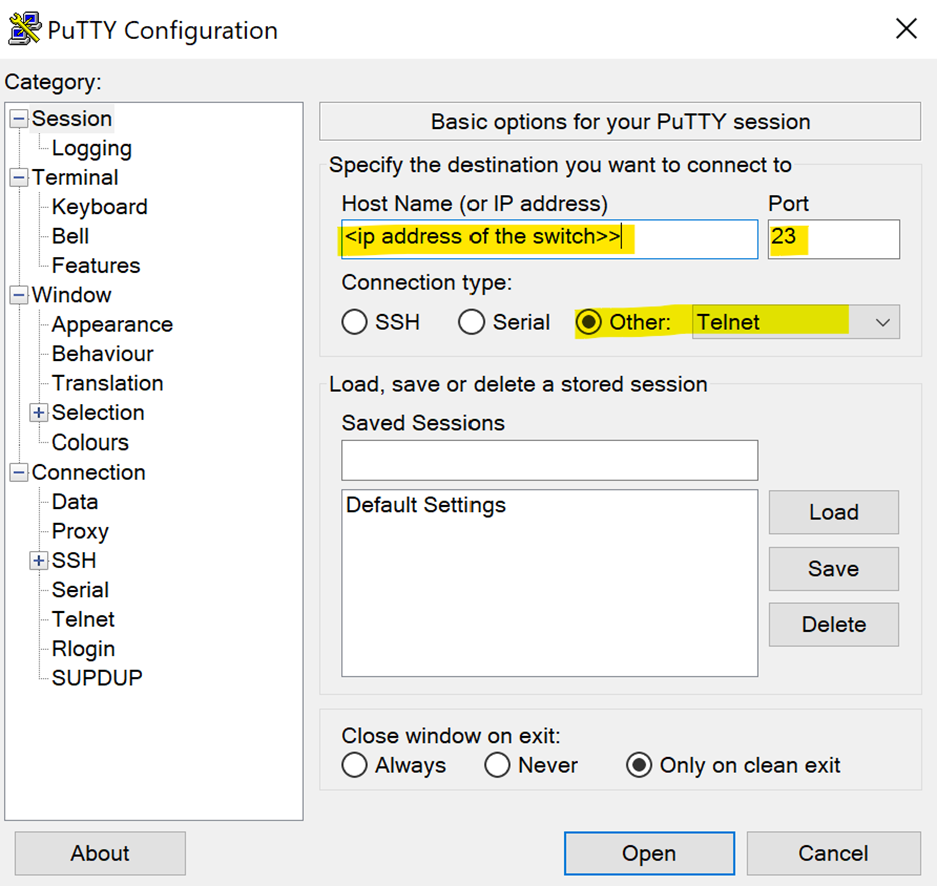
If SSH access is not working, please try using Telnet instead, as it does not require a username or password (please refer to the screenshot below).
Telnet – Port 23 (If SSH doesn’t work)
If that also does not work, please try resetting the username and password by following the process explained in the video below:
https://www.youtube.com/watch?v=XJS28DWbHM4
Please let me know how it goes.
Thank you again for your patience and understanding.
Best regards,
Imran Sanadi
RUCKUS | Lennar Home Community Support
Options
- Mark as New
- Bookmark
- Subscribe
- Mute
- Subscribe to RSS Feed
- Permalink
- Report Inappropriate Content
05-12-2026 09:25 AM
You'll have to forgive me, I should have started by saying I work in IT as a Senior Network and Systems Administrator; I know how to ssh/telnet into physical devices since I do this for a living. I say that in case someone else in the future comes across this thread looking for answers who has already tried the same things I have, and for the sake of letting Imran and future techs know: I've already tried following every article, youtube video, forum, and subreddit prior to reaching out through this online forum because I know what I'm doing; I manage switches for a living, and reaching out through this support channel was my very last ditch effort because I knew I would have to go through the motions of scripted tier 1 support. I know Imran couldn't possibly have known that, and I'm trying to be patient in regards to that and their company policy, but what bothers me is we're now going in circles because, as I've mentioned previously, I can't send keyboard input when using Putty nor MobaXTerm despite making sure the terminal settings are set correctly and drivers are installed, which is partially why I was trying to do a factory reset. And in my mind, having it show green lights and everything "working" doesn't hold any value at all because the factory reset button doesn't even work, which is literally the most basic function any device could have.
I can't send keyboard input even though I can see text output (so I know the terminal settings are correct), I can't change the password, and I can't factory reset it. By all means, if we can figure out how to get around those three issues, I'm every bit as willing to try.
And in case it wasn't clear and in response to the previous message: telnet won't accept keyboard input either.
Options
- Mark as New
- Bookmark
- Subscribe
- Mute
- Subscribe to RSS Feed
- Permalink
- Report Inappropriate Content
05-13-2026 05:27 AM
Greetings!!!
Thank you for sharing the requested information.
Based on the troubleshooting performed, your ICX-7150-C12P Switch is not responding properly, and seems to be Switch corrupt image.
As a result, this Switch unit appears to be defective and needs to be replaced through the RMA (Return Merchandise Authorization) process.
To initiate the replacement, Please use the private chat option to respond so we can proceed further. For your reference, I have included a screenshot below.

Please let me know if you have any queries in this regard.
Thank you again for your patience and understanding.
Best regards,
Imran Sanadi
RUCKUS | Lennar Home Community Support

Labels
-
Access point
3 -
Access points
5 -
all lights blinking after reset icx 7150 switch
1 -
Amber
1 -
Amber System
2 -
AP
1 -
AP Management
1 -
Boot mode
1 -
bootloader
1 -
cli
1 -
Compatibility
1 -
Console
1 -
console access
1 -
dns
1 -
eero
2 -
eps
1 -
Frontier
1 -
Green Power
2 -
Hard reset
1 -
Heartbeat
1 -
Heartbeat loss recurring
2 -
Help
2 -
Help Needed
2 -
i Al
1 -
ICX
2 -
ICX 7150-C12p
7 -
ICX switch
4 -
ICX Switch Disconnected
1 -
ICX Switch Management
4 -
ICX-7150-C12
3 -
ICX-7150-C12P
1 -
Important Announcement
1 -
Installation
1 -
Internet Issue
2 -
Ive been
1 -
Lennar
3 -
Lennar Home
2 -
Lennar homes
25 -
Management Port
1 -
NAND flash memory
1 -
New
1 -
No POE
2 -
No power via Ethernet
1 -
password
1 -
Please
1 -
Poe
2 -
Poe not working
1 -
Power Outage
1 -
Power Outtage
1 -
Proposed Solution
1 -
R510
2 -
r510 no power
2 -
REBOOT
1 -
Recovery
1 -
Red LED
1 -
Remote access
1 -
Reset ICX username password
1 -
Return
1 -
RMA
3 -
Ruckus
2 -
Ruckus ICX 7150-C12P
4 -
RUCKUS Self-Help
1 -
RUKUS 7150 c12p
1 -
Setup
1 -
Software Recovery
1 -
Solution Proposed
1 -
Solution Proposed warranty
1 -
SPR
1 -
SSH
1 -
Switch
1 -
Telnet
1 -
Unleashed
3 -
Unresolved Issue
1 -
Upgrade
3 -
Upgrading R510
1 -
User Management
1 -
username
1 -
VPN streaming fail proxy not working Amazon prime video
1 -
Wifi
1 -
Wifi6
1 -
Wireless
3
- « Previous
- Next »
