This website uses cookies. By clicking Accept, you consent to the use of cookies. Click Here to learn more about how we use cookies.
RUCKUS Community Forums are now in READ-ONLY mode while we migrate to a new platform.
You will still be able to read posts and knowledge articles, but will be unable to post new content until Go Live on the new platform Monday August 17.
Lennar Smart Home customers: please contact [email protected] for assistance during the week of August 9-17.

- Community
- RUCKUS Technologies
- RUCKUS Lennar Support
- Community Services
- RTF
- RTF Community
- Australia and New Zealand – English
- Brazil – Português
- China – 简体中文
- France – Français
- Germany – Deutsch
- Hong Kong – 繁體中文
- India – English
- Indonesia – bahasa Indonesia
- Italy – Italiano
- Japan – 日本語
- Korea – 한국어
- Latin America – Español (Latinoamérica)
- Middle East & Africa – English
- Netherlands – Nederlands
- Nordics – English
- North America – English
- Poland – polski
- Russia – Русский
- Singapore, Malaysia, and Philippines – English
- Spain – Español
- Taiwan – 繁體中文
- Thailand – ไทย
- Turkey – Türkçe
- United Kingdom – English
- Vietnam – Tiếng Việt
- EOL Products
Turn on suggestions
Auto-suggest helps you quickly narrow down your search results by suggesting possible matches as you type.
Showing results for
- RUCKUS Forums
- RUCKUS Technologies
- ICX Switches
- Re: Could not assign ip address
Options
- Subscribe to RSS Feed
- Mark Topic as New
- Mark Topic as Read
- Float this Topic for Current User
- Bookmark
- Subscribe
- Mute
- Printer Friendly Page
Could not assign ip address

Anonymous
Not applicable
Options
- Mark as New
- Bookmark
- Subscribe
- Mute
- Subscribe to RSS Feed
- Permalink
- Report Inappropriate Content
10-09-2019 09:00 PM
I am configurating IXC7150-C12-2X1G.
I could not assign IP address for switch
Someone can help me please.
UNIT 1: compiled on Aug 28 2019 at 13:38:53 labeled as SPR08090c
(32536860 bytes) from Primary SPR08090c.bin (UFI)
SW: Version 08.0.90cT213
Compressed Primary Boot Code size = 786944, Version:10.1.15T225 (mnz10115)
Compiled on Thu Jan 31 07:08:55 2019
BYT-Ruckus-Spare(config)#ip address 10.22.3.44 255.255.255.0
Invalid input -> address 10.22.3.44 255.255.255.0
Type ? for a list
I could not assign IP address for switch
Someone can help me please.
UNIT 1: compiled on Aug 28 2019 at 13:38:53 labeled as SPR08090c
(32536860 bytes) from Primary SPR08090c.bin (UFI)
SW: Version 08.0.90cT213
Compressed Primary Boot Code size = 786944, Version:10.1.15T225 (mnz10115)
Compiled on Thu Jan 31 07:08:55 2019
BYT-Ruckus-Spare(config)#ip address 10.22.3.44 255.255.255.0
Invalid input -> address 10.22.3.44 255.255.255.0
Type ? for a list
Reply
4 REPLIES 4

Options
- Mark as New
- Bookmark
- Subscribe
- Mute
- Subscribe to RSS Feed
- Permalink
- Report Inappropriate Content
10-10-2019 12:14 AM
Hello,
As you are using a Routing image (SPR08090c third letter R means for Routing), the IP address can't be at global configuration. Instead you can put it on interface, as you want on the management or virtual ethernet (attached to VLAN).
You can try this in config mode:
- interface management 1
- ip address 10.22.3.44 255.255.255.0
Hope this helps
Cheers
As you are using a Routing image (SPR08090c third letter R means for Routing), the IP address can't be at global configuration. Instead you can put it on interface, as you want on the management or virtual ethernet (attached to VLAN).
You can try this in config mode:
- interface management 1
- ip address 10.22.3.44 255.255.255.0
Hope this helps
Cheers
Reply
Options
- Mark as New
- Bookmark
- Subscribe
- Mute
- Subscribe to RSS Feed
- Permalink
- Report Inappropriate Content
10-10-2019 01:47 AM
Thank you very much.
Anonymous
Not applicable
Options
- Mark as New
- Bookmark
- Subscribe
- Mute
- Subscribe to RSS Feed
- Permalink
- Report Inappropriate Content
07-20-2021 09:49 AM
I'm having this very same issue and i cant for the life of me figure out why It's happening. I have 1 out of 40 switches that's set up this way for reasons I can't understand.
I tried the following commands to no avail
- interface management 1
- ip address 10.22.3.44 255.255.255.0
I receive the following
Error: ip subnet overlap with another interface!
My working switches have an IP config that looks like this
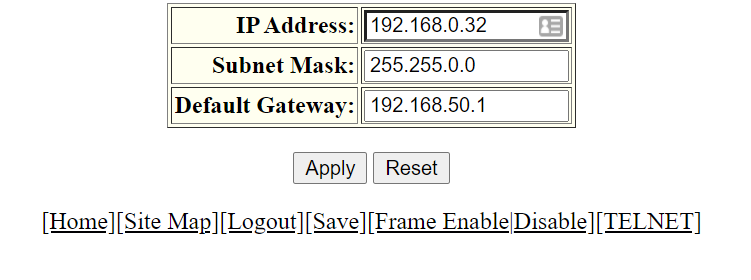
The switch that's giving me trouble looks like this
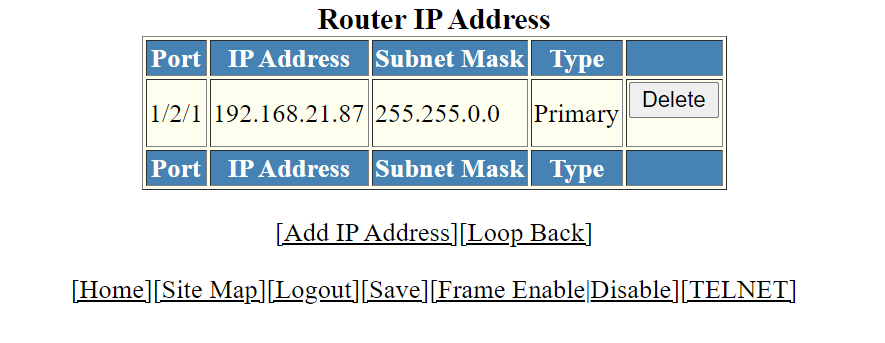
Anonymous
Not applicable
Options
- Mark as New
- Bookmark
- Subscribe
- Mute
- Subscribe to RSS Feed
- Permalink
- Report Inappropriate Content
07-20-2021 09:59 AM
This all started one day when none of the endpoints attached to this switch would respond. I observed that I could see these devices if I was connected to this switch directly but not if I was connected to an upstream switch. Since I had exhausted all of my troubleshooting options I chose to factory reset the switch (Not with the reset button because that doesn't work at all).
This is where I'm left.
I can access my switch using the IP address handed out by DHCP but as far as getting the correct IP, subnet, and gateway assigned im completely stumped
Labels
-
7250
1 -
802.3af PoE
1 -
802.3at PoE
1 -
AAA
1 -
ACL
1 -
auto-provision
1 -
auto-provisioning
1 -
Cluster synchronization
1 -
Crypto Keys
1 -
Deployment
1 -
dhcp-66
1 -
fastiron-10
1 -
fastiron-8
1 -
Firmware Downgrade
1 -
Firmware Recommendation
1 -
Firmware Upgrade
5 -
ICX
3 -
ICX 7150-C12p
1 -
ICX switch
2 -
ICX Switch Management
10 -
ICX-7150-C12
1 -
ICX-7550
1 -
ICX-8200
1 -
Installation
2 -
not enough electricity
1 -
overlad
1 -
Override PoE Operating Mode
1 -
PD overload
1 -
Poe
2 -
PoE mode.
1 -
power limitations
1 -
Proposed Solution
1 -
RADIUS
1 -
Routing
2 -
RUCKUS Self-Help
2 -
stack
1 -
stack password
1 -
Stacking
1 -
tftp
1 -
Upgrade
1 -
Upgrade path
1 -
We
1 -
zero-touch
1
- « Previous
- Next »
