This website uses cookies. By clicking Accept, you consent to the use of cookies. Click Here to learn more about how we use cookies.

- Community
- RUCKUS Technologies
- RUCKUS Lennar Support
- Community Services
- RTF
- RTF Community
- Australia and New Zealand – English
- Brazil – Português
- China – 简体中文
- France – Français
- Germany – Deutsch
- Hong Kong – 繁體中文
- India – English
- Indonesia – bahasa Indonesia
- Italy – Italiano
- Japan – 日本語
- Korea – 한국어
- Latin America – Español (Latinoamérica)
- Middle East & Africa – English
- Netherlands – Nederlands
- Nordics – English
- North America – English
- Poland – polski
- Russia – Русский
- Singapore, Malaysia, and Philippines – English
- Spain – Español
- Taiwan – 繁體中文
- Thailand – ไทย
- Turkey – Türkçe
- United Kingdom – English
- Vietnam – Tiếng Việt
- EOL Products
Turn on suggestions
Auto-suggest helps you quickly narrow down your search results by suggesting possible matches as you type.
Showing results for
- RUCKUS Forums
- RUCKUS Technologies
- Access Points
- Re: R710 unleashed group. Do not connect new AP.
Options
- Subscribe to RSS Feed
- Mark Topic as New
- Mark Topic as Read
- Float this Topic for Current User
- Bookmark
- Subscribe
- Mute
- Printer Friendly Page
R710 unleashed group. Do not connect new AP.

Anonymous
Not applicable
Options
- Mark as New
- Bookmark
- Subscribe
- Mute
- Subscribe to RSS Feed
- Permalink
- Report Inappropriate Content
10-18-2018 07:59 AM
I have a working group of four R710.
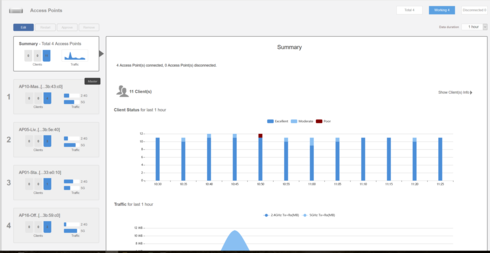
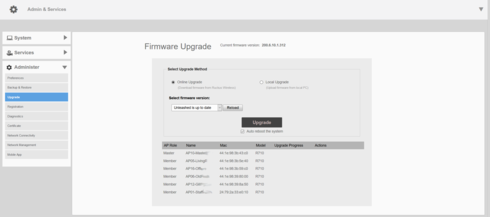
But attempts to add new access points to the group are unsuccessful. New devices are updated to the latest firmware version, but are only visible in the section Admin & Service -> Administer -> Upgrade.
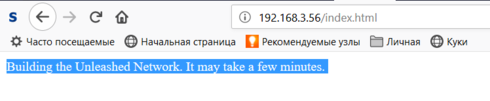
I can connect to new AP only via SSH, since via HTTP (S) I only see one page.
After outputting the debug information to the syslog server, I get a recurring group of messages for the new point:
Oct 18 14:46:10 wsgclient[540]: registration:692 Failed to init socket! ret:125 url:https://RuckusController/wsg/ap
Oct 18 14:46:10 wsgclient[540]: communicatorInit:331 Init connection failed, ret:125, connectRetry:1395
Oct 18 14:46:10 wsgclient[540]: cmrInit:141 Call 'crDefSocketInit()' failed, ip: port:443, ret:125/CR initial socket failed
Oct 18 14:46:10 wsgclient[540]: crResloveAddrInfo:152 getaddrinfo failed, ret:-2/Name or service not known
I ask the club for help solving this riddle.
But attempts to add new access points to the group are unsuccessful. New devices are updated to the latest firmware version, but are only visible in the section Admin & Service -> Administer -> Upgrade.
I can connect to new AP only via SSH, since via HTTP (S) I only see one page.
After outputting the debug information to the syslog server, I get a recurring group of messages for the new point:
Oct 18 14:46:10 wsgclient[540]: registration:692 Failed to init socket! ret:125 url:https://RuckusController/wsg/ap
Oct 18 14:46:10 wsgclient[540]: communicatorInit:331 Init connection failed, ret:125, connectRetry:1395
Oct 18 14:46:10 wsgclient[540]: cmrInit:141 Call 'crDefSocketInit()' failed, ip: port:443, ret:125/CR initial socket failed
Oct 18 14:46:10 wsgclient[540]: crResloveAddrInfo:152 getaddrinfo failed, ret:-2/Name or service not known
I ask the club for help solving this riddle.
42 REPLIES 42

Options
- Mark as New
- Bookmark
- Subscribe
- Mute
- Subscribe to RSS Feed
- Permalink
- Report Inappropriate Content
10-19-2018 02:38 AM
1. If you factory reset AP and AP can not join Unleashed network, how it can know the external syslog server setting and send these messages out?
2. "fw show all" command shows one backup image is 110.x which is not same as the previous 104.x, why? Did you check the same AP?
2. "fw show all" command shows one backup image is 110.x which is not same as the previous 104.x, why? Did you check the same AP?
Options
- Mark as New
- Bookmark
- Subscribe
- Mute
- Subscribe to RSS Feed
- Permalink
- Report Inappropriate Content
10-19-2018 02:45 AM
BTW: AP with either build 104.x or 110.x can not join Unleashed network. So please ensure AP is working on 200.x Unleashed firmware.
Options
- Mark as New
- Bookmark
- Subscribe
- Mute
- Subscribe to RSS Feed
- Permalink
- Report Inappropriate Content
10-19-2018 04:21 AM
1. "how it can know the external syslog server setting and send these messages out?"
- Connect via SSH and enter parameters in the command
set syslog : set syslog {options}
-> {enable|disable}
-> ip
-> port
-> protocol {tcp|udp}
-> level {local|network} level {0|1|..|6|7}
-----------------------------------------------
** 0(emergency), 1(alert), 2(critical) 3(error)
** 4(warning), 5(notice), 6(info), 7(debug)
-- Modify Syslog Settings
2. "Did you check the same AP?"
- I managed to load the 110.x version, and go back to 200.x. Please note that the MAC and IP points have not changed.
44:1e:98:39:80:00 192.168.3.56 member 1 67 313520 1 0 1 R710 200.6.10.1.312 110.0.0.0.663
- Connect via SSH and enter parameters in the command
set syslog : set syslog {options}
-> {enable|disable}
-> ip
-> port
-> protocol {tcp|udp}
-> level {local|network} level {0|1|..|6|7}
-----------------------------------------------
** 0(emergency), 1(alert), 2(critical) 3(error)
** 4(warning), 5(notice), 6(info), 7(debug)
-- Modify Syslog Settings
2. "Did you check the same AP?"
- I managed to load the 110.x version, and go back to 200.x. Please note that the MAC and IP points have not changed.
44:1e:98:39:80:00 192.168.3.56 member 1 67 313520 1 0 1 R710 200.6.10.1.312 110.0.0.0.663

Options
- Mark as New
- Bookmark
- Subscribe
- Mute
- Subscribe to RSS Feed
- Permalink
- Report Inappropriate Content
10-19-2018 10:13 AM
Hi Everybody,
Lots of community activity overnight, great. What you NEED is UNLEASHED firmware, if you want
your R710 to be recognized and join the Unleashed network. That's the 200.6 code, not 104.x or 110.x
which are Solo AP/Standalone AP code, which will join a ZoneDirector or SmartZone controller, or run
in Standalone mode, IGNORING the Unleashed network on the same VLAN...
Here is the code you need:
https://support.ruckuswireless.com/software/1809-ruckus-unleashed-ap-200-6-10-1-312-ga-refresh2-soft...
I hope you are soon running all your APs in Unleashed! With best regards.
Lots of community activity overnight, great. What you NEED is UNLEASHED firmware, if you want
your R710 to be recognized and join the Unleashed network. That's the 200.6 code, not 104.x or 110.x
which are Solo AP/Standalone AP code, which will join a ZoneDirector or SmartZone controller, or run
in Standalone mode, IGNORING the Unleashed network on the same VLAN...
Here is the code you need:
https://support.ruckuswireless.com/software/1809-ruckus-unleashed-ap-200-6-10-1-312-ga-refresh2-soft...
I hope you are soon running all your APs in Unleashed! With best regards.
Anonymous
Not applicable
Options
- Mark as New
- Bookmark
- Subscribe
- Mute
- Subscribe to RSS Feed
- Permalink
- Report Inappropriate Content
10-19-2018 01:01 PM
Dear Mr. Brado.
Apparently there was too much activity and you didn’t read the text.
Therefore, a brief summary: There are seven devices Ruckus R710 purchased at different times. ONE VERSION OF FIRMWARE - R710_200.6.10.1.312 is installed on all devices (exactly the version that you recommended). Four devices united in a group, and three others cannot join due to an error. An example of error messages is in the first message.
Apparently there was too much activity and you didn’t read the text.
Therefore, a brief summary: There are seven devices Ruckus R710 purchased at different times. ONE VERSION OF FIRMWARE - R710_200.6.10.1.312 is installed on all devices (exactly the version that you recommended). Four devices united in a group, and three others cannot join due to an error. An example of error messages is in the first message.
Labels
-
Access points
1 -
AP Controller Connectivity
2 -
AP Management
6 -
AP migration
1 -
Authentication Server
1 -
cli
1 -
Client Management
2 -
Firmware Upgrade
2 -
Guest Pass
1 -
I live in
1 -
Installation
3 -
IP Multicast
1 -
Poe
3 -
Proposed Solution
2 -
R320 SLOW SPEED
1 -
R550
1 -
R610
1 -
R650
2 -
R750
2 -
Ruckus
1 -
Security
1 -
SmartZone
1 -
Solution Proposed
2 -
SSH
1 -
Unleashed
1 -
User Management
1 -
Wireless Throughput
1 -
WLAN Management
2 -
ZoneDirector
1
- « Previous
- Next »
