This website uses cookies. By clicking Accept, you consent to the use of cookies. Click Here to learn more about how we use cookies.

- Community
- RUCKUS Technologies
- RUCKUS Lennar Support
- Community Services
- RTF
- RTF Community
- Australia and New Zealand – English
- Brazil – Português
- China – 简体中文
- France – Français
- Germany – Deutsch
- Hong Kong – 繁體中文
- India – English
- Indonesia – bahasa Indonesia
- Italy – Italiano
- Japan – 日本語
- Korea – 한국어
- Latin America – Español (Latinoamérica)
- Middle East & Africa – English
- Netherlands – Nederlands
- Nordics – English
- North America – English
- Poland – polski
- Russia – Русский
- Singapore, Malaysia, and Philippines – English
- Spain – Español
- Taiwan – 繁體中文
- Thailand – ไทย
- Turkey – Türkçe
- United Kingdom – English
- Vietnam – Tiếng Việt
- EOL Products
Turn on suggestions
Auto-suggest helps you quickly narrow down your search results by suggesting possible matches as you type.
Showing results for
- RUCKUS Forums
- RUCKUS Technologies
- Access Points
- Re: R710 unleashed group. Do not connect new AP.
Options
- Subscribe to RSS Feed
- Mark Topic as New
- Mark Topic as Read
- Float this Topic for Current User
- Bookmark
- Subscribe
- Mute
- Printer Friendly Page
R710 unleashed group. Do not connect new AP.

Anonymous
Not applicable
Options
- Mark as New
- Bookmark
- Subscribe
- Mute
- Subscribe to RSS Feed
- Permalink
- Report Inappropriate Content
10-18-2018 07:59 AM
I have a working group of four R710.
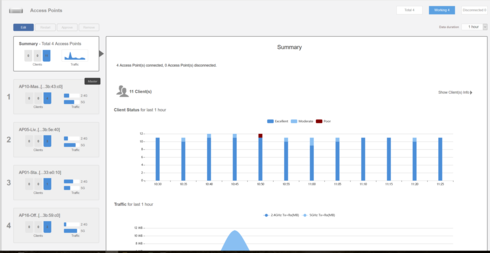
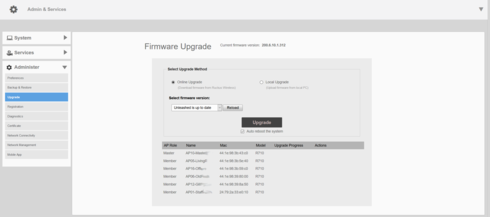
But attempts to add new access points to the group are unsuccessful. New devices are updated to the latest firmware version, but are only visible in the section Admin & Service -> Administer -> Upgrade.
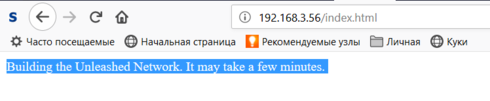
I can connect to new AP only via SSH, since via HTTP (S) I only see one page.
After outputting the debug information to the syslog server, I get a recurring group of messages for the new point:
Oct 18 14:46:10 wsgclient[540]: registration:692 Failed to init socket! ret:125 url:https://RuckusController/wsg/ap
Oct 18 14:46:10 wsgclient[540]: communicatorInit:331 Init connection failed, ret:125, connectRetry:1395
Oct 18 14:46:10 wsgclient[540]: cmrInit:141 Call 'crDefSocketInit()' failed, ip: port:443, ret:125/CR initial socket failed
Oct 18 14:46:10 wsgclient[540]: crResloveAddrInfo:152 getaddrinfo failed, ret:-2/Name or service not known
I ask the club for help solving this riddle.
But attempts to add new access points to the group are unsuccessful. New devices are updated to the latest firmware version, but are only visible in the section Admin & Service -> Administer -> Upgrade.
I can connect to new AP only via SSH, since via HTTP (S) I only see one page.
After outputting the debug information to the syslog server, I get a recurring group of messages for the new point:
Oct 18 14:46:10 wsgclient[540]: registration:692 Failed to init socket! ret:125 url:https://RuckusController/wsg/ap
Oct 18 14:46:10 wsgclient[540]: communicatorInit:331 Init connection failed, ret:125, connectRetry:1395
Oct 18 14:46:10 wsgclient[540]: cmrInit:141 Call 'crDefSocketInit()' failed, ip: port:443, ret:125/CR initial socket failed
Oct 18 14:46:10 wsgclient[540]: crResloveAddrInfo:152 getaddrinfo failed, ret:-2/Name or service not known
I ask the club for help solving this riddle.
42 REPLIES 42
Options
- Mark as New
- Bookmark
- Subscribe
- Mute
- Subscribe to RSS Feed
- Permalink
- Report Inappropriate Content
10-18-2018 11:58 PM
Can you try "set factory" in CLI and try again.
------------------------
Only the administrator's name and password has changed.
------------------------
Only the administrator's name and password has changed.
Options
- Mark as New
- Bookmark
- Subscribe
- Mute
- Subscribe to RSS Feed
- Permalink
- Report Inappropriate Content
10-19-2018 12:25 AM
You've definitely selected three unattached devices. But there is one more device attached:
24:79:2a:33:e0:10 192.168.3.51 member 482 66 293324 1 0 1 R710 200.6.10.1.312 110.0.0.0.663
It differs in the previous version of the firmware. Is it possible for non-aligned devices to return to version 104.x, update it to 110.x, and only then update to 200.x?
24:79:2a:33:e0:10 192.168.3.51 member 482 66 293324 1 0 1 R710 200.6.10.1.312 110.0.0.0.663
It differs in the previous version of the firmware. Is it possible for non-aligned devices to return to version 104.x, update it to 110.x, and only then update to 200.x?
Options
- Mark as New
- Bookmark
- Subscribe
- Mute
- Subscribe to RSS Feed
- Permalink
- Report Inappropriate Content
10-19-2018 01:41 AM
You've definitely selected three unattached devices. But there is one more device attached:
24:79:2a:33:e0:10 192.168.3.51 member 482 66 293324 1 0 1 R710 200.6.10.1.312 110.0.0.0.663
It differs in the previous version of the firmware. Is it possible for non-aligned devices to return to version 104.x, update it to 110.x, and only then update to 200.x?
----------------------------
Better not. Now:
44:1e:98:39:80:00 192.168.3.56 member 1 67 313520 1 0 1 R710 200.6.10.1.312 110.0.0.0.663
There is no connection with the master. Errors are repeated.
Need help specialist in firmware.
24:79:2a:33:e0:10 192.168.3.51 member 482 66 293324 1 0 1 R710 200.6.10.1.312 110.0.0.0.663
It differs in the previous version of the firmware. Is it possible for non-aligned devices to return to version 104.x, update it to 110.x, and only then update to 200.x?
----------------------------
Better not. Now:
44:1e:98:39:80:00 192.168.3.56 member 1 67 313520 1 0 1 R710 200.6.10.1.312 110.0.0.0.663
There is no connection with the master. Errors are repeated.
Need help specialist in firmware.
Anonymous
Not applicable
Options
- Mark as New
- Bookmark
- Subscribe
- Mute
- Subscribe to RSS Feed
- Permalink
- Report Inappropriate Content
10-18-2018 11:49 PM
Please tell me which command switches the boot image from Image1 to Image2?

Options
- Mark as New
- Bookmark
- Subscribe
- Mute
- Subscribe to RSS Feed
- Permalink
- Report Inappropriate Content
10-18-2018 11:58 PM
You don't need to switch the image. I see you pasted the current version(200.6.10.1.312) is correct. so you just do a factory reset and reboot it to try.
Labels
-
Access points
1 -
AP Controller Connectivity
2 -
AP Management
6 -
AP migration
1 -
Authentication Server
1 -
cli
1 -
Client Management
2 -
Firmware Upgrade
2 -
Guest Pass
1 -
I live in
1 -
Installation
3 -
IP Multicast
1 -
Poe
3 -
Proposed Solution
2 -
R320 SLOW SPEED
1 -
R550
1 -
R610
1 -
R650
2 -
R750
2 -
Ruckus
1 -
Security
1 -
SmartZone
1 -
Solution Proposed
2 -
SSH
1 -
Unleashed
1 -
User Management
1 -
Wireless Throughput
1 -
WLAN Management
2 -
ZoneDirector
1
- « Previous
- Next »
