This website uses cookies. By clicking Accept, you consent to the use of cookies. Click Here to learn more about how we use cookies.
RUCKUS Community Forums are now in READ-ONLY mode while we migrate to a new platform.
You will still be able to read posts and knowledge articles, but will be unable to post new content until Go Live on the new platform Monday August 17.
Lennar Smart Home customers: please contact [email protected] for assistance during the week of August 9-17.

- Community
- RUCKUS Technologies
- RUCKUS Lennar Support
- Community Services
- RTF
- RTF Community
- Australia and New Zealand – English
- Brazil – Português
- China – 简体中文
- France – Français
- Germany – Deutsch
- Hong Kong – 繁體中文
- India – English
- Indonesia – bahasa Indonesia
- Italy – Italiano
- Japan – 日本語
- Korea – 한국어
- Latin America – Español (Latinoamérica)
- Middle East & Africa – English
- Netherlands – Nederlands
- Nordics – English
- North America – English
- Poland – polski
- Russia – Русский
- Singapore, Malaysia, and Philippines – English
- Spain – Español
- Taiwan – 繁體中文
- Thailand – ไทย
- Turkey – Türkçe
- United Kingdom – English
- Vietnam – Tiếng Việt
- EOL Products
Turn on suggestions
Auto-suggest helps you quickly narrow down your search results by suggesting possible matches as you type.
Showing results for
- RUCKUS Forums
- RUCKUS Technologies
- ZD
- Re: HtH: ZoneDirector - Setting Up Web Authenticat...
Options
- Subscribe to RSS Feed
- Mark Topic as New
- Mark Topic as Read
- Float this Topic for Current User
- Bookmark
- Subscribe
- Mute
- Printer Friendly Page
HtH: ZoneDirector - Setting Up Web Authentication with LDAP

Options
- Mark as New
- Bookmark
- Subscribe
- Mute
- Subscribe to RSS Feed
- Permalink
- Report Inappropriate Content
05-28-2019 04:02 PM
Announcing new video, articles, and technical document resources for setting up web authentication with LDAP on ZoneDirector:
Video:
ZoneDirector:Setting Up Web Authentication with LDAP
KB Articles:
Configuring LDAP based web authentication on ZoneDirector
LDAP authentication empty or no password
LDAP authentication with encrypted password
Is it possible to configure 802.1X with Active Directory?
Issue with AAA to Novell through LDAP
Tech Docs:
"Using an External AAA Server" section in the ZoneDirector 10.2 User Guide
Video:
ZoneDirector:Setting Up Web Authentication with LDAP
KB Articles:
Configuring LDAP based web authentication on ZoneDirector
LDAP authentication empty or no password
LDAP authentication with encrypted password
Is it possible to configure 802.1X with Active Directory?
Issue with AAA to Novell through LDAP
Tech Docs:
"Using an External AAA Server" section in the ZoneDirector 10.2 User Guide
Reply
3 REPLIES 3

Anonymous
Not applicable
Options
- Mark as New
- Bookmark
- Subscribe
- Mute
- Subscribe to RSS Feed
- Permalink
- Report Inappropriate Content
08-06-2019 09:35 PM
Thanks for the instruction.
I have a question. I configure it on Smatzone. When I test LDAP server, it show: Primary server: Success!. But when I login via hotspot and authenticate via LDAP, it won't let me connect, only show login failed. Please advice. Thank you.
I have a question. I configure it on Smatzone. When I test LDAP server, it show: Primary server: Success!. But when I login via hotspot and authenticate via LDAP, it won't let me connect, only show login failed. Please advice. Thank you.

Options
- Mark as New
- Bookmark
- Subscribe
- Mute
- Subscribe to RSS Feed
- Permalink
- Report Inappropriate Content
09-29-2023 06:58 AM
Hello community.
I have a problem, when the client tries to log into LDAP, the portal shows an error saying "system busy, please try again".
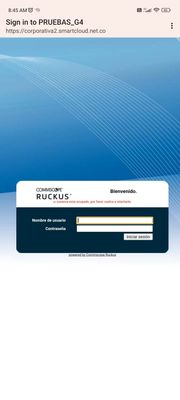
We are thinking that the problem could be the port that is be blocked by the firewall, but we don't have access to the firewall to see the port, and we can't find the port through the forums.
We have configured the no-proxy like this
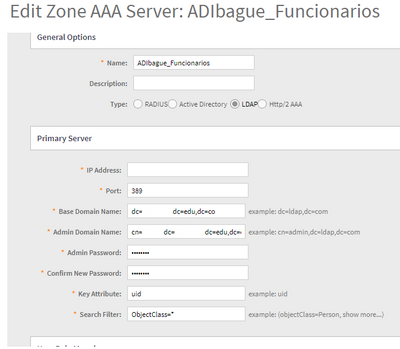
We appreciate your help.


Options
- Mark as New
- Bookmark
- Subscribe
- Mute
- Subscribe to RSS Feed
- Permalink
- Report Inappropriate Content
09-29-2023 07:00 PM
Hi @Isai_Roa
The default port for the LDAP is 389. However, have you checked the below points:
1. Is the AP connected to the Controller and showing "Up-to-date"?
2. Login to the AP CLI and ping the controller and LDAP server to see if there is any delay or packet drops.
3. Try rebooting the AP once.
4. You can also try to use Proxy instead of "Non-Proxy" and check.
Labels
-
DHCP
1 -
IP lease
1 -
license snmp
1 -
Proposed Solution
1 -
Ruckus
1 -
server
1 -
VLAN
1 -
wap
1 -
zone director
1 -
ZoneDirector
1
