This website uses cookies. By clicking Accept, you consent to the use of cookies. Click Here to learn more about how we use cookies.
RUCKUS Community Forums are now in READ-ONLY mode while we migrate to a new platform.
You will still be able to read posts and knowledge articles, but will be unable to post new content until Go Live on the new platform Monday August 17.
Lennar Smart Home customers: please contact [email protected] for assistance during the week of August 9-17.

- Community
- RUCKUS Technologies
- RUCKUS Lennar Support
- Community Services
- RTF
- RTF Community
- Australia and New Zealand – English
- Brazil – Português
- China – 简体中文
- France – Français
- Germany – Deutsch
- Hong Kong – 繁體中文
- India – English
- Indonesia – bahasa Indonesia
- Italy – Italiano
- Japan – 日本語
- Korea – 한국어
- Latin America – Español (Latinoamérica)
- Middle East & Africa – English
- Netherlands – Nederlands
- Nordics – English
- North America – English
- Poland – polski
- Russia – Русский
- Singapore, Malaysia, and Philippines – English
- Spain – Español
- Taiwan – 繁體中文
- Thailand – ไทย
- Turkey – Türkçe
- United Kingdom – English
- Vietnam – Tiếng Việt
- EOL Products
Turn on suggestions
Auto-suggest helps you quickly narrow down your search results by suggesting possible matches as you type.
Showing results for
- RUCKUS Forums
- RUCKUS Technologies
- Unleashed
- Re: Recurrent broadcasting Configure.me on 5Ghz in...
Options
- Subscribe to RSS Feed
- Mark Topic as New
- Mark Topic as Read
- Float this Topic for Current User
- Bookmark
- Subscribe
- Mute
- Printer Friendly Page
Recurrent broadcasting Configure.me on 5Ghz in configured network

Anonymous
Not applicable
Options
- Mark as New
- Bookmark
- Subscribe
- Mute
- Subscribe to RSS Feed
- Permalink
- Report Inappropriate Content
01-25-2017 02:05 AM
In the simple network with:
- two access-points R600 (master) and R500
- unlashed 200.2.9.13.186
- connected via DGS-1100-08
- four SSIDs but only two active
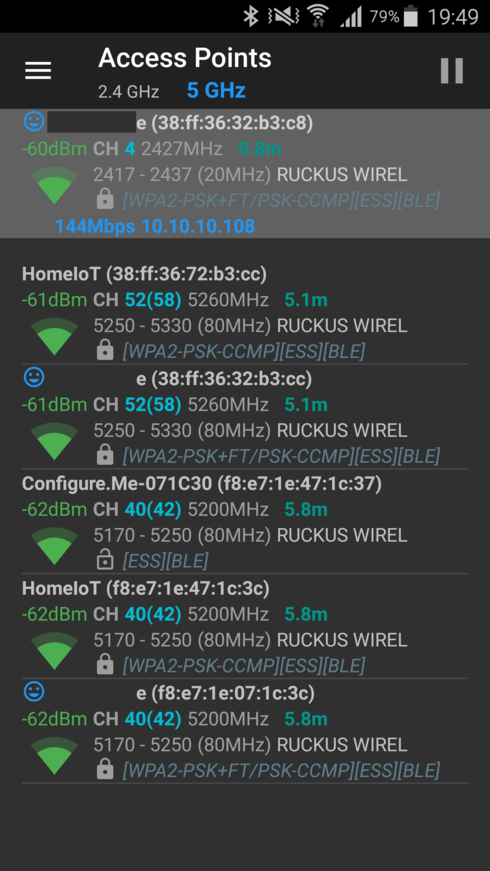
I have a problem - R500 recurrently broadcasts an open network Configure.Me.
That network is only on 5Ghz (as I understood from documentation it should be broadcasted only on 2,4Ghz and only during first configuration).
Get wlanlistname shows all inactive bssid as 00:00:00:00:00:00, with one exception - wlan103 is down but bssid is " f8:e7:1e:47:1c:37".
How can I disable broadcasting Configure.Me ?
rkscli: get wlanlistname status type wlanID radioID bssid ssid
--------------------------------------------------------------------------------------------------
wlan0 up AP wlan0 0 f8:e7:1e:07:1c:38 e
wlan1 up AP wlan1 0 f8:e7:1e:47:1c:38 HomeIoT
wlan2 down AP wlan2 0 00:00:00:00:00:00 Internet
wlan3 down AP wlan3 0 00:00:00:00:00:00 Plus 8
wlan100 down MON wlan100 0 00:00:00:00:00:00
recovery-ssid down AP wlan102 0 00:00:00:00:00:00 Configure.Me-071C30
wlan32 up AP wlan32 1 f8:e7:1e:07:1c:3c e
wlan33 up AP wlan33 1 f8:e7:1e:47:1c:3c HomeIoT
wlan34 down AP wlan34 1 00:00:00:00:00:00 Internet
wlan35 down AP wlan35 1 00:00:00:00:00:00 Plus 8
recovery-ssid down AP wlan103 1 f8:e7:1e:47:1c:37 Configure.Me-071C30
OK
- two access-points R600 (master) and R500
- unlashed 200.2.9.13.186
- connected via DGS-1100-08
- four SSIDs but only two active
I have a problem - R500 recurrently broadcasts an open network Configure.Me.
That network is only on 5Ghz (as I understood from documentation it should be broadcasted only on 2,4Ghz and only during first configuration).
Get wlanlistname shows all inactive bssid as 00:00:00:00:00:00, with one exception - wlan103 is down but bssid is " f8:e7:1e:47:1c:37".
How can I disable broadcasting Configure.Me ?
rkscli: get wlanlistname status type wlanID radioID bssid ssid
--------------------------------------------------------------------------------------------------
wlan0 up AP wlan0 0 f8:e7:1e:07:1c:38 e
wlan1 up AP wlan1 0 f8:e7:1e:47:1c:38 HomeIoT
wlan2 down AP wlan2 0 00:00:00:00:00:00 Internet
wlan3 down AP wlan3 0 00:00:00:00:00:00 Plus 8
wlan100 down MON wlan100 0 00:00:00:00:00:00
recovery-ssid down AP wlan102 0 00:00:00:00:00:00 Configure.Me-071C30
wlan32 up AP wlan32 1 f8:e7:1e:07:1c:3c e
wlan33 up AP wlan33 1 f8:e7:1e:47:1c:3c HomeIoT
wlan34 down AP wlan34 1 00:00:00:00:00:00 Internet
wlan35 down AP wlan35 1 00:00:00:00:00:00 Plus 8
recovery-ssid down AP wlan103 1 f8:e7:1e:47:1c:37 Configure.Me-071C30
OK
Reply
2 REPLIES 2
Anonymous
Not applicable
Options
- Mark as New
- Bookmark
- Subscribe
- Mute
- Subscribe to RSS Feed
- Permalink
- Report Inappropriate Content
01-25-2017 08:52 AM
Hi
i fear that R50O has not joined the Unleashed network correctly...
do you see R500 listed as connected AP as master AP or standby AP?
i fear that R50O has not joined the Unleashed network correctly...
do you see R500 listed as connected AP as master AP or standby AP?
Anonymous
Not applicable
Options
- Mark as New
- Bookmark
- Subscribe
- Mute
- Subscribe to RSS Feed
- Permalink
- Report Inappropriate Content
01-25-2017 12:45 PM
Yes I see R500 as standby AP
---------------------------------------
---------------------------------------
ruckus# show ap all
AP:
  ID:
    1:
      MAC Address= 38:ff:36:32:b3:c0
      Model= r600
      Approved= Yes
      Device Name= R 600
      Description=
      Location=
      GPS=
      CERT = Normal
      Bonjour-policy=
      Group Name= System Default
      Channel Range:
        A/N= 36,40,44,48,52,56,60,64,100,104,108,112,116,120,124,128,132,136 (Disallowed= )
        B/G/N= 1,2,3,4,5,6,7,8,9,10,11,12,13 (Disallowed= )
      Radio a/n:
        Channelization= Auto
        Channel= Auto
        WLAN Services enabled= Yes
        Tx. Power= -6dB(1/4)
        WLAN Group Name= Default
        Call Admission Control= OFF
        SpectraLink Compatibility= Disabled
      Radio b/g/n:
        Channelization= Auto
        Channel= Auto
        WLAN Services enabled= Yes
        Tx. Power= Auto
        WLAN Group Name= Default
        Call Admission Control= OFF
        SpectraLink Compatibility= Disabled
      Override global ap-model port configuration= No
      Network Setting:
        Protocol mode= Use Parent Setting
        Device IP Settings= Manual
        IP Address= 10.10.10.203
        Netmask= 255.255.255.0
        Gateway= 10.10.10.1
        Primary DNS Server=
        Secondary DNS Server=
        Device IPv6 Settings= Keep AP's Setting
IPv6 Type= Auto Configuration
IPv6 Address=
IPv6 Prefix Length= 0
IPv6 Gateway=
IPv6 Primary DNS Server=
IPv6 Secondary DNS Server=
Mesh:
Status= Disabled
LLDP:
Status = Use Parent Setting
LAN Port:
0:
Interface= eth0
Dot1x= None
LogicalLink= Up
PhysicalLink= Up 1000Mbps full
Label= 10/100/1000 PoE LAN1
1:
Interface= eth1
Dot1x= None
LogicalLink= Down
PhysicalLink= Down
Label= 10/100/1000 LAN2
2:
MAC Address= f8:e7:1e:07:1c:30
Model= r500
Approved= Yes
Device Name= R 500
Description=
Location=
GPS=
CERT = Normal
Bonjour-policy=
Group Name= System Default
Channel Range:
A/N= 36,40,44,48,52,56,60,64,100,104,108,112,116,120,124,128,132,136 (Disallowed= )
B/G/N= 1,2,3,4,5,6,7,8,9,10,11 (Disallowed= 12,13)
Radio a/n:
Channelization= Auto
Channel= Auto
WLAN Services enabled= Yes Tx. Power= -6dB(1/4)
WLAN Group Name= Default
Call Admission Control= OFF SpectraLink Compatibility= Disabled
Radio b/g/n:
Channelization= Auto
Channel= Auto
WLAN Services enabled= Yes
Tx. Power= -6dB(1/4)
WLAN Group Name= Default
Call Admission Control= OFF
SpectraLink Compatibility= Disabled
Override global ap-model port configuration= No
Network Setting:
Protocol mode= Use Parent Setting
Device IP Settings= Keep AP's Setting
IP Type= Static
IP Address= 10.10.10.204
Netmask= 255.255.255.0
Gateway= 10.10.10.1
Primary DNS Server= 10.10.10.220
Secondary DNS Server= 8.8.8.8
Device IPv6 Settings= Keep AP's Setting
IPv6 Type= Auto Configuration
IPv6 Address=
IPv6 Prefix Length= 0
IPv6 Gateway=
IPv6 Primary DNS Server=
IPv6 Secondary DNS Server=
Mesh:
Status= Disabled
LLDP:
Status = Use Parent Setting
LAN Port:
0:
Interface= eth0
Dot1x= None
LogicalLink= Up
PhysicalLink= Up 1000Mbps full
Label= 10/100/1000 PoE LAN1
1:
Interface= eth1
Dot1x= None
LogicalLink= Down
PhysicalLink= Down
Label= 10/100/1000 LAN2
Labels
-
AP Certificate error
1 -
AP Management
5 -
AP reporting
1 -
authentication fails
1 -
captive portal
1 -
Certificate
1 -
Client Management
1 -
DPSK
1 -
Guest Access
1 -
Guest Pass
1 -
Installation
1 -
IP Multicast
1 -
l2acl
1 -
LACP
1 -
laptop hp probook 430 g8
1 -
Mesh
1 -
Monitoring
1 -
Op
1 -
pfSense
1 -
R310
2 -
R550
1 -
Security
1 -
Solution Proposed
3 -
SSID
1 -
temporarily blocked
1 -
Unleashed
5 -
User Management
1 -
Web UI
1 -
Wired Throughput
1 -
Wireless Throughput
2 -
WLAN
1 -
WLAN Management
2 -
WPA3
1 -
WPA3-Enterprise
1
- « Previous
- Next »
