This website uses cookies. By clicking Accept, you consent to the use of cookies. Click Here to learn more about how we use cookies.
RUCKUS Community Forums are now in READ-ONLY mode while we migrate to a new platform.
You will still be able to read posts and knowledge articles, but will be unable to post new content until Go Live on the new platform Monday August 17.
Lennar Smart Home customers: please contact [email protected] for assistance during the week of August 9-17.

- Community
- RUCKUS Technologies
- RUCKUS Lennar Support
- Community Services
- RTF
- RTF Community
- Australia and New Zealand – English
- Brazil – Português
- China – 简体中文
- France – Français
- Germany – Deutsch
- Hong Kong – 繁體中文
- India – English
- Indonesia – bahasa Indonesia
- Italy – Italiano
- Japan – 日本語
- Korea – 한국어
- Latin America – Español (Latinoamérica)
- Middle East & Africa – English
- Netherlands – Nederlands
- Nordics – English
- North America – English
- Poland – polski
- Russia – Русский
- Singapore, Malaysia, and Philippines – English
- Spain – Español
- Taiwan – 繁體中文
- Thailand – ไทย
- Turkey – Türkçe
- United Kingdom – English
- Vietnam – Tiếng Việt
- EOL Products
Turn on suggestions
Auto-suggest helps you quickly narrow down your search results by suggesting possible matches as you type.
Showing results for
- RUCKUS Forums
- RUCKUS Technologies
- Unleashed
- Re: R750 Slow Speeds
Options
- Subscribe to RSS Feed
- Mark Topic as New
- Mark Topic as Read
- Float this Topic for Current User
- Bookmark
- Subscribe
- Mute
- Printer Friendly Page
R750 Slow Speeds

Options
- Mark as New
- Bookmark
- Subscribe
- Mute
- Subscribe to RSS Feed
- Permalink
- Report Inappropriate Content
11-24-2020 07:57 PM
One of my homes has Cable Internet speeds rated at 450 Mbps Down & 20Mbps Up.
I have a Arris TM1602 DoCSIS 3.0 16x4 > Ubiquiti EdgeRouter 12
At this location I had a...
27" iMac (Model Spring 2019)
iMac > Cat 6 Wire > EdgeRouter 12 = 450 Mbps Down & 20 Mbps Up
iMac > WiFi 5 > PhiComm K3C AC 1900 = 380 Mbps Down & 20 Mbps Up
iPhone 11 Pro (2x2 WiFi 6 Chipset) > WiFi 5 > PhiComm K3C AC 1900 = 365 Mbps Down & 20 Mbps Up
I picked up a Ruckus R750 Unleashed and added it to the EdgeRouter 12
27" iMac (Model Spring 2019)
iMac > Cat 6 Wire > EdgeRouter 12 = 450 Mbps Down & 20 Mbps Up
iMac > WiFi 5 > Ruckus R750 = 375 Mbps Down & 20 Mbps Up
iPhone 11 Pro (2x2 WiFi 6 Chipset) > WiFi 6 > Ruckus R750 = 362 Mbps Down & 20 Mbps Up
Note: I am powering the R750 with a POE+ Injector but could it may be under powered?
I know if it is under powered it may not perform as well as it should but I find it hard to believe an $750 Access Point can't beat a 2 year old $80 consumer router, especially since R750 is WiFi 6 Certified and I'm using an iPhone 11 Pro with WiFi 6 2x2 Chipset.
PoE Injector = Cudy 30W Gigabit PoE+ Injector Adapter, IEEE 802.3 at and IEEE 802.3 af Compliant, up to 100 Meters (328 Feet), 10/100/1000Mbps RJ-45, POE150
Ruckus Power Specs
https://www.commscope.com/globalassets/digizuite/61778-ds-ruckus-r750.pdf (Page 5)
802.3af PoE = PoE: 12.54W
802.3at PoE+ = Full Functionality = PoE+ : 22.34W / DC Power: 22.69W
Ruckus Optional Accessories
These are much higher power specs than stated above in their power specs.
902-0180-XX00 · PoE Injector (60W)
902-1170-XX00 · Power Supply (48V, 0.75A, 36W)
Super appreciate any advice even if it's not related to the R750 just seems odd to me. Thank you!
I will also run iPerf3 tests between server (iMac) and iPhone to test the speed of the hardware minus the ISP. This will rule out any ISP issues. I still think hitting the same 450 Mpbs as a Cat 6 cable via the iPhone 11 Pro via the 2x2 WiFi 6 chipset should be easy.
27 REPLIES 27

Anonymous
Not applicable
Options
- Mark as New
- Bookmark
- Subscribe
- Mute
- Subscribe to RSS Feed
- Permalink
- Report Inappropriate Content
11-25-2020 12:02 AM
My set up is similar in that I also have R750 and EdgeRouter but ER4. Also use an injector - 60 watts also if I recall correctly but it is third party. In unleashed, I have the R750 set for at power mode always.
Gigabit down (measured at 940 with ookla on ethernet).
I see betw 400 and 650 on iPhone 11 Pro which is my only WiFi 6 device as I walk around. My WiFi 5 MacBook Pro toos out at around 550,
What is strange about your data is the iMac is faster than iPhone. Opposite my experience.
I don’t have suggestions but thought I would provide some comparative data given the setup similarities.
Reply
Anonymous
Not applicable
Options
- Mark as New
- Bookmark
- Subscribe
- Mute
- Subscribe to RSS Feed
- Permalink
- Report Inappropriate Content
11-25-2020 01:07 AM
https://www.commscope.com/resources/apps/ruckus-speedflex/
Try the Ruckus speedflex app to test without having to setup iPerf.
Also check on which radio band you are connecting, 2,4 or 5 GHz
Reply
Options
- Mark as New
- Bookmark
- Subscribe
- Mute
- Subscribe to RSS Feed
- Permalink
- Report Inappropriate Content
11-25-2020 04:45 AM
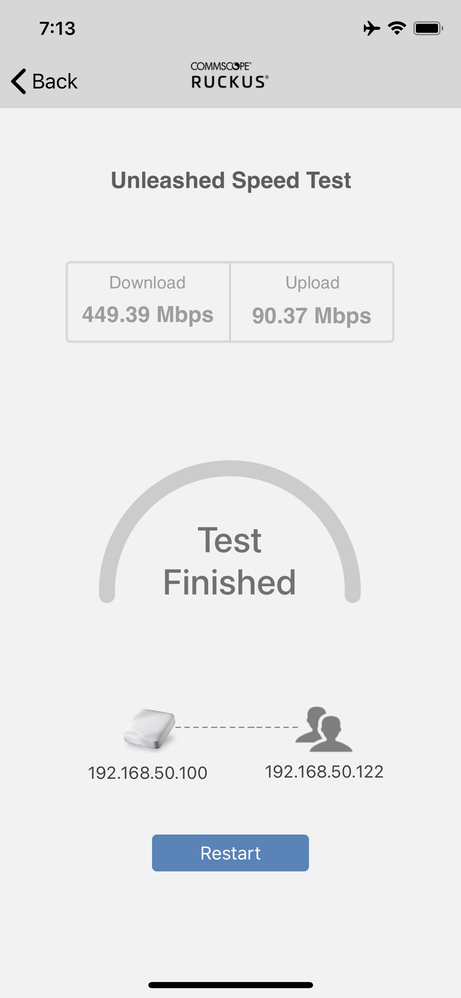
I tried the speedflex tool on the iPhone 11 Pro from about 10ft away no barriers.
I don’t know how to check which radio I’m connect too. Update below.
I will also get a 60W PoE injector but this should not be the issue I wouldn’t think.
R750 <> WiFi <> iPhone 11 Pro
This seems sad for a pretty high end Access Point.
Absolutely nothing else connected to this AP when this test was run.
Reply
Options
- Mark as New
- Bookmark
- Subscribe
- Mute
- Subscribe to RSS Feed
- Permalink
- Report Inappropriate Content
12-05-2022 08:45 PM
I'm having the exact same issue. I'm testing using Speedflex on a mac m1. I ping the AP itself so it isn't going out to the internet.
Labels
-
AP Certificate error
1 -
AP Management
5 -
AP reporting
1 -
authentication fails
1 -
captive portal
1 -
Certificate
1 -
Client Management
1 -
DPSK
1 -
Guest Access
1 -
Guest Pass
1 -
Installation
1 -
IP Multicast
1 -
l2acl
1 -
LACP
1 -
laptop hp probook 430 g8
1 -
Mesh
1 -
Monitoring
1 -
Op
1 -
pfSense
1 -
R310
2 -
R550
1 -
Security
1 -
Solution Proposed
3 -
SSID
1 -
temporarily blocked
1 -
Unleashed
5 -
User Management
1 -
Web UI
1 -
Wired Throughput
1 -
Wireless Throughput
2 -
WLAN
1 -
WLAN Management
2 -
WPA3
1 -
WPA3-Enterprise
1
- « Previous
- Next »
