This website uses cookies. By clicking Accept, you consent to the use of cookies. Click Here to learn more about how we use cookies.

- Community
- RUCKUS Technologies
- RUCKUS Lennar Support
- Community Services
- RTF
- RTF Community
- Australia and New Zealand – English
- Brazil – Português
- China – 简体中文
- France – Français
- Germany – Deutsch
- Hong Kong – 繁體中文
- India – English
- Indonesia – bahasa Indonesia
- Italy – Italiano
- Japan – 日本語
- Korea – 한국어
- Latin America – Español (Latinoamérica)
- Middle East & Africa – English
- Netherlands – Nederlands
- Nordics – English
- North America – English
- Poland – polski
- Russia – Русский
- Singapore, Malaysia, and Philippines – English
- Spain – Español
- Taiwan – 繁體中文
- Thailand – ไทย
- Turkey – Türkçe
- United Kingdom – English
- Vietnam – Tiếng Việt
- EOL Products
Turn on suggestions
Auto-suggest helps you quickly narrow down your search results by suggesting possible matches as you type.
Showing results for
- RUCKUS Forums
- Community Services
- To Be Moved
- Re: Microsoft Surface, just not compatible with Ru...
Options
- Subscribe to RSS Feed
- Mark Topic as New
- Mark Topic as Read
- Float this Topic for Current User
- Bookmark
- Subscribe
- Mute
- Printer Friendly Page
Microsoft Surface, just not compatible with Ruckus?

Options
- Mark as New
- Bookmark
- Subscribe
- Mute
- Subscribe to RSS Feed
- Permalink
- Report Inappropriate Content
09-19-2019 12:17 PM
Seeing this at three different locations - customers show up with an MS Surface device and they simply cannot log in. No interesting logs in the ZD, I'll see one log of "too many authentication failures" and then even hours or days later ZERO logs for the client. And on the client side, this incredibly unhelpful error:
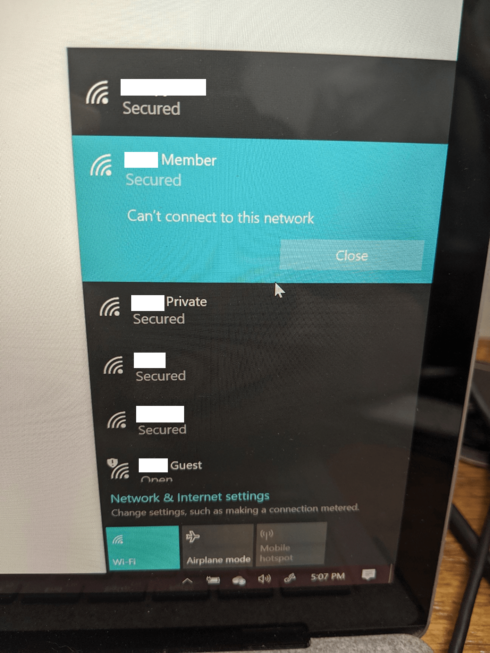
All the networks shown there are served from the same APs.
We even see this on clients running Unleashed setups.
How is there not a KB article about this?
All the networks shown there are served from the same APs.
We even see this on clients running Unleashed setups.
How is there not a KB article about this?
20 REPLIES 20


Options
- Mark as New
- Bookmark
- Subscribe
- Mute
- Subscribe to RSS Feed
- Permalink
- Report Inappropriate Content
11-27-2019 02:47 AM
Hi All,
It is a known issue with Surface pro WiFi driver running 15.68.17013.110
Ruckus already documented this in below KBA, please refer the same.
https://support.ruckuswireless.com/articles/000009828
Syamantak Omer
Sr.Staff TSE | CWNA | CCNA | RCWA | RASZA | RICXI
RUCKUS Networks, CommScope!
Follow me on LinkedIn
It is a known issue with Surface pro WiFi driver running 15.68.17013.110
Ruckus already documented this in below KBA, please refer the same.
https://support.ruckuswireless.com/articles/000009828
Syamantak Omer
Sr.Staff TSE | CWNA | CCNA | RCWA | RASZA | RICXI
RUCKUS Networks, CommScope!
Follow me on LinkedIn

Options
- Mark as New
- Bookmark
- Subscribe
- Mute
- Subscribe to RSS Feed
- Permalink
- Report Inappropriate Content
12-04-2019 12:28 PM
I tried to access this link, There seems to be an issue with the page. I get the following error when trying to access. Is there an ETA on when this will be resolved? I would really like to see the release from Ruckus on this.


Options
- Mark as New
- Bookmark
- Subscribe
- Mute
- Subscribe to RSS Feed
- Permalink
- Report Inappropriate Content
12-04-2019 12:43 PM
The heart of the Issue isn't Ruckus' to resolve. the issue presents its self on Meraki Wi-Fi too.
Here is the URL listed at the bottom of the KB.
https://answers.microsoft.com/en-us/surface/forum/surfbook-surfnetwork/marvell-semiconductor-inc-net...


Here is the URL listed at the bottom of the KB.
https://answers.microsoft.com/en-us/surface/forum/surfbook-surfnetwork/marvell-semiconductor-inc-net...

Options
- Mark as New
- Bookmark
- Subscribe
- Mute
- Subscribe to RSS Feed
- Permalink
- Report Inappropriate Content
12-04-2019 03:46 PM
That support link won't load as of 12/4/2019.
Tested on my Surface Pro 5: 15.68.17015.112 fixes it; 15.68.17015.110 broke it.
Tested on my Surface Pro 5: 15.68.17015.112 fixes it; 15.68.17015.110 broke it.
Options
- Mark as New
- Bookmark
- Subscribe
- Mute
- Subscribe to RSS Feed
- Permalink
- Report Inappropriate Content
12-04-2019 03:51 PM
Yup, that's exactly what Microsoft said in their advisory.
Marvell Semiconductor, Inc. – Net – 15.68.17013.110 WiFi driver breaks 5GHz connection on the Surface Book (1st Gen i5 with dGPU 256 GB)
Marvell Semiconductor, Inc. – Net – 15.68.17013.110 WiFi driver breaks 5GHz connection on the Surface Book (1st Gen i5 with dGPU 256 GB)

