This website uses cookies. By clicking Accept, you consent to the use of cookies. Click Here to learn more about how we use cookies.
RUCKUS Community Forums are now in READ-ONLY mode while we migrate to a new platform.
You will still be able to read posts and knowledge articles, but will be unable to post new content until Go Live on the new platform Monday August 17.
Lennar Smart Home customers: please contact [email protected] for assistance during the week of August 9-17.

- Community
- RUCKUS Technologies
- RUCKUS Lennar Support
- Community Services
- RTF
- RTF Community
- Australia and New Zealand – English
- Brazil – Português
- China – 简体中文
- France – Français
- Germany – Deutsch
- Hong Kong – 繁體中文
- India – English
- Indonesia – bahasa Indonesia
- Italy – Italiano
- Japan – 日本語
- Korea – 한국어
- Latin America – Español (Latinoamérica)
- Middle East & Africa – English
- Netherlands – Nederlands
- Nordics – English
- North America – English
- Poland – polski
- Russia – Русский
- Singapore, Malaysia, and Philippines – English
- Spain – Español
- Taiwan – 繁體中文
- Thailand – ไทย
- Turkey – Türkçe
- United Kingdom – English
- Vietnam – Tiếng Việt
- EOL Products
Turn on suggestions
Auto-suggest helps you quickly narrow down your search results by suggesting possible matches as you type.
Showing results for
Options
- Subscribe to RSS Feed
- Mark Topic as New
- Mark Topic as Read
- Float this Topic for Current User
- Bookmark
- Subscribe
- Mute
- Printer Friendly Page
Slow WiFi

Options
- Mark as New
- Bookmark
- Subscribe
- Mute
- Subscribe to RSS Feed
- Permalink
- Report Inappropriate Content
01-09-2026 09:19 AM
I'm using a ICX7150 along with two Ruckus 510 WAPs. One the WAP is configured as the Master. My ISP speed is 1Gbps and I do get over 900Mbps when I connect to my ISP WiFi directly and about 1Gbps when connected via ethernet.
However, when I'm connect to ICX7150 switch via ethernet or via Ruckus WAP, I don't get more than 450 Mbps. Please help to troubleshoot.
The firmware on the WAPs are up to date: Current firmware version: 200.15.6.212.27
Lights on the WAP:
Master: PWR, CTL, 5G and 2.4G are solid green
2nd WAP: PWR, 5G and 2.4G are solid green.
6 REPLIES 6


Options
- Mark as New
- Bookmark
- Subscribe
- Mute
- Subscribe to RSS Feed
- Permalink
- Report Inappropriate Content
01-09-2026 11:16 AM
Thank you for the response and the information.
Please check the mentioned information.
Wireless Speed / Throughput (Theoretical PHY Rates)
5 GHz band (802.11ac Wave 2): up to ~867 Mbps — this is the maximum physical (PHY) data rate the AP can advertise under ideal conditions on the 5 GHz channel with 80 MHz channel width.
2.4 GHz band (802.11n): up to ~300 Mbps — maximum PHY rate on the 2.4 GHz band.
These numbers are maximum link rates between the AP and compatible client devices under ideal conditions, not guaranteed real-world speeds.
What This Means in Practice:
The 867 Mbps figure on 5 GHz is not the speed you’ll always see on internet speed tests; actual throughput to clients is usually lower due to:
RF interference and signal attenuation
Client device Wi-Fi support (not all devices support 867 Mbps rates)
Network overhead and shared airtime
Channel width and MU-MIMO efficiency
Users often observe real throughput around 300–500 Mbps per client under good conditions.
- On the 2.4 GHz band, speeds are significantly lower and typically best for range/coverage rather than high throughput.
To clarify, a 2.4 GHz connection generally provides longer range but at lower speeds, whereas 5 GHz frequencies offer faster speeds but cover shorter distances. The choice between 2.4 GHz and 5 GHz is often determined automatically by the end device (such as phones, PCs, Ring doorbells, Mac devices, iPhones). Additionally, network configuration (Wi-Fi/SSID/WLAN) may specify whether the network supports only 2.4 GHz, only 5 GHz, or both.
It's also worth noting that many electronic devices and appliances, such as microwaves, baby monitors, security cameras, garage door openers, and phones, operate on the 2.4 GHz frequency, which can contribute to interference. Screenshot below for the reference.
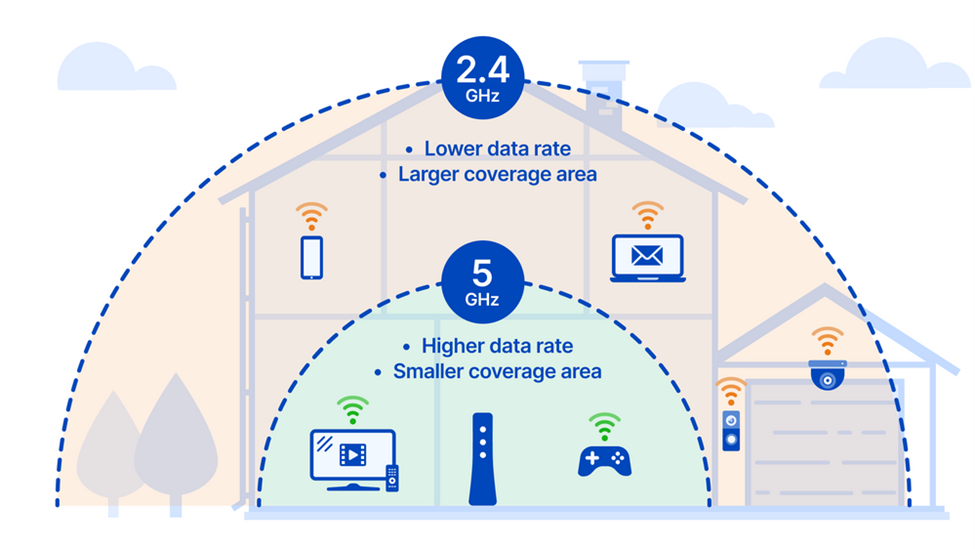
Thank you again for your patience.
Best regards,
Imran Sanadi
RUCKUS | Lennar Home Community Support
Options
- Mark as New
- Bookmark
- Subscribe
- Mute
- Subscribe to RSS Feed
- Permalink
- Report Inappropriate Content
01-12-2026 04:43 AM
Greetings!!!
I trust this message finds you well.
Please let me know if you have further questions or queries in this regard.
If we do not receive a response from you within 24 hours from the timestamp of this message, your case will proceed to closure.
Thank you.
Best regards,
Imran Sanadi
RUCKUS | Lennar Home Community Support

Labels
-
Access point
3 -
Access points
5 -
all lights blinking after reset icx 7150 switch
1 -
Amber
1 -
Amber System
2 -
AP
1 -
AP Management
1 -
Boot mode
1 -
bootloader
1 -
cli
1 -
Compatibility
1 -
Console
1 -
console access
1 -
dns
1 -
eero
2 -
eps
1 -
Frontier
1 -
Green Power
2 -
Hard reset
1 -
Heartbeat
1 -
Heartbeat loss recurring
2 -
Help
2 -
Help Needed
2 -
i Al
1 -
ICX
2 -
ICX 7150-C12p
7 -
ICX switch
4 -
ICX Switch Disconnected
1 -
ICX Switch Management
4 -
ICX-7150-C12
3 -
ICX-7150-C12P
1 -
Important Announcement
1 -
Installation
1 -
Internet Issue
2 -
Ive been
1 -
Lennar
3 -
Lennar Home
2 -
Lennar homes
25 -
Management Port
1 -
NAND flash memory
1 -
New
1 -
No POE
2 -
No power via Ethernet
1 -
password
1 -
Please
1 -
Poe
2 -
Poe not working
1 -
Power Outage
1 -
Power Outtage
1 -
Proposed Solution
1 -
R510
2 -
r510 no power
2 -
REBOOT
1 -
Recovery
1 -
Red LED
1 -
Remote access
1 -
Reset ICX username password
1 -
Return
1 -
RMA
3 -
Ruckus
2 -
Ruckus ICX 7150-C12P
4 -
RUCKUS Self-Help
1 -
RUKUS 7150 c12p
1 -
Setup
1 -
Software Recovery
1 -
Solution Proposed
1 -
Solution Proposed warranty
1 -
SPR
1 -
SSH
1 -
Switch
1 -
Telnet
1 -
Unleashed
3 -
Unresolved Issue
1 -
Upgrade
3 -
Upgrading R510
1 -
User Management
1 -
username
1 -
VPN streaming fail proxy not working Amazon prime video
1 -
Wifi
1 -
Wifi6
1 -
Wireless
3
- « Previous
- Next »
