This website uses cookies. By clicking Accept, you consent to the use of cookies. Click Here to learn more about how we use cookies.
RUCKUS Community Forums are now in READ-ONLY mode while we migrate to a new platform.
You will still be able to read posts and knowledge articles, but will be unable to post new content until Go Live on the new platform Monday August 17.
Lennar Smart Home customers: please contact [email protected] for assistance during the week of August 9-17.

- Community
- RUCKUS Technologies
- RUCKUS Lennar Support
- Community Services
- RTF
- RTF Community
- Australia and New Zealand – English
- Brazil – Português
- China – 简体中文
- France – Français
- Germany – Deutsch
- Hong Kong – 繁體中文
- India – English
- Indonesia – bahasa Indonesia
- Italy – Italiano
- Japan – 日本語
- Korea – 한국어
- Latin America – Español (Latinoamérica)
- Middle East & Africa – English
- Netherlands – Nederlands
- Nordics – English
- North America – English
- Poland – polski
- Russia – Русский
- Singapore, Malaysia, and Philippines – English
- Spain – Español
- Taiwan – 繁體中文
- Thailand – ไทย
- Turkey – Türkçe
- United Kingdom – English
- Vietnam – Tiếng Việt
- EOL Products
Turn on suggestions
Auto-suggest helps you quickly narrow down your search results by suggesting possible matches as you type.
Showing results for
- RUCKUS Forums
- RUCKUS Lennar Support
- RUCKUS Support for Lennar Homes
- Re: Ruckus switch ICX 7150 - IP lost after hard re...
Options
- Subscribe to RSS Feed
- Mark Topic as New
- Mark Topic as Read
- Float this Topic for Current User
- Bookmark
- Subscribe
- Mute
- Printer Friendly Page

Options
- Mark as New
- Bookmark
- Subscribe
- Mute
- Subscribe to RSS Feed
- Permalink
- Report Inappropriate Content
09-15-2025 05:33 PM
Hi,
As you asked me to create a new ticket, so here it is. There was a power outrage in my home. After that, the wifi got really slow. Before that, the switch ICX 7150 used to show 'disconnected' in the unleashed dashboard. Also, it didn't have the latest firmware to work with unleased. However, I had ignored it because the wifi was working fine, and I got busy at work.
After the recent power outrage, I went through some topics here and found similar issue raised by members. I tried to fi it myself so I did hard reset on switch because I didn't have login/password credentials and none of the default credentials worked. After the hard reset, the switch has no IP address. I would need your help to configure the switch to its latest firmware, and to be able to connect it in the unleased. I hope after this fix, the wifi should start functioning properly. I have Macbook and no windows laptop to work with.
Thank you,
Solved! Go to Solution.
1 ACCEPTED SOLUTION


Options
- Mark as New
- Bookmark
- Subscribe
- Mute
- Subscribe to RSS Feed
- Permalink
- Report Inappropriate Content
09-29-2025 05:07 AM
Hi @mshrivas
Thank you for your response and for providing the detailed update.
It’s great to see that your Switch has been successfully upgraded to the recommended version.
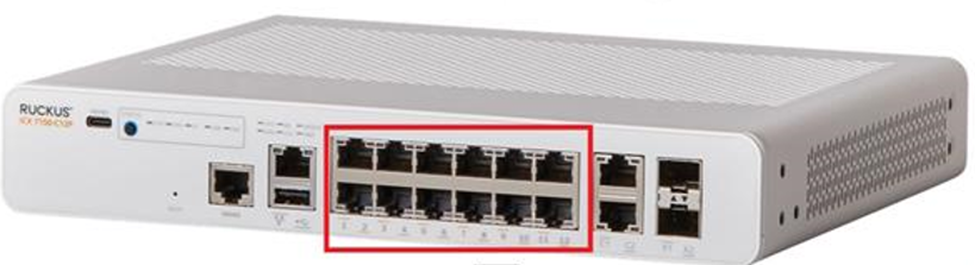
Since one of your Access Points is showing as disconnected on the Unleashed dashboard, please try unplugging the Ethernet cable of this Access Point from its current Switch port and reconnect it to any of the available ports from 1 to 12 on the Switch (refer to the screenshot below).
Kindly test this and let me know if it resolves the issue.
Thank you once again for your patience and cooperation.
Best regards,
Imran Sanadi
RUCKUS | Lennar Home Community Support
35 REPLIES 35
Options
- Mark as New
- Bookmark
- Subscribe
- Mute
- Subscribe to RSS Feed
- Permalink
- Report Inappropriate Content
09-27-2025 08:53 PM - edited 09-27-2025 08:57 PM
Hi,
I followed the steps and downloaded 08095g version. After extraction, I selected ICX7150 folder, which contains four folders with contents:
Firmware: icx7xxx_poe_02.1.8.b004.fw
Images: SPR08095gufi.bin, SPS08095gufi.bin
MIBs: Two .mib files
Signatures: Four .sig files
As per the article, I should see "mnz10114.bin, SPS08080f.bin, and SPS08095gufi.bin." . I however, could not find mnz10114.bin. Instead, there's file named icx7xxx_poe_02.1.8.b004.fw. I'm not sure if this is the correct file.
Anyway, I tried to install these files:
telnet@ICX7150-C12 Switch#copy disk0 flash icx7xxx_poe_02.1.8.b004.fw bootrom
copy disk0 flash icx7xxx_poe_02.1.8.b004.fw bootrom
Invalid input -> bootrom
Type ? for a list
Section G:
telnet@ICX7150-C12 Switch#copy disk0 flash SPS08095gufi.bin secondary
........
Flashing bootrom image to Secondary partition...
SYNCING IMAGE TO FLASH. DO NOT SWITCH OVER OR POWER DOWN THE UNIT(65536 bytes per dot)...
............
Post processing bundle image...
Bundle image processed successfully
telnet@ICX7150-C12 Switch#boot system flash secondary yes
This automatically exited the switch without any message prompt.
my@Mac ~ %
my@Mac ~ % nc 192.168.1.xx 23
nothing happens. Since, I was not able to connect using telnet, I tried with usbc-console. The version shows SPS08095g.bin, so it seems that firmware is updated.
ICX7150-C12 Switch#show version
Copyright (c) Ruckus Networks, Inc. All rights reserved.
UNIT 1: compiled on May 6 2022 at 23:24:50 labeled as SPS08095g
(31457280 bytes) from Secondary SPS08095g.bin (UFI)
SW: Version 08.0.95gT211
Compressed Secondary Boot Code size = 786944, Version:10.1.24T225 (mnz10124)
Compiled on Thu Apr 21 06:08:52 2022
Since the telnet had exited, I could not synchronize the partition using command > copy flash flash primary
But when I connected to switch using console cable and plugged in the USB flash that had the firmware, it automatically tried to download the firmware.

From switch GUI, I enabled the telnet again, and now, I can telnet to switch.
Options
- Mark as New
- Bookmark
- Subscribe
- Mute
- Subscribe to RSS Feed
- Permalink
- Report Inappropriate Content
09-27-2025 09:04 PM - edited 09-27-2025 09:07 PM
Since the primary and secondary versions were not same, I used command
copy flash flash primary
.........................................................
Processing the bundle image...
Flashing application image to Primary partition...
Creating certificate, please wait...
SSL Client Certificate is successfully created
SYNCING IMAGE TO FLASH. DO NOT SWITCH OVER OR POWER DOWN THE UNIT(65536 bytes per dot)...
................................................................................................................................................................................................................................................................................................................................................................................................................................................................................................
Flashing bootrom image to Primary partition...
SYNCING IMAGE TO FLASH. DO NOT SWITCH OVER OR POWER DOWN THE UNIT(65536 bytes per dot)...
............
Post processing bundle image...
Bundle image processed successfully
Copy Done
????telnet@ICX7150-C12 Switch>show flash
show flash
Stack unit 1:
NAND Type: Micron NAND 2GiB (x 1)
Compressed Pri Code size = 31457280, Version:08.0.95gT211 (SPS08095g.bin)
Compressed Sec Code size = 31457280, Version:08.0.95gT211 (SPS08095g.bin)
Compressed Pri Boot Code size = 786944, Version:10.1.24T225 (mnz10124)
Compressed Sec Boot Code size = 786944, Version:10.1.24T225 (mnz10124)
Code Flash Free Space = 1033121792
telnet@ICX7150-C12 Switch>
I think the boot code is same as before.
Options
- Mark as New
- Bookmark
- Subscribe
- Mute
- Subscribe to RSS Feed
- Permalink
- Report Inappropriate Content
09-27-2025 09:20 PM

I now wait for your further instructions. Thanks
Options
- Mark as New
- Bookmark
- Subscribe
- Mute
- Subscribe to RSS Feed
- Permalink
- Report Inappropriate Content
09-29-2025 05:07 AM
Hi @mshrivas
Thank you for your response and for providing the detailed update.
It’s great to see that your Switch has been successfully upgraded to the recommended version.
Since one of your Access Points is showing as disconnected on the Unleashed dashboard, please try unplugging the Ethernet cable of this Access Point from its current Switch port and reconnect it to any of the available ports from 1 to 12 on the Switch (refer to the screenshot below).
Kindly test this and let me know if it resolves the issue.
Thank you once again for your patience and cooperation.
Best regards,
Imran Sanadi
RUCKUS | Lennar Home Community Support
Options
- Mark as New
- Bookmark
- Subscribe
- Mute
- Subscribe to RSS Feed
- Permalink
- Report Inappropriate Content
09-29-2025 06:46 PM
Thanks, the unplugging and plugging the ethernet helped to bring the third AP online.

Labels
-
Access point
3 -
Access points
5 -
all lights blinking after reset icx 7150 switch
1 -
Amber
1 -
Amber System
2 -
AP
1 -
AP Management
1 -
Boot mode
1 -
bootloader
1 -
cli
1 -
Compatibility
1 -
Console
1 -
console access
1 -
dns
1 -
eero
2 -
eps
1 -
Frontier
1 -
Green Power
2 -
Hard reset
1 -
Heartbeat
1 -
Heartbeat loss recurring
2 -
Help
2 -
Help Needed
2 -
i Al
1 -
ICX
2 -
ICX 7150-C12p
7 -
ICX switch
4 -
ICX Switch Disconnected
1 -
ICX Switch Management
4 -
ICX-7150-C12
3 -
ICX-7150-C12P
1 -
Important Announcement
1 -
Installation
1 -
Internet Issue
2 -
Ive been
1 -
Lennar
3 -
Lennar Home
2 -
Lennar homes
25 -
Management Port
1 -
NAND flash memory
1 -
New
1 -
No POE
2 -
No power via Ethernet
1 -
password
1 -
Please
1 -
Poe
2 -
Poe not working
1 -
Power Outage
1 -
Power Outtage
1 -
Proposed Solution
1 -
R510
2 -
r510 no power
2 -
REBOOT
1 -
Recovery
1 -
Red LED
1 -
Remote access
1 -
Reset ICX username password
1 -
Return
1 -
RMA
3 -
Ruckus
2 -
Ruckus ICX 7150-C12P
4 -
RUCKUS Self-Help
1 -
RUKUS 7150 c12p
1 -
Setup
1 -
Software Recovery
1 -
Solution Proposed
1 -
Solution Proposed warranty
1 -
SPR
1 -
SSH
1 -
Switch
1 -
Telnet
1 -
Unleashed
3 -
Unresolved Issue
1 -
Upgrade
3 -
Upgrading R510
1 -
User Management
1 -
username
1 -
VPN streaming fail proxy not working Amazon prime video
1 -
Wifi
1 -
Wifi6
1 -
Wireless
3
- « Previous
- Next »
