This website uses cookies. By clicking Accept, you consent to the use of cookies. Click Here to learn more about how we use cookies.
RUCKUS Community Forums are now in READ-ONLY mode while we migrate to a new platform.
You will still be able to read posts and knowledge articles, but will be unable to post new content until Go Live on the new platform Monday August 17.
Lennar Smart Home customers: please contact [email protected] for assistance during the week of August 9-17.

- Community
- RUCKUS Technologies
- RUCKUS Lennar Support
- Community Services
- RTF
- RTF Community
- Australia and New Zealand – English
- Brazil – Português
- China – 简体中文
- France – Français
- Germany – Deutsch
- Hong Kong – 繁體中文
- India – English
- Indonesia – bahasa Indonesia
- Italy – Italiano
- Japan – 日本語
- Korea – 한국어
- Latin America – Español (Latinoamérica)
- Middle East & Africa – English
- Netherlands – Nederlands
- Nordics – English
- North America – English
- Poland – polski
- Russia – Русский
- Singapore, Malaysia, and Philippines – English
- Spain – Español
- Taiwan – 繁體中文
- Thailand – ไทย
- Turkey – Türkçe
- United Kingdom – English
- Vietnam – Tiếng Việt
- EOL Products
Turn on suggestions
Auto-suggest helps you quickly narrow down your search results by suggesting possible matches as you type.
Showing results for
- RUCKUS Forums
- RUCKUS Lennar Support
- RUCKUS Support for Lennar Homes
- Re: My APs are not connecting to internet
Options
- Subscribe to RSS Feed
- Mark Topic as New
- Mark Topic as Read
- Float this Topic for Current User
- Bookmark
- Subscribe
- Mute
- Printer Friendly Page
My APs are not connecting to internet

Options
- Mark as New
- Bookmark
- Subscribe
- Mute
- Subscribe to RSS Feed
- Permalink
- Report Inappropriate Content
05-15-2025 10:48 AM
I'm currently having issues with my Ruckus access points not connecting to the internet. I'm in a 3-story Lennar home where the builder installed the APs for me. It was working fine until a few months ago. Not sure what's wrong. I have 1 AP per floor and now b/c its not working, I have to directly connect to Xfinity modem which doesn't provide proper coverage around the house. Please help! I need someone to walk me through how to troubleshoot this
17 REPLIES 17


Options
- Mark as New
- Bookmark
- Subscribe
- Mute
- Subscribe to RSS Feed
- Permalink
- Report Inappropriate Content
05-21-2025 09:32 AM
Hi @nshah
Thank you for your response and the update.
Based on the picture you shared, it appears that the black cable from your Internet Service Provider’s (ISP) router is connected to the incorrect port on the RUCKUS ICX-7150-C12P Switch. The cable should be connected to one of the 1-12 ports on the switch (please refer to the screenshots below). Kindly unplug the cable and reconnect it to the appropriate port. Afterward, please reboot the ISP router by unplugging and plugging it back into the power outlet. Once done, check your internet connection.
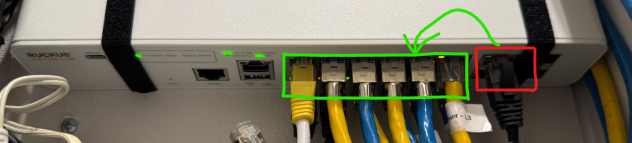
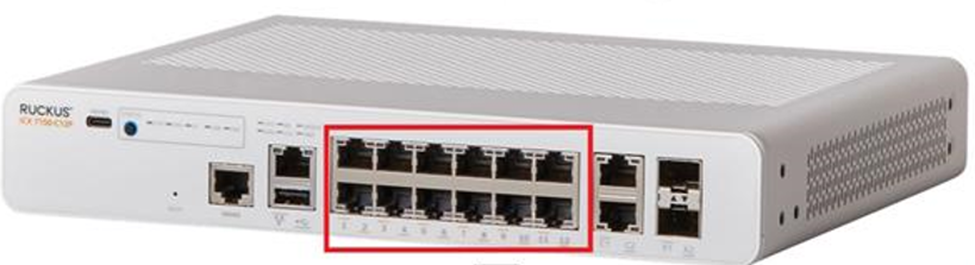
Please let me know how it goes, and feel free to reach out if further assistance is needed.
Thank you again for your patience and understanding.
Best regards,
Imran Sanadi
RUCKUS Lennar Home Community
Options
- Mark as New
- Bookmark
- Subscribe
- Mute
- Subscribe to RSS Feed
- Permalink
- Report Inappropriate Content
05-21-2025 01:13 PM
Thanks Imran, this solved the internet speed issue for me. However, I have 2 related issues that I'd like to resolve.
(1) In order to plug in the black cable into one of the 12 ports, I had to pull an existing one out. When I moved into the Lennar home there were no labels that were added to any of the cables plugged into 12 ports (except for the 3 APs). Do you know how to best identify what each of the yellow/blue cables point to in the home? Is there a way to get visibility into what is currently connected to my switch? What's the best way to get support here?
(2) In my Ruckus admin, I see that the ICX switch shows up as disconnected (see my previous screenshot). In fact when I follow the instructions in some other Ruckus community threads, I see that I can use LanScan tool in Mac to get my ICX IP address so I can manually add it. However when I run it, it only picks up the 3 APs and not the ICX switch. Why is that? How can I get visibility into ICX in the Ruckus portal?
Thanks
Options
- Mark as New
- Bookmark
- Subscribe
- Mute
- Subscribe to RSS Feed
- Permalink
- Report Inappropriate Content
05-21-2025 01:50 PM
Hi @nshah
Thank you for your response and the update. I'm glad to hear that the speed-related issues have been resolved.
Please find below the answers to your queries:
Device Labeling:
RUCKUS devices are typically labeled accordingly. However, other cables may be connected to third-party devices such as cameras, doorbells, or other smart home components, depending on how the home builder or technician set up the wiring. We recommend consulting an external technician to accurately identify and trace those additional connections.
Switch Disconnected Error: (This error is when your Switch is on an older version and needs to upgrade to the new version to get it connected in the Unleashed system)
To upgrade the Switch version, we need its IP address. Please try accessing the IP address that displays the "Switch is disconnected" error (as shown in the screenshot you shared).
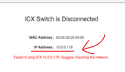
If you are unable to access that IP address, then restart both ISP Router and RUCKUS ICX-7150-C12P Switch by disconnecting it from the power outlet and plugging it back in. After the reboot, wait for few minutes and use LanScan to check if an IP address associated with the RUCKUS ICX-7150-C12P Switch appears.
Please let me know how it goes. I appreciate your continued patience and understanding.
Best regards,
Imran Sanadi
RUCKUS | Lennar Home Community Support
Options
- Mark as New
- Bookmark
- Subscribe
- Mute
- Subscribe to RSS Feed
- Permalink
- Report Inappropriate Content
05-21-2025 03:13 PM
Ok cool. I'll work on device labeling on my own or hire someone to help.
For the ICX disconnected issue. I just restarted my switch as you mentioned and its still not showing up. Someone else in our Lennar community mentioned that they had a similar issue and they were able to setup a webex screenshare where support walked them through how to run CLI commands to get ICX showing up properly. Is this something that we can do?
Options
- Mark as New
- Bookmark
- Subscribe
- Mute
- Subscribe to RSS Feed
- Permalink
- Report Inappropriate Content
05-23-2025 06:07 AM
Hi @nshah
Thank you for your response and the update.
Please accept our apologies for any inconvenience. As of November 2022, RUCKUS Support for Lennar Homes customers is no longer provided via phone, email, or remote sessions. All assistance is now offered exclusively through this community forum, on a best-effort support basis.
That said, rest assured I’m here to assist you every step of the way.
If the switch’s IP address is not accessible, could you please use a Windows laptop to access the Command Line Interface (CLI) using a console cable? This method will allow us to troubleshoot the issue more effectively.
You can refer to the following article for guidance on how to console into the ICX 7150-12CP switch:
https://community.ruckuswireless.com/t5/RUCKUS-Support-for-Lennar-Homes/How-to-console-in-the-ICX-71...
Once you've attempted to access the CLI, please let me know the outcome.
Thank you again for your patience and understanding.
Best regards,
Imran Sanadi
RUCKUS | Lennar Home Community Support

Labels
-
Access point
3 -
Access points
5 -
all lights blinking after reset icx 7150 switch
1 -
Amber
1 -
Amber System
2 -
AP
1 -
AP Management
1 -
Boot mode
1 -
bootloader
1 -
cli
1 -
Compatibility
1 -
Console
1 -
console access
1 -
dns
1 -
eero
2 -
eps
1 -
Frontier
1 -
Green Power
2 -
Hard reset
1 -
Heartbeat
1 -
Heartbeat loss recurring
2 -
Help
2 -
Help Needed
2 -
i Al
1 -
ICX
2 -
ICX 7150-C12p
7 -
ICX switch
4 -
ICX Switch Disconnected
1 -
ICX Switch Management
4 -
ICX-7150-C12
3 -
ICX-7150-C12P
1 -
Important Announcement
1 -
Installation
1 -
Internet Issue
2 -
Ive been
1 -
Lennar
3 -
Lennar Home
2 -
Lennar homes
25 -
Management Port
1 -
NAND flash memory
1 -
New
1 -
No POE
2 -
No power via Ethernet
1 -
password
1 -
Please
1 -
Poe
2 -
Poe not working
1 -
Power Outage
1 -
Power Outtage
1 -
Proposed Solution
1 -
R510
2 -
r510 no power
2 -
REBOOT
1 -
Recovery
1 -
Red LED
1 -
Remote access
1 -
Reset ICX username password
1 -
Return
1 -
RMA
3 -
Ruckus
2 -
Ruckus ICX 7150-C12P
4 -
RUCKUS Self-Help
1 -
RUKUS 7150 c12p
1 -
Setup
1 -
Software Recovery
1 -
Solution Proposed
1 -
Solution Proposed warranty
1 -
SPR
1 -
SSH
1 -
Switch
1 -
Telnet
1 -
Unleashed
3 -
Unresolved Issue
1 -
Upgrade
3 -
Upgrading R510
1 -
User Management
1 -
username
1 -
VPN streaming fail proxy not working Amazon prime video
1 -
Wifi
1 -
Wifi6
1 -
Wireless
3
- « Previous
- Next »
