This website uses cookies. By clicking Accept, you consent to the use of cookies. Click Here to learn more about how we use cookies.
RUCKUS Community Forums are now in READ-ONLY mode while we migrate to a new platform.
You will still be able to read posts and knowledge articles, but will be unable to post new content until Go Live on the new platform Monday August 17.
Lennar Smart Home customers: please contact [email protected] for assistance during the week of August 9-17.

- Community
- RUCKUS Technologies
- RUCKUS Lennar Support
- Community Services
- RTF
- RTF Community
- Australia and New Zealand – English
- Brazil – Português
- China – 简体中文
- France – Français
- Germany – Deutsch
- Hong Kong – 繁體中文
- India – English
- Indonesia – bahasa Indonesia
- Italy – Italiano
- Japan – 日本語
- Korea – 한국어
- Latin America – Español (Latinoamérica)
- Middle East & Africa – English
- Netherlands – Nederlands
- Nordics – English
- North America – English
- Poland – polski
- Russia – Русский
- Singapore, Malaysia, and Philippines – English
- Spain – Español
- Taiwan – 繁體中文
- Thailand – ไทย
- Turkey – Türkçe
- United Kingdom – English
- Vietnam – Tiếng Việt
- EOL Products
Turn on suggestions
Auto-suggest helps you quickly narrow down your search results by suggesting possible matches as you type.
Showing results for
- RUCKUS Forums
- RUCKUS Lennar Support
- RUCKUS Support for Lennar Homes
- Borrowed a PC to update Ruckus switch.
Options
- Subscribe to RSS Feed
- Mark Topic as New
- Mark Topic as Read
- Float this Topic for Current User
- Bookmark
- Subscribe
- Mute
- Printer Friendly Page

Options
- Mark as New
- Bookmark
- Subscribe
- Mute
- Subscribe to RSS Feed
- Permalink
- Report Inappropriate Content
04-04-2026 01:10 AM
After having gone thru the inspection and review process with Lennar support last fall I was unable to use my Mac to update the Ruckus 7150 switch. I've borrowed a PC from my neighbor who also has never updated his switch. Both were installed at the same time, so fixing one could lead to fixing the other. Neither of us know our passwords for our respective switches and its been years since I've used a PC so my skills on it are very limited. We've got one week left before we head for home for 6 months, so any help would be very helpful. Thanks.
Solved! Go to Solution.
1 ACCEPTED SOLUTION


Options
- Mark as New
- Bookmark
- Subscribe
- Mute
- Subscribe to RSS Feed
- Permalink
- Report Inappropriate Content
04-16-2026 06:11 AM
Hi @Gunner
Thank you for your responses on Private Chat.
That’s great to hear! I’m glad the issue has been resolved.
We truly appreciate your time and patience throughout this case.
This case is now closed as the issue has been resolved.
Thank you once again for reaching out to the RUCKUS Lennar Home Community. Should you have any further questions or need assistance in the future, please don’t hesitate to contact us.
Wishing you a wonderful day ahead!
If your issue has been fully addressed, please click the Kudos button and mark the responses as an Accepted Solutions.
Best regards,
Imran Sanadi
RUCKUS | Lennar Home Community Support
Reply
9 REPLIES 9
Options
- Mark as New
- Bookmark
- Subscribe
- Mute
- Subscribe to RSS Feed
- Permalink
- Report Inappropriate Content
04-06-2026 07:30 AM
Hi @Gunner
Greetings!!!
Thank you for reaching out to the RUCKUS Lennar Home Community.
We appreciate your patience and understanding as we work to resolve the issues you are experiencing with your RUCKUS setup.
Based on the information provided, it appears that you are trying to upgrade your RUCKUS ICX-7150-C12P Switch.
We apologize for any inconvenience this has caused and are committed to assisting you promptly.
To assist you further, please follow these steps:
1. Attempt to access the CLI using Telnet without requiring a username/password. Please refer to the attached screenshot for guidance.
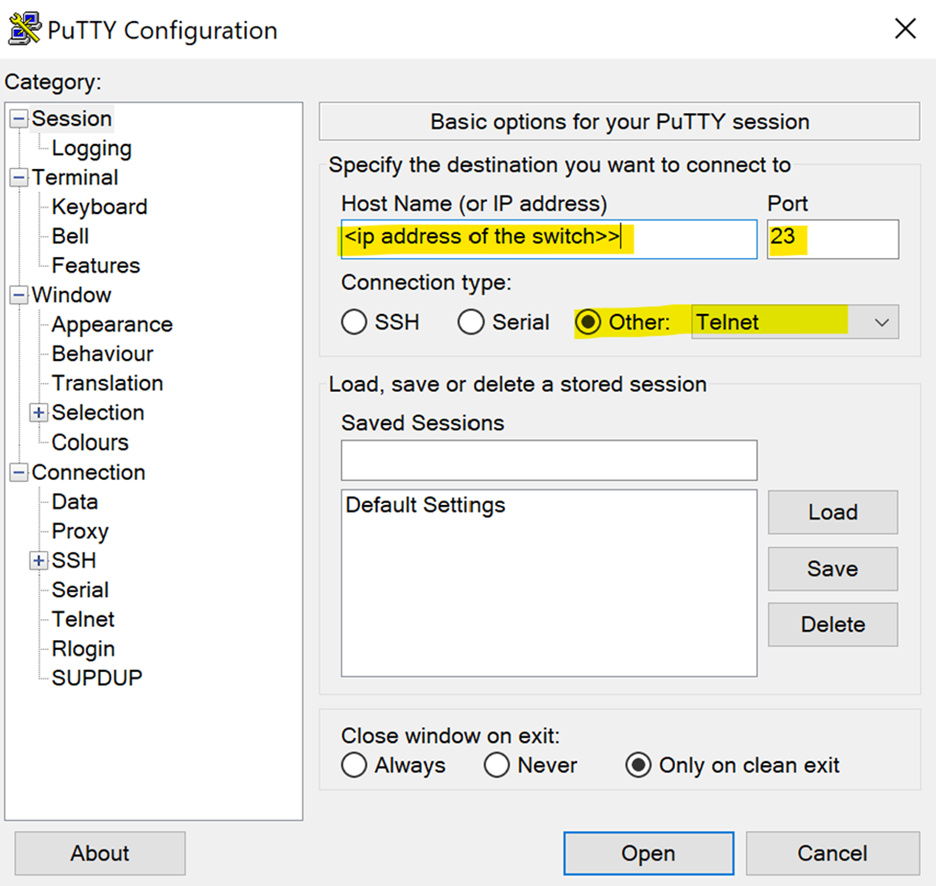
Once accessed, execute the following commands and provide the outputs:
enable
show version
show flash
show inline power
show inline power detail
show interface brief
2. If Telnet access is unsuccessful, consider performing a factory reset on the RUCKUS ICX-7150-C12P Switch. Detailed instructions can be found in our RUCKUS Lennar Knowledge Base article and accompanying video:
Article: https://community.ruckuswireless.com/t5/RUCKUS-Lennar-Support-Knowledge/Process-for-performing-a-phy...
Video Link: https://www.youtube.com/watch?v=6jHMTdo_hK4
Default Credentials:
Username: super
Password: sp-admin
Alternative Credentials screenshot: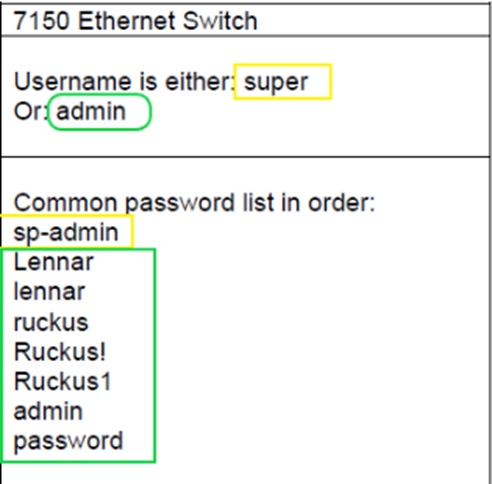
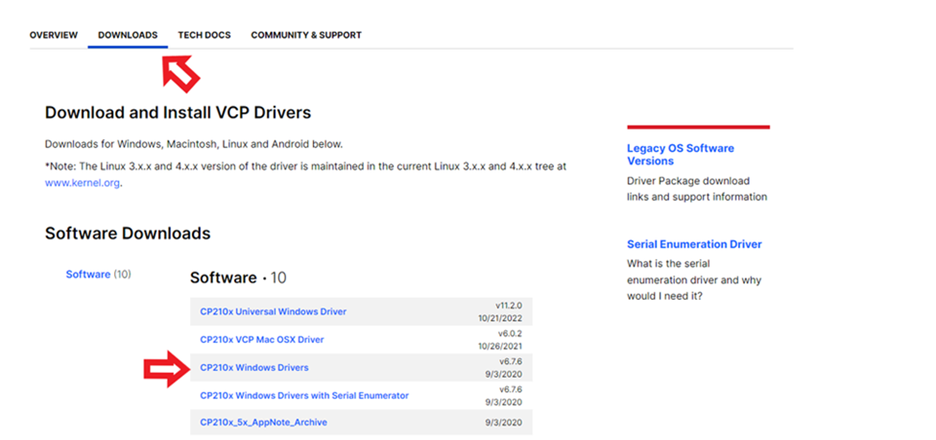
3. Should the above steps not resolve the issue, download the console drivers onto your laptop and attempt CLI access using the console option. Please ensure you have extracted and installed the drivers correctly from the following links:
- How to console the RUCKUS ICX-7150-C12P Switch: https://community.ruckuswireless.com/t5/RUCKUS-Support-for-Lennar-Homes/How-to-console-in-the-ICX-71...
, please make sure to download the zip drive for the file below & "extract all". Once it's extracted, run the file, the driver should be installed using the 2 links below.
Link 1: https://support.ruckuswireless.com/software/1414-brocade-ruckus-7150-usb-serial-driver-windows
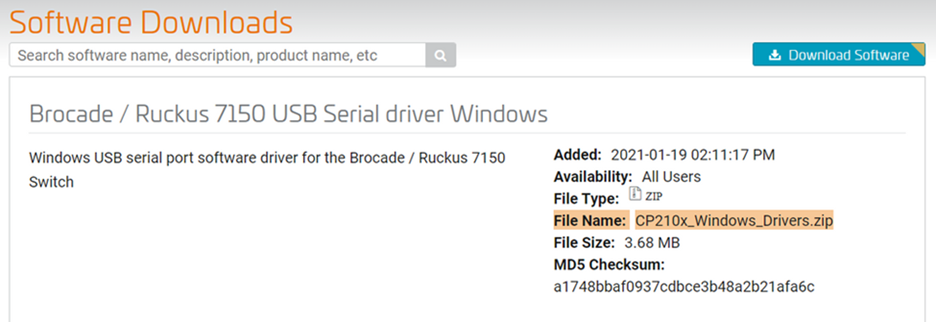
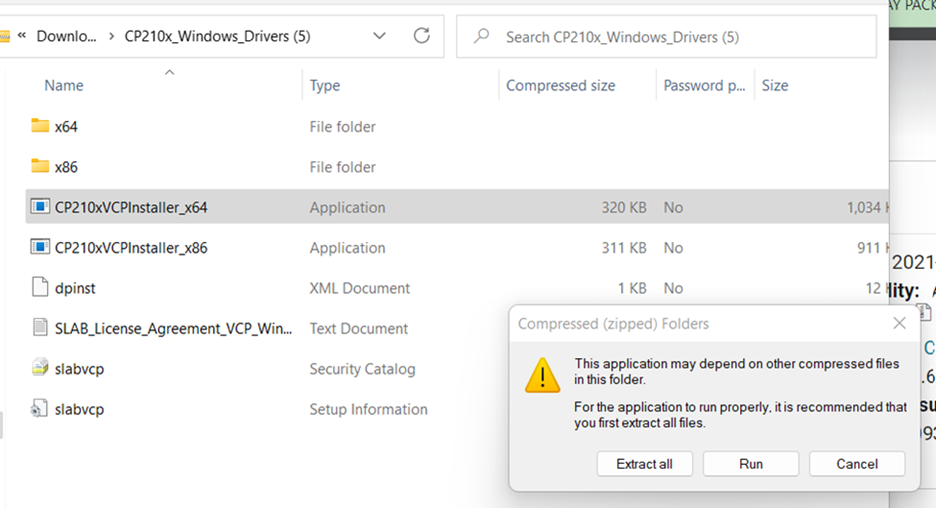
Link 2: silabs.com/developers/usb-to-uart-bridge-vcp-drivers?tab=downloads
Should you have any questions or concerns during this process, please do not hesitate to reach out.
Thank you for your cooperation and patience.
Best regards,
Imran Sanadi
RUCKUS | Lennar Home Community Support
Options
- Mark as New
- Bookmark
- Subscribe
- Mute
- Subscribe to RSS Feed
- Permalink
- Report Inappropriate Content
04-06-2026 12:52 PM
You may recall you and I spent a considerable amount of time last fall working on this.
Options
- Mark as New
- Bookmark
- Subscribe
- Mute
- Subscribe to RSS Feed
- Permalink
- Report Inappropriate Content
04-06-2026 01:19 PM
Hi @Gunner
Thank you for the response.
Please use the private chat option to respond so we can proceed further. For your reference, I have included a screenshot below.

Thank you once again for your patience and understanding.
Best regards,
Imran Sanadi
RUCKUS | Lennar Home Community Support
Options
- Mark as New
- Bookmark
- Subscribe
- Mute
- Subscribe to RSS Feed
- Permalink
- Report Inappropriate Content
04-10-2026 11:05 AM
Hi @Gunner
Thank you for your communication via private chat.
We have successfully upgraded your switch using the TFTP method. For your reference, please find the article below:
https://community.ruckuswireless.com/t5/RUCKUS-Support-for-Lennar-Homes/How-to-upgrade-the-RUCKUS-IC...
Additionally, the switch has been upgraded to the recommended firmware version. To copy the same version to the secondary partition, please execute the following commands:
ICX7150-12P Switch>enable
ICX7150-12P Switch#copy flash flash secondary
ICX7150-12P Switch#write memory
Please let me know if you have any further questions or if you encounter any issues with the switch.
Thank you again for your patience and understanding.
Best regards,
Imran Sanadi
RUCKUS | Lennar Home Community Support

Labels
-
Access point
3 -
Access points
5 -
all lights blinking after reset icx 7150 switch
1 -
Amber
1 -
Amber System
2 -
AP
1 -
AP Management
1 -
Boot mode
1 -
bootloader
1 -
cli
1 -
Compatibility
1 -
Console
1 -
console access
1 -
dns
1 -
eero
2 -
eps
1 -
Frontier
1 -
Green Power
2 -
Hard reset
1 -
Heartbeat
1 -
Heartbeat loss recurring
2 -
Help
2 -
Help Needed
2 -
i Al
1 -
ICX
2 -
ICX 7150-C12p
7 -
ICX switch
4 -
ICX Switch Disconnected
1 -
ICX Switch Management
4 -
ICX-7150-C12
3 -
ICX-7150-C12P
1 -
Important Announcement
1 -
Installation
1 -
Internet Issue
2 -
Ive been
1 -
Lennar
3 -
Lennar Home
2 -
Lennar homes
25 -
Management Port
1 -
NAND flash memory
1 -
New
1 -
No POE
2 -
No power via Ethernet
1 -
password
1 -
Please
1 -
Poe
2 -
Poe not working
1 -
Power Outage
1 -
Power Outtage
1 -
Proposed Solution
1 -
R510
2 -
r510 no power
2 -
REBOOT
1 -
Recovery
1 -
Red LED
1 -
Remote access
1 -
Reset ICX username password
1 -
Return
1 -
RMA
3 -
Ruckus
2 -
Ruckus ICX 7150-C12P
4 -
RUCKUS Self-Help
1 -
RUKUS 7150 c12p
1 -
Setup
1 -
Software Recovery
1 -
Solution Proposed
1 -
Solution Proposed warranty
1 -
SPR
1 -
SSH
1 -
Switch
1 -
Telnet
1 -
Unleashed
3 -
Unresolved Issue
1 -
Upgrade
3 -
Upgrading R510
1 -
User Management
1 -
username
1 -
VPN streaming fail proxy not working Amazon prime video
1 -
Wifi
1 -
Wifi6
1 -
Wireless
3
- « Previous
- Next »
