This website uses cookies. By clicking Accept, you consent to the use of cookies. Click Here to learn more about how we use cookies.
RUCKUS Community Forums are now in READ-ONLY mode while we migrate to a new platform.
You will still be able to read posts and knowledge articles, but will be unable to post new content until Go Live on the new platform Monday August 17.
Lennar Smart Home customers: please contact [email protected] for assistance during the week of August 9-17.

Turn on suggestions
Auto-suggest helps you quickly narrow down your search results by suggesting possible matches as you type.
Showing results for
- RUCKUS Forums
- RUCKUS Technologies
- ICX Switches
- ACL Adding a access-group to a interface not selec...
Options
- Subscribe to RSS Feed
- Mark Topic as New
- Mark Topic as Read
- Float this Topic for Current User
- Bookmark
- Subscribe
- Mute
- Printer Friendly Page

Options
- Mark as New
- Bookmark
- Subscribe
- Mute
- Subscribe to RSS Feed
- Permalink
- Report Inappropriate Content
06-29-2022 11:31 AM
Hello, I believe this to be a CLI command line bug.
I have done this before successfully but can't remember how you do this
Config:
ip access-list extended 100
remark Block_CapWap
sequence 10 deny udp any any eq 5246
sequence 20 deny udp any any eq 5247
sequence 30 permit ip any any
!
BUT!
When I try and add it to the Inf it doesn't add it but drops me into building the ACL
See:
(config)#interface ethernet 2/1/3
config-if-e1000-2/1/3)#ip access-list extended Block_CapWap
SW(config-ext-nacl)#
****Here you can see it applied to a working interface.***
ip access-list extended 100
remark Block_CapWap
sequence 10 deny udp any any eq 5246
sequence 20 deny udp any any eq 5247
sequence 30 permit ip any any
Show Int e 1/1/23
interface ethernet 1/1/23
port-name WiFi CGP_Ticket_EX~
loop-detection
dual-mode 750
ip access-group Block_CapWap in
spanning-tree 802-1w admin-edge-port
inline power power-by-class 4
stp-bpdu-guard
trust dscp
sflow forwarding
sflow sample 4096
snmp-server enable traps mac-notification
Thx
JM
Solved! Go to Solution.
1 ACCEPTED SOLUTION


Options
- Mark as New
- Bookmark
- Subscribe
- Mute
- Subscribe to RSS Feed
- Permalink
- Report Inappropriate Content
07-08-2022 10:03 AM
Hey all,
We do also use the ip access-group command to apply ACLs. Here's an example from our Security guide:
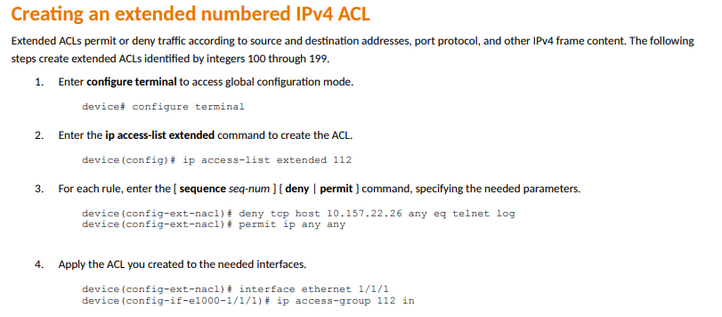
Some additional references:
Ben Beck, RCNA, RCNI, Principal Technical Support Engineer
support.ruckuswireless.com/contact-us
support.ruckuswireless.com/contact-us
3 REPLIES 3

Labels
-
7250
1 -
802.3af PoE
1 -
802.3at PoE
1 -
AAA
1 -
ACL
1 -
auto-provision
1 -
auto-provisioning
1 -
Cluster synchronization
1 -
Crypto Keys
1 -
Deployment
1 -
dhcp-66
1 -
fastiron-10
1 -
fastiron-8
1 -
Firmware Downgrade
1 -
Firmware Recommendation
1 -
Firmware Upgrade
5 -
ICX
3 -
ICX 7150-C12p
1 -
ICX switch
2 -
ICX Switch Management
10 -
ICX-7150-C12
1 -
ICX-7550
1 -
ICX-8200
1 -
Installation
2 -
not enough electricity
1 -
overlad
1 -
Override PoE Operating Mode
1 -
PD overload
1 -
Poe
2 -
PoE mode.
1 -
power limitations
1 -
Proposed Solution
1 -
RADIUS
1 -
Routing
2 -
RUCKUS Self-Help
2 -
stack
1 -
stack password
1 -
Stacking
1 -
tftp
1 -
Upgrade
1 -
Upgrade path
1 -
We
1 -
zero-touch
1
- « Previous
- Next »
