This website uses cookies. By clicking Accept, you consent to the use of cookies. Click Here to learn more about how we use cookies.
RUCKUS Community Forums are now in READ-ONLY mode while we migrate to a new platform.
You will still be able to read posts and knowledge articles, but will be unable to post new content until Go Live on the new platform Monday August 17.
Lennar Smart Home customers: please contact [email protected] for assistance during the week of August 9-17.

- Community
- RUCKUS Technologies
- RUCKUS Lennar Support
- Community Services
- RTF
- RTF Community
- Australia and New Zealand – English
- Brazil – Português
- China – 简体中文
- France – Français
- Germany – Deutsch
- Hong Kong – 繁體中文
- India – English
- Indonesia – bahasa Indonesia
- Italy – Italiano
- Japan – 日本語
- Korea – 한국어
- Latin America – Español (Latinoamérica)
- Middle East & Africa – English
- Netherlands – Nederlands
- Nordics – English
- North America – English
- Poland – polski
- Russia – Русский
- Singapore, Malaysia, and Philippines – English
- Spain – Español
- Taiwan – 繁體中文
- Thailand – ไทย
- Turkey – Türkçe
- United Kingdom – English
- Vietnam – Tiếng Việt
- EOL Products
Turn on suggestions
Auto-suggest helps you quickly narrow down your search results by suggesting possible matches as you type.
Showing results for
- RUCKUS Forums
- RUCKUS Technologies
- Access Points
- Ebay R710 cannot connect via SSH or browser. NMAP ...
Options
- Subscribe to RSS Feed
- Mark Topic as New
- Mark Topic as Read
- Float this Topic for Current User
- Bookmark
- Subscribe
- Mute
- Printer Friendly Page
Ebay R710 cannot connect via SSH or browser. NMAP reveals several ports open
after factory reset

Anonymous
Not applicable
Options
- Mark as New
- Bookmark
- Subscribe
- Mute
- Subscribe to RSS Feed
- Permalink
- Report Inappropriate Content
10-13-2020 10:23 PM
Just received used R710 from ebay auction. Plugged in to 12v power, factory reset, tried the phone app to try Typical Install, get the "Great you are connected to Unleased factory WiFi...." but when I hit start I get Unleashed Unable to fetch default configuration from the AP. So I try connecting via wire to 192.168.0.1, nothing, not SSH not HTTP or HTTPS. Nmap reveals:
Discovered open port 53/tcp on 192.168.0.1
Discovered open port 9999/tcp on 192.168.0.1
Discovered open port 18301/tcp on 192.168.0.1
Discovered open port 1883/tcp on 192.168.0.1
Discovered open port 8099/tcp on 192.168.0.1
So, is there anyway to fix this? Can I put Standalone or fresh version of Unleashed on it using the USB port? Can you upgrade the firmware using the USB?
Thanks in advance for your help,
John
Discovered open port 53/tcp on 192.168.0.1
Discovered open port 9999/tcp on 192.168.0.1
Discovered open port 18301/tcp on 192.168.0.1
Discovered open port 1883/tcp on 192.168.0.1
Discovered open port 8099/tcp on 192.168.0.1
So, is there anyway to fix this? Can I put Standalone or fresh version of Unleashed on it using the USB port? Can you upgrade the firmware using the USB?
Thanks in advance for your help,
John
Reply
6 REPLIES 6

Options
- Mark as New
- Bookmark
- Subscribe
- Mute
- Subscribe to RSS Feed
- Permalink
- Report Inappropriate Content
09-01-2021 12:12 PM
I used a cable similar to this one: https://lawicel-shop.se/elektronik/kommunikation/rs232/usb-to-ttl-33v-serial-cable-for-rpi/
But basically any 3.3V serial to usb cable would work.
Using mincom in linux to connect 115200 8N1
Pinout something similar to:
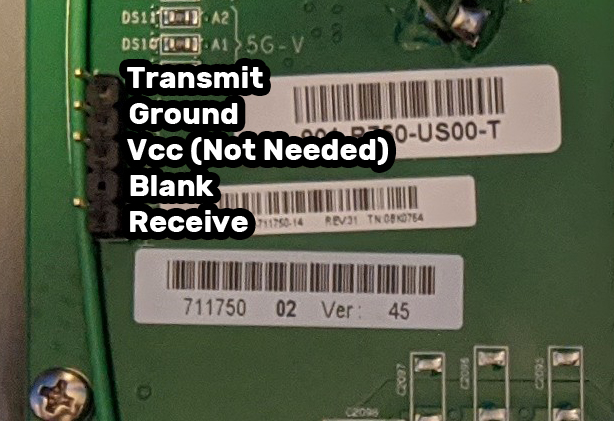
(Not my picture, borrowed on internet)
Login with super and sp-admin as password in the console
You need to setup a tftp server. I used my laptop with the same ip range as the AccessPoint, and had a tftp server running locally on it.
Then you can flash by:
fw set host <TFTP server IP address>
fw set proto tftp
fw set port 69
fw set control <image file name>
fw update
reboot
image file name is the firmware you want to flash onto the ap, which should be located on your tftp.
Options
- Mark as New
- Bookmark
- Subscribe
- Mute
- Subscribe to RSS Feed
- Permalink
- Report Inappropriate Content
09-01-2021 03:20 PM
@jside Thanks very much, I will give this a shot tomorrow.
Reply
Labels
-
Access points
1 -
AP Controller Connectivity
2 -
AP Management
6 -
AP migration
1 -
Authentication Server
1 -
cli
1 -
Client Management
2 -
Firmware Upgrade
2 -
Guest Pass
1 -
I live in
1 -
Installation
3 -
IP Multicast
1 -
Poe
3 -
Proposed Solution
2 -
R320 SLOW SPEED
1 -
R550
1 -
R610
1 -
R650
2 -
R750
2 -
Ruckus
1 -
Security
1 -
SmartZone
1 -
Solution Proposed
2 -
SSH
1 -
Unleashed
1 -
User Management
1 -
Wireless Throughput
1 -
WLAN Management
2 -
ZoneDirector
1
- « Previous
- Next »
