This website uses cookies. By clicking Accept, you consent to the use of cookies. Click Here to learn more about how we use cookies.


- Community
- RUCKUS Technologies
- RUCKUS Lennar Support
- Community Services
- RTF
- RTF Community
- Australia and New Zealand – English
- Brazil – Português
- China – 简体中文
- France – Français
- Germany – Deutsch
- Hong Kong – 繁體中文
- India – English
- Indonesia – bahasa Indonesia
- Italy – Italiano
- Japan – 日本語
- Korea – 한국어
- Latin America – Español (Latinoamérica)
- Middle East & Africa – English
- Netherlands – Nederlands
- Nordics – English
- North America – English
- Poland – polski
- Russia – Русский
- Singapore, Malaysia, and Philippines – English
- Spain – Español
- Taiwan – 繁體中文
- Thailand – ไทย
- Turkey – Türkçe
- United Kingdom – English
- Vietnam – Tiếng Việt
- EOL Products
Turn on suggestions
Auto-suggest helps you quickly narrow down your search results by suggesting possible matches as you type.
Showing results for
- RUCKUS Forums
- RUCKUS Technologies
- Access Points
- Re: Clients keep getting Disassociated from AP = R...
Options
- Subscribe to RSS Feed
- Mark Topic as New
- Mark Topic as Read
- Float this Topic for Current User
- Bookmark
- Subscribe
- Mute
- Printer Friendly Page
Clients keep getting Disassociated from AP = Reason 8

Anonymous
Not applicable
Options
- Mark as New
- Bookmark
- Subscribe
- Mute
- Subscribe to RSS Feed
- Permalink
- Report Inappropriate Content
10-13-2015 03:28 AM
Well, the on-going saga continues.
I have an R600 that for some reason disassociates clients giving 'reason 8' that i found in the web UI log.
Could someone tell me what reason 8 is please?
Also, could someone maybe explain what the AP classes as 'interference'?
I am confused as to why the AP all of a sudden starts to SmartSelect to find a clearer 5G channel when there no other rogue 5G networks anywhere nearby.
Plus, the 2.4G network is perfectly stable and that has plenty of reason to hop about as there quite a fair few nearby networks.
I have an R600 that for some reason disassociates clients giving 'reason 8' that i found in the web UI log.
Could someone tell me what reason 8 is please?
Also, could someone maybe explain what the AP classes as 'interference'?
I am confused as to why the AP all of a sudden starts to SmartSelect to find a clearer 5G channel when there no other rogue 5G networks anywhere nearby.
Plus, the 2.4G network is perfectly stable and that has plenty of reason to hop about as there quite a fair few nearby networks.
38 REPLIES 38
Anonymous
Not applicable
Options
- Mark as New
- Bookmark
- Subscribe
- Mute
- Subscribe to RSS Feed
- Permalink
- Report Inappropriate Content
10-15-2015 10:56 PM
Thanks Michael,
I did indeed let the AP's settle on a channel and then manually locked them to those and all seems to be ok so far for the 5G band.
I have left the 2.4G with smart select for now as that is quite stable.
However, surely it would be better for the AP to look for clearer channels before it decides to change?
Its a bit of pain that it decides to hop around and keep disconnecting clients.
I did indeed let the AP's settle on a channel and then manually locked them to those and all seems to be ok so far for the 5G band.
I have left the 2.4G with smart select for now as that is quite stable.
However, surely it would be better for the AP to look for clearer channels before it decides to change?
Its a bit of pain that it decides to hop around and keep disconnecting clients.
Options
- Mark as New
- Bookmark
- Subscribe
- Mute
- Subscribe to RSS Feed
- Permalink
- Report Inappropriate Content
10-16-2015 02:25 AM
Channel Fly does asses all channels prior to changing.
Here is the feature sheet:
http://c541678.r78.cf2.rackcdn.com/feature-sheets/fs-channelfly.pdf
I have also heard that there is also a new version of Channel Fly coming out soon, who knows what that will bring 🙂
Here is the feature sheet:
http://c541678.r78.cf2.rackcdn.com/feature-sheets/fs-channelfly.pdf
I have also heard that there is also a new version of Channel Fly coming out soon, who knows what that will bring 🙂
Anonymous
Not applicable
Options
- Mark as New
- Bookmark
- Subscribe
- Mute
- Subscribe to RSS Feed
- Permalink
- Report Inappropriate Content
10-16-2015 02:28 AM
I have just checked the log and its shows a Reason 8 many times, and these are clients on the 2.4G network.
I do not have that many wifi clients in the house so maybe there is a firmware issue?
Just to point out that i had the same issue on the 5G network, and that was with only 2 clients connected.
One of them from the log...
"RuckusAP daemon.warn Eved: STA-DISASSOC-REASON,nimac=2c:f0:ee:06:ab:96,func=ieee80211_recv_mgmt,line=7033,hint=recv disassociate (reason 8),rx_rssi=59,ack_rssi=0,reason=8,freq=2472,chan=13,stats=(841,94534,940,228925)"
Would this show when a client has disconnected from the AP after leaving the house?
I do not have that many wifi clients in the house so maybe there is a firmware issue?
Just to point out that i had the same issue on the 5G network, and that was with only 2 clients connected.
One of them from the log...
"RuckusAP daemon.warn Eved: STA-DISASSOC-REASON,nimac=2c:f0:ee:06:ab:96,func=ieee80211_recv_mgmt,line=7033,hint=recv disassociate (reason 8),rx_rssi=59,ack_rssi=0,reason=8,freq=2472,chan=13,stats=(841,94534,940,228925)"
Would this show when a client has disconnected from the AP after leaving the house?
Options
- Mark as New
- Bookmark
- Subscribe
- Mute
- Subscribe to RSS Feed
- Permalink
- Report Inappropriate Content
10-16-2015 02:42 AM
Is this Apple device still in your network: 2c:f0:ee:06:ab:96?
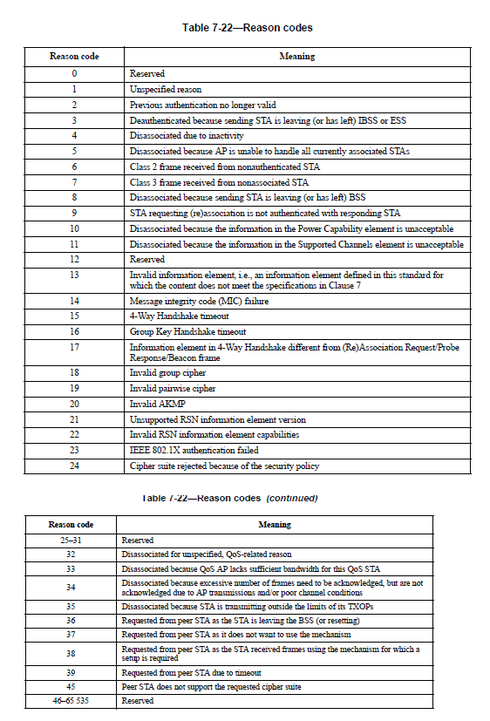
If it is not, then the reason code 8 is purely down to the fact that the STA has "Disassociated because sending station is leaving (or has left) BSS"
Here is an extract from Ruckus Support:
When disconnecting from an AP, what does reason code X mean?
Summary
This article provides insight into the reason codes for why an unsolicited notification management frame of type Disassociation, Deauthentication, DELTS, DELBA, or DLS Teardown was generated for a UE. This article lists the various reason codes along with a basic description.
Question
When disconnecting from an AP, what does reason code X mean?
Customer Environment
The customer operates any WIFI access network, where the 802.11 standard is adhered to by access points and UEs.
Root Cause
An AP may disconnect a UE for any number of reasons. These reasons are provided to the client by way of a reason code supplied in an unsolicited management frame.
Troubleshooting Steps
In a Ruckus AP Support File, note the disconnect reason cited for the particular disconnect in question, for example:
Resolution
When an Access Point (AP) disconnects a UE, according to the 802.11 standard, it must provide a reason code for why this event took place. Below is a table of the reason code numbers and their associated descriptions.
Outside of the above, what Firmware are you running and how do you have you WLAN configured?
Also please note that just because you see something in the log, does not make it an issue.
I would start with the approach of are you experiencing any connectivity issues (other than what you see in a log), if so then i would start to look at each of the mac addresses that are having the issues
Note: Reason codes are not all bad and Reason Code 8 in my eyes is one of these, as is Reason Code 4.
If it is not, then the reason code 8 is purely down to the fact that the STA has "Disassociated because sending station is leaving (or has left) BSS"
Here is an extract from Ruckus Support:
When disconnecting from an AP, what does reason code X mean?
Summary
This article provides insight into the reason codes for why an unsolicited notification management frame of type Disassociation, Deauthentication, DELTS, DELBA, or DLS Teardown was generated for a UE. This article lists the various reason codes along with a basic description.
Question
When disconnecting from an AP, what does reason code X mean?
Customer Environment
The customer operates any WIFI access network, where the 802.11 standard is adhered to by access points and UEs.
Root Cause
An AP may disconnect a UE for any number of reasons. These reasons are provided to the client by way of a reason code supplied in an unsolicited management frame.
Troubleshooting Steps
In a Ruckus AP Support File, note the disconnect reason cited for the particular disconnect in question, for example:
Mar 23 08:54:21 RuckusAP-kla daemon.info hostapd: @@204,clientDisconnect,"apMac"="xx:xx:xx:xx:xx:xx","clientMac"="64:76:ba:98:27:de","ssid"="MySSID",
"bssid"="54:3d:37:d8:9c:a8","wlanId"="49","tenantUUID"="839f87c6-d116-497e-afce-aa8157abd30c",
"apName"="RuckusAP-kla","apLocation"="My Test","clientIP"="10.2.12.2","vlanId"="100",
"radio"="b/g/n","encryption"="None","hostname"="macbookair","firstAuth"="1427100759",
"associationTime"="1427100759","ipAssignTime"="1427100766","disconnectTime"="1427100861",
"sessionDuration"="102","disconnectReason"="8","rxFrames"="305","rxBytes"="21118","txFrames"="85",
"txBytes"="13640","peakRx"="19934","peakTx"="13640","rssi"="25","receivedSignalStrength"="-69",
"Instantaneous rssi"="17","Xput"="0"
Resolution
When an Access Point (AP) disconnects a UE, according to the 802.11 standard, it must provide a reason code for why this event took place. Below is a table of the reason code numbers and their associated descriptions.
Outside of the above, what Firmware are you running and how do you have you WLAN configured?
Also please note that just because you see something in the log, does not make it an issue.
I would start with the approach of are you experiencing any connectivity issues (other than what you see in a log), if so then i would start to look at each of the mac addresses that are having the issues
Note: Reason codes are not all bad and Reason Code 8 in my eyes is one of these, as is Reason Code 4.
Options
- Mark as New
- Bookmark
- Subscribe
- Mute
- Subscribe to RSS Feed
- Permalink
- Report Inappropriate Content
10-16-2015 04:52 AM
Hi Sean, thanks for all the information!!
Yes, that particular device has indeed left, however, when i originally posted, this was two clients on the 5G network, with both of them right in front of me with one AP virtually above me on the ceiling.
With regards to the ChannelFly (however, I am using SmartSelect), when i initially had the problem, it was jumping every few minutes to a different channel and disconnecting clients that were associated with it. It was as if the AP had been rebooted (which it hadnt) and was doing the initial scan for the cleanest channel.
Therefore, because i was actually having random reboots i decided to drop the firmware back to 100....128 and so far so good.
Yes, that particular device has indeed left, however, when i originally posted, this was two clients on the 5G network, with both of them right in front of me with one AP virtually above me on the ceiling.
With regards to the ChannelFly (however, I am using SmartSelect), when i initially had the problem, it was jumping every few minutes to a different channel and disconnecting clients that were associated with it. It was as if the AP had been rebooted (which it hadnt) and was doing the initial scan for the cleanest channel.
Therefore, because i was actually having random reboots i decided to drop the firmware back to 100....128 and so far so good.
Labels
-
Access points
1 -
AP Controller Connectivity
2 -
AP Management
6 -
AP migration
1 -
Authentication Server
1 -
cli
1 -
Client Management
2 -
Firmware Upgrade
2 -
Guest Pass
1 -
I live in
1 -
Installation
3 -
IP Multicast
1 -
Poe
3 -
Proposed Solution
2 -
R320 SLOW SPEED
1 -
R550
1 -
R610
1 -
R650
2 -
R750
2 -
Ruckus
1 -
Security
1 -
SmartZone
1 -
Solution Proposed
2 -
SSH
1 -
Unleashed
1 -
User Management
1 -
Wireless Throughput
1 -
WLAN Management
2 -
ZoneDirector
1
- « Previous
- Next »
