This website uses cookies. By clicking Accept, you consent to the use of cookies. Click Here to learn more about how we use cookies.
RUCKUS Community Forums are now in READ-ONLY mode while we migrate to a new platform.
You will still be able to read posts and knowledge articles, but will be unable to post new content until Go Live on the new platform Monday August 17.
Lennar Smart Home customers: please contact [email protected] for assistance during the week of August 9-17.

Turn on suggestions
Auto-suggest helps you quickly narrow down your search results by suggesting possible matches as you type.
Showing results for
- RUCKUS Forums
- RUCKUS Technologies
- ICX Switches
- ICX 7125 cannot be logged in after a power outage
Options
- Subscribe to RSS Feed
- Mark Topic as New
- Mark Topic as Read
- Float this Topic for Current User
- Bookmark
- Subscribe
- Mute
- Printer Friendly Page

Anonymous
Not applicable
Options
- Mark as New
- Bookmark
- Subscribe
- Mute
- Subscribe to RSS Feed
- Permalink
- Report Inappropriate Content
12-17-2021 02:54 PM
I can't get to the CLI screen, I am prompted for a username and password, but I don't have one. auto approval is enabled.The system has been reset.
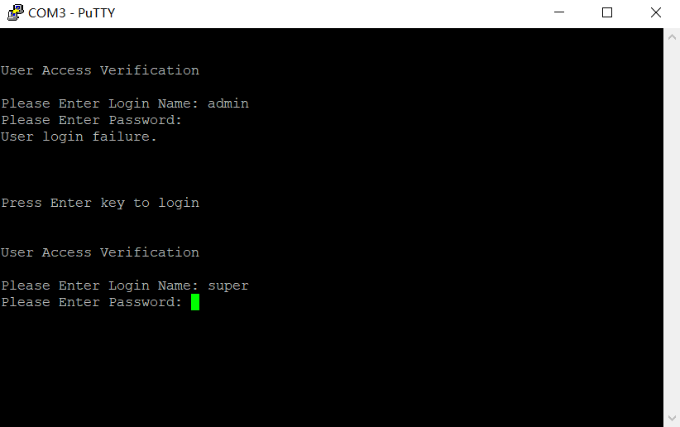
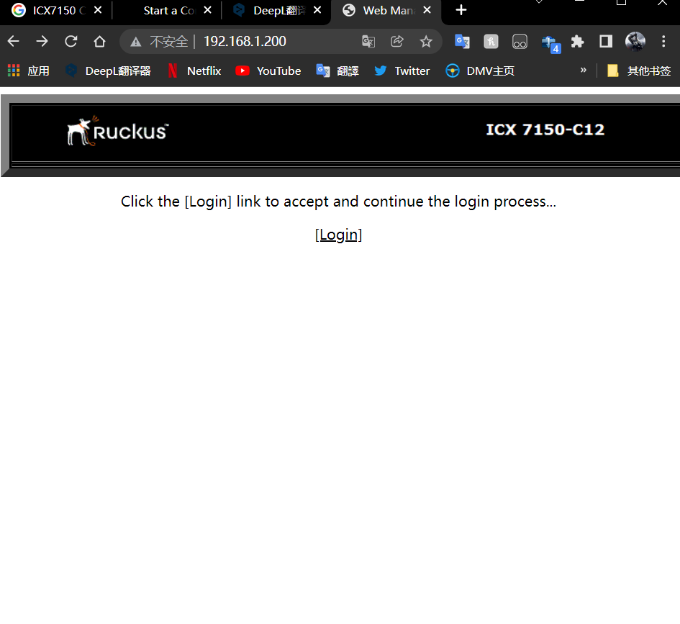
Solved! Go to Solution.
1 ACCEPTED SOLUTION

Options
- Mark as New
- Bookmark
- Subscribe
- Mute
- Subscribe to RSS Feed
- Permalink
- Report Inappropriate Content
12-18-2021 03:19 AM
Otherwise, you have to do a password recovery procedure:
- connect to the console switch
- boot up
- stop the boot process at the begin by press 'b' key
- enter 'no password' and 'boot'
- the switch will start normally and you will have access to the CLI
- change the password
- and don't forget to do a 'write mem' 😉
Hope this will help
Vince
Reply
4 REPLIES 4
Options
- Mark as New
- Bookmark
- Subscribe
- Mute
- Subscribe to RSS Feed
- Permalink
- Report Inappropriate Content
12-18-2021 03:10 AM
Hi Shawn,
If the system has been reset, did you tried the default credentials super/sp-admin ?
Cheers
Vince
Options
- Mark as New
- Bookmark
- Subscribe
- Mute
- Subscribe to RSS Feed
- Permalink
- Report Inappropriate Content
12-18-2021 03:19 AM
Otherwise, you have to do a password recovery procedure:
- connect to the console switch
- boot up
- stop the boot process at the begin by press 'b' key
- enter 'no password' and 'boot'
- the switch will start normally and you will have access to the CLI
- change the password
- and don't forget to do a 'write mem' 😉
Hope this will help
Vince
Reply
Options
- Mark as New
- Bookmark
- Subscribe
- Mute
- Subscribe to RSS Feed
- Permalink
- Report Inappropriate Content
12-18-2021 02:51 PM
@vincent_felisaz Thanks Vince, I tried "no password", unfortunately it still asked me to provide a username and password.
Anonymous
Not applicable
Options
- Mark as New
- Bookmark
- Subscribe
- Mute
- Subscribe to RSS Feed
- Permalink
- Report Inappropriate Content
12-18-2021 04:57 PM
It's done! I used Vince's method:
--type "no password"
-- "boot"
-- "ena"
-- "conf t"
-- "username admin password 123456789"
-- "aaa authentication web default local"
This adds the username and password.
Labels
-
7250
1 -
802.3af PoE
1 -
802.3at PoE
1 -
AAA
1 -
ACL
1 -
auto-provision
1 -
auto-provisioning
1 -
Cluster synchronization
1 -
Crypto Keys
1 -
Deployment
1 -
dhcp-66
1 -
fastiron-10
1 -
fastiron-8
1 -
Firmware Downgrade
1 -
Firmware Recommendation
1 -
Firmware Upgrade
5 -
ICX
3 -
ICX 7150-C12p
1 -
ICX switch
2 -
ICX Switch Management
10 -
ICX-7150-C12
1 -
ICX-7550
1 -
ICX-8200
1 -
Installation
2 -
not enough electricity
1 -
overlad
1 -
Override PoE Operating Mode
1 -
PD overload
1 -
Poe
2 -
PoE mode.
1 -
power limitations
1 -
Proposed Solution
1 -
RADIUS
1 -
Routing
2 -
RUCKUS Self-Help
2 -
stack
1 -
stack password
1 -
Stacking
1 -
tftp
1 -
Upgrade
1 -
Upgrade path
1 -
We
1 -
zero-touch
1
- « Previous
- Next »
