This website uses cookies. By clicking Accept, you consent to the use of cookies. Click Here to learn more about how we use cookies.


- Community
- RUCKUS Technologies
- RUCKUS Lennar Support
- Community Services
- RTF
- RTF Community
- Australia and New Zealand – English
- Brazil – Português
- China – 简体中文
- France – Français
- Germany – Deutsch
- Hong Kong – 繁體中文
- India – English
- Indonesia – bahasa Indonesia
- Italy – Italiano
- Japan – 日本語
- Korea – 한국어
- Latin America – Español (Latinoamérica)
- Middle East & Africa – English
- Netherlands – Nederlands
- Nordics – English
- North America – English
- Poland – polski
- Russia – Русский
- Singapore, Malaysia, and Philippines – English
- Spain – Español
- Taiwan – 繁體中文
- Thailand – ไทย
- Turkey – Türkçe
- United Kingdom – English
- Vietnam – Tiếng Việt
- EOL Products
Turn on suggestions
Auto-suggest helps you quickly narrow down your search results by suggesting possible matches as you type.
Showing results for
- RUCKUS Forums
- EOL Products
- FlexMaster
- Re: Client Association Successful / Failed
Options
- Subscribe to RSS Feed
- Mark Topic as New
- Mark Topic as Read
- Float this Topic for Current User
- Bookmark
- Subscribe
- Mute
- Printer Friendly Page
Client Association Successful / Failed

Anonymous
Not applicable
Options
- Mark as New
- Bookmark
- Subscribe
- Mute
- Subscribe to RSS Feed
- Permalink
- Report Inappropriate Content
10-25-2015 11:59 PM
How will the SCG / ZD determine a failed associations and what is the main reason of the failed association?
Will it related to frequency jam? or Will it related to the maxium number of client the AP supported?
34 REPLIES 34

Options
- Mark as New
- Bookmark
- Subscribe
- Mute
- Subscribe to RSS Feed
- Permalink
- Report Inappropriate Content
10-28-2015 09:21 AM
The Histogram reports quite typical and very low interference on both bands.
What kind of client are you concerned with?
Are there other type of clients in use that have no concerns?
What kind of client are you concerned with?
Are there other type of clients in use that have no concerns?
Options
- Mark as New
- Bookmark
- Subscribe
- Mute
- Subscribe to RSS Feed
- Permalink
- Report Inappropriate Content
10-29-2015 08:18 AM
The above log is just want to know how to determine the PHY is enough to use or not.
But I have a problem case today that the CPU of the AP is 100% with around 70 client
How can I check why the AP is 100% CPU?
### Device Info ###Model : T301N
CPU : 100.00%
Load : 7.43 7.44 4.98 5/58 9276
Memory : 149292 KB (free), 12508 KB (cache) 161800 KB (available) 254988 KB (total)
Besides any manual can teach me how to check the support log file like below wording?
daemon.info memcached: msg type: 2, error: NOT FOUND
daemon.warn Eved: wlan33 xx:xx:xx:xx:xx:xx : Authentication Difficulty
user.warn kernel: FWLOG: [26412061] WAL_DBGID_DEV_TX_TIMEOUT ( 0x5 )
And also the below Airtime Stats seems busy am I correct?
------------ PHY Error Stats ------------
194568558 PHY errors since clearing all stats (rx_phyerr)
207 phy ofdm timing
9 phy ofdm restart
125 phy cck timing
73 phy cck restart
174356072 phy ofdm group
20212072 phy cck group
2 PHY errors since clearing delta stats (1 sec)
2 phy cck restart
Histogram of PHY errors per second (pcttime in each range)
0 1-500 ..1K ..2K ..5K ..10K ..20K ..50K .100K more
1 63 19 10 5 2 1 0 0 0
------------ Airtime Stats ------------
Airtime utilized (percent) since clearing delta stats (1 sec)
Busy: 29 RX: 49 TX: 7 Total: 84
Histograms of airtime (pcttime in each range) since clearing all stats
0 0-10 ..20 ..30 ..40 ..50 ..60 ..70 ..80 ..90 ..100
busy: 24 71 4 1 0 0 0 0 0 0 0
rx: 0 17 40 25 10 5 2 1 0 0 0
tx: 61 35 2 1 1 0 0 0 0 0 0
tot: 0 15 36 19 10 9 6 3 2 1 0
------------ PHY Error Stats ------------
3492058 PHY errors since clearing all stats (rx_phyerr)
0 PHY errors since clearing delta stats (0 sec)
Histogram of PHY errors per second (pcttime in each range)
0 1-500 ..1K ..2K ..5K ..10K ..20K ..50K .100K more
99 1 0 0 0 0 0 0 0 0
------------ Airtime Stats ------------
Airtime utilized (percent) since clearing delta stats (0 sec)
Busy: 4 RX: 17 TX: 25 Total: 47
Histograms of airtime (pcttime in each range) since clearing all stats
0 0-10 ..20 ..30 ..40 ..50 ..60 ..70 ..80 ..90 ..100
busy: 57 43 0 0 0 0 0 0 0 0 0
rx: 85 12 1 1 0 0 0 0 0 0 0
tx: 9 90 1 0 0 0 0 0 0 0 0
tot: 5 91 2 1 0 0 0 0 0 0 0
But I have a problem case today that the CPU of the AP is 100% with around 70 client
How can I check why the AP is 100% CPU?
### Device Info ###Model : T301N
CPU : 100.00%
Load : 7.43 7.44 4.98 5/58 9276
Memory : 149292 KB (free), 12508 KB (cache) 161800 KB (available) 254988 KB (total)
Besides any manual can teach me how to check the support log file like below wording?
daemon.info memcached: msg type: 2, error: NOT FOUND
daemon.warn Eved: wlan33 xx:xx:xx:xx:xx:xx : Authentication Difficulty
user.warn kernel: FWLOG: [26412061] WAL_DBGID_DEV_TX_TIMEOUT ( 0x5 )
And also the below Airtime Stats seems busy am I correct?
------------ PHY Error Stats ------------
194568558 PHY errors since clearing all stats (rx_phyerr)
207 phy ofdm timing
9 phy ofdm restart
125 phy cck timing
73 phy cck restart
174356072 phy ofdm group
20212072 phy cck group
2 PHY errors since clearing delta stats (1 sec)
2 phy cck restart
Histogram of PHY errors per second (pcttime in each range)
0 1-500 ..1K ..2K ..5K ..10K ..20K ..50K .100K more
1 63 19 10 5 2 1 0 0 0
------------ Airtime Stats ------------
Airtime utilized (percent) since clearing delta stats (1 sec)
Busy: 29 RX: 49 TX: 7 Total: 84
Histograms of airtime (pcttime in each range) since clearing all stats
0 0-10 ..20 ..30 ..40 ..50 ..60 ..70 ..80 ..90 ..100
busy: 24 71 4 1 0 0 0 0 0 0 0
rx: 0 17 40 25 10 5 2 1 0 0 0
tx: 61 35 2 1 1 0 0 0 0 0 0
tot: 0 15 36 19 10 9 6 3 2 1 0
------------ PHY Error Stats ------------
3492058 PHY errors since clearing all stats (rx_phyerr)
0 PHY errors since clearing delta stats (0 sec)
Histogram of PHY errors per second (pcttime in each range)
0 1-500 ..1K ..2K ..5K ..10K ..20K ..50K .100K more
99 1 0 0 0 0 0 0 0 0
------------ Airtime Stats ------------
Airtime utilized (percent) since clearing delta stats (0 sec)
Busy: 4 RX: 17 TX: 25 Total: 47
Histograms of airtime (pcttime in each range) since clearing all stats
0 0-10 ..20 ..30 ..40 ..50 ..60 ..70 ..80 ..90 ..100
busy: 57 43 0 0 0 0 0 0 0 0 0
rx: 85 12 1 1 0 0 0 0 0 0 0
tx: 9 90 1 0 0 0 0 0 0 0 0
tot: 5 91 2 1 0 0 0 0 0 0 0
Options
- Mark as New
- Bookmark
- Subscribe
- Mute
- Subscribe to RSS Feed
- Permalink
- Report Inappropriate Content
10-29-2015 09:04 AM
if the CPU is at 100% then there is obviously an issue and this can sometimes be due to the rpm cache and max-aid values.
I would do the following on the AP's to reduce some of the CPU load and tweak network performance:
then run this on each model of you AP:
then using the values above issue the following:
Note: As you can see the default unconnected cache on my AP is 640 per radio.
Essentially what I have done here is set the maximum association per radio to be 100 (connected client cache) and then applied the same value to the rpm (unconnected client cache).
By default the AP will dedicate resource to the unconnected client cache and the default value is 512 for each radio - so its wasting memory on clients that are not even connected 😞
By setting the rpm to be the same value as the max-aid what you get is a see-saw effect:
In a state where no clients are connected you get this:
connected cache = 0
unconnected cache = 100
and then when they connect you get this:
connected cache = 10
unconnected cache = 90
Essentially all you are doing here is allowing the AP to dedicate memory to the maximum of clients you want to per radio.
I would also issue the following:
If you have multiple SSID's then you need to apply the above commands to the relevant SSID's i.e. set ofdm-only to 2.4GHz SSID and the set bss-minrate & proxy-arp to both 2.4 and 5GHz SSID's.
If you are using an SCG you can accomplish this by using a ksp script in the following format:
You can upload the ksp file from the Administration>Diagnostics>AP CLI Scripts
This can also be accomplished in the Edit WLAN Config>Advanced section:
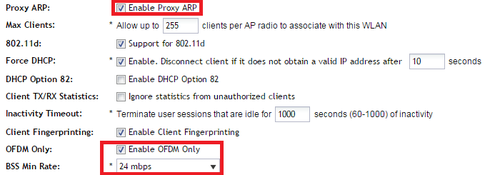
Outside of the above you could look at load balancing clients and band Balancing all capable clients to the 5GHz radio to reduce noise by using the following settings (if your running v3.0 or above):

The 17dB value means clients will be load balanced is they are at 17dB (you can get top bit rate at 17dB), and setting the value to 0% means that if they are 5GHz capable they will join the 5GH radio.
Also look at smart roam to prevent sticky client issues:
Note: This can also be applied via ksp script also using the above mentioned format.
Here is the link to help you understand:
https://support.ruckuswireless.com/answers/000002277
Note: Client Admission control is something that may help in the future, but I would not be touching it at this stage as its experimental and introduces CPU load to the AP if you don't configure it correctly
Try the above and see what you get form there 🙂
I would do the following on the AP's to reduce some of the CPU load and tweak network performance:
set max-aid wlan0 100
set max-aid wlan32 100
then run this on each model of you AP:
rkscli: get rpmkey wifi0/mq-config
wifi0/mq-config = 4096 1536 640 128 768 512 128
OK
rkscli: get rpmkey wifi1/mq-config
wifi1/mq-config = 4096 1536 640 128 768 512 128
OK
then using the values above issue the following:
set rpmkey wifi0/mq-config = 4096 1536 100 128 768 512 128
set rpmkey wifi1/mq-config = 4096 1536 100 128 768 512 128
Note: As you can see the default unconnected cache on my AP is 640 per radio.
Essentially what I have done here is set the maximum association per radio to be 100 (connected client cache) and then applied the same value to the rpm (unconnected client cache).
By default the AP will dedicate resource to the unconnected client cache and the default value is 512 for each radio - so its wasting memory on clients that are not even connected 😞
By setting the rpm to be the same value as the max-aid what you get is a see-saw effect:
In a state where no clients are connected you get this:
connected cache = 0
unconnected cache = 100
and then when they connect you get this:
connected cache = 10
unconnected cache = 90
Essentially all you are doing here is allowing the AP to dedicate memory to the maximum of clients you want to per radio.
I would also issue the following:
set ofdm-only wlan0 enable
set bss-minrate wlan0 24000
set bss-minrate wlan32 24000
set proxy-arp wlan0 enable
set proxy-arp wlan32 enable
If you have multiple SSID's then you need to apply the above commands to the relevant SSID's i.e. set ofdm-only to 2.4GHz SSID and the set bss-minrate & proxy-arp to both 2.4 and 5GHz SSID's.
If you are using an SCG you can accomplish this by using a ksp script in the following format:
fw_version=3.1.1.0.348Note: save the above in a file as filename.ksp
model=all
set ofdm-only wlan0 enable
set bss-minrate wlan0 24000
set bss-minrate wlan32 24000
set proxy-arp wlan0 enable
set proxy-arp wlan32 enable
You can upload the ksp file from the Administration>Diagnostics>AP CLI Scripts
This can also be accomplished in the Edit WLAN Config>Advanced section:
Outside of the above you could look at load balancing clients and band Balancing all capable clients to the 5GHz radio to reduce noise by using the following settings (if your running v3.0 or above):
The 17dB value means clients will be load balanced is they are at 17dB (you can get top bit rate at 17dB), and setting the value to 0% means that if they are 5GHz capable they will join the 5GH radio.
Also look at smart roam to prevent sticky client issues:
set roam_factor wlan0 3
set roam_factor wlan32 3
reboot now
quit
Note: This can also be applied via ksp script also using the above mentioned format.
Here is the link to help you understand:
https://support.ruckuswireless.com/answers/000002277
Note: Client Admission control is something that may help in the future, but I would not be touching it at this stage as its experimental and introduces CPU load to the AP if you don't configure it correctly
Try the above and see what you get form there 🙂
Options
- Mark as New
- Bookmark
- Subscribe
- Mute
- Subscribe to RSS Feed
- Permalink
- Report Inappropriate Content
10-29-2015 09:52 AM
Thanks for your information
For the last AP log I give out it is a test case that we want to know if all user is under web browsing or downloading traffic how many user can be handle on single AP.
it has few SSID that original has set 100 client per ssid per radio limit but during one of the test case. End user suspect the AP can't handle the client (>200) may be due to this setting and then they request to change the value to 500 and redo the test and provide the last AP log.
Actually the end user want to know the performance for the AP so that it can plan the density for the next phase.
The test result is
5G Client is 19 (open)
5G Client is 44 (WPA2)
2.4G Client is 11 (WPA2)
Then no more client can join this AP and the AP cpu is 100%
( the end user is active user doing some file download and also web browsing)
Below is the value I got from that AP
wifi0/mq-config='4096 1536 640 128 768 512 128'
wifi1/mq-config='2048 768 384 64 384 256 64'
Also the client association is show below

For the last AP log I give out it is a test case that we want to know if all user is under web browsing or downloading traffic how many user can be handle on single AP.
it has few SSID that original has set 100 client per ssid per radio limit but during one of the test case. End user suspect the AP can't handle the client (>200) may be due to this setting and then they request to change the value to 500 and redo the test and provide the last AP log.
Actually the end user want to know the performance for the AP so that it can plan the density for the next phase.
The test result is
5G Client is 19 (open)
5G Client is 44 (WPA2)
2.4G Client is 11 (WPA2)
Then no more client can join this AP and the AP cpu is 100%
( the end user is active user doing some file download and also web browsing)
Below is the value I got from that AP
wifi0/mq-config='4096 1536 640 128 768 512 128'
wifi1/mq-config='2048 768 384 64 384 256 64'
Also the client association is show below
Options
- Mark as New
- Bookmark
- Subscribe
- Mute
- Subscribe to RSS Feed
- Permalink
- Report Inappropriate Content
10-29-2015 10:16 AM
So you appear to have a lot of failures.
Questions first:
1. Whats the area capacity - footfall figure
2. What is your target demographic percentage of the area capacity 20%, 30% etc
3. What is the application demand within that area
Now on to the rpm response:
I think from the test I done in our chamber that the 5GHz radio on this AP only accepts a maximum value of 128 clients as opposed to 256 on the 2.4GHz radio (ARPing test).
You can check the max values by issuing:
If your looking at safe number values for network design, this comment should come from Ruckus (Michael again :))or you can test it yourself using a Ixia or Spirent.
Seeing as there is a RAM implication on the 5GHz radio I would be looking at whether or not this AP is the right AP for your deployment type.
I personally would be using the 7782 range for HD outdoor deployments as they have 128 RAM on each radio and designed for that type of deployment.
Questions first:
1. Whats the area capacity - footfall figure
2. What is your target demographic percentage of the area capacity 20%, 30% etc
3. What is the application demand within that area
Now on to the rpm response:
I think from the test I done in our chamber that the 5GHz radio on this AP only accepts a maximum value of 128 clients as opposed to 256 on the 2.4GHz radio (ARPing test).
You can check the max values by issuing:
get max-aid wlan 32
get max-aid wlan0
The rpm command also shows that the AP has less RAM for the 5GHz radio - strange (maybe a question for Michael).
If your looking at safe number values for network design, this comment should come from Ruckus (Michael again :))or you can test it yourself using a Ixia or Spirent.
Seeing as there is a RAM implication on the 5GHz radio I would be looking at whether or not this AP is the right AP for your deployment type.
I personally would be using the 7782 range for HD outdoor deployments as they have 128 RAM on each radio and designed for that type of deployment.
