• You must have a RUCKUS Support Portal account (including username and password). You can use this account to access the general Support site.
• Every purchased license has its own unique activation code.
• You receive the activation code in a separate Support Purchase Acknowledgment (SPA) email message for each license.
• Open the SPA email message that you received from RUCKUS and verify the End User Account Information Only a registered user can complete the activation process.
• (Smartzone/SO/cloud should be the same name)
• Click the activation Code link in the email message.
• Ruckus sign-on page is displayed, log in
• Verify the licenses to be activated. Accept the terms and conditions and click activate Purchase.
• Click the license entry for RUCKUS Analytics (CLD-ANAP) to activate the license
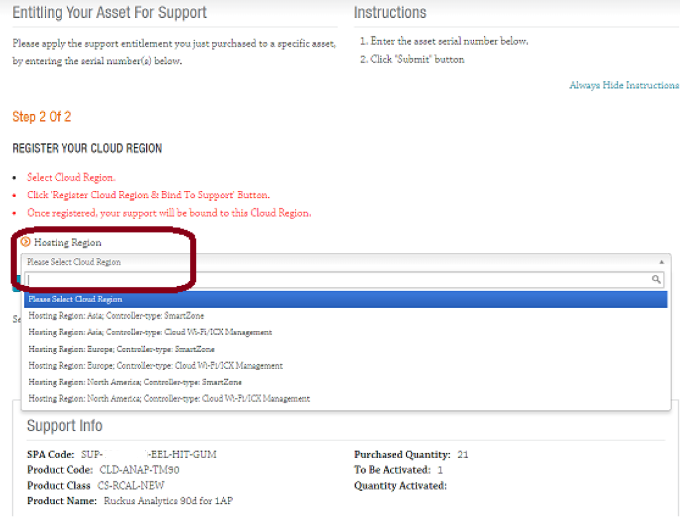
• In the entitling Your Assets for Support page, select the following options:
• The region where you want to maintain your analytics data. Currently, the supported regions are the US, Europe, and Asia.
• The Controller-type to which to attach the license: On-prem controller (SmartZone) or RUCKUS Cloud controller
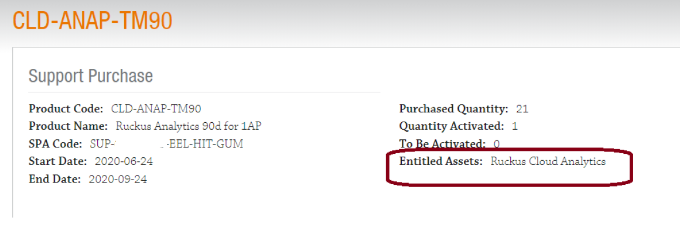
• Activation Confirmation- Entitled Assets: Ruckus Cloud Analytics
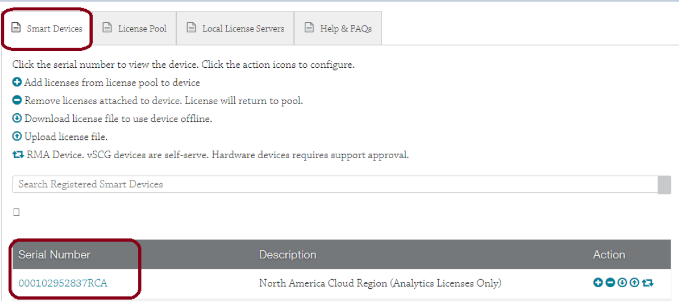
• Verify the asset in LiMan.