This website uses cookies. By clicking Accept, you consent to the use of cookies. Click Here to learn more about how we use cookies.
RUCKUS Community Forums are now in READ-ONLY mode while we migrate to a new platform.
You will still be able to read posts and knowledge articles, but will be unable to post new content until Go Live on the new platform Monday August 17.
Lennar Smart Home customers: please contact [email protected] for assistance during the week of August 9-17.

- Community
- RUCKUS Technologies
- RUCKUS Lennar Support
- Community Services
- RTF
- RTF Community
- Australia and New Zealand – English
- Brazil – Português
- China – 简体中文
- France – Français
- Germany – Deutsch
- Hong Kong – 繁體中文
- India – English
- Indonesia – bahasa Indonesia
- Italy – Italiano
- Japan – 日本語
- Korea – 한국어
- Latin America – Español (Latinoamérica)
- Middle East & Africa – English
- Netherlands – Nederlands
- Nordics – English
- North America – English
- Poland – polski
- Russia – Русский
- Singapore, Malaysia, and Philippines – English
- Spain – Español
- Taiwan – 繁體中文
- Thailand – ไทย
- Turkey – Türkçe
- United Kingdom – English
- Vietnam – Tiếng Việt
- EOL Products
Turn on suggestions
Auto-suggest helps you quickly narrow down your search results by suggesting possible matches as you type.
Showing results for
- RUCKUS Forums
- RUCKUS Technologies
- Access Points
- Smart Roam and Mac OS compatibility - known issues...
Options
- Subscribe to RSS Feed
- Mark Topic as New
- Mark Topic as Read
- Float this Topic for Current User
- Bookmark
- Subscribe
- Mute
- Printer Friendly Page
Smart Roam and Mac OS compatibility - known issues?

Options
- Mark as New
- Bookmark
- Subscribe
- Mute
- Subscribe to RSS Feed
- Permalink
- Report Inappropriate Content
03-04-2024 11:35 PM - edited 03-04-2024 11:43 PM
I have successfully enabled Smart Roam on an R750 Unleashed network by logging into master > enable > config > wlan "SSID_name" > smart-roam 6 > end > end > quit
The deployment consists of 10 R750 APs and -55dbm or better 5GHz HE80 coverage everywhere for MCS11 rates.
I am noticing some Macbook Pro clients are getting booted off one of the APs even when signal is -55dbm or better. Full on disconnect, goes to no bars on the client, followed by an immediate full reconnect
I have 2 theories:
1.) The Bluetooth and/or Location Services are causing the client to become a "ghost" resulting in Smart Roam kicking it off. The Mac OS Bluetooth and Location causing wifi interruptions are talked about a lot in Parsec and Sunshine/Moonlight game streaming threads on reddit and other forums.
2.) There is something I don't understand about setting Smart Roam above level 5.
To get the roaming performance I want, I actually need level 7. I determined this by extensive walk testing. This is because the deployment is -55 coverage everywhere on 5GHz, designed for MCS11 data rates in all areas.
I am trying to kick clients off when they approach -65.
Thanks for any suggestions
1 REPLY 1


Options
- Mark as New
- Bookmark
- Subscribe
- Mute
- Subscribe to RSS Feed
- Permalink
- Report Inappropriate Content
03-05-2024 12:15 AM
Hi @zoneMedicOrches
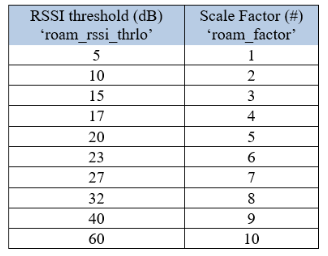
Below table explains the table explains the matching of Roam factor value to SNR value. SNR is a combination of RSSI and the Noise. So the client will be disconnected when it reaches the SNR threshold set.
If you want the client to disconnect at -65, probably Roamfactor 5 should help.
Higher the roamfactor, the more sticky the client will be to the AP.

Labels
-
Access points
1 -
AP Controller Connectivity
2 -
AP Management
6 -
AP migration
1 -
Authentication Server
1 -
cli
1 -
Client Management
2 -
Firmware Upgrade
2 -
Guest Pass
1 -
I live in
1 -
Installation
3 -
IP Multicast
1 -
Poe
3 -
Proposed Solution
2 -
R320 SLOW SPEED
1 -
R550
1 -
R610
1 -
R650
2 -
R750
2 -
Ruckus
1 -
Security
1 -
SmartZone
1 -
Solution Proposed
2 -
SSH
1 -
Unleashed
1 -
User Management
1 -
Wireless Throughput
1 -
WLAN Management
2 -
ZoneDirector
1
- « Previous
- Next »
