This website uses cookies. By clicking Accept, you consent to the use of cookies. Click Here to learn more about how we use cookies.
RUCKUS Community Forums are now in READ-ONLY mode while we migrate to a new platform.
You will still be able to read posts and knowledge articles, but will be unable to post new content until Go Live on the new platform Monday August 17.
Lennar Smart Home customers: please contact [email protected] for assistance during the week of August 9-17.

- Community
- RUCKUS Technologies
- RUCKUS Lennar Support
- Community Services
- RTF
- RTF Community
- Australia and New Zealand – English
- Brazil – Português
- China – 简体中文
- France – Français
- Germany – Deutsch
- Hong Kong – 繁體中文
- India – English
- Indonesia – bahasa Indonesia
- Italy – Italiano
- Japan – 日本語
- Korea – 한국어
- Latin America – Español (Latinoamérica)
- Middle East & Africa – English
- Netherlands – Nederlands
- Nordics – English
- North America – English
- Poland – polski
- Russia – Русский
- Singapore, Malaysia, and Philippines – English
- Spain – Español
- Taiwan – 繁體中文
- Thailand – ไทย
- Turkey – Türkçe
- United Kingdom – English
- Vietnam – Tiếng Việt
- EOL Products
Turn on suggestions
Auto-suggest helps you quickly narrow down your search results by suggesting possible matches as you type.
Showing results for
- RUCKUS Forums
- RUCKUS Technologies
- Access Points
- Re: Access Point R310 Ping test delay
Options
- Subscribe to RSS Feed
- Mark Topic as New
- Mark Topic as Read
- Float this Topic for Current User
- Bookmark
- Subscribe
- Mute
- Printer Friendly Page

Options
- Mark as New
- Bookmark
- Subscribe
- Mute
- Subscribe to RSS Feed
- Permalink
- Report Inappropriate Content
04-12-2023 08:11 PM - edited 04-12-2023 08:14 PM
Hello
I am inquiring about the delay of Access Point R310 Ping.
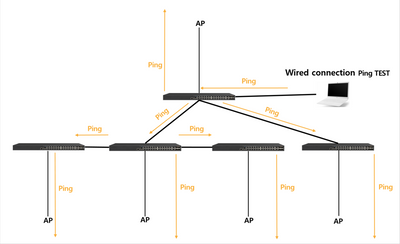
If you ping the AP with the configuration status in the picture below, the disconnect occurs.
I understand that the ping should not be cut off in the wired section, so I looked it up and I heard that if the AP is receiving data, it delays the ping data. Is that correct?
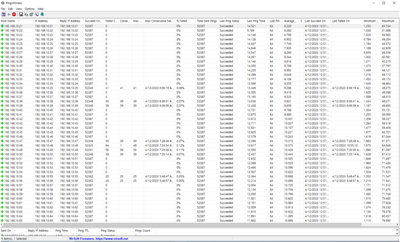
However, if you look at the picture below, only certain APs are frequently pinged.
※ I think there is a problem with the UTP cable connected to the AP.
◎ TEST Configuration
◎ About Ping
Please help me
Thank you.
Solved! Go to Solution.
1 ACCEPTED SOLUTION

Options
- Mark as New
- Bookmark
- Subscribe
- Mute
- Subscribe to RSS Feed
- Permalink
- Report Inappropriate Content
04-14-2023 01:22 AM
Hi Youngjae,
Regardless of the AP model, the delay in ping or time out might happen if the AP is overwhelmed by the huge traffic.
Another possibility for time out can be due to faulty ethport/cabling issue. However, as per the ping stats screenshot the %failed looks very less(negligible). Kindly let us know if you are facing any performance issue with the AP's where ping timed out is noticed.
Thanks.
2 REPLIES 2
Options
- Mark as New
- Bookmark
- Subscribe
- Mute
- Subscribe to RSS Feed
- Permalink
- Report Inappropriate Content
04-14-2023 01:22 AM
Hi Youngjae,
Regardless of the AP model, the delay in ping or time out might happen if the AP is overwhelmed by the huge traffic.
Another possibility for time out can be due to faulty ethport/cabling issue. However, as per the ping stats screenshot the %failed looks very less(negligible). Kindly let us know if you are facing any performance issue with the AP's where ping timed out is noticed.
Thanks.
Options
- Mark as New
- Bookmark
- Subscribe
- Mute
- Subscribe to RSS Feed
- Permalink
- Report Inappropriate Content
04-20-2023 05:26 PM
Hi aswin_dasari
Thank you for your answer.

Labels
-
Access points
1 -
AP Controller Connectivity
2 -
AP Management
6 -
AP migration
1 -
Authentication Server
1 -
cli
1 -
Client Management
2 -
Firmware Upgrade
2 -
Guest Pass
1 -
I live in
1 -
Installation
3 -
IP Multicast
1 -
Poe
3 -
Proposed Solution
2 -
R320 SLOW SPEED
1 -
R550
1 -
R610
1 -
R650
2 -
R750
2 -
Ruckus
1 -
Security
1 -
SmartZone
1 -
Solution Proposed
2 -
SSH
1 -
Unleashed
1 -
User Management
1 -
Wireless Throughput
1 -
WLAN Management
2 -
ZoneDirector
1
- « Previous
- Next »
