This website uses cookies. By clicking Accept, you consent to the use of cookies. Click Here to learn more about how we use cookies.

- Community
- RUCKUS Technologies
- RUCKUS Lennar Support
- Community Services
- RTF
- RTF Community
- Australia and New Zealand – English
- Brazil – Português
- China – 简体中文
- France – Français
- Germany – Deutsch
- Hong Kong – 繁體中文
- India – English
- Indonesia – bahasa Indonesia
- Italy – Italiano
- Japan – 日本語
- Korea – 한국어
- Latin America – Español (Latinoamérica)
- Middle East & Africa – English
- Netherlands – Nederlands
- Nordics – English
- North America – English
- Poland – polski
- Russia – Русский
- Singapore, Malaysia, and Philippines – English
- Spain – Español
- Taiwan – 繁體中文
- Thailand – ไทย
- Turkey – Türkçe
- United Kingdom – English
- Vietnam – Tiếng Việt
- EOL Products
Turn on suggestions
Auto-suggest helps you quickly narrow down your search results by suggesting possible matches as you type.
Showing results for
- RUCKUS Forums
- RUCKUS Technologies
- ZD
- Re: ZD 1200
Options
- Subscribe to RSS Feed
- Mark Topic as New
- Mark Topic as Read
- Float this Topic for Current User
- Bookmark
- Subscribe
- Mute
- Printer Friendly Page
ZD 1200

Anonymous
Not applicable
Options
- Mark as New
- Bookmark
- Subscribe
- Mute
- Subscribe to RSS Feed
- Permalink
- Report Inappropriate Content
06-08-2016 12:25 AM
Hi all ,
I have wireless network contain ZD1200 and R310 , this the first time I deal with Ruckus devices , I configure ZD 1200 ,R310 trying to connect to ZD 1200 but this message appear :
" 2016/06/08 10:23:02 Medium Model[r310] is not supported; connection request from AP[1c:b9:c4:02:0b:d0] refused "
any help please ??!
I have wireless network contain ZD1200 and R310 , this the first time I deal with Ruckus devices , I configure ZD 1200 ,R310 trying to connect to ZD 1200 but this message appear :
" 2016/06/08 10:23:02 Medium Model[r310] is not supported; connection request from AP[1c:b9:c4:02:0b:d0] refused "
any help please ??!
8 REPLIES 8
Anonymous
Not applicable
Options
- Mark as New
- Bookmark
- Subscribe
- Mute
- Subscribe to RSS Feed
- Permalink
- Report Inappropriate Content
06-09-2016 04:29 AM
No.
Read release notes.
9.9.0.0.216 does not support R310
Release notes, page 7, supported models...R300 but not R310.
https://support.ruckuswireless.com/documents/666-zoneflex-9-9-ga-refresh-2-release-notes/download
Only firmware 9.12.2 (and above in future until EOF) supports R310
Read release notes.
9.9.0.0.216 does not support R310
Release notes, page 7, supported models...R300 but not R310.
https://support.ruckuswireless.com/documents/666-zoneflex-9-9-ga-refresh-2-release-notes/download
Only firmware 9.12.2 (and above in future until EOF) supports R310
Anonymous
Not applicable
Options
- Mark as New
- Bookmark
- Subscribe
- Mute
- Subscribe to RSS Feed
- Permalink
- Report Inappropriate Content
06-09-2016 04:38 AM
I downloaded this Image (zd1200_9.12.2.0.219.ap_9.12.2.0.219) , how I can Upload it to ZD ?
Anonymous
Not applicable
Options
- Mark as New
- Bookmark
- Subscribe
- Mute
- Subscribe to RSS Feed
- Permalink
- Report Inappropriate Content
06-09-2016 04:58 AM
I found it .. Login to the ZD and go to the Administer --> Upgrade page , Click on the "Choose File" and browse to the downloaded firmware file.
ZD will prompt you to backup the current configuration.
If you don't have the most latest backup, say "Yes" to this before proceeding with ZoneDirector upgrade.
Thank you so much 🙂
ZD will prompt you to backup the current configuration.
If you don't have the most latest backup, say "Yes" to this before proceeding with ZoneDirector upgrade.
Thank you so much 🙂
Anonymous
Not applicable
Options
- Mark as New
- Bookmark
- Subscribe
- Mute
- Subscribe to RSS Feed
- Permalink
- Report Inappropriate Content
06-09-2016 04:59 AM
save firmware image somewhere you can find it again!
log in to ZD
go to tab on top right...
administer
upgrade
screenshot...
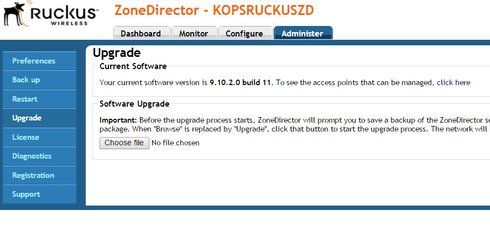
you will be asked to backup your ZD configuration (do it).
You might also find the upgrade fails because there is not enough memory (common issue). This requires the event log to be cleared and a ZD reboot. Takes time but straightforward. The same process as above.
I am assuming that the ZD is not controlling any wifi at the moment (because conversation started with R310 not connecting).
Firmware upgrades are routine but need to be carefully considered.
They should only be done after reading release notes and looking for gotchas, incompatibilities and known issues. If you have no functional Wifi then you have nothing to break so in a reasonably "safe" position.
Beat me to it!
log in to ZD
go to tab on top right...
administer
upgrade
screenshot...
you will be asked to backup your ZD configuration (do it).
You might also find the upgrade fails because there is not enough memory (common issue). This requires the event log to be cleared and a ZD reboot. Takes time but straightforward. The same process as above.
I am assuming that the ZD is not controlling any wifi at the moment (because conversation started with R310 not connecting).
Firmware upgrades are routine but need to be carefully considered.
They should only be done after reading release notes and looking for gotchas, incompatibilities and known issues. If you have no functional Wifi then you have nothing to break so in a reasonably "safe" position.
Beat me to it!
Labels
-
DHCP
1 -
IP lease
1 -
license snmp
1 -
Proposed Solution
1 -
Ruckus
1 -
server
1 -
VLAN
1 -
wap
1 -
zone director
1 -
ZoneDirector
1
