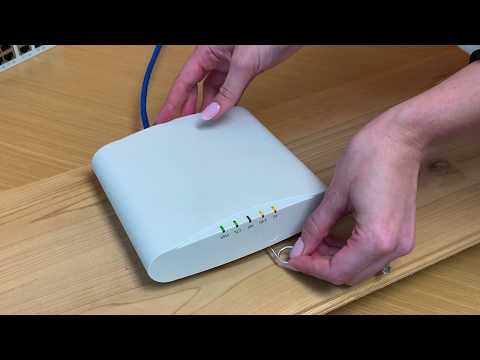
During update of unleashed firmware my internet connection disappeared, the extender router started showing amber light on 5G and 2.4
Hi @JMOCANA
Greetings of the day,
For detailed understanding of the issue please confirm what is the status of the PWR and AIR light in the Access Point, using the next guide to provide the details?
R510 LED lights
https://docs.commscope.com/bundle/unleashed-200.12-onlinehelp/page/GUID-19D4261B-D10B-4DE3-B63A-3498F80103D0.html
PWR:
AIR:
Best regards,
Jayavidhya
Lennar Home Community
PWR: solid green
AIR: no light
CTR: Solid green
AIR: no light 2.4: amber
Thanks for the details provided.
Based on the description, the light on AIR is off and the light on the Radios 2.4 and 5g shows Amber when the WAP is configured but no clients are connected to that specific radio or WAP.
Which means the radio signal is on, but you have no devices connected (phone, computer so ion).
To solve this issue please check the connection between the ISP router to the Ruckus ICX7150 Switch, because if this connection it's not working you will never get internet connection, just the AP will be powering up, because the Switch will provide power only. The yellow ports must be connected to your AP and your ISP router.
https://community.ruckuswireless.com/t5/RUCKUS-Support-for-Lennar-Homes/Most-common-Setups-for-Lenna...
https://www.youtube.com/watch?v=vFD_ByQWGH0
https://www.youtube.com/watch?v=j8I5aVwMNMg
All connections are according to the above diagram. I rebooted my internet and now the light of the access point ctrl is off.
Please follow the below steps to make sure your access point is working fine or not?
1. Please check if this is happening on the ISP router or specific Access Point ?
2- Please check whether the cable is working fine or not
3- Please connect a PC directly to the Ruckus Switch ICX-7150 to see if you are having the same connectivity issue.
4- Also please try the physical reset of the AP using the following guide.
Physical Factory Reset of RUCKUS Access Point:
https://community.ruckuswireless.com/t5/RUCKUS-Support-for-Lennar-Homes/Physical-Factory-Reset-an-Access-Points-Ruckus/td-p/47056
Please let us know if you have any queries in this regard.
Just to provide further background, my access point (R510) was up-and-running flawlessly, unit I access the ruckus unleaded hub, which asked me about updating the firmware (from 2.07 to 2.09), which I click on the update, at the moment that the software finished uploading, my internet account associated to the access point disappeared. all cables are in place properly (as shown in the diagram provided by you. The internet router is working properly, which I rebooted, and since the following lights are showing at the access point device:
Power: solid green
CTRL: No light
Air: No Light
2.4: Solid amber
5: Solid amber
Thanks for the update.
To solve this issue, we have to check whether is there any software issues. For that here I attach few guides to follow the steps.
This guide show you how to run an IP scanner in order to fin the IP address if your Access Points ( Ruckus unleashed ) in order to access via IP via the URL
How to find my Ruckus “Devices IP address” using free applications
https://community.ruckuswireless.com/t5/RUCKUS-Support-for-Lennar-Homes/How-to-find-my-Ruckus-Device...Ruckus unleashed upgradehttps://community.ruckuswireless.com/t5/RUCKUS-Support-for-Lennar-Homes/Ruckus-unleashed-upgrade/td-...
Creating a New Wireless WLAN (SSID)
https://community.ruckuswireless.com/t5/RUCKUS-Support-for-Lennar-Homes/Creating-a-New-Wireless-WLAN...
Unleashed dashboard :
https://docs.commscope.com/bundle/unleashed-200.9-onlinehelp/page/GUID-BC93A166-B3D1-4967-99F8-991CE...
Unleashed mobile APP solution
https://www.youtube.com/watch?v=L_oAReVK1qo
I was able to reste the acces point, same result, same lights:
I was able to located the IP address with LanScan, which I added it to the address bar on FireFox, which took me to unleash website, however, I was not able to login with my credentials or using Lennar's suggested pw
Thanks for the update,
Please try the most common username and passwords ( This is key sensitive so please include capital letters )
Username:admin password: Ruckus!
Username:admin password: Ruckus1
Username:admin password: Lennar
Username:super password: sp-admin
Admin usernames and passwords for the Ruckus Wi-Fi Access Points/Switch for Lennar home users
https://community.ruckuswireless.com/t5/RUCKUS-Support-for-Lennar-Homes/Admin-usernames-and-password...
None worked...
I was able to connect directly to the switch through ethernet, which worked in the sense of getting access to internet, however, when the IP address was entered it did take me to the unleashed Ruckus portal but the same, non of the provided passwords worked.
Thanks for your update.
If the given password doesn't work please follow the below steps to do the password recovery process.
For doing the password recovery process, we need physical access to the ICX-7150-Using the console connection
Here is a short guide :
How to console in the ICX-7150-C12P
https://community.ruckuswireless.com/t5/RUCKUS-Support-for-Lennar-Homes/How-to-console-in-the-ICX-7150-12CP-Ruckus-Switch/m-p/46759#M3
Short Guide for password recovery :
https://support.purdi.com/hc/en-gb/articles/360016495292-Ruckus-ICX-Password-Recovery-Resetting-a-Switch
Video link as reference : https://www.youtube.com/watch?v=XJS28DWbHM4
1.Start a CLI session over the serial ( console access) interface to the RUCKUS ICX device.
2-Enter OS mode. This uses a key combination and drops below the fastiron operating system
Key Combination: Ctrl+y, release, tap 'm', tap 'Enter'
OS>
4-just write reset
OS>reset
5-.While the system is booting, before the initial system prompt appears,enter b to enter the boot monitor mode.
Enter 'b' to stop at boot monitor: 0
In this Part you have to press B before the counter ends
6-Enter no password. (You cannot abbreviate this command.)
ICX7650-Boot> no password00 00 00 00OK! Skip password check when the system is up.
7-Enter boot. This command causes the device to bypass the system passwordcheck.
ICX7650-Boot> boot
8-After the console prompt reappears, assign a new password.
device> enabledevice# configure terminaldevice(config)# username USERNAME password PASSWORD
After few many attempts (few dozen of times), finally, I was able to complete the process. One good thing was that the switch IP address became visible, the problem is that the password reset did not work. I was able to reset it, but did not work. I have trouble with step 8. I don't know what is that I am doing wrong.
Please share the screenshot of the error you are getting while following the steps 8.
Good morning Jayavidhya,
Here is scrips copy of the last step:
ICX7150-C12 Switch(config)#user-admin password XXXXXX
Invalid input -> user-admin password XXXXXX
Type ? for a list
ICX7150-C12 Switch(config)#username admin password XXXXX
Switch(config)#end
ICX7150-C12 Switch#end
Invalid input -> end
ICX7150-C12 Switch#
Thanks for your reply,
Please enter the command as mentioned below by using the following username and password .
For example: device(config)# username admin password Ruckus!
If the above process is not working please enter the below commands.
enable
configure terminal
device(config)# username super password pass
Where the username is ’super’ and password ‘pass’
In order to allow the correct authentication please run the following commands:
Device(config)#crypto key generate rsa
device(config)# aaa authentication login default local
Now you could try using your new credentials to log in.
the keys did not work, therefore, I follow to super recommendation:
ICX7150-C12 Switch#enable
Incomplete command.
ICX7150-C12 Switch#conf t
ICX7150-C12 Switch(config)#
ICX7150-C12 Switch(config)#username super password pxxx
ICX7150-C12 Switch(config)#crypto
ICX7150-C12 Switch(config)#crypto key generate rsa
Creating RSA key pair, please wait...
RSA Key pair is successfully created
ICX7150-C12 Switch(config)#aaa authentication login default local
But unable to make it work.
Please share the screenshot of the error you are getting while entering the given username and password.
Is there a better way to communicate?Unfortunately, me and my family need the internet for work, and it's taking too long to find a solution.
Sorry for the inconvenience.
Effective November’2022, ‘Ruckus Support for Lennar Homes customers will no longer be handled by phone or email. We will be exclusively supporting customers via this community forum support model.
Please try gaining access to switch via CLI/console and share the output of the below command.
https://community.ruckuswireless.com/t5/RUCKUS-Support-for-Lennar-Homes/How-to-console-in-the-ICX-7150-12CP-Ruckus-Switch/m-p/46759
show version
show flash
UNIT 1: compiled on Nov 20 2018 at 00:09:55 labeled as SPS08080d
(25968884 bytes) from Primary SPS08080d.bin
SW: Version 08.0.80dT211
Compressed Boot-Monitor Image size = 786944, Version:10.1.14T225 (mnz10114)
Compiled on Thu Nov 15 12:59:22 2018
HW: Stackable ICX7150-C12-POE
UNIT 1: SL 1: ICX7150-C12-2X1G POE 12-port Management Module
Software Package: BASE_SOFT_PACKAGE
Current License: 2X1G
ICX7150-C12 Switch#show flash
Stack unit 1:
NAND Type: Micron NAND 2GiB (x 1)
Compressed Pri Code size = 25968884, Version:08.0.80dT211 (SPS08080d.bin)
Compressed Sec Code size = 29819448, Version:08.0.80dT213 (SPR08080d.bin)
Compressed Boot-Monitor Image size = 786944, Version:10.1.14T225
Code Flash Free Space = 1319366656
The recommended firmware version for ICX 7150 Switch is SPS08095dufi.bin .
Please perform an upgrade to the code 08095g UFI and upgrade both partitions with the switching code file named SPS08095gufi.bin,
1.Upgrade a Switch ICX-7150-C12P using a USB flash drive
https://community.ruckuswireless.com/t5/RUCKUS-Support-for-Lennar-Homes/How-to-Upgrade-a-Switch-ICX-7150-C12P-using-a-USB-flash-drive/td-p/46781
2. Upgrade a Switch ICX7150-C12P via TFTP
https://community.ruckuswireless.com/t5/RUCKUS-Support-for-Lennar-Homes/How-to-Upgrade-a-Switch-ICX-7150-C12P-via-TFTP/m-p/47187
3. Upgrade a switch via Web GUI (ICX7150 Switch)
https://community.ruckuswireless.com/t5/RUCKUS-Support-for-Lennar-Homes/How-to-perform-an-Upgrade-via-Web-GUI-ICX7150-Switch/td-p/48200
Greetings Jayavidhya,
Done!
Compressed Sec Code size = 31457280, Version:08.0.95gT211 (SPS08095g.bin)
Compressed Pri Boot Code size = 786944, Version:10.1.14T225 (mnz10114)
Compressed Sec Boot Code size = 786944, Version:10.1.24T225 (mnz10124)
Thank you for the response and update.
As I can see, only your secondary partition is upgraded to the 8095g version, and the primary partition still is on an older version (please refer to the below screenshot). To upgrade the primary partition also to the same version, please perform the below commands in CLI.
Note: Hit Enter to accept each command
copy flash flash primary
boot system flash primary yes
reload
Once Switch boots up and online, please check the Internet connectivity from your RUCKUS setup.
Thank you again for your patience.
Imran Sanadi
Lennar Home Community.
I saw that missed one step, so here is the corrected flash/version:
Compressed Pri Code size = 31457280, Version:08.0.95gT211 (SPS08095g.bin)
Compressed Pri Boot Code size = 786944, Version:10.1.24T225 (mnz10124)
Code Flash Free Space = 1112952832
Now both Primary and Secondary partitions are on the 8095g Version. Could you please confirm the Internet connectivity from your RUCKUS setup? Are you able to connect and is it working now?
Thank you again.
Hello Imran,
Unfortunately, I’m still unable to connect to the internet via AP.
After upgradation of the switch please let us know the LED status of the switch and the access points using the below guide.
RUCKUS SWITCH
https://docs.commscope.com/bundle/icx7150-installguide/page/GUID-973C8AE8-837A-41C7-9811-BAEF6ADEF3D3.html
Hi Jayavidhya,
PWR: green
CTL: off
Air: off
2.4: amber
5: amber
Power status mode: obstructed view
Status: Green
Sys: Green
Ethernet Port to Router: green (blinking)
Please verify the connections from the access points and ICX 7150 -C12 P that the cable seems to be in good conditions.
Do a factory reset (try about 3 times) on the access point that is not working to see if the lights change.
Physical Factory Reset an Access Points Ruckus
https://community.ruckuswireless.com/t5/RUCKUS-Support-for-Lennar-Homes/Physical-Factory-Reset-an-Ac...
How to factory reset or factory default different type of Ruckus Access points?
https://support.ruckuswireless.com/articles/000012418
Ruckus Unleashed Set-up using your Mobile
https://community.ruckuswireless.com/t5/RUCKUS-Support-for-Lennar-Homes/Ruckus-Unleashed-Set-up-usi...
Please let me know if you have any queries in this regard.
Cables are in good condition, the green light next to the AP cable is blinking.
The AP was reseted 3 time, with no changes (PWR- solid green, CLT- Off, Air- Off, 2.4- Amber, and 5- Amber)
Regarding Ruckus Unleashed Set-up using the Mobile app, I was not able to do it because the WiFi "Config.Me-xxxxxx". did not show as an available WiFi option.
Thanks for your response.
If you have access to the Unleashed APP or Dashboard web access, check the status of the access Point(off-line, getting an IP address )
Example of a disconnected device:
Hit Access Point>
If it shows as disconnected, click on the access point to get more details and provide the screenshot.
Unfortunately that has been part of the problem, that as my AP-internet access disappeared, also the unleashed access (via app or web) was loss.
Please let us know how many access points are connected to the switch. If you have more than one access points in your network please follow the below steps before performing factory reset process.
While performing factory please try to disconnect the other access points which is working fine from the ICX-7150 switch. For example, if you have 2 access points you should disconnect the one which is working fine from the switch and leave the one in which we are going to perform the factory reset. Once the process is done please connect the other access points back.
Ruckus Unleashed Set-up using your Mobile:
https://community.ruckuswireless.com/t5/RUCKUS-Support-for-Lennar-Homes/Ruckus-Unleashed-Set-up-using-your-Mobile/td-p/47086
Ruckus Unleashed Set-up using Web:
There is only one access point
Thank you for the response.
Could you please confirm if you were able to factory reset your AP successfully? Below is the process to factory reset.
Please complete the factory reset once again and try to access Unleashed on the web browser.
Password recovery setup:
https://www.youtube.com/watch?v=sqnG8fupaLk
Please confirm once it is completed.
RUCKUS Lennar Home Community.
I tried several times at least 10, the config.me-XXX only appears when the CLT in blinking (about 20 seconds) the connection shows an error (in the computer) requesting diagnosis, after that it disappears.
In summary, no luck back to square one.
Please try performing factory reset in your mobile app using the below link.
I had a similar experience during the attempt of performing factory reset in my mobile app. It only connects to the config.me-XXX for few seconds (about 20) during the reset process, but then the connection disappears before been able to establish a full connection with the app.
Please share the screenshot of the error(showing config.me-XXX) you are getting while doing factory reset in your mobile app.
The Config.me connections only shows during the reset process, which right after connecting my phone and try to establish the app connection it say "Unleashed - You must be connected to Configure.me Wi-Fi to perform this operation. So I immediately go back to the WiFi selection, and the Configure.me Wi-Fi selection no longer shows in the list of available Wi-Fi connections.
If you have performed the factory reset of the AP please try to gain access to the ruckus AP CLI and share the output of the below command.
show sysinfo
I don't understand your recommendation, I have an AP R510, and have done the factory reset for more than 20 times, as mentioned before, every time via computer or app (mobile) there is no way to establish the access to Ruckus because the config.me connection disappears before the reset cycle is completed. And as you can see previously, for some reason, we were not able to establish the Ruckus password.
I do understand that your communication policies have change, I do respect that. However, 2 weeks has passed without resolving this issue. My wife teleworks full time, and I also telework 2 or 3 times per week. We need this issue to be resolve. Going over 1 or 2 steps per day based on the current mode of communication, is not functional I need a solution, and I need to speak with an IT support to resolve this issue.
Based on your description and the troubleshooting you have done it seems that the AP radios got damaged. To confirm this issue we have to check whether the 2.4g and 5g got enabled.
If you have already done the factory reset of AP we need to gain access to the AP CLI and need to check the system information.
Please enter the following command and share the screenshot of the output.
Show sysinfo
Good day Jayavidhya,
I was able to connect direct to the AP R510 with an ethrente cable, although, I did receive internet connection, I was not able to enter to IP address. And when I ping the AP default IP address on my Mac computer via terminal, I just receive a message that it run out of time. In addition, the AP has an USB connection, which I also connect my computer, but when running the command: ls /dev/cu.* it does not show the AP USB connection, as it did when establishing the switch access connection. Is there another way to have access to the sys info?
Please try to find the IP address of the access points using IP scanner.
I will leave you a guide how to perform an IP scanner on your local network to identify the IP address very easily.
https://community.ruckuswireless.com/t5/RUCKUS-Support-for-Lennar-Homes/How-to-find-my-Ruckus-Device...
2-Once we identified the IP address of the switch proceed to access remote to the device 'command Line'
How to remotely access to 'ICX 7150-12P' or 'access points' "Network devices"
https://community.ruckuswireless.com/t5/RUCKUS-Support-for-Lennar-Homes/How-to-remotely-access-to-IC...
https://support.ruckuswireless.com/articles/000001538
I was not able to connect to IP address 192.168.0.1, actually, I ping it returning as "No route to host." On the other hand, I was able to identify the IP associated with the Ruckus account, which after Ping it sent 64 packets returning 64 packets. I tried to access that IP via SSH and Telnet unsuccessfully. I also connected to the AP directly, based on the above guidance, and did not work. Is it possible to access the AP via switch, if so what commands do I need to follow after establishing the ICX 7150-12P-switch connection?
If access via IP address is not possible here is a guide on how to access to the Switch via console (cable access between your PC to the ICX 7150-C12P) in this case we need a USB type C to USB standard or Console cable Rj45 to USB.
Once you are logged in to the ICX-7150-C12P please enter the below command and share the output of it.
show sysinfo.
NOTE: The best way to make sure that the AP is able to communicate with other devices is to connect it directly to a computer and see if you are able to ping and access the GUI of the AP.
If these steps are successful, then you've shown that the AP is able to communicate with the network and working fine. Otherwise, it is defective.NOTE: By default AP is a DHCP client, so the AP will grab an IP address as soon as it is connected to the network. When the AP is powered by PoE switch and there is a DHCP server in the network the default ip for the AP is not 192.168.0.1 . The corresponding ip can be found on the DHCP server using the MAC address of the AP .
How to Access an ICX Switch remotely via SSH or Telnet.
https://community.ruckuswireless.com/t5/RUCKUS-Support-for-Lennar-Homes/How-to-Access-an-ICX-Switch-remotely-via-SSH-or-Telnet-using-a/m-p/46760
I got this message in terminal:
ICX7150-C12 Switch#show sysinfoInvalid input -> sysinfoType ? for a listICX7150-C12 Switch#
One additional thing, the IP address associated with the MAC AP address, it did responded when it was pinged, by sending and receiving the same amount of packets (64 each way).
Please confirm what radio the clients are using in the unleashed dashboard.
https://docs.commscope.com/bundle/unleashed-200.12-onlinehelp/page/GUID-19D4261B-D10B-4DE3-B63A-3498...
Expand the Clients section on the Dashboard>move the bar to the left >Radio Band
5G=802.11ac
2.4=802.11B/G/N
Also check the radio set up for the SSID/Wi-Fi ID
wireless network>choose the SSID> Edit > Advanced Options > Radio Control tab
Guide:
https://docs.commscope.com/bundle/unleashed-200.12-onlinehelp/page/GUID-99ECE1DB-1459-437A-ADF3-DF7E...
Lights:
I can't access unleashed dashboard, so I was not able to follow your ratio recommendations. The "show sysinfo" command did not work (Invalid input).
The Amber LED on 2.4 and 5 GHz means there is no client associated/connected to the 2.4 and 5GHz radio.
Please try the following troubleshooting steps.
1. Hard reset the AP using a paper clip to factor default it. Press and hold the FD pinhole for 40 secs.
2. Create a Test SSID
3. Try to connect any client to the SSID.
Note: In case the client doesn't connect to 5GHz, then for testing, disable 2.4 GHz radio on the AP and try to connect to the AP on 5GHz to verify if the client is getting associated and the LED turns Green.
Please try the above mentioned steps to see whether the lights turn green or not.
I reset the AP by pressing the rest button located in the back of the R510, then I connected my computer directly to the access point with an ethernet cable, I wrote done in the address bar the IP address of the AP, which took me to the unleashed portal asking for the name and PW, which I used super and sp-admin (as PW), and the rest of the recommended logins - which none worked. Part of the original problem has been the fact that the SSID disappeared when this problem started (after downloading the the firmware). Therefore, my access point still non-operational. Current lights:
- PWR: Green
- CLT: NO light
- Air: NO light
- 2.4G: Amber
- 5G: Amber
Is evidently that the switch is working, but the nor the access point. By aal means I am no IT expert, but it is evidently that the AP was corrupted during the attempt of the firmware update. During the initial 3 weeks, with your help, we were able to get access (via terminal) to the switch and to update the software to the 8095g Version, change the PW of the switch, we were able to find the right IP of the AP, the computer does have internet when connected directly to the AP. But I am still unable to make the AP work, or to access the unleashed site, no matter how many times I have reset the AP, and no a been able to configure unleashed also no matter how many times the AP has been reset. The lights, still the same after reset, no matter how many times has been reset the AP.
1. Is there anything that can be done to fix this problem? if Not, can you send be a AP R512 replacement? Also, if is not possible to send me a replacement, what other AP brands are compatible with the Ruckus switch.
Based on the troubleshooting done, even after performing the factory reset of the AP, and by checking the connectivity and connections, the issue exists. This Access Point Unit Should be RMA (Return Merchandise Authorization) in simple words replacing it.
Feel free to contact us via chat, comment you already have a post, copy the link from the post (URL) and paste it into the chat to start the unit replacement.
Please follow the below steps as shown in the below example:
As shown in the below picture, copy the link and share it via chat from the link provided below:
The below link is to contact us by chat (only)
https://support.ruckuswireless.com/contact-us
Greetings,
I received the AP R510 replacement, which I connected, but the same problem persist. The configmeXXX (SSID) disappears every time right before completing the full AP reset.
Please try to do a factory reset process again (try about 3 times) on the access point.
Here is the correct guide how to preform the Factory reset on a Access Point
Please check the connection between the ISP router to the Ruckus ICX7150 Switch. If the devices are not connected properly you won't be able to get the internet connection.
Please check the following guide to make sure is the right devices and the connections.
Most common Setups for Lennar homes users
https://community.ruckuswireless.com/t5/RUCKUS-Support-for-Lennar-Homes/Most-common-Setups-for-Lennar-homes-users/m-p/47106
Also please check whether your AP is getting the IP address from the DHCP Server by the connected router and it’s in a normal state.