When dealing with a corrupted flash or related issues, follow these steps to troubleshoot and resolve the problem.
Boot Loop Process
When a unit is stuck in a boot loop and fails to stabilize, the first step is to console into the unit directly and review the boot process. This can provide insights into why the unit is not booting correctly.
Example Error:
Booting image from Secondary
Wrong Image Format for bootm command
ERROR: can't get kernel image!
could not boot from secondary, no valid image; trying to boot from primary
Booting image from Primary
Wrong Image Format for bootm command
ERROR: can't get kernel image!
- Console the Unit:
- Connect to the unit via a console cable and monitor the boot process. Interrupt the boot process by pressing b at the boot counter.
Ruckus Networks Bootloader: 10.1.26T215 (Nov 29 2022 - 04:42:59)
Validate Shmoo parameters stored in flash ..... OK
Restoring Shmoo parameters from flash .....
Running simple memory test ..... OK
ICX7450-24 Copper (Non-POE), PVT1
SYS CPLD VER: 0x10, Released Ver: 0
Enter 'b' to stop at boot monitor: 3 >>>> Press 'b' to stop the process.
ICX7450-Boot>
- Access Boot Mode:
- Check the installed images using the show_image command.
ICX7450-Boot> show_image
===========================
Primary : SPR08095k(33554432)
Secondary: SPS08095j(31457280)
===========================
- Set Up for Recovery:
- Connect an Ethernet cable from the management port to the TFTP server.
- Ensure the device is in boot mode for recovery.
Example:
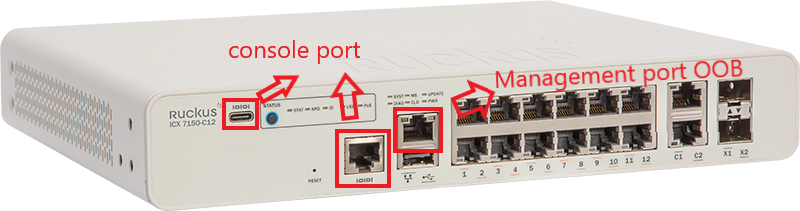
- Configure Environment Variables:
- Set the TFTP server IP and other necessary network settings.
ICX 7450-48> setenv serverip 10.10.10.21
ICX 7450-48> setenv ipaddr 10.10.10.22
ICX 7450-48> setenv gatewayip 10.10.10.1
ICX 7450-48> setenv netmask 255.255.255.0
ICX 7450-48> saveenv
ICX 7450-48> printenv
baudrate=9600
ipaddr=10.10.10.22
gatewayip=10.10.10.1
netmask=255.255.255.0
serverip=10.10.10.21
uboot=ruckus/ICX7450/bootcode/spz10115
Version:10.1.06T215 (May 15 2015 - 11:28:23)
- Test Connectivity:
- Ping the TFTP server to ensure connectivity.
- Disable the Windows Firewall
ICX 7450-48> ping 10.10.10.21
ethPortNo = 0
Using egiga0 device
host 10.10.10.21 is alive
- Update the Flash:
- Set the image file name and update the flash.
ICX 7450-48> setenv image_name images/ICX/SPR08090.bin
ICX 7450-48> update_primary
- For versions below 8080f, update the uboot file.
Provide the file name of the boot image to be copied from the tftp server.
ICX 7450-48> setenv uboot <xxx.bin>
ICX 7450-48> update_uboot
- Boot the Unit:
- Load the image from the primary or secondary flash.
ICX 7450-48> boot_primary
Video Link as reference: https://www.youtube.com/watch?v=RHriOYYD_iI
Link as reference : https://docs.commscope.com/bundle/fastiron-09010-upgradeguide/page/GUID-9B5D5A56-039D-44FB-8FD2-B9B55E71ADE8.html
- For ICX-8200 models, boot from the golden image if necessary.
boot_golden_primary - Flash the Golden UFI Image to Primary and boot from Primary

