Hello @Jayl ,
Thank you for the response.
Kindly provide us with the email address used to login to the support portal for us to proceed further.
Please let us know if you have any queries in this regard.
Thank you for your patience and understanding.
Regards,
Pinky Rajendran
RUCKUS Lennar Home Community
Hi @Jayl ,
Greetings!!!
Thank you for contacting RUCKUS Lennar Home Community.
I hope you are doing well!!!
Thank you for the information you shared.
As per the case description, I understand that your Ruckus Access point R320 is not working.
Could you please let us know the answers to the below queries to assist you better?
1. Was there any power outage before you started facing this issue?
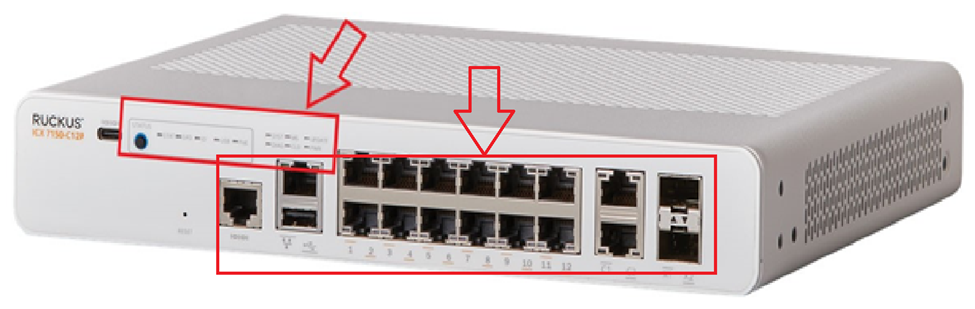
2. On your switch while it's plugged into the outlet, do you see any lights on? (Amber or green) Please let us know which lights are on. (Please refer to the below picture and share a picture of the same, showing the light status and the FULL Switch panel cable connections to the Switch ports)
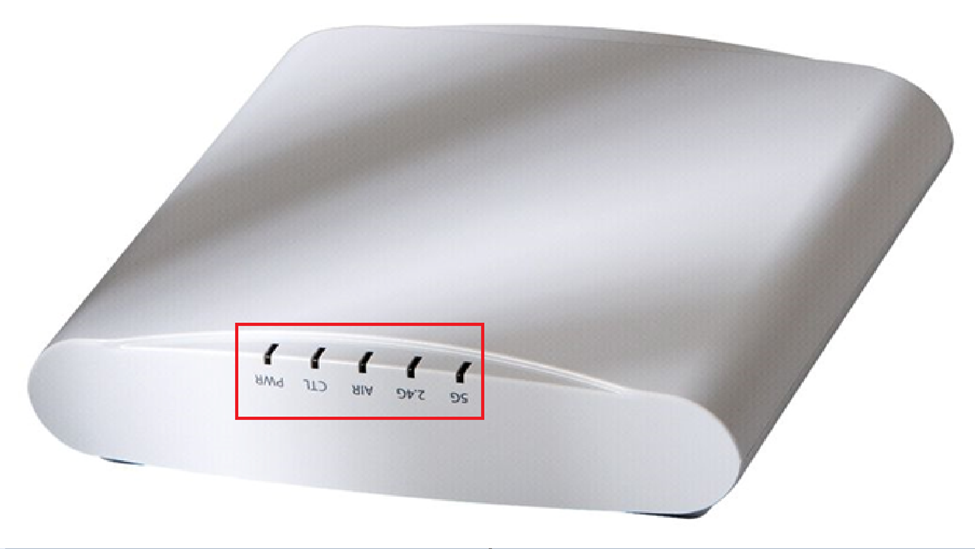
3. May I know how many Access Points are connected to the Switch? Could you please let me know the light status on the Access Points? Any of these lights are on (Please refer to the below picture and share a picture of the same)
Please help us with pictures of your ICX-7150-C12P Switch showing the status of the lights and cable connections to the Switch ports. Also, light the status of Access Points.
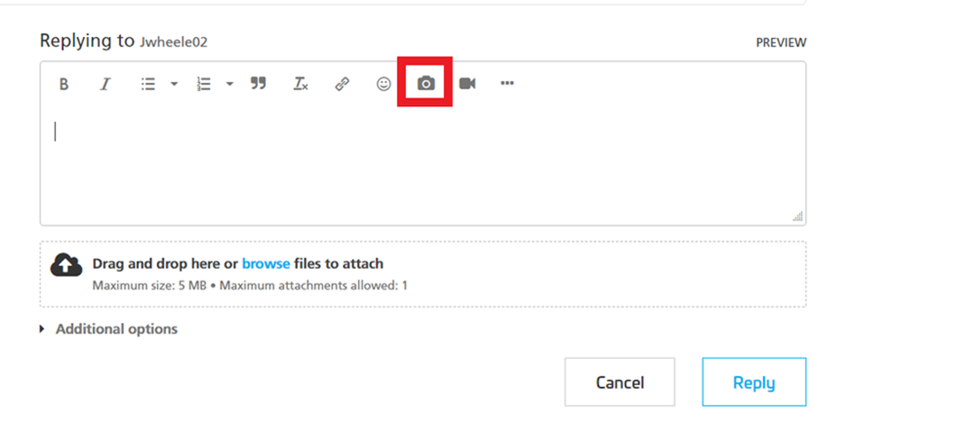
Before uploading the photos please log in to the RUCKUS account and you can upload the image.
Please let us know the answers to ALL the above queries or let us know if you have any queries in this regard.
Thank you again for your patience.
Best regards,
RUCKUS Lennar Home Community.
Hi Pinky,Thank you for your response.
1. The issue began almost 2 years ago and I don't recall if it was after power outage or not.
2. On the ICX switch, all lights are green. The switch powers on normally and all ports being used show green link/activity lights.
Switch
3. I have two Access Points connected to the switch:- AP #1 (working): all LEDs normal and it connects to the Unleashed network without issues.
This one is fine- AP #2 (problem AP – R320): Power LED is solid green, and the CTL LED keeps blinking green continuously. It never joins the network.
Power is green and other one is blinking
blinking
The working AP proves that PoE, the switch, and the network are all functioning correctly. The R320 has been stuck in this state and has not been operational since then.
Please advise on the next steps.
Thank you for the response and sharing the pictures.
To proceed further, we would need to check few configurations of the switch.
To check this, we must identify the ‘current’ IP address assigned by your local router to the switch ICX-7150-C12P
I will leave you a guide on how to perform an IP scanner on your local network to identify the switch IP address very easily.
How to find the IP Address of the RUCKUS Devices (Switch and APs) using IP Scanner free applications:
/kb/articles/10-how-to-find-the-ip-address-of-the-ruckus-devices-switch-and-aps-using-ip-scanner-free-applications
Once we identify the IP address of the switch proceed to access remotely to the device “Command Line”
/kb/articles/8-how-to-access-the-command-line-interface-cli-of-the-ruckus-icx-7150-c12p-switch
If you can access the Command line should look like this:
ICX7150-C12 Router> OR
ICX7150-C12 Switch>
Once you login to CLI, please enter the below commands and share the output.
Note: Hit Enter to accept each command
enable
show version
show flash
show inline power
show inline power detail
show interface brief
Please share the output of the above commands or share the screenshots if stuck at any step or error (if any) and let me know if you have any queries in this regard.
Thank you again. We appreciate your patience and understanding.
Here you go Pinky,
ICX7150-C12 Switch#show versionCopyright (c) Ruckus Networks, Inc. All rights reserved.UNIT 1: compiled on May 6 2022 at 23:24:50 labeled as SPS08095g(31457280 bytes) from Primary SPS08095g.bin (UFI)SW: Version 08.0.95gT211Compressed Secondary Boot Code size = 786944, Version:10.1.24T225 (mnz10124)Compiled on Thu Apr 21 06:08:52 2022
HW: Stackable ICX7150-C12-POE==========================================================================UNIT 1: SL 1: ICX7150-C12-2X1G POE 12-port Management ModuleSerial #:FEK3834R1LFSoftware Package: BASE_SOFT_PACKAGECurrent License: 2X1GP-ASIC 0: type B160, rev 11 Chip BCM56160_B0==========================================================================UNIT 1: SL 2: ICX7150-2X1GC 2-port 2G Module==========================================================================UNIT 1: SL 3: ICX7150-2X10GF 2-port 20G Module==========================================================================1000 MHz ARM processor ARMv7 88 MHz bus8 MB boot flash memory2 GB code flash memory1 GB DRAM
ICX7150-C12 Switch#show flashStack unit 1:NAND Type: Micron NAND 2GiB (x 1)Compressed Pri Code size = 31457280, Version:08.0.95gT211 (SPS08095g.bin)Compressed Sec Code size = 31457280, Version:08.0.95gT211 (SPS08095g.bin)Compressed Pri Boot Code size = 786944, Version:10.1.15T225 (mnz10115)Compressed Sec Boot Code size = 786944, Version:10.1.24T225 (mnz10124)Code Flash Free Space = 1005219840
inline power
inline power details
interface brief
Hi Pinky,
Here you go
inline powerpower detailsinterface brief
Hello ,
Thank you for sharing the information.
Based on the troubleshooting done, your RUCKUS Access point is still not working even after completing the reset. However, even after performing troubleshooting steps, the Access point is still not responding.. This AP unit Should be RMA (Return Merchandise Authorization) in simple words replacing it.
Please confirm the shipping address, if you wish to proceed with the RMA.
Serial number of defective AP':
Street :
City :
State/Province :
Country :
Zip/Postal Code:
Attention Name:
Attention Phone:
Attention Email :
Please let me know if you have any queries in this regard.
Thank you again for your patience and understanding.
Upon checking, we could see that your email address is not registered in the Ruckus support portal.
I would request you to please register the email address in the support portal using the link https://support.ruckuswireless.com/
On the login page, select Join Now to initiate the account registration process.
Complete the registration form by providing the required user information.
Review and accept the following agreements:
Select Register to submit the registration request.
Once the registration is completed, you will receive an email to verify your email address.
Once the email address verification is completed, you may login to the support portal.
Please confirm once you are able to verify your email address.