After a power outage and a reset we are still getting the following errors
what is our next step?
Hi @mrozone ,
Greetings!!!
Thank you for contacting RUCKUS Lennar Home Community.
I hope you are doing well!!!
Thank you for the information you shared.
As per the case description, I understand that your RUCKUS setup is not working and you are getting corrupt mount error.
Could you please let us know the answers to the below queries to assist you better?
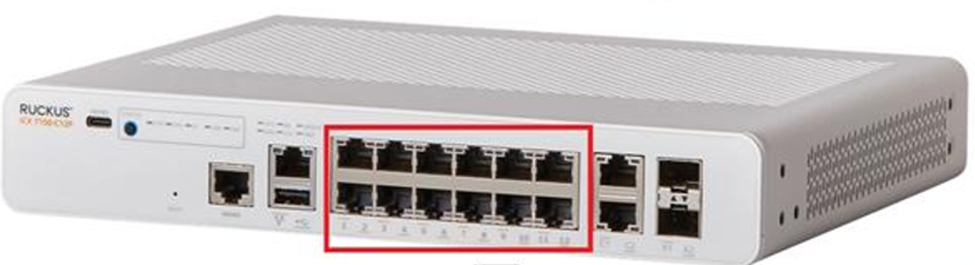
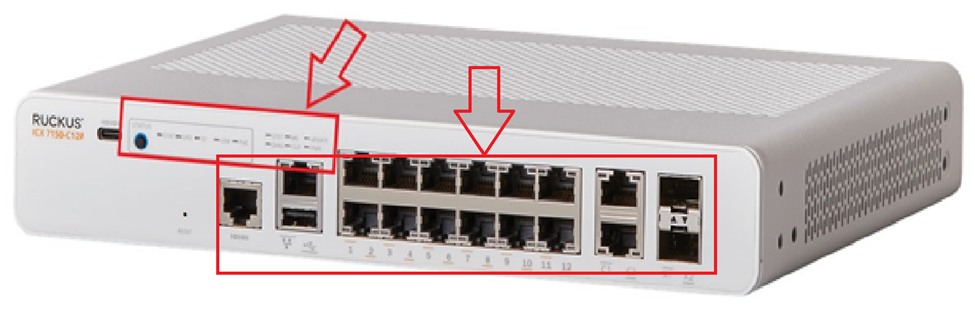
1) On your switch while it's plugged into the outlet, do you see any lights on? (Amber or green) Please let us know which lights are on. (Please refer to the below picture and share a picture of the same, showing the light status and the FULL Switch panel cable connections to the Switch ports)
Please help us with pictures of your ICX-7150-C12P Switch showing the status of the lights and cable connections to the Switch ports.
Before uploading the photos please log in to the RUCKUS account and you can upload the image.
Please let us know the answers to ALL the above queries or let us know if you have any queries in this regard.
Best regards,
Pinky Rajendran
RUCKUS Lennar Home Community.
Here is a picture of the front
the cable goes to a att modem and the port is not coming online. I have tested the cable/port on the modem and it comes up plugged into a laptop.
Hi @mrozone
Thank you for your recent correspondence and update.
As per the light status of the RUCKUS ICX-7150-C12P Switch, it seems normal.
However, we may need to check some configurations of your RUCKUS ICX-7150-C12P Switch to troubleshoot this issue through CLI using the Switch's IP Address.
To proceed with troubleshooting the issue, please follow the steps outlined below to access the Command Line Interface (CLI) and provide the necessary command outputs:
1. First, identify the current IP address assigned to the switch ICX-7150-C12P by your local router. You can use an IP scanner tool to easily locate the switch's IP address on your network. Here is a guide on how to perform this using IP Scanner free applications:
/kb/articles/10-how-to-find-the-ip-address-of-the-ruckus-devices-switch-and-aps-using-ip-scanner-free-applications
2. Once you have identified the IP address of the switch, proceed to access the Command Line Interface (CLI) of the RUCKUS ICX-7150-C12P switch. Here is a guide on how to access the CLI:
/kb/articles/8-how-to-access-the-command-line-interface-cli-of-the-ruckus-icx-7150-c12p-switch
If you can access the Command line the prompt should look like below:
ICX7150-C12 Router> OR
ICX7150-C12 Switch>
3. After successfully accessing the CLI, please execute the following commands and provide the outputs:
enable
show version
show flash
show inline power
show inline power detail
show interface brief
Please share the command outputs or screenshots if you encounter any issues or errors during these steps.
Feel free to reach out if you have any questions or require further assistance.
Thank you for your cooperation and patience.
Imran Sanadi
RUCKUS Lennar Home Community
my config is default. no ip no nothing. I tried to use backup, thats corrupt too. If you take a look at the original posting, is it normal for all volumes to be corrupt?
Thank you for the response and the update.
If you are unable to get the IP address of the Switch, please try getting console access to the Switch and help me with the command outputs I shared previously.
Here is a guide on how to access to the Switch via console (cable access between your PC to the ICX 7150-C12P) in this case, we need a USB type C to USB standard OR Console cable Rj45 to USB (Any one cable- please refer the guide)
How to console in the ICX-7150-C12P
https://community.ruckuswireless.com/t5/RUCKUS-Support-for-Lennar-Homes/How-to-console-in-the-ICX-7150-12c-using-a-Windows-Machine/td-p/46759
1. Once again, please make sure to download the zip drive for the file below & "extract all". Once it's extracted, run the file, the driver should be installed using the 2 links below.
Link 1: https://support.ruckuswireless.com/software/1414-brocade-ruckus-7150-usb-serial-driver-windows
Link 2: silabs.com/developers/usb-to-uart-bridge-vcp-drivers?tab=downloads
Once installed restart your laptop and try to locate the COM port details under 'Ports (COM & LTP)' with cables connected between the Laptop and the Switch (Refer to the below screenshot), Please check and let me know if that works.
If you have already tried the above process, please share pictures showing the console cable connections between the Switch and the laptop.
Please let me know if you have any queries in this regard.
Thank you again for your patience and understanding.
here you go
ICX7150-C12 Switch#sh runCurrent configuration:!ver 08.0.70cT211!stack unit 1module 1 icx7150-c12-poe-port-management-modulemodule 2 icx7150-2-copper-port-2g-modulemodule 3 icx7150-2-sfp-plus-port-20g-module!!!!!!!!!!!!!!interface ethernet 1/3/1speed-duplex 1000-full!interface ethernet 1/3/2speed-duplex 1000-full!!!!!!!!!end
Greetings!!!Thank you for the response and the update.
I see your Switch version is on an outdated non-UFI version.
We suggest upgrading your Switch to a stable UFI version.
Please refer to the below RUCKUS Lennar Knowledge Base self-help article for the Upgrade process.
/kb/articles/1-how-to-upgrade-ruckus-icx-7150-c12p-from-non-unified-forwarding-image-ufi-to-a-stable-ufi-version
If you can access CLI, We suggest to follow the 2nd option.
Please let me know if you need any help during the upgrade process.
performed the upgrade on the primary but the ethernet port 1/1/1 is not activating when plugged into the modem. I have tested the port on the modem and it does come online when I plug my laptop into it. is there anything special i must do at the cli to force it to get a ip from the modem?
ICX7150-C12 Switch#sh versionCopyright (c) Ruckus Networks, Inc. All rights reserved.UNIT 1: compiled on May 6 2022 at 23:24:50 labeled as SPS08095g(31457280 bytes) from Primary SPS08095g.bin (UFI)SW: Version 08.0.95gT211Compressed Secondary Boot Code size = 786944, Version:10.1.24T225 (mnz10124)Compiled on Thu Apr 21 06:08:52 2022
HW: Stackable ICX7150-C12-POE==========================================================================UNIT 1: SL 1: ICX7150-C12-2X1G POE 12-port Management ModuleSerial #:FEK3811Q08RSoftware Package: BASE_SOFT_PACKAGECurrent License: 2X1GP-ASIC 0: type B160, rev 11 Chip BCM56160_B0==========================================================================UNIT 1: SL 2: ICX7150-2X1GC 2-port 2G Module==========================================================================UNIT 1: SL 3: ICX7150-2X10GF 2-port 20G Module==========================================================================1000 MHz ARM processor ARMv7 88 MHz bus8 MB boot flash memory2 GB code flash memory1 GB DRAMSTACKID 1 system uptime is 46 second(s)The system started at 23:25:03 GMT+00 Fri May 06 2022
The system : started=cold start
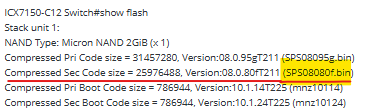
ICX7150-C12 Switch#show flashStack unit 1:NAND Type: Micron NAND 2GiB (x 1)Compressed Pri Code size = 31457280, Version:08.0.95gT211 (SPS08095g.bin)Compressed Sec Code size = 25976488, Version:08.0.80fT211 (SPS08080f.bin)Compressed Pri Boot Code size = 786944, Version:10.1.14T225 (mnz10114)Compressed Sec Boot Code size = 786944, Version:10.1.24T225 (mnz10124)Code Flash Free Space = 1168273408
I see your Secondary partition is still on the 08080f version. (Refer to the screenshot below)
Please copy the 08095g version on the secondary and check how it works.
Please enter the below commands to copy the image to the secondary.
Note: Hit Enter to accept each command
copy flash flash secondary
boot system flash secondary yes
Example:
VIDEO LINK AS REFERENCE: https://www.youtube.com/watch?v=Eem1IBgYaWc
ICX7150-24P Router>enable (hit enter to accept the command) ICX7150-24P Router#copy flash flash secondary (hit enter to accept the command and wait: until the flash finished) ICX7150-24P Router#boot system flash secondary yes (hit enter to accept the command: the switch will reboot)
If that doesn't work, please share the output of the below commands:
so poe devices (wap's ports 1/1/1 and 1/1/2) are coming online but non-poe devices are not coming online
ICX7150-C12 Switch#show interface br
Port Link State Dupl Speed Trunk Tag Pvid Pri MAC Name1/1/1 Up Forward Full 1G None No 1 0 d4c1.9e96.3a841/1/2 Up Forward Full 1G None No 1 0 d4c1.9e96.3a851/1/3 Down None None None None No 1 0 d4c1.9e96.3a861/1/4 Up Forward Full 100M None No 1 0 d4c1.9e96.3a871/1/5 Down None None None None No 1 0 d4c1.9e96.3a881/1/6 Down None None None None No 1 0 d4c1.9e96.3a891/1/7 Down None None None None No 1 0 d4c1.9e96.3a8a1/1/8 Down None None None None No 1 0 d4c1.9e96.3a8b1/1/9 Down None None None None No 1 0 d4c1.9e96.3a8c1/1/10 Down None None None None No 1 0 d4c1.9e96.3a8d1/1/11 Down None None None None No 1 0 d4c1.9e96.3a8e1/1/12 Down None None None None No 1 0 d4c1.9e96.3a8f1/2/1 Down None None None None No 1 0 d4c1.9e96.3a911/2/2 Down None None None None No 1 0 d4c1.9e96.3a921/3/1 Down None None None None No 1 0 d4c1.9e96.3a931/3/2 Down None None None None No 1 0 d4c1.9e96.3a94mgmt1 Down None None None None No None 0 d4c1.9e96.3a84
Please share the output of the below commands as well:
Thank you.
ICX7150-C12 Switch>sh versionCopyright (c) Ruckus Networks, Inc. All rights reserved.UNIT 1: compiled on May 6 2022 at 23:24:50 labeled as SPS08095g(31457280 bytes) from Primary SPS08095g.bin (UFI)SW: Version 08.0.95gT211Compressed Primary Boot Code size = 786944, Version:10.1.24T225 (mnz10124)Compiled on Thu Apr 21 06:08:52 2022
HW: Stackable ICX7150-C12-POE==========================================================================UNIT 1: SL 1: ICX7150-C12-2X1G POE 12-port Management ModuleSerial #:FEK3811Q08RSoftware Package: BASE_SOFT_PACKAGECurrent License: 2X1GP-ASIC 0: type B160, rev 11 Chip BCM56160_B0==========================================================================UNIT 1: SL 2: ICX7150-2X1GC 2-port 2G Module==========================================================================UNIT 1: SL 3: ICX7150-2X10GF 2-port 20G Module==========================================================================1000 MHz ARM processor ARMv7 88 MHz bus8 MB boot flash memory2 GB code flash memory1 GB DRAMSTACKID 1 system uptime is 4 minute(s) 50 second(s)The system started at 01:36:40 GMT+00 Sat May 07 2022
The system : started=warm start reloaded=by "reload"
ICX7150-C12 Switch>show flashStack unit 1:NAND Type: Micron NAND 2GiB (x 1)Compressed Pri Code size = 31457280, Version:08.0.95gT211 (SPS08095g.bin)Compressed Sec Code size = 31457280, Version:08.0.95gT211 (SPS08095g.bin)Compressed Pri Boot Code size = 786944, Version:10.1.24T225 (mnz10124)Compressed Sec Boot Code size = 786944, Version:10.1.24T225 (mnz10124)Code Flash Free Space = 1070604288
ICX7150-C12 Switch>show inline power
Power Capacity: Total is 124000 mWatts. Current Free is 124000 mWatts.
Power Allocations: Requests Honored 12 times
Port Admin Oper ---Power(mWatts)--- PD Type PD Class Pri Fault/State State Consumed Allocated Error-----------------------------------------------------------------------------1/1/1 On Off 0 0 n/a n/a 3 n/a1/1/2 On Off 0 0 n/a n/a 3 n/a1/1/3 On Off 0 0 n/a n/a 3 n/a1/1/4 On Off 0 0 n/a n/a 3 n/a1/1/5 On Off 0 0 n/a n/a 3 n/a1/1/6 On Off 0 0 n/a n/a 3 n/a1/1/7 On Off 0 0 n/a n/a 3 n/a1/1/8 On Off 0 0 n/a n/a 3 n/a1/1/9 On Off 0 0 n/a n/a 3 n/a1/1/10 On Off 0 0 n/a n/a 3 n/a1/1/11 On Off 0 0 n/a n/a 3 n/a1/1/12 On Off 0 0 n/a n/a 3 n/a-----------------------------------------------------------------------------Total 0 0
ICX7150-C12 Switch>show inline power detail
Power Supply Data On unit 1:++++++++++++++++++
Power Supply Data:++++++++++++++++++
Power Supply #1:Max Curr: 2.3 AmpsVoltage: 54.0 VoltsCapacity: 124 WattsPoePower: 124 Watts
POE Details Info. On Unit 1 :
General PoE Data:+++++++++++++++++
FirmwareVersion----------------02.1.8 Build 004
HardwareVersion----------------V2R4
Device HW version : 0:V2R4 1:V2R4Device Temperature(deg-C) : 0:50 1:54Device Status : 0:Good 1:Good
Cumulative Port State Data:+++++++++++++++++++++++++++
#Ports #Ports #Ports #Ports #Ports #Ports #PortsAdmin-On Admin-Off Oper-On Oper-Off Off-Denied Off-No-PD Off-Fault-------------------------------------------------------------------------12 0 0 12 0 12 0
Cumulative Port Power Data:+++++++++++++++++++++++++++
#Ports #Ports #Ports Power PowerPri: 1 Pri: 2 Pri: 3 Consumption Allocation-----------------------------------------------0 0 12 0.000 W 0.000 W
Thank you for your prompt response and the update.
Based on the command output, everything appears to be functioning normally.
Could you kindly try disconnecting the Ethernet cables of the non-working devices from their current switch ports and reconnecting them to the same ports or any other available port within the first 12, as indicated in the screenshot below?
Please let me know if that works.
Thank you again for your patience.
I have moved them to a few different ports and still no connectivity.
logs dont even indicate its trying to come online
Please enter the below commands and try once again:
Switch>enableNo password has been assigned yet...Switch#configure terminalSwitch(config)#interface ethernet 1/1/1 to 1/1/12Switch(config-mif-1/1/1-1/1/12)#no inline power (please wait till the process gets complete)
Switch(config-mif-1/1/1-1/1/12)#inline power (please wait till the process gets complete and check)
Please check and let me know if that works.
If that doesn't work, please share the below information:
1. Please provide a photo showing the status of the lights and the full switch panel with cable connections to the switch ports.
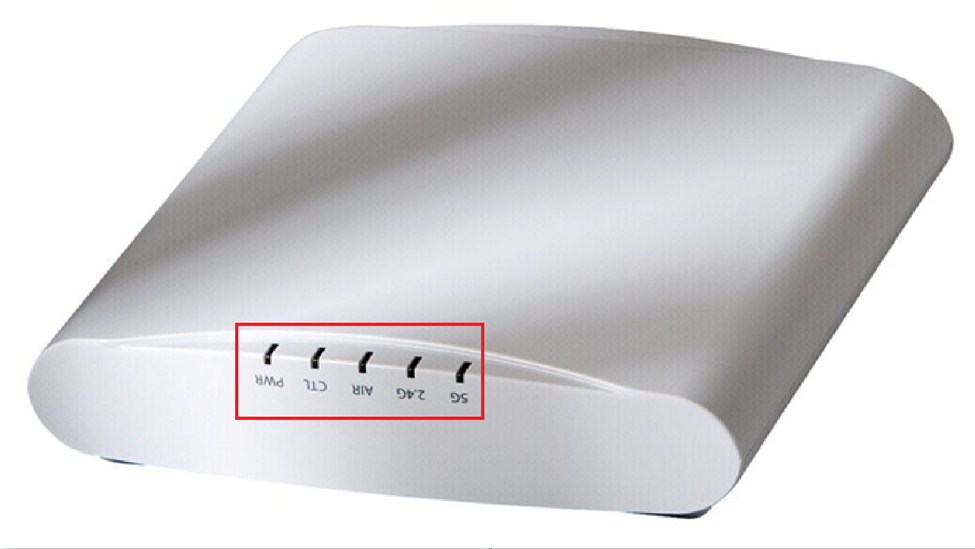
2. How many access points are currently connected to the switch? Please describe the status of the lights on the access points. Similarly, include a photo showing the access points' light status.
Herer you go still no lights on orange cable which goes to modem.
Thank you for your response and the information provided.
Could you please disconnect the Ethernet cable from the ISP router and plug it into a different port within the first 12 available ports? Afterward, kindly reboot the ISP router and the RUCKUS Switch by unplugging it from the power outlet and then reconnecting it. Once this is done, please verify your internet connection.
Additionally, it would be helpful to test with a different Ethernet cable in case there is an issue with the current one.
Thank you once again for your patience and understanding.
Best regards,Imran SanadiRUCKUS Lennar Home Community
I unplugged power to both devices. Changed the cable from modem to 7150 and changed port as well. Plugged power into modem waited till it was up then plugged power into 7150. AP ports came up but the port for the modem did not come up
I hope this message finds you well.
Could you kindly connect the Ethernet cable from any Access Point (AP) to the current switch port where the ISP router’s cable is plugged in and verify whether the AP powers up?
Additionally, please confirm whether the ISP modem is directly connected to the ICX-7150-C12P switch. Please note that the modem alone will not suffice for functionality; the connection must be made through a router or a modem-router combo device. I would appreciate it if you could verify this for me.
Please keep me informed of your findings.
Thank you once again for your cooperation and patience.
Could you kindly connect the Ethernet cable from any Access Point (AP) to the current switch port where the ISP router’s cable is plugged in and verify whether the AP powers up? Did this and they do come up.
Additionally, please confirm whether the ISP modem is directly connected to the ICX-7150-C12P switch. - The modem is a also a router. I have been able to connect other switches to the modem/router and they come online with no issues. For some reason the 7150 is not coming online from any port ( 1-12 ) when connected to the router/modem.
Thank you for your response and the update.
I recommend replacing the Ethernet cable that connects the ISP router to the RUCKUS switch, as the current cable may be damaged.
Additionally, please verify the port on the router to which this Ethernet cable is connected.
If the issue persists, I suggest contacting your ISP (Internet Service Provider), as everything seems to be functioning properly, except for the router's connection to the switch.
Please feel free to reach out if you have any further questions or need assistance.
recommend replacing the Ethernet cable that connects the ISP router to the RUCKUS switch, as the current cable may be damaged. - I already did that when you asked me too previously.
. Everything is working properly on teh modem/router. I can connect any device to it and it comes online except your switch. There appears to be something wrong the 7150 and not my equipment.
As we have seen previously, the light status and command outputs are normal.
I would suggest factory resetting the RUCKUS ICX-7150-C12P Switch and RUCKUS Access Points using a paper clip.
Please refer to the below RUCKUS Lennar Knowledge Base self-help articles for the process:
Switch:
/kb/articles/11-process-for-performing-a-physical-factory-reset-hard-reset-on-the-ruckus-icx-7150-c12p-switch
Access Points:
/kb/articles/7-how-to-factory-reset-your-ruckus-r510-r310-access-point-and-set-up-a-new-wi-fi-network-ssid
Please let me know about the output after the process.
Thank you again. We appreciate your patience and understanding.
i have reset the 7150 and it is still not working with the modem/router. Though If I take the same cable and plug it into a different switch, it works. Is it possible to get a RMA ?
Greetings of the day!!!
Thank you for sharing the requested PICTURES and a VIDEO.
Based on the troubleshooting conducted, it appears that your ICX-7150-C12P switch is not functioning as expected with the RUCKUS APs, as they are not receiving IP addresses. You have confirmed that the APs are working correctly with another switch.
Given these findings, it is recommended that this switch be processed for RMA (Return Merchandise Authorization), essentially meaning it should be replaced.
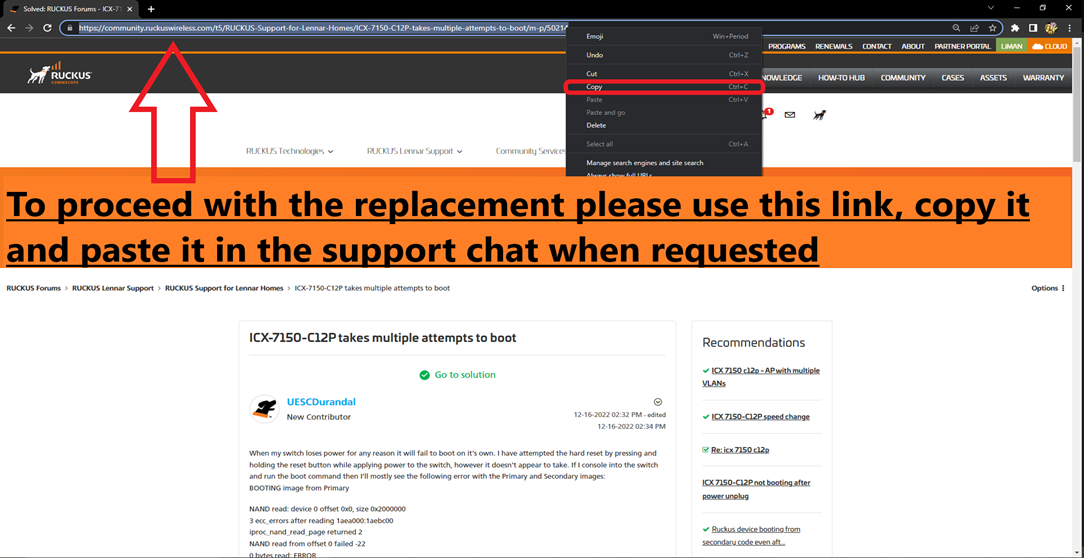
To initiate the unit replacement, please feel free to contact us via CHAT only. When prompted, kindly provide the Serial Number of the unit along with the link to this post (URL), and paste it into the chat to start the process.
Please follow the steps as shown in the example below:
As shown in the below picture, copy the link and share it via chat from the link provided:
The below link is to contact us by chat (only)
https://support.ruckuswireless.com/contact-us
Did I answer your queries? If yes, hit the Kudos buttons and also accept the answers as Accepted solutions.
i was able to swap out to the new one and everything is working. But I did not get a return slip.
Greetings!
Thank you for reaching out to the RUCKUS Lennar Community Forums.
We apologize, but we specialize in assisting with technical inquiries and RMA approvals. For other processes, we recommend using the chat option available on the same link you used to initiate the RMA or replacement request.
Thank you again for your understanding.