My Sonos Playbar is operating on 2.4 GHz no longer connects to my Rukus ICX7150, Serial number ***********.Admin edit: Removed sensitive information for security reasons.
Sonos suggested I contact you and ask about Bridge mode. This Sonos device used to connect with my other 2 Sonos speakers, which are conncected @ 5GHz. Sonos tech support said they see two different IP addresses.
Hi @rmwass Greetings!!!
Thank you for reaching out to the RUCKUS Community Forums.
Could you please confirm if this inquiry is related to a RUCKUS setup in a Lennar Home?
Looking forward to your response.
Best regards,Imran SanadiRUCKUS | Lennar Home Community Support
Yes, it is a Lennar home. The Rukus device was replaced in 2022.
Hi @rmwass
Greetings!!!
Thank you for reaching out to the RUCKUS Lennar Home Community.
We appreciate your patience and understanding as we work to resolve the issues you are experiencing with your RUCKUS setup.
Based on the information provided, it appears that you are encountering issues with SONOS connected to the RUCKUS Wi-Fi.
We apologize for any inconvenience this has caused and are committed to assisting you promptly.
To assist you with your RUCKUS Access Points, please provide the following details:
Log in to your Unleashed system from a laptop web browser using either:
The Master Access Point’s IP address, or
https://unleashed.ruckuswireless.com
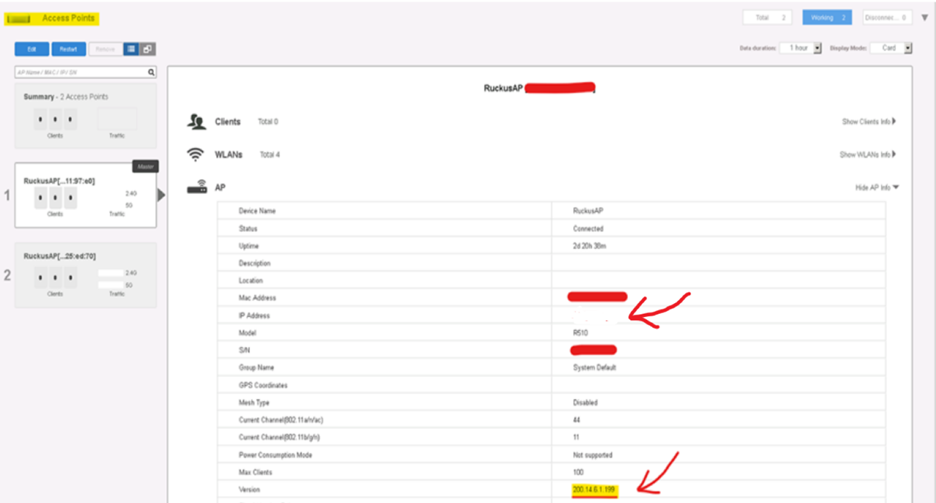
Once logged in, please check the current firmware version and IP address of your Unleashed Access Points and share a screenshot of the dashboard.
Note: Make sure your laptop is connected to the RUCKUS Wi-Fi network's ISP while attempting access.
If you're unable to log in via the above link or do not know the IP address of your Access Point, please refer to the following guide to locate it:
/kb/articles/10-how-to-find-the-ip-address-of-the-ruckus-devices-switch-and-aps-using-ip-scanner-free-applications
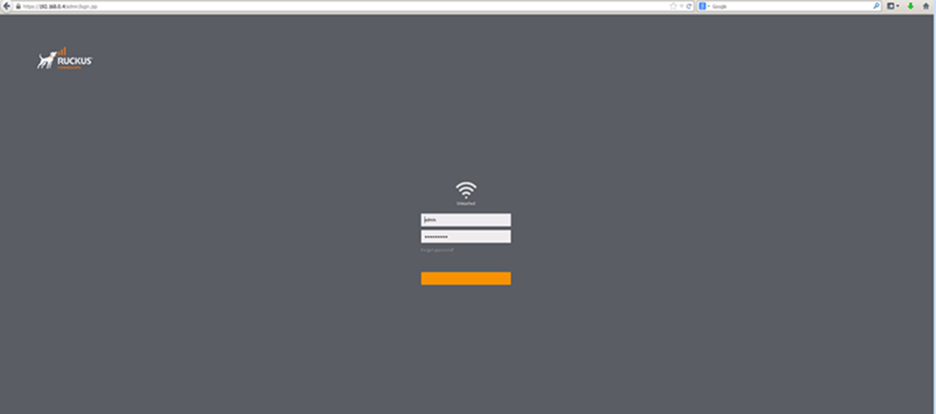
Once you find the IP address and access the Unleashed dashboard, you should see the interface shown in the screenshot below. Please attempt to log in and share the requested information.
With this information, we’ll be able to assist you further.
Feel free to reach out if you have any questions or need further assistance.
Thank you again for your patience and understanding.
My MAC is not allowing me to log in to the Unleashed site. I have a Ruckus user ID and password, but this site doesn't recognize it and will not allow me to reset my password. I have the IP address, but can't get any further than that, so I'm stuck.
Thank you for the response and the update.
Please try with different device if there is any issue with MAC.
Additionally, please try with the default username/password combinations mentioned in the RUCKUS Lennar Knowledge Base self-help article.
/kb/articles/14-default-admin-login-username-password-for-ruckus-icx-7150-c12p-switches-and-wi-fi-access-points
Let me know how it goes.
I don't understand why this is so difficult. My login that I have saved works to get into Ruckus Wireless but not Unleased. None of the combinations that are in the article work. I'm about ready to givre up.
Thank you for your response and the update.
Apologies for the inconvenience.
If your login username/password is not working and no recovery email was configured initially, the only available option is to perform a factory reset of the Access Point and set it up again with a new Wi-Fi configurations with username and password.
Please refer to the RUCKUS Lennar Knowledge Base self-help article below for step-by-step instructions on resetting the Unleashed Access Points:/kb/articles/7-how-to-factory-reset-your-ruckus-r510-r310-access-point-and-set-up-a-new-wi-fi-network-ssid
Kindly proceed with the reset, and feel free to reach out if you need assistance at any step. I’ll be happy to help.
What does this refer to? " No recovery email was configured initially," and what happens with a factory reset and my current WIFI. Also, are we able to talk by phone?
Thank you for your response.
Please note that a recovery email is typically configured during the initial setup. If you are unable to recover the login credentials using email at this time, it is likely that a recovery email was not configured during the original setup of RUCKUS Wi-Fi you are currently using.
As mentioned earlier, the only available option to proceed is to perform a factory reset of the Access Point(s) and reconfigure the network.
Additionally, please note that effective November 2022, support for RUCKUS Lennar Homes customers is provided exclusively through this community forum. Support via phone, email, or remote sessions is no longer available.
This forum operates on a best-effort support basis.
Thank you for your understanding and patience.
How
Why do my login credentials work to get me into this site but not Unleashed?
Please see my screenshot above. I am afraid to reset everything since it may mess up all of my connections. This is a new ICX device that was sent to me in 6/2022 to replace my original one. I would be willing to pay for phone service if that is the only way to speak to someone, because clearly, this is not working. Is there another way to recover my login credentials?
Apologies, but there is no alternative method to recover the username and password if they are unknown and the default credentials are not working.
Please note that RUCKUS does not provide on-site technician support for Lennar Homes, and this forum operates on a best-effort support basis.
As mentioned earlier, the only available option is to perform a factory reset of the Access Point(s) and reconfigure the network from scratch. If you encounter any difficulties while following factory reset steps, we recommend seeking assistance from a outside technician.
Thank you for your patience and understanding.
Where do I find an outside technician?
Apologies for any confusion. By 'technician,' we mean a local technician that you can arrange independently. However, we would like to inform you that you may proceed with the factory reset process. We are here to assist you at any point if you encounter any difficulties.
Thank you again for your understanding.
I trust this message finds you well.
I kindly request an update on the status of the issue. Please let me know if you tried to factory reset the Access Points and need any help with the same.
Thank you.
I was able to finally log in to Unleased for my AP- where do I check the firmware, and what do I do from here?
Greetings!
Based on the screenshot you shared, it appears that your RUCKUS Unleashed Access Points are running an older firmware version.
To check and upgrade them, please refer to the RUCKUS Lennar Knowledge Base self-help article below:/kb/articles/9-ruckus-unleashed-access-points-upgrade-process-to-the-recommended-firmware-version
If you need any assistance during the upgrade process, please feel free to reach out—I’ll be happy to help.
Any harm in doing this? Should this help my Sonos Playbar, which only operates on 2.4Ghz work again? As I said it the beginning, it has been fine for years, and all of a sudden it isn't recognized.
There will not be any harm, just the Wi-Fi will go down during upgrade process until APs reboots. Based on the screenshot you shared, I noticed that your Access Points are currently running an older firmware version. This version must be upgraded before proceeding with further configuration for SONOS.
Step 1: Firmware Upgrade
Please follow the instructions in the RUCKUS Lennar Knowledge Base self-help article to upgrade your Access Points:
/kb/articles/9-ruckus-unleashed-access-points-upgrade-process-to-the-recommended-firmware-version
Step 2: Execute Configuration Commands
Once the upgrade is complete, please proceed with the following steps:
1. Launch PuTTY from your laptop.
2. Connect via SSH:
Step 3. Run the following commands:(Please replace “your Wi-Fi name” with your actual Wi-Fi/SSID name, enclosed in double quotes if it contains spaces)
ruckus> en
ruckus# config
ruckus(config)# wlan "your Wi-Fi name"
ruckus(config-wlan)# no qos directed-multicast
ruckus(config-wlan)# qos directed-threshold 0
ruckus(config-wlan)# end
ruckus(config)# end
ruckus(config-wlan)# qos directedDHCP disable
This configuration should help resolve the issue.
Here’s an example of PuTTY command line output from my lab for reference: (Bold fonts are commands to execute)
login as: admin
Please login: adminPassword:Welcome to Ruckus Unleashed Network Command Line Interfaceruckus> enruckus# configYou have all rights in this mode.ruckus(config)# wlan "Your Wi-Fi Name"The WLAN service 'Your Wi-Fi Name' has been created. To save the WLAN service, type 'end' or 'exit'.ruckus(config-wlan)# no qos directed-multicastThe command was executed successfully. To save the changes, type 'end' or 'exit'.ruckus(config-wlan)# qos directed-threshold 0The command was executed successfully. To save the changes, type 'end' or 'exit'.ruckus(config-wlan)# endThe WLAN service 'Your Wi-Fi Name' has been updated and saved.Your changes have been saved.ruckus(config)# endYour changes have been saved.ruckus# ap-modeYou have all rights in this mode.ruckus(ap-mode)# set qos directedDHCP disableDirecet DHCP is DisabledOKruckus(ap-mode)#
Once done with the commands, please reconnect your SONOS setup and check.
Please let me know how it goes or if you need any further assistance.
Thank you once again for your patience and cooperation.
Please follow the steps shared in my previous post and let me know how it goes.
Thank you. I have a MAC, not Windows, does that matter? And, the IP you provided 192.168.1.177 is different from what I saw on unleashed. Did you see both of my screenshots?
So the Unleased site went down during my upgrade. I do I know if it is complete?
I don't think I provided the IP address 192.168.1.177. You can identify the IP address assigned by your ISP to the Unleashed system using an IP scanner tool.
Once the upgrade process is completed, the Unleashed system may take a few minutes to come back online.
Please check the current status and let me know the outcome.
This is what you sent me
It is a moot point because I tried the update and was timed out when trying three differnt times. I got near the end and the unleashed site went down.
Please check whether a new IP address has been assigned to the Unleashed system after the reboot, and try accessing it using the updated IP.
You may refer to the RUCKUS Lennar Knowledge Base self-help article below for guidance on locating the IP address:/kb/articles/10-how-to-find-the-ip-address-of-the-ruckus-devices-switch-and-aps-using-ip-scanner-free-applications
Please let me know how it goes.
Hi @rmwass,
As mentioned in my previous post, please perform an IP scan to identify the Unleashed system’s IP address and use it to access the interface on a web browser.
Thank you again for your patience.
It looks like the firmware has been updated, and now my Sonos is working. Does it mean that Ruckus can detect 2.4Ghz and 5Ghz? How do I see that in Unleashed?
Thanks