Hi @rahulmandava
Greetings!!!
Thank you for reaching out to the RUCKUS Lennar Home Community.
We appreciate your patience and understanding as we work to resolve the issues you are experiencing with your RUCKUS setup.
Based on the information provided, it appears that your RUCKUS ICX-7150-C12P Switch is stuck in boot mode with Amber SYST LED.
We apologize for any inconvenience this has caused and are committed to assisting you promptly.
If multiple physical hard resets do not resolve the issue, the next step is to perform the Software Recovery process.
Please refer to the following RUCKUS Lennar Knowledge Base self-help article for the complete recovery procedure:/kb/articles/4-fixing-ruckus-switch-with-an-amber-orange-light-on-syst-green-light-on-pwr-no-lights-on-aps
Kindly let me know how it goes. If you encounter any difficulty or get stuck at any step during the Software Recovery process, I will be happy to assist you further.
Thank you for your patience and understanding.
Best regards,Imran SanadiRUCKUS | Lennar Home Community Support
I trust this message finds you well.
I kindly request an update on the status of the issue so that we may proceed further with resolving it.
Thank you.
Hi Imran, Sorry for the delayed response. Yes I did try the steps. But unfortunately after setting and saving new environment, when I test with ping I get timeout and not alive status. I disabled my windows firewall, reconnected usb between switch and laptop, but it still didn't work. Not sure what is wrong, could you please assist me to get pass this step? I used Type C to USB connector between switch and my laptop.
Greetings!!!Thank you for the response and the update.
Could you please share a picture showing the Software Recovery cable connections between the Switch and the laptop?
Please log into your RUCKUS Account before uploading these photos/screenshots.
Should you have any further questions or concerns, feel free to reach out.
We appreciate your cooperation and look forward to resolving this matter for you promptly.
Hi Imran, as I mentioned earlier I am using Type C to USB connector between switch and my laptop.
Hello @rahulmandava ,
Thank you for the response.
I understand that you are still getting ping not alive error.
Could you please share the screenshot of the network adapter settings for us to proceed further?
Also, could you please share a picture of the software recovery cable connections between Switch and laptop?
Please let us know if you have any queries in this regard.
Thank you again for your patience.
Best regards,
Pinky Rajendran
RUCKUS Lennar Home Community.
Hi Pinky, I was able to get the ping status alive now. However, when I perform the recovery I am getting file not found or no permission issue, but I did check that the path is correct in tftp, file has all the permission for all users in the laptop including system user. Could you please advise next step from here? Below are the images
test
Greetings!
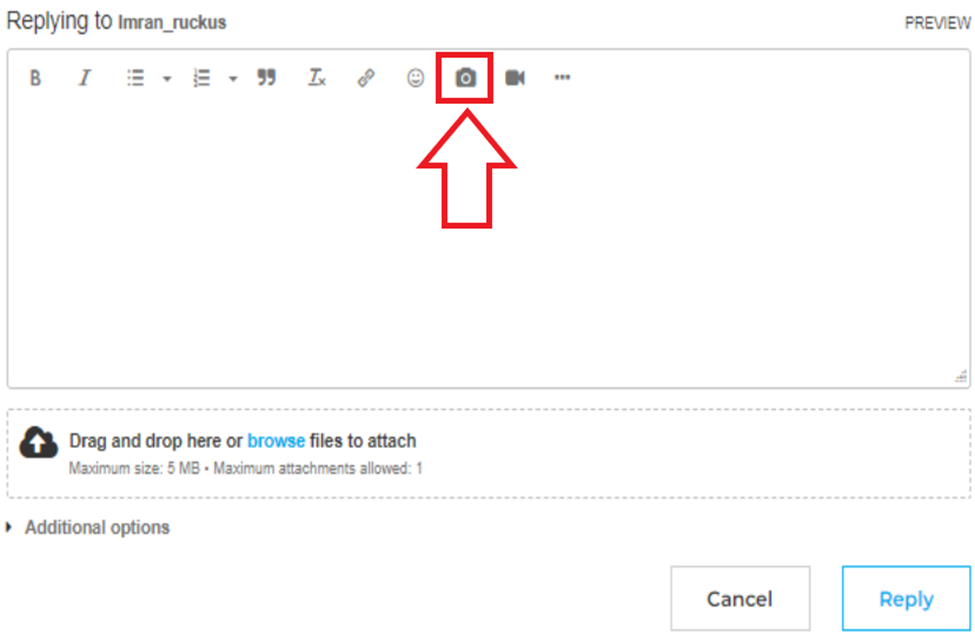
Please use the private chat option to respond so we can proceed further. For your reference, I have included a screenshot below.
Thank you once again for your patience and understanding.
RUCKUS Lennar Home Community
Hi Pinky, I just sent a private message with the requested information.