Ruckus ICX 7150 is the most unreliable system I have ever experienced.
Hi @TWM1 Greetings!!!
Thank you for contacting the RUCKUS Community forums.
Apologies for the inconvenience caused. Let me help you with this.
Before I assist you, could you please let me know if this is a Lennar Home RUCKUS setup?
Please confirm.
Thank you again.
Best regards,
Imran Sanadi
RUCKUS Lennar Home Community.
Yes, and
1. It never worked correctly.2. In frustration, I shut the Ruckus down for 4+ years.3. About 6 weeks ago I implemented a factory reset on the Access Point, and it all worked.4. Yesterday, a short power failure occurred.5. Power-cycled the modem, router, Switch/AP.6. Ruckus frequently loses internet connection.
In frustration, I again shut the Ruckus down, and reverted back to a reliable router extender. All works perfectly now that the Ruckus is shutdown.
Hi @TWM1
Greetings!
Thank you for your response and the information provided.
We sincerely apologize for the inconvenience caused.
If you would like to continue using the RUCKUS devices, I’ll be happy to assist you in getting them back up and running. In case the devices are found to be faulty, I can also assist you with the replacement/RMA process.
Please let me know how you would like to proceed.
Thank you once again for your patience and understanding.
Best regards,Imran SanadiRUCKUS | Lennar Home Community Support
I accept your offer. How do we proceed?
Thank you for your response and the update.
Kindly connect your RUCKUS devices as outlined in the following RUCKUS Lennar Knowledge Base self-help article:
/kb/articles/12-ruckus-lennar-home-devices-connectivity-setup-and-configuration-guidelines
Once the setup is complete, please confirm and let me know so I can assist you further.
Thank you again for your patience and understanding.
Complete, except I did not implement a factory reset. Both Switch and AP are up. My cell is connected to the AP. Cell frequently reports internet is down.
Greetings!!!
Thank you for your recent correspondence and update.
We may need to check some configurations of your RUCKUS ICX-7150-C12P Switch to troubleshoot further.
To proceed with troubleshooting the issue, please follow the steps outlined below to access the Command Line Interface (CLI) and provide the necessary command outputs:
1. First, identify the current IP address assigned to the switch ICX-7150-C12P by your local router. You can use an IP scanner tool to easily locate the switch's IP address on your network. Here is a guide on how to perform this using IP Scanner free applications:
/kb/articles/10-how-to-find-the-ip-address-of-the-ruckus-devices-switch-and-aps-using-ip-scanner-free-applications
2. Once you have identified the IP address of the switch, proceed to access the Command Line Interface (CLI) of the RUCKUS ICX-7150-C12P switch. Here is a guide on how to access the CLI:
/kb/articles/8-how-to-access-the-command-line-interface-cli-of-the-ruckus-icx-7150-c12p-switch
If you can access the Command line the prompt should look like below:
ICX7150-C12 Router> OR
ICX7150-C12 Switch>
3. After successfully accessing the CLI, please execute the following commands and provide the outputs:
enable
show version
show flash
show inline power
show inline power detail
show interface brief
Please share the command outputs or screenshots if you encounter any issues or errors during these steps.
Feel free to reach out if you have any questions or require further assistance.
Thank you for your cooperation and patience.
I hope these screen shots work?
Thank you for the response and the information you shared.
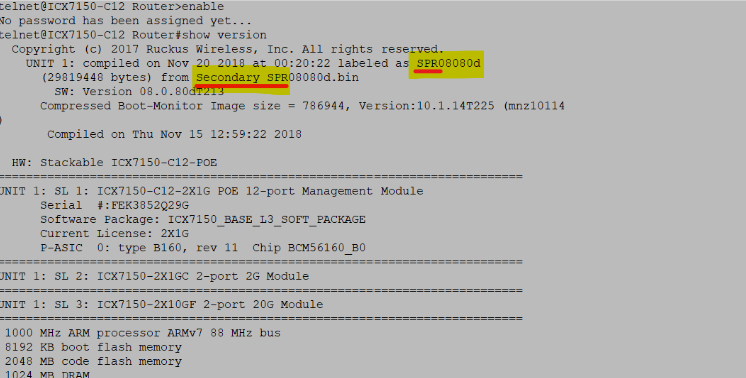
The issue you're experiencing is due to your switch running on the Routing code (SPR), whereas for Lennar Home users, the switch should be operating on the Switching code (SPS) to avoid such problems. This often occurs after a power outage or power spike, which can cause the switch to boot from the alternate partition, typically the one running the Routing code.
Based on the output you provided, your switch has indeed booted from the secondary partition, which is running the Routing code (SPR), as shown in the screenshot below.
To resolve this, please follow the CLI commands listed below:
Note: Hit Enter to accept each command
copy flash flash secondary
boot system flash secondary yes
Example:
VIDEO LINK AS REFERENCE: https://www.youtube.com/watch?v=Eem1IBgYaWc
ICX7150-24P Router>enable (hit enter to accept the command) ICX7150-24P Router#copy flash flash secondary (hit enter to accept the command and wait: until the flash finished) ICX7150-24P Router#boot system flash secondary yes (hit enter to accept the command: the switch will reboot)
Please let me know how it goes.
Ruckus is back on-line. I'll continue to monitor. Must I execute this list of commands after every frequent loss of internet?
Thank you for your response and the update. I'm glad to hear the switch is back online.
There is no need to execute these commands after future power outages, as both partitions of the switch are now running the Switching code (SPS).
Feel free to monitor the system, and don't hesitate to reach out if you need any further assistance.
Thank you again for your continued patience.
Did I answer your queries? If yes, hit the Kudos buttons and also accept the answers as Accepted solutions.
Imran, Thank you for helping me correct this anomaly.
Feel free to reach out if you need any further assistance.